
On this page
Start here
Quick answer
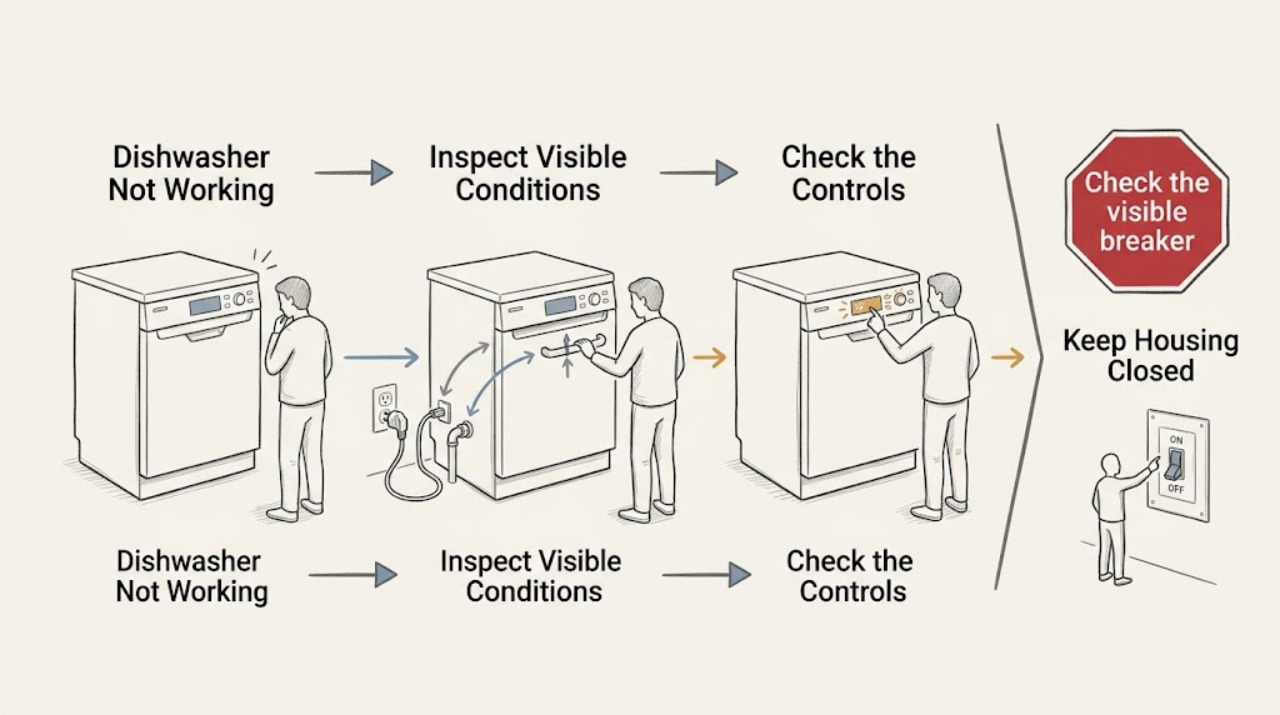
First decide whether your AEG dishwasher has no power or has power but will not start. With no display or response, verify the plug and wall switch, check the socket with a small known-working device if it is safe, and check whether a breaker or RCD has opened; if the socket is dead, use an electrician, and if the dishwasher remains dead with a live socket, request AEG service. If the display is on, select a programme, close the door fully until the latch engages, cancel Delay Start or a previous programme using the exact model's RESET/CANCEL procedure, and check whether DEMO mode is displayed. If a programme light flashes, also check that filters and spray arms are correctly installed and free, the salt cap is tight, and the load does not obstruct the door or spray arms. Do not force the door, repeatedly reset a tripping protective device, remove panels, or test internal wiring. If there is smoke, burning odor, water near electrical parts, a damaged cord, repeated breaker/RCD trips, an error that persists, or no response after the safe external checks, disconnect power only when the plug and area are safe and arrange an authorised technician.
Work through in order
Diagnostic checks
Use only checks that match the exact appliance or system and its official guide.
-
Check 1
Look at the control panel and note whether any display, indicator, or response appears when the normal On/Off control is pressed; do not keep pressing if there is smoke, heat, a burning odor, or water near electrical parts.
Expected result: The panel is completely dark, the panel lights but the programme will not begin, a programme indicator flashes, or the appliance stops after starting.
Next step: Follow the matching branch below rather than resetting every symptom in the same way. For a safety warning, stop using the dishwasher and arrange qualified service.
Why this matters
Why: A dark panel points first to supply or power-control questions. A lit but idle panel is more consistent with programme selection, door detection, Delay Start, a previous programme, DEMO mode, or a model-specific control state. A flashing indicator or mid-cycle stop can indicate a condition or fault that needs the manual.
-
Check 2
If the panel is dark, confirm that the plug is inserted and the wall switch is on; if the socket is cool, dry, and safe, check it with a small known-working device rather than opening the socket or dishwasher.
Expected result: The test device also has no power, the socket works but the AEG panel remains dark, or the dishwasher plug/cord/socket is hot, damaged, wet, or loose.
Next step: If the socket is dead, stop and contact a local electrician. If the dishwasher remains dark with a working socket, request an authorised service visit. Do not use a damaged connection or continue if it is unsafe to touch.
Why this matters
Why: A second device that also fails makes the electrical connection, fuse, breaker, or RCD more likely. A working socket with a dark dishwasher points more toward the appliance, while heat, damage, moisture, or looseness is a safety condition rather than a normal no-start.
-
Check 3
Check the visible breaker or RCD status only from a safe, dry position and note whether it has opened; reset it at most once only when there is no smoke, heat, water, damage, or active fault indication.
Expected result: The breaker/RCD stays on after a single reset, opens again immediately, or will not remain on; the dishwasher may be unplugged or still connected.
Next step: For a repeated or non-resetting trip, stop and call an electrician or authorised service professional; do not increase a fuse/breaker rating, bypass the RCD, or test inside the panel. If power returns safely, continue with the lit-panel checks.
Why this matters
Why: A protective device that opens again can indicate an appliance or electrical fault and should not be defeated by repeated resets. A reset that restores power does not prove the dishwasher is healthy.
-
Check 4
If the display is on, select a programme before closing the door, then close the door normally and confirm that it latches; do not slam or force it.
Expected result: The cycle starts after a programme is selected and the door clicks shut, or the door will not latch, the appliance gives no start response, or the door-status indicator remains.
Next step: Rearrange only items visibly preventing closure and use the exact manual for approved alignment checks. If the door still will not latch or the programme will not start, stop and request service rather than bending the housing or dismantling the latch.
Why this matters
Why: AEG dishwashers are designed to start only after a programme is selected and the door is detected as fully closed. A door that will not latch can reflect loading, alignment, level, or latch trouble rather than a dead control.
-
Check 5
Check the display and controls for Delay Start, a previous programme, RESET/CANCEL, or a DEMO indication such as `d:on`; use only the reset sequence documented for the exact model.
Expected result: Delay Start is active, the controls remain on an old programme, the model's reset clears the selection, or the display shows DEMO mode and the start animation ends without filling.
Next step: Cancel the delay or old programme with the matching manual procedure. If DEMO mode is displayed, follow the exact AEG deactivation instructions for that model. Do not guess a button combination from another dishwasher.
Why this matters
Why: A stored delay or previous programme can make a working dishwasher appear unresponsive. AEG says DEMO mode can display functions without actually connecting to water or drain, and reset/button combinations vary by model.
-
Check 6
If a programme indicator is flashing or the cycle refuses to start, switch the dishwasher off and check only the user-accessible door, filters, spray arms, salt-container cap, racks, and detergent loading against the exact manual.
Expected result: A filter is dirty or not seated, a spray arm is blocked, the salt cap is loose, an item obstructs the door or spray arm, or these checks are normal but the indicator still flashes.
Next step: Disconnect the plug before cleaning filters or reaching into the tub, refit parts exactly as shown, and do not run the dishwasher with a missing or loose filter. If the light remains, record it and request an authorised service assessment.
Why this matters
Why: AEG lists clean, correctly installed filters, freely moving spray arms, a tight salt cap, correct loading, and correct detergent as pre-start checks. A persistent flashing indicator after these conditions are correct needs the model guide or service.
-
Check 7
For a cycle that starts and then stops, record the display, indicator pattern, water-inlet or drain symptoms, and whether the door remains closed; do not repeatedly start cycles to reproduce the failure.
Expected result: The dishwasher shows an error, does not fill, does not drain, stops and restarts, or returns to programme selection after a reset; there may be standing water or a leak.
Next step: Note the complete error exactly and consult the matching manual or AEG support. If water is leaking, standing dirty water remains, the appliance trips protection, or the fault repeats, leave it off and arrange qualified service; do not dismantle hoses or pumps.
Why this matters
Why: These patterns can involve water intake, drainage, door sensing, pump operation, a protective stop, or an internal electronics fault. The visible symptom does not identify a replaceable part.
-
Check 8
Prepare the complete model number/PNC, serial number, exact indicator or error, power status, programme selected, door behavior, water symptoms, and checks already performed before contacting AEG.
Expected result: The problem is repeatable with one programme, occurs immediately on power-up, follows a breaker/RCD trip, or cannot be reproduced after a safe reset.
Next step: Request an authorised AEG service visit when the safe checks do not restore operation. Do not order a latch, pump, heater, control board, or other part from the symptom alone.
Why this matters
Why: Model and timing information allow AEG or a technician to distinguish a supply issue, user-selectable state, installation condition, or internal fault without asking the homeowner to open the appliance.
Use your observations
Decision map
Find the observation that best matches what you see, then follow the next safe action.
-
PATH 01Next step
What you see
Do this next
Stop resetting protection and contact a local electrician. Do not open the outlet or electrical panel and do not reconnect the dishwasher until the connection is safe.
-
PATH 02Next step
What you see
Do this next
Leave the dishwasher disconnected and request an authorised AEG service technician. Do not remove panels or attempt an internal repair.
-
PATH 03Next step
What you see
Do this next
Correct only a visible loading obstruction and use the exact model manual for door/alignment guidance. If the latch or start state remains abnormal, request service without forcing the door.
-
PATH 04Next step
What you see
Do this next
Cancel/reset using the exact AEG model procedure; for `d:on`, follow the matching DEMO-mode instructions. Do not apply a button combination from another model.
-
PATH 05Next step
What you see
Do this next
Leave the dishwasher off, record the exact code or light pattern, and arrange authorised service. Do not dismantle the pump, hoses, electrical covers, or internal components.
Helpful context
Understand the symptom
“Not working” is several different AEG faults
An AEG dishwasher with no lights has a different first decision from one whose display is on but whose cycle will not begin. A dark panel usually directs attention to the plug, wall switch, socket, breaker, or RCD before an appliance fault. A lit panel that refuses to run may instead be waiting for a programme, a fully closed door, the end of Delay Start, cancellation of a previous programme, or exit from DEMO mode. A flashing programme indicator adds checks for the door, filters, spray arms, load, salt cap, and detergent. Do not treat every symptom as a failed control board.
Model-specific controls are part of the diagnosis
AEG uses different fascia layouts and reset methods across integrated and freestanding dishwashers. AEG's support examples show several possible RESET/CANCEL combinations and note that button layouts and programme names vary by model. Use the complete model number or PNC and the matching manual before holding unfamiliar buttons or changing settings.
Stop before opening the appliance
Keep these checks at the plug, wall switch, breaker or RCD, visible controls, door, racks, filters, spray arms, and visible hoses. Disconnect power before filter cleaning or other maintenance. Do not remove an electrical cover, reach into a running or hot tub, probe wiring, dismantle a pump, or attempt to correct an internal fault yourself.
When checks do not resolve it
Need a professional?
Stop using the dishwasher and arrange qualified service for smoke, a burning odor, sparks, a hot or damaged cord/plug, water near electrical parts, a leak, repeated breaker/RCD trips, standing water, an error that persists, or a cycle that repeatedly stops. Call an electrician for a dead or unsafe socket or protective-device problem; call AEG authorised service when the socket is live but the appliance stays dark or an internal dishwasher fault is suspected. Disconnect power only when the plug and surrounding area are cool, dry, and safe to touch.
Common questions
FAQ
Why is my AEG dishwasher completely dead?
AEG's first checks are the plug, wall switch, socket, and any tripped breaker or RCD. A safe test with a small known-working device can distinguish a dead socket from a dishwasher that remains dark on a working supply. If the socket works but the dishwasher has no response, leave it disconnected and request authorised service.
Why does my AEG dishwasher have power but not start?
Select a programme, close the door fully so the latch engages, and check for Delay Start or a previous programme that needs the exact model's RESET/CANCEL procedure. If `d:on` appears, DEMO mode may be active. Button layouts and reset methods vary, so use the matching manual rather than guessing.
What should I do when the AEG dishwasher programme light flashes?
Check that the door closes, filters are clean and correctly installed, spray arms can move freely, the salt cap is tight, and the load and detergent are correct. Use the exact model manual for reset guidance. If the light continues, an error appears, or the cycle will not start, record the pattern and arrange service.
Can I reset my AEG dishwasher by holding buttons?
Only use the reset sequence documented for the exact model. AEG shows different RESET/CANCEL combinations for integrated and freestanding controls, and the panel layout can vary. A reset can clear a stored programme, but it does not repair a repeated trip, leak, error, or internal fault.
Should I repair an AEG dishwasher that will not work myself?
Keep checks external and disconnect power before cleaning filters or doing maintenance. AEG recommends an authorised service technician when the supply checks do not resolve a no-power condition or when an internal fault is suspected. Do not remove covers, probe wiring, dismantle pumps, or order a part from the symptom alone.
Read the exact guide
Official sources
- User ManualAEG · Model-specific manual used for examples of filters, spray arms, drainage, and fault boundaries; it is not a universal procedure for every AEG dishwasher.
- Dishwasher's On / Off button does not workAEG Support · Direct AEG guidance for an unresponsive On/Off button; exact installation and control details still vary by model and market.
- Dishwasher repair serviceAEG Support · Official AEG service-routing guidance; local warranty and service eligibility depend on the appliance and market.
- Dishwasher does not / will not start but the power is onAEG Support · Direct AEG guidance for a powered dishwasher that will not start; button combinations and display features vary by model.
- Program not starting and cycle indicator light flashing on dishwasherAEG Support · Direct AEG guidance for flashing programme indicators; exact reset controls and maintenance access vary by model.
- Dishwasher does not switch on, no light on the control panelAEG Support · Direct AEG no-display triage; it does not authorize internal diagnosis or establish a component fault for an unspecified model.
Community feedback
Share a repair observation
Share a plain-text repair observation. Accepted observations are published automatically; this page may take a moment to update.