
On this page
Start here
Quick answer
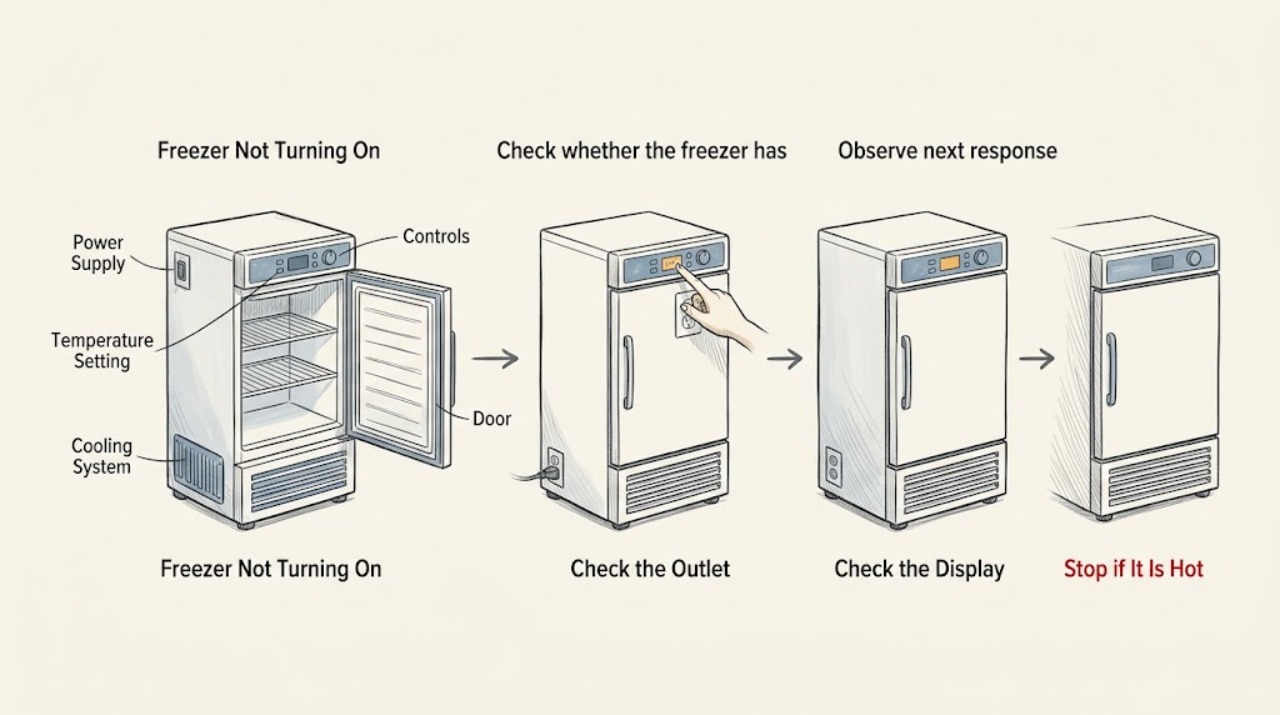
If a Bosch freezer will not turn on, first check whether the interior light or display is completely dark. From a dry, safe position, confirm that the plug is seated and that the outlet still has power; Bosch identifies an unplugged freezer or a dead outlet as the first no-running checks. If the display is lit but the freezer is not cooling, verify that the temperature setting was not changed and that the door closes properly, then check for an alarm or error indication. Do not open the cabinet, test live terminals, bypass controls, or keep resetting a tripped circuit. If the outlet works but the freezer remains dark, an error returns, the temperature stays too warm, or there is smoke, sparking, a hot cord, or a burning odor, stop using the appliance and arrange qualified service.
Work through in order
Diagnostic checks
Use only checks that match the exact appliance or system and its official guide.
-
Check whether the freezer has any power indication
Without opening the cabinet or moving the appliance, look for the interior light, temperature display, alarm indicator, and any normal operating sound. Note whether everything is dark, the display is lit, or an alarm or code is present.
Expected result: The light and display are dark, the display is lit but the freezer is not cooling, or an alarm/error indication is visible.
Next step: Follow the matching branch and record the exact display text or symbol before changing a setting.
Stop if: Stop for smoke, sparking, a burning odor, a hot cord or plug, water near electrical parts, or visible damage.
Why this matters
Why: A dark appliance follows a power path. A lit display shifts the check toward temperature, door, alarm, or cooling behavior; an error or alarm may require the model-specific error path and service.
-
Check the plug and outlet from a safe position
If the area is dry and undamaged, verify that the power plug is fully seated and observe whether the outlet supplies power using a normal, safe household check. Do not pull the appliance out, open an electrical box, touch terminals, or use exposed-wire testing.
Expected result: The plug is loose, the outlet appears dead, the household supply is interrupted, or the outlet and plug appear normal.
Next step: Reseat a loose plug only if it can be done without contact with damage. If the outlet is dead, use qualified electrical help; if the outlet works but the freezer is dark, arrange appliance service.
Stop if: Stop for heat, scorch marks, a loose or cracked outlet, exposed conductors, shock, a damaged cord, or a repeated circuit trip.
Why this matters
Why: Bosch identifies an unplugged freezer or an outlet without electricity as a cause of a freezer not running. A normal outlet with a completely dark freezer points toward the appliance power path rather than a reason to open the cabinet.
-
Check the temperature and door state when the display is lit
Read the freezer temperature setting and compare it with the model's normal setting without making repeated adjustments. Visually confirm that the door is fully closed and that no package blocks the seal or ventilation opening.
Expected result: The temperature setting was changed, the display shows a warm or alarm state, the door is not closing fully, ventilation is obstructed, or the settings and door appear normal.
Next step: Correct only an obvious setting or loose package obstruction, close the door, and allow the appliance to stabilize while keeping it closed. If it remains warm, request qualified service.
Stop if: Do not chip ice with sharp tools, dismantle the door seal, block or remove internal covers, or continue if food is thawing and the appliance is alarming.
Why this matters
Why: Bosch says a freezer that is too warm should first be checked for an accidentally changed thermostat setting and that an open door or covered ventilation can contribute to a warm freezer. Normal settings and a closed, unobstructed door do not rule out an internal cooling fault.
-
Read and preserve any error or alarm indication
Record the exact code, flashing display, alarm light, and whether the freezer light remains on. Use the Bosch error-code page or the exact model manual to identify whether the displayed code has a documented user step; do not guess from a similar-looking code.
Expected result: There is no code, a temperature or door alarm is present, an electronics code remains, or the display is blank.
Next step: Follow one model-matched documented instruction if available, then recheck the display. If the code remains or returns, stop and arrange service with the code recorded.
Stop if: Do not repeatedly reset the appliance, erase a code before recording it, or open the control area.
Why this matters
Why: Bosch distinguishes temperature and door alarms from electronics faults and directs persistent errors to support. A blank display returns to the power path; a repeated electronics code is not a user-level part diagnosis.
-
Check for a recent power or installation event
Record whether the freezer was recently installed, moved, unplugged, affected by an outage, or loaded with a large quantity of fresh food. Keep the door closed and do not move the appliance just to inspect its rear connections.
Expected result: The symptom began after a power outage or move, the freezer was just switched on, a large fresh load was added, or none of these events occurred.
Next step: Follow the exact manual for a newly installed or recently powered appliance and monitor the display without repeated door openings. If normal operation does not return, request service.
Stop if: Do not change wiring, adjust refrigeration components, or keep food in a freezer that remains at an unsafe temperature.
Why this matters
Why: Bosch documentation notes that alarms can occur when an appliance is switched on or after a large fresh load, while a power event can explain a dark display. These observations do not prove that the appliance is operating correctly if it stays dark or warm.
-
Document the symptom for qualified service
From a normal safe position, record the model number, whether the light and display work, outlet observation, temperature setting, door and ventilation condition, alarm or error text, recent power event, and any smell, heat, water, or unusual sound.
Expected result: The freezer remains dark with a working outlet, remains warm with a lit display, repeats an error, or shows a hazard symptom.
Next step: Provide the record and model information to Bosch support or qualified appliance service. Keep the freezer closed and address food safety separately if it has warmed.
Stop if: Do not remove panels, perform live tests, bypass a control, or replace a component based only on the symptom.
Why this matters
Why: The pattern helps Bosch support or a qualified technician choose the correct model-specific diagnosis, but it does not identify a failed compressor, control, sensor, relay, or other part by itself.
Use your observations
Decision map
Find the observation that best matches what you see, then follow the next safe action.
-
PATH 01Safety boundary
What you see
The freezer's light and display are dark, and the plug or outlet is also abnormal.
Do this next
Leave the appliance unused and arrange qualified electrical help for the outlet or household supply.
Why this path and its safety boundary
Safety stop: Do not open the fuse box, touch wiring, or keep resetting a tripped circuit.
-
PATH 02Safety boundary
What you see
The outlet appears powered, but the Bosch freezer remains completely dark.
Do this next
Leave the freezer unused and arrange qualified Bosch appliance service for the appliance power path and controls.
Why this path and its safety boundary
Safety stop: Do not pull the appliance out, remove the cabinet, or test internal terminals.
-
PATH 03Safety boundary
What you see
The display is lit, but the freezer is warm or the compressor does not appear to run.
Do this next
Check the temperature setting, door closure, ventilation opening, and alarm state once, then use qualified service if the freezer remains warm.
Why this path and its safety boundary
Safety stop: Do not diagnose or replace refrigeration components, and do not keep opening the door while food is thawing.
-
PATH 04Safety boundary
What you see
A Bosch alarm or error code is displayed.
Do this next
Record the exact code, follow one matching instruction in the Bosch error page or model manual, and contact service if it remains or returns.
Why this path and its safety boundary
Safety stop: Do not guess the code, repeatedly reset the appliance, or open the control area.
-
PATH 05Safety boundary
What you see
The freezer was recently powered on, experienced an outage, or received a large fresh load, and the alarm is otherwise expected to clear.
Do this next
Keep the door closed and follow the model manual while monitoring whether the set temperature returns; request service if the appliance remains dark or warm.
Why this path and its safety boundary
Safety stop: Do not keep food stored in a freezer that remains too warm, and do not treat a cleared alarm as proof that every function is normal.
-
PATH 06Safety boundary
What you see
There is smoke, sparking, a burning odor, a hot cord or plug, water near electrical parts, or visible damage.
Do this next
Stop using the freezer, keep people away from the hazard, and obtain appropriate qualified electrical or appliance help; use a safe accessible disconnect only when it can be done without contact with damage.
Why this path and its safety boundary
Safety stop: Do not touch wet electrical parts, open the cabinet, or restore power to test the appliance.
Helpful context
Understand the symptom
Separate no power from no cooling
A completely dark freezer and a freezer with a lit display are different symptoms. The first points to the plug, outlet, household supply, or appliance power path. The second means at least some power is present, so the temperature setting, door, alarm, and model-specific cooling diagnosis matter. Do not infer a failed internal part from silence alone.
Protect the frozen food while checking
Keep the door closed as much as practical while you record the display, alarm, and temperature symptom. If the freezer has warmed, treat food safety separately from appliance diagnosis and follow applicable food-safety guidance. Bosch notes that a temperature alarm can mean frozen food is at risk, so a warm compartment is not just a cosmetic display issue.
The model manual controls any reset or service step
Bosch provides model-specific manuals and says some freezer problems require professional assistance. A reset shown on a generic error page may not apply to every freezer, so use it only when the displayed error and exact model guidance match. Internal electrical and refrigeration work is outside the homeowner check.
When checks do not resolve it
Need a professional?
Arrange qualified Bosch appliance service when the outlet has power but the freezer remains dark, the display is lit but the compartment stays warm, an error returns, the door or ventilation path is not the explanation, or the problem persists after one safe model-matched check. Use qualified electrical help for a dead or damaged outlet, repeated circuit trips, or a damaged cord. Seek urgent help for smoke, sparking, fire, a burning odor, or a hot electrical area.
Have this ready
- Provide the Bosch model number, light and display state, plug and outlet observation, temperature setting, door and ventilation condition, alarm or exact error text, recent outage or move, fresh-load history, and any odor, heat, water, or unusual sound.
Common questions
FAQ
Why is my Bosch freezer completely dark?
Bosch recommends checking whether the freezer was unplugged and whether the outlet still provides electricity. If the outlet works but the light and display remain dark, leave the appliance unused and arrange qualified appliance service rather than opening the cabinet.
What if my Bosch freezer has power but is not cooling?
Check the temperature setting, door closure, ventilation opening, and alarm state once. Bosch says an accidentally changed thermostat setting can make the freezer too warm; if the setting and door are normal but the compartment remains warm, request service.
Should I keep resetting a Bosch freezer that will not turn on?
Do not keep resetting it. Record any error first and use a reset only when the exact Bosch error guidance and model manual support that step. A returning error, dark display, or warm freezer needs qualified diagnosis.
Can I open the back of my Bosch freezer to test why it will not start?
No. Do not open the cabinet, test live terminals, bypass controls, or work on the sealed cooling system. Bosch directs more serious freezer problems to professional assistance; provide the model and symptom record instead.
When should I stop using a Bosch freezer that will not turn on?
Stop when the outlet is normal but the freezer stays dark, the display is lit but the compartment stays warm, an error returns, or you notice smoke, sparking, a burning odor, a hot cord, water near electrical parts, or visible damage. Keep the door closed and arrange appropriate qualified help.
Read the exact guide
Official sources
- Bosch Refrigeration Error CodesBosch Home Appliances · Official Bosch US refrigeration error page opened for error and reset handling; displayed codes and controls vary by model.
- Common Freezer problemsBosch Home Appliances · Official Bosch US freezer support page opened for the exact not-running and too-warm symptom split; model-specific instructions may differ.
- Freezer repairBosch Home Appliances · Official Bosch US support page opened for the professional-service boundary and owner-manual direction.
Community feedback
Share a repair observation
Share a plain-text repair observation. Accepted observations are published automatically; this page may take a moment to update.