
On this page
Start here
Quick answer
Start by separating a no-power problem from a freezer that has power but is not cooling. Check whether the control is set to ON, confirm the plug is firmly in a suitable wall outlet, look for a tripped breaker or GFCI, and check for a household outage. Use the control-panel lights, interior light, or an external signal light as evidence that power is reaching the freezer. If the lights work but the compressor and fan never start after the control is set correctly, or if a breaker trips again, stop resetting it and arrange authorized service; do not open the sealed system or electrical controls.
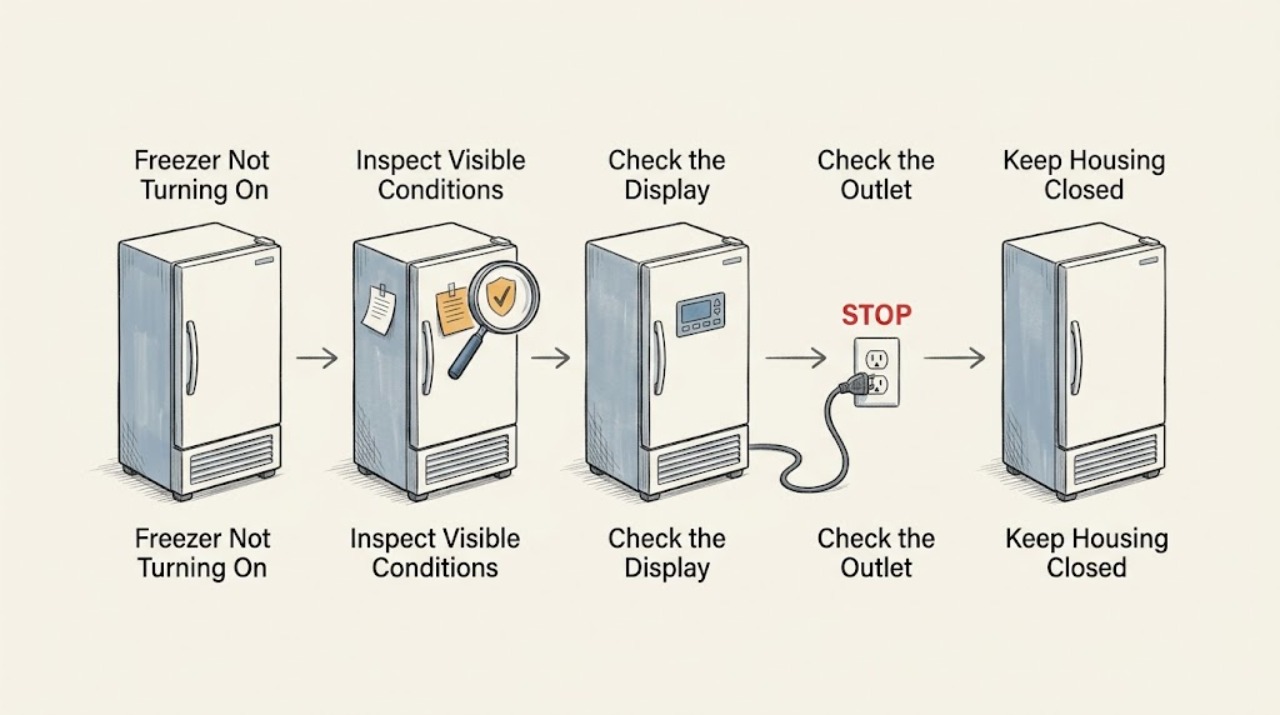
Work through in order
Diagnostic checks
Use only checks that match the exact appliance or system and its official guide.
-
Check 1
Look at the control knob or electronic control and confirm that the freezer is set to ON or a normal cooling setting, not OFF, Demo, or a display-only mode described by the model's manual.
Expected result: The control was OFF or in a non-cooling mode, or it was already set to a normal cooling setting.
Next step: If changing the setting starts a hum or fan, keep the door closed and monitor cooling. If the setting was already correct or the freezer stays silent, continue to the power-indicator check.
Why this matters
Why: Frigidaire identifies an OFF control position as one possible reason a freezer is not running; a display can be active even when the cooling function is not enabled.
-
Check 2
Check the control-panel indicators, interior light, and any external safety or power light without removing a cover.
Expected result: At least one light is on, or all of the control, interior, and external lights are dark.
Next step: If a light is on, continue with the sound and cooling check. If every light is dark, inspect the plug and outlet and then check the home's breaker or GFCI once.
Why this matters
Why: Frigidaire's support guidance uses indicator or interior lights to verify that power is reaching the freezer. An all-dark freezer is more consistent with a supply or protection issue than with a compressor-only problem.
-
Check 3
With the freezer in a safe position, confirm that the power cord is firmly seated in the wall outlet and that the outlet has not lost power; check the corresponding breaker or GFCI for a trip and check whether other household circuits are also out.
Expected result: The plug was loose, the outlet or GFCI was off, the breaker was tripped, or the wider home has no power; alternatively, the outlet appears normal and the freezer remains dark.
Next step: Restore a clearly tripped household protection device only once if it is safe and no damage is visible, then check the freezer. If it trips again, the outlet is dead, the cord is damaged, or the cause is a wider outage, stop and contact an electrician or authorized appliance service as appropriate; do not use an extension cord.
Why this matters
Why: Frigidaire lists a loose plug, a blown fuse or tripped breaker, and a power outage as causes of a freezer that is not running. A repeated trip is evidence of a fault or unsafe circuit condition, not a reason to keep resetting it.
-
Check 4
If any light is on, listen for a compressor hum, fan movement, or normal startup sound for a short observation period, and check whether the interior is cooling rather than relying on the light alone.
Expected result: The freezer makes a hum or fan sound and begins to cool, is silent but lit, or has lights and sounds but remains warm.
Next step: If it starts cooling, leave the door closed and allow temperature to stabilize. If it is lit but silent, or it runs without cooling, do not remove panels; continue with the temperature, airflow, and service branch in the model guide.
Why this matters
Why: Frigidaire describes compressor hum and fans as signs that a freezer is attempting to cool. Power at the lights does not prove that the cooling system is operating.
-
Check 5
Check only external conditions that can prevent normal cooling: make sure the door or lid closes, vents are not blocked by food, and frost is not preventing closure or airflow.
Expected result: The door or lid is blocked or not sealing, food covers an airflow opening, or heavy frost is present; alternatively, the enclosure and airflow path appear normal.
Next step: Correct the external obstruction and monitor the appliance with the door closed. If it remains warm after normal operation has had time to stabilize, or if the compressor never starts, schedule service rather than dismantling the freezer.
Why this matters
Why: Frigidaire notes that an open or poorly sealing door, blocked airflow, and excess frost can make a freezer warm even when it has power and is trying to run.
-
Check 6
Check for escalation signs before any further test: a damaged cord or plug, burning odor, buzzing with heat, water near electrical parts, repeated breaker trips, or a freezer that has been running without cooling.
Expected result: An electrical, heat, leak, repeated-trip, or persistent no-cooling sign is present, or none is present and one safe external test has been completed.
Next step: If any escalation sign is present, stop using the freezer, disconnect power only if it can be done safely, and arrange service. If no sign is present and the unit has restarted, monitor it without repeatedly unplugging or resetting it.
Why this matters
Why: These signs move the problem beyond ordinary user checks. Frigidaire directs owners to schedule service when the unit still does not cool after the support checks, and electrical faults require a qualified person.
Use your observations
Decision map
Find the observation that best matches what you see, then follow the next safe action.
-
PATH 01Safety boundary
What you see
The control panel, interior light, and external power or safety light are all dark.
Do this next
Check the control position, plug, outlet, GFCI, breaker, and household outage once. If the outlet remains dead or protection trips again, stop and obtain electrical or authorized appliance service.
Why this path and its safety boundary
Safety stop: At least some power is reaching the freezer; continue to the startup-sound branch.
-
PATH 02Safety boundary
What you see
The control or interior light is on, but there is no compressor or fan activity after the control is set to a normal cooling position.
Do this next
Keep the freezer closed, do not remove panels, and arrange authorized service if it remains silent or does not begin cooling.
Why this path and its safety boundary
Safety stop: If it hums or the fan runs, inspect only external airflow and door or lid closure before monitoring temperature.
-
PATH 03Safety boundary
What you see
The freezer has power and makes normal operating sounds, but food remains warm or the unit does not cool.
Do this next
Check door or lid sealing, blocked vents, and heavy frost. If the freezer still does not cool after the model guide's stabilization period, schedule service.
Why this path and its safety boundary
Safety stop: If cooling returns, keep the door closed and monitor until the temperature stabilizes.
-
PATH 04Safety boundary
What you see
There is a burning smell, damaged cord, water near electrical parts, repeated breaker operation, or a recurring no-start condition.
Do this next
Stop testing and arrange qualified electrical or authorized appliance service. Do not keep resetting the breaker or attempt internal repair.
Why this path and its safety boundary
Safety stop: One safe external correction followed by normal startup can be monitored without further intervention.
Helpful context
Understand the symptom
First decide whether the freezer is powered
A dark control panel or interior light points toward the outlet, cord, breaker, GFCI, or a wider outage. A lit panel or interior light means the freezer has at least some power, so the next question is whether the control is set to run and whether you can hear the compressor or fan. These are different paths and should not be treated as the same failure.
Protect the food while you test
Keep the lid or door closed as much as possible while checking the power path. If food is thawing, move it to another working freezer or a safe cold-storage plan. Do not repeatedly cycle a breaker, use an extension cord, or remove panels to reach live wiring.
When checks do not resolve it
Need a professional?
Use an authorized Frigidaire appliance service agent for a persistent no-start or no-cooling condition, internal control or compressor symptoms, a recurring protection trip, or any repair requiring panel removal.
Common questions
FAQ
Why is my Frigidaire freezer completely dark?
Check whether the control is set to ON, then check the plug, outlet, GFCI, breaker, and any wider power outage. If the outlet is dead or a protection device trips again, stop resetting it and arrange qualified electrical or appliance service.
What if the freezer light works but the freezer does not start?
A working light shows that some power reaches the unit but does not prove that the compressor or fan is operating. Check the control setting and listen for normal startup activity; if the unit stays silent or does not cool, arrange authorized service without removing panels.
Should I use an extension cord to power a freezer that will not turn on?
No. Frigidaire's no-running guidance says not to use an extension cord. Use the correct wall outlet for the model and have a qualified person investigate a dead outlet or repeated breaker trip.
How long should I wait after a power problem?
After power is restored, keep the door closed and allow the freezer to stabilize according to the model's guide. If it runs without cooling after that stabilization period, schedule service rather than repeatedly unplugging it.
Read the exact guide
Official sources
- What should I do if my freezer isn’t running?Frigidaire · General Frigidaire owner guidance for freezers and refrigerators; exact control behavior varies by model.
- Freezers - What should I do if the light bulb in the freezer is off?Frigidaire · General Frigidaire freezer and refrigerator guidance; light design varies by model.
- Freezer - Not Freezing or Not CoolingFrigidaire · General Frigidaire freezer and refrigerator-freezer troubleshooting; use the model's use-and-care guide for model-specific controls.
Community feedback
Share a repair observation
Share a plain-text repair observation. Accepted observations are published automatically; this page may take a moment to update.