
On this page
Start here
Quick answer
If a Bosch induction cooktop is not heating, first separate a pan-detection problem from a cooktop fault: confirm the correct zone is selected, the pan is induction-compatible, centered, stable, and appropriately sized, and the control panel is unlocked and dry. If the display flashes, shows an error, the electronics overheat, or all zones remain cold with suitable cookware, follow the exact model manual and stop for qualified Bosch appliance or electrical service. Do not open the cooktop, bypass a lock or safety shutdown, or perform energized electrical testing.
Before you begin
Safety first
- This article supports ordinary-access cookware, control, and visible-ventilation checks only. Do not open the appliance, access wiring or coils, perform energized electrical testing, bypass protection, or replace an internal part from symptoms alone.
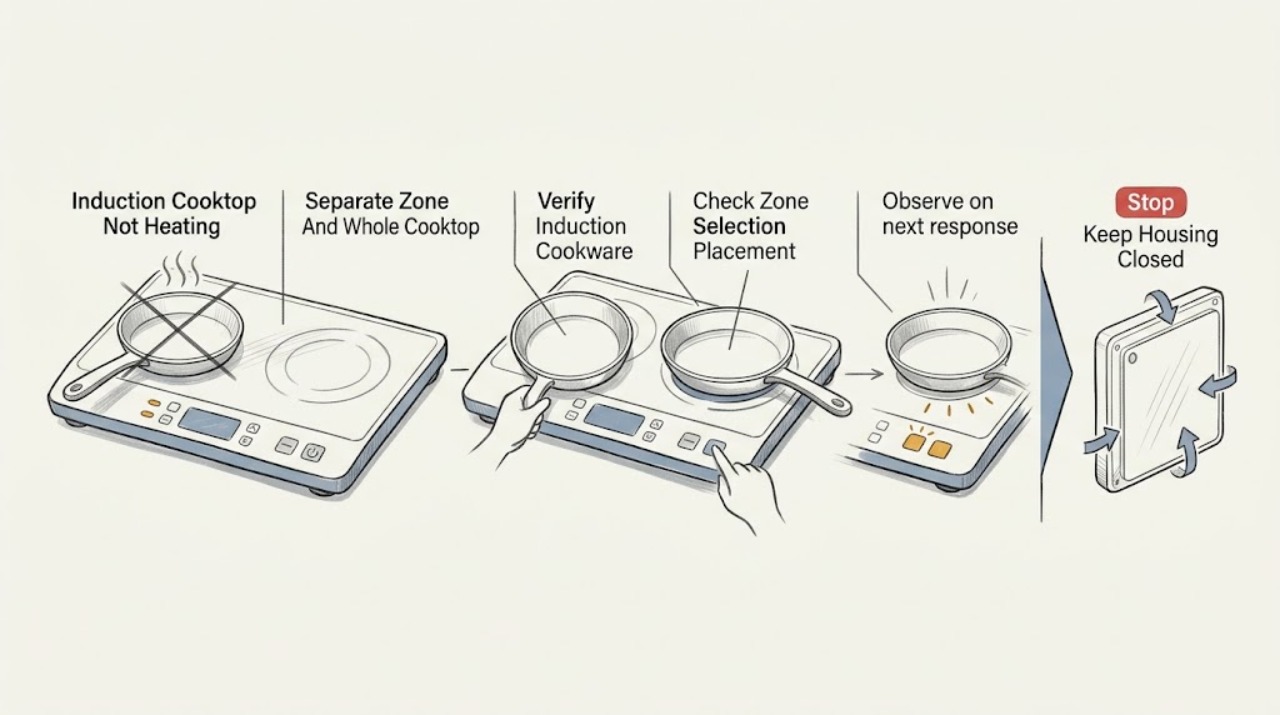
Work through in order
Diagnostic checks
Use only checks that match the exact appliance or system and its official guide.
-
Check 1
With cookware cool enough to handle, test the symptom by observing whether one cooking zone is cold or all zones are cold. Confirm that the cooktop display and the selected-zone controls respond normally without opening the appliance.
Expected result: Record whether the problem follows one zone, one pan, or the whole cooktop; note any flashing power level, blank display, lock symbol, audible signal, or error code.
Next step: Use the zone and display pattern to choose the cookware, placement, control-panel, or error check below. Stop using the cooktop for smoke, burning odor, visible damage, or wet electrical areas.
Stop if: Do not remove the glass, access wiring, or repeatedly operate the cooktop to reproduce a fault.
Why this matters
Why: One zone or one pan points toward cookware detection, placement, or a zone-specific condition. All zones cold, a blank display, repeated lock behavior, or an error indication points toward controls, power, overheating protection, or another fault that needs model-specific guidance.
-
Check 2
Check the pan's underside and documentation for induction suitability; when the pan is cool, use the model-approved cookware check or place a magnet on the bottom as Bosch describes. Do not heat an empty pan just to test it.
Expected result: Record whether the pan is magnetic, has a stable flat base, is damaged or warped, and whether a known suitable pan heats on the affected zone.
Next step: Use suitable cookware that the exact Bosch manual accepts. If a known suitable pan still does not heat, continue to the placement and control checks rather than buying an internal cooktop part.
Stop if: Do not use cracked, unstable, or damaged cookware, and do not place loose metal objects on the cooktop.
Why this matters
Why: A nonmagnetic, unstable, damaged, or unsuitable pan can explain a cold zone. If a known suitable pan heats while the original does not, the cooktop is more likely detecting cookware correctly and the first pan needs replacement or different use.
-
Check 3
Place the suitable pan on the zone that best matches its base, center it, select that zone, and set a power level using the normal controls. Compare the pan position with the zone markings without sliding hot cookware across the glass.
Expected result: Note whether the power level remains displayed, flashes, turns off, or heats only when the pan is centered or moved to another suitable zone.
Next step: Keep the pan centered on the matching zone and use the model's normal power-setting procedure. If the correct pan and zone still fail, record the result and continue to controls or service escalation.
Stop if: Do not cover controls with cookware, drag a heavy pan across the glass, or force a zone to activate by changing wiring or settings outside the manual.
Why this matters
Why: Bosch says a pan on the wrong zone, too small for the selected zone, or not correctly positioned may not be detected or may heat poorly. If placement and selection are correct but the zone remains cold with suitable cookware, the cause is not established as a simple pan-position issue.
-
Check 4
Inspect the control panel for a child-lock or panel-lock symbol, pause state, liquid, food residue, or an object covering a touch key. With the surface dry, use only the unlock and zone-selection procedure in the Bosch manual.
Expected result: Record whether the lock clears, the selected zone accepts a power level, all indicators flash, or the panel beeps or remains unresponsive after visible moisture and objects are removed.
Next step: Clear only visible moisture or objects and retry the model-approved control sequence once. If the panel remains unresponsive or an indication returns, stop and arrange service.
Stop if: Do not pour cleaner or water over the controls, use sharp tools on touch keys, bypass the lock, or open the control panel.
Why this matters
Why: A locked, wet, or obstructed panel can prevent the selected zone from heating even when cookware is suitable. An unresponsive or repeatedly flashing panel with a clear, dry surface suggests a control or fault condition rather than a pan problem.
-
Check 5
Observe whether the cooktop is hot, has shut a zone down, or shows an overheating indication; check only the visible ventilation area and whether hot cookware is covering or near the controls. Allow the appliance to cool as the model instructions direct.
Expected result: Note whether heating returns after cooling, whether the same zone shuts down again, whether the control area was covered by hot cookware, and whether ventilation is visibly obstructed.
Next step: Remove only the visible obstruction or misplaced cookware when safe, allow cooling, and retry with suitable cookware only if the manual permits. Stop and arrange service if overheating or shutdown recurs.
Stop if: Do not touch hot surfaces, remove ventilation guards, insert objects into vents, or continue cooking through repeated overheating.
Why this matters
Why: Bosch identifies overheating, blocked ventilation, and hot cookware near controls as conditions that can trigger protective shutoff or error indications. A recurring shutdown after cooling is not a normal pan-detection issue and needs diagnosis.
-
Check 6
If the cooktop still does not heat, record the exact display code or symbol, affected zone, cookware result, control-panel state, and whether the appliance cooled or shut down. Consult the exact Bosch model manual without opening the appliance.
Expected result: Classify the result as a resolved cookware or setting issue, a recurring code, no display, all zones cold with suitable cookware, a cracked surface, or smoke, burning odor, or visible electrical damage.
Next step: Stop using the cooktop and arrange qualified Bosch appliance or electrical service for any unresolved result. Give the technician the model information and the recorded code and observations.
Stop if: Do not remove panels, perform energized electrical testing, bypass a safety shutdown, or guess at a coil, board, sensor, or wiring replacement.
Why this matters
Why: A resolved pan or control condition supports normal use with the correct setup. A recurring code, no display, all-zone failure, damage, or odor indicates a power, control, heating, or safety fault that cannot be identified from the visible symptom alone.
Use your observations
Decision map
Find the observation that best matches what you see, then follow the next safe action.
-
PATH 01Safety boundary
What you see
The pan is not induction-compatible, is unstable or damaged, or a known suitable pan heats on the same zone.
Do this next
Use cookware accepted by the exact Bosch manual, with a stable base and appropriate size, and retest normally.
Why this path and its safety boundary
Why it matters: The cold result is most consistent with cookware detection or cookware condition rather than a confirmed cooktop failure.
Safety stop: Do not use damaged cookware or leave loose metal objects on the glass.
-
PATH 02Safety boundary
What you see
The power level flashes or the pan heats only after the correct zone is selected and the pan is centered.
Do this next
Keep suitable cookware centered on the matching zone and set the power level after selecting that zone.
Why this path and its safety boundary
Why it matters: The earlier result fits Bosch's guidance for wrong-zone selection, pan size, or placement.
Safety stop: Stop if the correct setup still leaves the zone cold, produces an error, or causes overheating.
-
PATH 03Safety boundary
What you see
The lock symbol clears or the panel responds after visible moisture or an object is removed using the model procedure.
Do this next
Keep the panel dry and clear, then use the ordinary zone-selection and power-setting sequence.
Why this path and its safety boundary
Why it matters: The control state was preventing normal zone selection or heating.
Safety stop: Arrange service if the panel remains unresponsive or the indication returns with a dry, clear surface.
-
PATH 04Safety boundary
What you see
A zone or the electronics shut down after high heat, hot cookware near controls, or blocked visible ventilation and recover only after cooling.
Do this next
Remove only the visible obstruction or misplaced cookware when safe, allow cooling, and follow the exact manual before resuming.
Why this path and its safety boundary
Why it matters: The cooktop's protective behavior is active; the cause may be operating conditions or a recurring fault.
Safety stop: Stop and arrange service if overheating, shutdown, or an error returns.
-
PATH 05Safety boundary
What you see
A known suitable pan is centered on the selected zone, the panel is unlocked and dry, and that zone remains cold without a clear operating code.
Do this next
Stop using the affected zone and arrange qualified Bosch appliance service with the model and test observations.
Why this path and its safety boundary
Why it matters: The symptom is not explained by ordinary cookware, placement, or visible control conditions; a zone or power-system fault remains possible.
Safety stop: Do not open the cooktop or attempt to replace a coil, sensor, board, or wiring.
-
PATH 06Safety boundary
What you see
All zones remain cold with suitable cookware, a recurring error or blank display appears, or the glass is cracked or there is smoke, burning odor, or visible damage.
Do this next
Stop using the cooktop and arrange qualified appliance or electrical service; provide the exact model, code, and visible symptoms.
Why this path and its safety boundary
Why it matters: This is a whole-appliance or safety-service condition, not a pan-specific adjustment.
Safety stop: Do not bypass shutdown, restore use on cracked glass, open panels, or perform energized electrical tests.
Helpful context
Understand the symptom
Start with the pan and the selected zone
Induction heats the cookware, so a cold pan does not always mean the cooktop has failed. Bosch guidance points first to induction-compatible cookware, correct size and placement, the selected zone, and a set power level. A pan that is not detected may leave the display flashing or the zone inactive even though the cooktop itself has power.
Treat displays and heat protection as clues
A wet or obstructed control panel, panel lock, hot cookware near the controls, overheating, or an automatic time limit can prevent a zone from heating. Clear only visible moisture or objects and allow a hot appliance to cool as the model instructions direct. A recurring code or shutdown changes the task to model-specific service diagnosis.
Know the electrical-service boundary
Do not remove the glass or underside cover to inspect the induction coils, wiring, fan, or power electronics. If suitable cookware and ordinary control checks do not restore heating, record the model, zone, display behavior, and error code and arrange qualified service. A replacement coil or board cannot be selected safely from the symptom alone.
Safety boundary
Stop conditions
- Do not open the cooktop, remove the glass or underside cover, or access coils, wiring, controls, or power electronics.
- Do not perform energized electrical testing, bypass a lock or safety shutdown, alter wiring, or guess at an internal replacement part.
- Stop for a cracked or chipped surface, smoke, burning odor, visible scorching, liquid inside the appliance, or exposed electrical damage.
- Stop and arrange service for recurring error codes, all zones remaining cold with suitable cookware, persistent one-zone failure, or repeated overheating.
- Keep cookware, liquids, sharp tools, and cleaning products away from the touch controls and ventilation openings.
When checks do not resolve it
Need a professional?
Arrange qualified Bosch appliance or electrical service when suitable cookware and correct zone settings do not restore heating, the panel remains unresponsive, an error code returns, all zones are cold, overheating or unexpected shutdown recurs, the glass is damaged, or diagnosis would require access to wiring, coils, controls, or power electronics.
Safety scope: This article supports ordinary-access cookware, control, and visible-ventilation checks only. Do not open the appliance, access wiring or coils, perform energized electrical testing, bypass protection, or replace an internal part from symptoms alone.
Common questions
FAQ
Why is my Bosch induction cooktop on but not heating the pan?
Check that the pan is induction-compatible, stable, and centered on the selected zone, then confirm a power level is set and the panel is unlocked. If the power level flashes or a suitable pan still stays cold, record the display behavior and follow the exact model manual or arrange service.
How can I tell whether cookware is suitable for a Bosch induction cooktop?
Use the exact Bosch manual's cookware guidance. Bosch also describes checking whether a magnet attaches to the pan bottom and using a stable base; if a known suitable pan heats while another does not, the original pan is the more likely issue.
What does a flashing power level mean on a Bosch induction zone?
Bosch manuals associate flashing indicators with cookware that is on the wrong zone, too small, or unsuitable for induction, and with cookware-detection timing. Center suitable cookware on the matching zone, select that zone, and set the power level; persistent flashing needs model-specific support.
When should I call for Bosch induction-cooktop service?
Arrange service when suitable cookware and correct placement do not restore heating, one or all zones remain cold, an error code returns, the panel stays unresponsive, overheating or shutdown recurs, the glass is cracked, or diagnosis would require opening the cooktop or touching electrical parts.
Read the exact guide
Official sources
- Bosch Gas Cooktop Troubleshooting & Repair | Bosch – Fix Cooktops Not Heating, Overheating, Uneven Heating & MoreBosch · Bosch owner-support troubleshooting page whose induction section covers no-heat, cookware, settings, ventilation, and overheating; the exact model manual controls model-specific steps.
- Use and Care Manual NIT5460UC | Bosch, Manuel d'utilisation NIT5460UC | BoschBosch · Bosch use-and-care manual for specified NIT5460UC models; the exact manual for another model controls its procedures and displays.
- Induction hob not heating | BoschBosch Home Appliances · Bosch support guidance for an induction hob not heating; use the installed model manual and local service process for a particular appliance.
- Bosch Cooktop & Rangetop Error Codes | Bosch - Troubleshooting Instructions for Error Codes, Child Locks & Other IssuesBosch · Bosch cooktop and rangetop error-code guidance; exact meanings and reset procedures depend on the installed model.
Community feedback
Share a repair observation
Share a plain-text repair observation. Accepted observations are published automatically; this page may take a moment to update.