
On this page
Start here
Quick answer
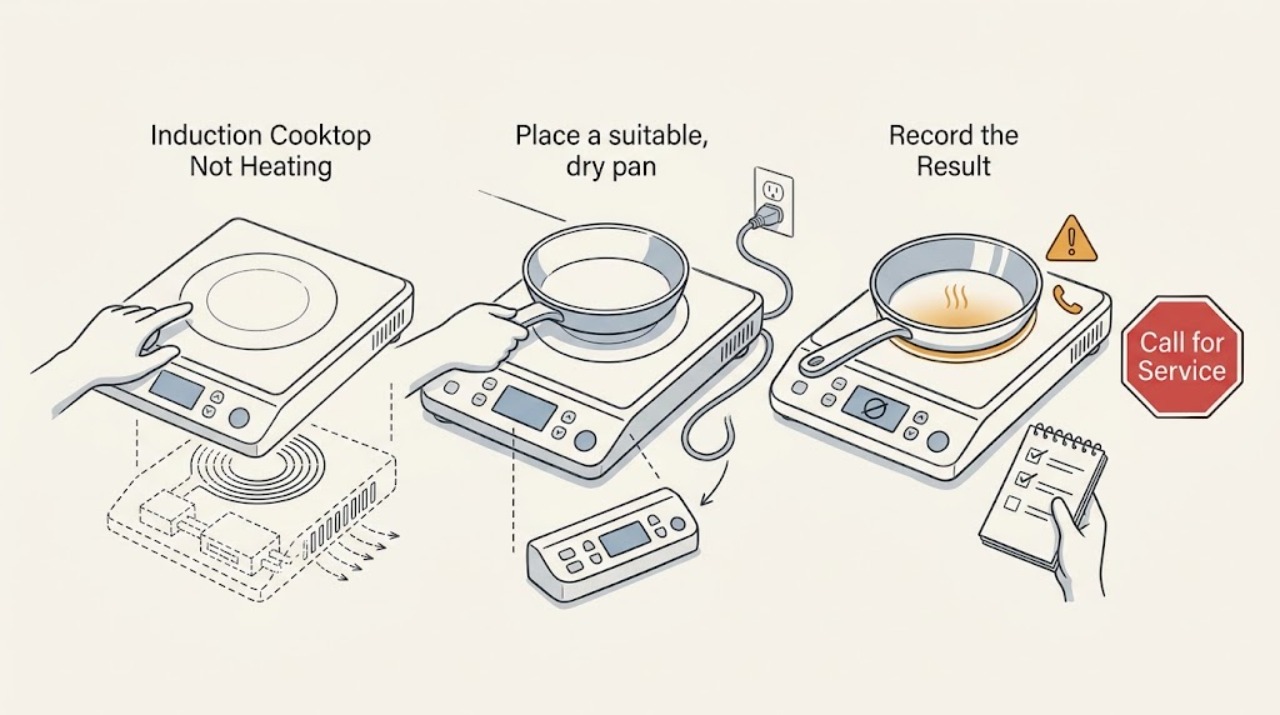
Keep this as a pure induction diagnosis: do not look for gas ignition parts. First check that the pan is magnetic, large enough for the selected zone, flat, and centered. Confirm that the intended zone has a power level, the control lock or demo mode is not active, and the touch surface is clean and dry. If one zone works while another does not, or power is reduced when several zones run, the result may be cookware detection or model-specific power management. If all zones fail, the breaker trips, the glass is cracked, an arc or smoke appears, or the cooktop overheats and shuts down, stop using it and arrange qualified electrical or appliance service.
Work through in order
Diagnostic checks
Use only checks that match the exact appliance or system and its official guide.
-
Check 1
Place a suitable, dry pan on the center of the affected induction zone and hold a small magnet against the outside of its base while the cooktop is off; use only cookware identified as induction-compatible by the pan maker or cooktop manual.
Expected result: The magnet is attracted across much of the base and the pan is flat, or the magnet does not hold, the base is warped, or only a small area is magnetic.
Next step: Try one known-compatible pan on the zone that best matches its base. If the display still shows no pan or the pan stays cool, continue to the control and power checks rather than using a converter disc or a gas-related workaround.
Stop if: Stop for cracked glass, a pan that has melted or bonded to the surface, smoke, an arc, or an unusually hot control area.
Why this matters
Why: A non-magnetic, damaged, or poorly matched base may not be detected or may heat weakly; a compatible pan makes a cookware mismatch less likely but does not clear the zone electronics.
-
Check 2
Select the exact cooking zone first, set a low-to-moderate power level using the model's controls, and center the pan on that zone; for a flexible or linked zone, use only the linking method shown in the manual.
Expected result: The selected zone recognizes the pan and shows a stable power level, the power display flashes, or a different zone responds instead.
Next step: Move the pan only while the zone is off or as the manual allows, then select the matching zone again. If the same zone remains cold with a known-compatible pan, compare it with a second zone once and document the result.
Stop if: Stop for a cracked surface, uncontrolled heating, smoke, arcing, or any control that activates by itself.
Why this matters
Why: A flashing level or no response can indicate wrong-zone selection, an unsuitable position, or a pan base below the zone's detection limit; a stable level with a cold pan points elsewhere.
-
Check 3
Inspect the display for a lock, pause, demo, error, or pan-detection indicator; with the surface cool and controls Off, wipe away food or liquid and use only the exact model manual's unlock or mode procedure.
Expected result: A lock or special mode is active, the panel is wet or covered by an object, an error returns, or the panel is clear and the controls respond normally.
Next step: Clear the accessible obstruction or mode once according to the manual and retry one zone. If the error returns or the controls remain unresponsive, stop using the cooktop and arrange service.
Stop if: Stop for a damaged touch panel, liquid entering an edge, smoke, an arc, or an error that persists after the model procedure.
Why this matters
Why: A lock or wet panel can inhibit zone commands, while a recurring error after the manual procedure points toward a control, sensor, supply, or electronics fault.
-
Check 4
If more than one zone is in use, note whether one power level drops or a boost function becomes unavailable; compare the behavior with the model manual's power-management description without changing installation settings.
Expected result: A level is reduced only when zones share a side or linked area, or a single zone is weak even when all other zones are Off.
Next step: Use lower settings or a different zone only as the manual permits. If one zone remains cold by itself, stop using that zone and arrange qualified service.
Stop if: Stop for a breaker trip, hot wiring or outlet, smoke, arcing, uncontrolled heat, or a glass surface that is damaged.
Why this matters
Why: Some induction cooktops limit combined output to stay within their configured supply capacity; a single-zone failure with no load sharing is more suggestive of a zone, sensor, or control fault.
-
Check 5
If the cooktop stopped after extended high-power use, remove cookware from the control area, turn the affected zone Off, and allow the appliance to cool; then check only the accessible ventilation clearance described in the installation manual.
Expected result: A hot-surface or electronics warning appears, a fan runs after shutoff, the cooktop resumes after cooling, or it stays cold or shuts down again.
Next step: Keep vents clear and use the model's normal power range. If the warning returns, the glass is too hot to handle, or the cooktop does not recover, stop use and arrange service.
Stop if: Stop for smoke, burning odor, a cracked glass surface, repeated thermal shutdown, sparks, or a hot electrical connection.
Why this matters
Why: Induction electronics can reduce output or shut down for temperature protection, and poor ventilation can worsen that condition; a repeat shutdown after cooling needs service.
-
Check 6
From a dry, safe position, check only the accessible breaker, plug, cord, and outlet or isolator status against the installation instructions; do not remove covers, probe conductors, or alter the circuit.
Expected result: The display is completely dark, the breaker is open, the connection is hot or damaged, or the accessible supply appears normal while zones remain cold.
Next step: Do not repeatedly reset a breaker. Arrange qualified electrical inspection for a supply or connection warning and appliance service for persistent no-heat behavior.
Stop if: Stop for smoke, visible arcing, a hot or melted plug, water at the connection, exposed conductors, or a repeated trip.
Why this matters
Why: An induction cooktop may have a supply or connection problem, while a normal-looking exterior cannot clear internal power electronics or zone hardware.
Use your observations
Decision map
Find the observation that best matches what you see, then follow the next safe action.
-
PATH 01Next step
What you see
The display flashes or shows no pan with a non-magnetic, undersized, warped, or off-center pan.
Do this next
If a known-compatible pan is still not detected, compare one other zone once and arrange service if the problem follows the zone rather than the pan.
Why this path and its safety boundary
Why it matters: Use one flat, magnetic pan that fits the selected zone and center it according to the model manual.
-
PATH 02Next step
What you see
A lock, pause, demo, or wet-panel indicator is present.
Do this next
If the control remains locked or the error returns, stop using the cooktop and arrange service.
Why this path and its safety boundary
Why it matters: Clear the surface and follow the exact model manual's control procedure once; do not guess at an unfamiliar key combination.
-
PATH 03Next step
What you see
A zone heats alone but its displayed level drops when another zone or boost function is used.
Do this next
If one zone is weak even when used alone, stop using that zone and arrange appliance service.
Why this path and its safety boundary
Why it matters: Follow the model's power-management limits and use a lower combined setting or an allowed zone combination.
-
PATH 04Next step
What you see
The cooktop shows an overheat condition, shuts a zone down, or has poor ventilation around its installation.
Do this next
If the condition repeats after cooling or the cooktop stays cold, stop use and arrange qualified service.
Why this path and its safety boundary
Why it matters: Turn the zone Off, remove cookware from the control area, allow cooling, and restore only the clearance described by the manual.
-
PATH 05Next step
What you see
One zone fails with more than one compatible pan while other zones work normally.
Do this next
Arrange appliance service with the affected zone, pan results, display behavior, and model information.
Why this path and its safety boundary
Why it matters: The pan mismatch is less likely; leave that zone Off and do not open the glass or cabinet.
-
PATH 06Next step
What you see
All zones fail, the display is dark, the breaker trips, or the supply connection is hot or damaged.
Do this next
Keep clear of smoke, water, exposed conductors, and arcing, and use the appropriate local emergency route for an active hazard.
Why this path and its safety boundary
Why it matters: Stop using the cooktop and do not repeatedly reset or modify the circuit. This needs qualified electrical and appliance diagnosis.
Helpful context
Understand the symptom
Induction heat depends on pan detection
An induction zone transfers energy into compatible cookware rather than heating like a gas flame. If the pan is non-magnetic, too small for the selected zone, off-center, or placed on a different zone than the one selected, the display may flash while the pan stays cool. A magnet check on the pan base is a low-risk way to screen compatibility, but the model manual controls the final size and placement rule.
Treat controls, power, and temperature as separate clues
A lock symbol, wet touch panel, demo setting, incorrect zone selection, or a power-management limit can look like a failed heater. One zone failing is different from every zone failing. Induction electronics also use fans and protective shutoff when heat or ventilation is a concern. Never open the glass or cabinet to investigate coils, boards, wiring, or the power supply.
Safety boundary
Stop conditions
- Stop immediately for smoke, a burning odor, visible arcing, a hot or melted plug, exposed conductors, or a repeated breaker trip.
- Stop for cracked or shattered glass, uncontrolled heating, a control that activates by itself, or cookware that has bonded to the surface.
- Do not open the cooktop, remove the glass, probe wiring, alter the circuit, bypass thermal protection, or make live electrical checks.
- Stop if water reaches the control panel, ventilation opening, outlet, isolator, or any other electrical connection.
- Stop ordinary troubleshooting when a known-compatible pan and correct settings still leave a zone cold; arrange qualified appliance service.
Only after diagnosis
Potential parts
- induction power module
Consider this category only after qualified diagnosis confirms an internal electronics fault rather than a pan, control, supply, or ventilation issue.
Confirm the exact cooktop model and manufacturer service information before selecting any component. - induction zone coil assembly
Consider this category only when a qualified technician identifies one zone coil or its associated circuit as the failed section.
Do not infer fit from zone size or appearance; model-specific service data is required. - temperature sensor
Consider this category only when the cooktop's error or thermal behavior is traced by qualified diagnosis to sensing hardware.
Use the full model information and approved fit guidance; never bypass a temperature safety device.
When checks do not resolve it
Need a professional?
Arrange qualified appliance service when a known-compatible pan remains cold on the correct zone, one zone fails repeatedly, an error returns, or overheating recurs. Arrange qualified electrical inspection for a dark display, breaker trip, hot or damaged connection, or supply concern. Use the local emergency route for smoke, fire, active arcing, or another immediate hazard.
Have this ready
- model and installation information
- affected zone or all-zone pattern
- pan compatibility and placement result
- display symbols or error text
- power-sharing and overheat behavior
- any breaker, odor, smoke, or heat event
Common questions
FAQ
Why does an induction cooktop turn on but not heat the pan?
The pan may be non-magnetic, too small, off-center, or on a different zone than the selected control. Check one flat, induction-compatible pan and the exact model settings before suspecting an internal fault.
How can I check whether cookware is induction-compatible?
With the cooktop off, hold a small magnet against the outside of the pan base. If it does not hold across a useful area, use cookware identified as induction-compatible by its maker or by the cooktop manual.
Why does one induction zone heat less when another zone is on?
Some models share available output and lower one zone or a boost setting when several areas request high power. Follow the model's power-management guidance; a zone that stays cold when used alone needs service.
What should I do when the induction cooktop overheats and stops?
Turn the zone Off, remove cookware from the control area, allow the electronics to cool, and check only the manual's ventilation clearance. If the condition repeats or the cooktop stays cold, stop use and arrange qualified service.
When should I stop using an induction cooktop?
Stop for cracked glass, smoke, burning odor, arcing, uncontrolled heating, water at an electrical connection, a hot or damaged cord, or a breaker trip. Do not open the cooktop or alter its circuit.
Read the exact guide
Official sources
- Lock - Electric and Induction Cooktop - Product HelpWhirlpool · Induction and electric cooktop control-lock behavior
- Appliance and Electrical Fire SafetyU.S. Fire Administration · Major-appliance cord, outlet, extension-cord, and electrical fire safety
- Performance Boost Flashing - Power Level Changes - Induction Cooktop - Product HelpWhirlpool · Induction boost and power-level changes when multiple cooking areas share available output
- Burner Turns Off During Cooking - Induction - Product HelpWhirlpool · Induction cookware detection, pan material, size, placement, control-panel liquid, and protective operation
- Bosch Induction Cooktop Error CodesBosch Home Appliances · Induction control lock, wet-panel, supply, demo, overheat, and recurring-error examples
- Bosch Induction Cooktop TroubleshootingBosch Home Appliances · Manufacturer guidance on induction pan compatibility, size, placement, controls, supply, and overheating
- Register yourBosch Home Appliances · Manufacturer manual example of induction power management and automatic output reduction
Community feedback
Share a repair observation
Share a plain-text repair observation. Accepted observations are published automatically; this page may take a moment to update.