
On this page
Start here
Quick answer
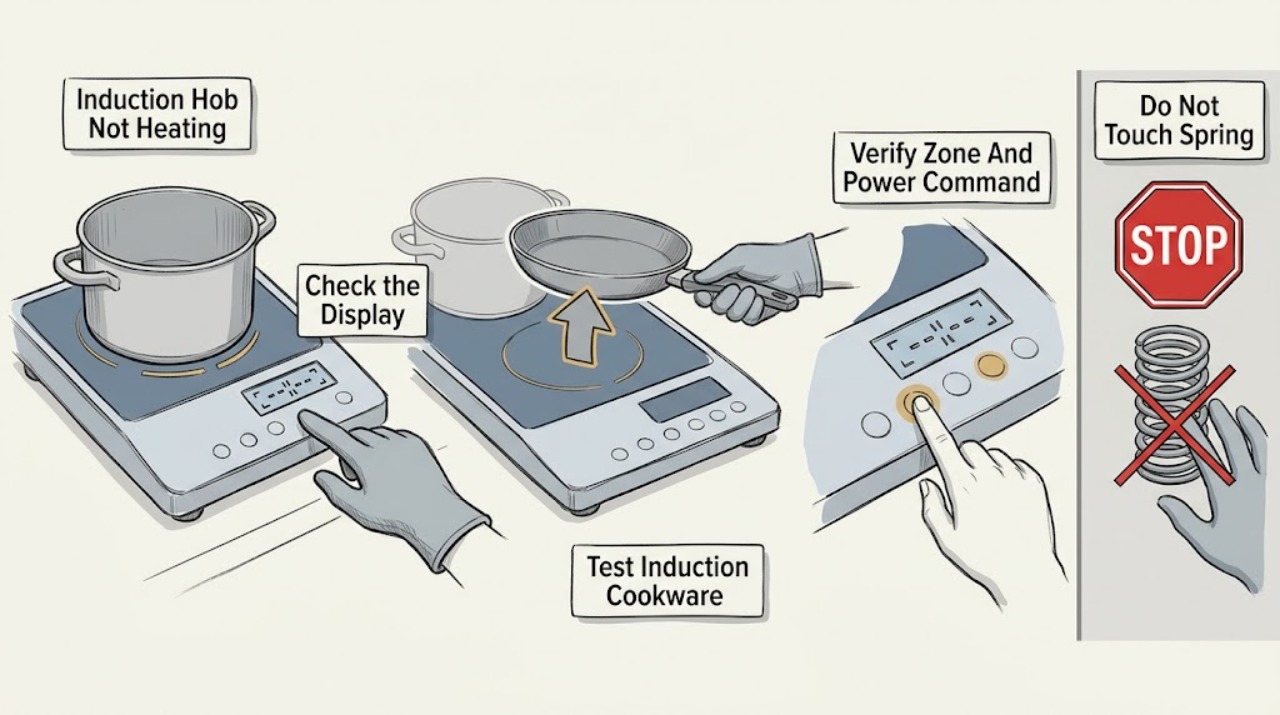
If a Bosch induction hob is on but not heating, test the pan before assuming the hob is broken: induction cookware needs a magnetic, flat base and must be centered on the selected zone. Confirm that the correct zone has a power level, and clear a wet or covered control panel. If all zones fail, an error returns, the hob has overheated, the glass or cable is damaged, or the problem persists with known-suitable cookware, stop and arrange qualified Bosch service; do not open the hob or perform live electrical tests.
Work through in order
Diagnostic checks
Use only checks that match the exact appliance or system and its official guide.
-
Check 1
With the hob cool enough to handle safely, try one known control sequence on one zone and note whether the display responds. Do not remove the glass or reach underneath. Compare the behavior of one zone with the other zones.
Expected result: Only one zone fails, every zone fails, the power level flashes, the display is blank, or a fault message appears.
Next step: Use the matching Bosch manual to interpret the display and continue with the pan and control checks. Record the exact message rather than guessing what it means.
Stop if: Stop if the glass is cracked, the cable is damaged, there is scorching or a burning smell, or the hob behaves unpredictably.
Why this matters
Why: A single-zone symptom points the investigation toward that zone's detection or heating path, while an all-zone or display symptom makes a shared control or supply issue more plausible. A flashing level can indicate that the pan is not detected or is unsuitable.
-
Check 2
Place a dry pan with a flat base on the zone that best matches its size. With the hob off and the pan cool, hold a magnet to the underside; do not heat an empty pan merely to test it.
Expected result: The magnet is attracted to the base and the pan is centered and appropriately sized, or the magnet does not hold, the base is warped, or the pan is too small or off-center.
Next step: Try one other known-compatible, flat pan on the correctly selected zone. If the second pan works, the first pan is the likely limitation; if neither works, continue without opening the hob.
Stop if: Do not use an adapter plate, heat an empty pan, or place a damaged or unstable pan on the hob.
Why this matters
Why: Bosch says induction cookware must be ferromagnetic, flat, and matched to the zone. Unsuitable, poorly positioned, or undersized cookware may not be detected and therefore will not heat correctly.
-
Check 3
Remove the pan, select the intended cooking zone, place the pan in its center, and set a clear power level using the normal controls for the model. Check that child lock or pause is not active.
Expected result: The wrong zone was selected, no power level was set, a lock or pause indicator is present, or the intended zone accepts the command but still does not heat.
Next step: Deactivate the lock or pause only with the model's documented control sequence and retry the correctly selected zone. If the controls do not respond or the symptom remains with suitable cookware, proceed to error and safety checks.
Stop if: Do not guess at service-menu combinations, bridge terminals, or bypass a lock or safety function.
Why this matters
Why: Bosch identifies wrong-zone selection, no power setting, and active lock or pause functions as control conditions that can make a suitable pan appear not to heat.
-
Check 4
Turn the hob off and, once safe, wipe the touch panel dry with a soft cloth. Remove utensils, cloths, spills, or other objects resting on the controls, then retry after the surface is clear.
Expected result: The display was flashing or controls were inhibited while the panel was wet or covered, or the panel remains dry and clear but heating still fails.
Next step: Retry with a dry, clear panel and the correct zone and pan. If the panel continues to flash or remains unresponsive, record the display and arrange service if the manual does not provide a safe user step.
Stop if: Do not pour liquid onto the hob, use abrasive tools, or remove the control panel.
Why this matters
Why: Bosch states that a wet control panel or an object covering it can cause the displays to flash and interfere with operation. If clearing it changes nothing, the fault is not explained by that condition alone.
-
Check 5
If the hob recently ran at high power or shows a heat-related indication, remove the cookware from the control area and allow the electronics to cool naturally. Do not cover the ventilation area or force a restart while it is hot.
Expected result: The hob resumes heating after cooling, or it remains unable to heat, repeatedly shuts down, or shows a fault indication.
Next step: Retry once the hob is cool, using a suitable pan and a moderate setting. If the issue repeats, record the indication and stop for qualified service.
Stop if: Stop immediately for smoke, a burning odor, cracking, scorching, or abnormal heat at the controls or glass.
Why this matters
Why: Bosch explains that overheating can trigger protective shutoff or a fault indication and instructs the user to wait for the electronics to cool before trying again. A repeat failure is not a reason to keep cycling the hob.
-
Check 6
After the pan, control, and cooling checks, record the model or E-Nr, affected zone, cookware test result, display or fault message, and whether the supply appears normal from the user's safe external view.
Expected result: A known-compatible pan heats normally, or no suitable pan heats and the fault persists or affects all zones.
Next step: Use Bosch support or an authorized appliance service provider with the model information and observations. Keep the hob isolated if a hazard is present.
Stop if: Do not open the hob, perform live electrical tests, replace a coil or control board, or attempt to repair the power electronics yourself.
Why this matters
Why: If a suitable pan works, the original problem was likely detection, placement, or cookware. If suitable cookware fails across zones or a fault returns, the symptom cannot select a safe replacement part and needs professional diagnosis.
Use your observations
Decision map
Find the observation that best matches what you see, then follow the next safe action.
-
PATH 01Next step
What you see
The magnet does not hold, the pan is too small or off-center, or the heating level flashes with that pan.
Do this next
Use a dry, flat, magnetic pan that matches the zone and center it; retry without an adapter plate.
Why this path and its safety boundary
Why it matters: The pan is not confirmed as suitable or correctly detected.
-
PATH 02Next step
What you see
The wrong zone or no power level was selected, or lock, pause, moisture, or an object is affecting the panel.
Do this next
Clear and dry the controls, apply the model's documented unlock or resume sequence, and select the zone and power level again.
Why this path and its safety boundary
Why it matters: The hob may be refusing the command rather than failing to generate heat.
-
PATH 03Next step
What you see
The hob recently overheated and resumes after a natural cool-down.
Do this next
Use the appliance only after it cools and follow the model manual; escalate if shutdown or fault indications recur.
Why this path and its safety boundary
Why it matters: A protective thermal response may have temporarily limited operation.
-
PATH 04Next step
What you see
One zone remains unable to heat with more than one known-compatible pan after controls are clear.
Do this next
Stop using the affected zone and arrange qualified Bosch appliance service with the model and test observations.
Why this path and its safety boundary
Why it matters: A zone-specific sensor, coil, or control fault is possible, but the failed component cannot be identified safely from the user checks.
-
PATH 05Next step
What you see
All zones fail, a fault returns, the glass or cable is damaged, or there is smoke, scorching, or a burning smell.
Do this next
Stop using the hob and obtain qualified appliance or electrical service; do not open or live-test it.
Why this path and its safety boundary
Why it matters: This is a shared-control, supply, or safety issue rather than a simple pan mismatch.
Helpful context
Understand the symptom
First separate a pan-detection problem from a hob or power problem. Bosch says induction cookware must have a ferromagnetic base, a flat bottom, and a size that suits the cooking zone. A pan that is too small, off-center, or not compatible may leave the zone apparently active without heating the food.
The control panel can also prevent a heating command from taking effect. Bosch troubleshooting guidance calls out wet controls, objects covering the panel, an active child lock or pause function, and an unselected zone or power level. Keep the panel dry and use only the controls identified in the manual for the exact model.
If a suitable pan is correctly placed and the selected zone still does not heat, record whether one zone or every zone is affected, any flashing display or fault message, and whether the hob recently overheated. Persistent faults belong with qualified service; the pan test cannot identify a failed coil, sensor, control board, or power stage.
Safety boundary
Stop conditions
- Stop immediately for cracked glass, damaged cable, smoke, scorching, burning odor, sparking, or abnormal heat at the controls.
- Do not open the hob, bypass a lock or safety function, or perform live electrical tests.
- Do not use an adapter plate, heat an empty pan, or use damaged or unstable cookware.
- Stop repeated resets or retries if a fault returns or all zones remain unable to heat.
- Arrange qualified service when a suitable pan fails on a zone after the safe control and cooling checks.
When checks do not resolve it
Need a professional?
Arrange qualified Bosch appliance service when a known-compatible pan fails on one or more zones after the panel is dry and the correct zone and power level are selected, when a fault returns, or when the hob has a damaged glass, cable, or electrical symptom. Use qualified electrical help for an unsafe supply connection.
Have this ready
- Provide the Bosch model or E-Nr, affected zone, cookware magnet and placement result, control settings, display or fault message, recent overheating, and any visible damage or odor.
Common questions
FAQ
Why does my Bosch induction hob turn on but not heat the pan?
Check that the pan is magnetic, flat, correctly sized, and centered on the selected zone. Also confirm a power level is set and the controls are dry and unlocked.
How can I test whether cookware is suitable for induction?
With the pan cool, place a magnet against its underside. If it is not attracted, Bosch does not consider that base suitable for induction heating; also check the base is flat and suits the zone size.
Why is the heat level flashing on my Bosch induction hob?
Bosch lists a pan on the wrong zone, a pan that is too small, or cookware that is not suitable for induction as possible reasons. Reposition the pan on the correctly selected zone or try suitable cookware.
Can a wet control panel stop an induction hob from heating?
Yes. Bosch says a wet panel or an object covering it can make the displays flash or interfere with operation. Turn it off, let the panel become dry and clear, then retry using the normal controls.
When should I stop troubleshooting and call Bosch service?
Stop for cracked glass, damaged wiring, scorching, smoke, burning odor, a recurring fault, all-zone failure, or persistent no-heating with known-compatible cookware. Do not open or live-test the hob.
Read the exact guide
Official sources
- Bosch Induction Cooktop TroubleshootingBosch Home Appliances · Official Bosch troubleshooting page; exact controls and warnings can vary by model.
- Information for Use PIE...B15Bosch · Official Bosch model-family manual used for general induction principles and safety; the exact appliance manual takes priority.
- Induction hob not heatingBosch Home Appliances · Official Bosch induction-hob support page; regional page used for the general cookware and professional-repair boundary.
Community feedback
Share a repair observation
Share a plain-text repair observation. Accepted observations are published automatically; this page may take a moment to update.