
On this page
Start here
Quick answer
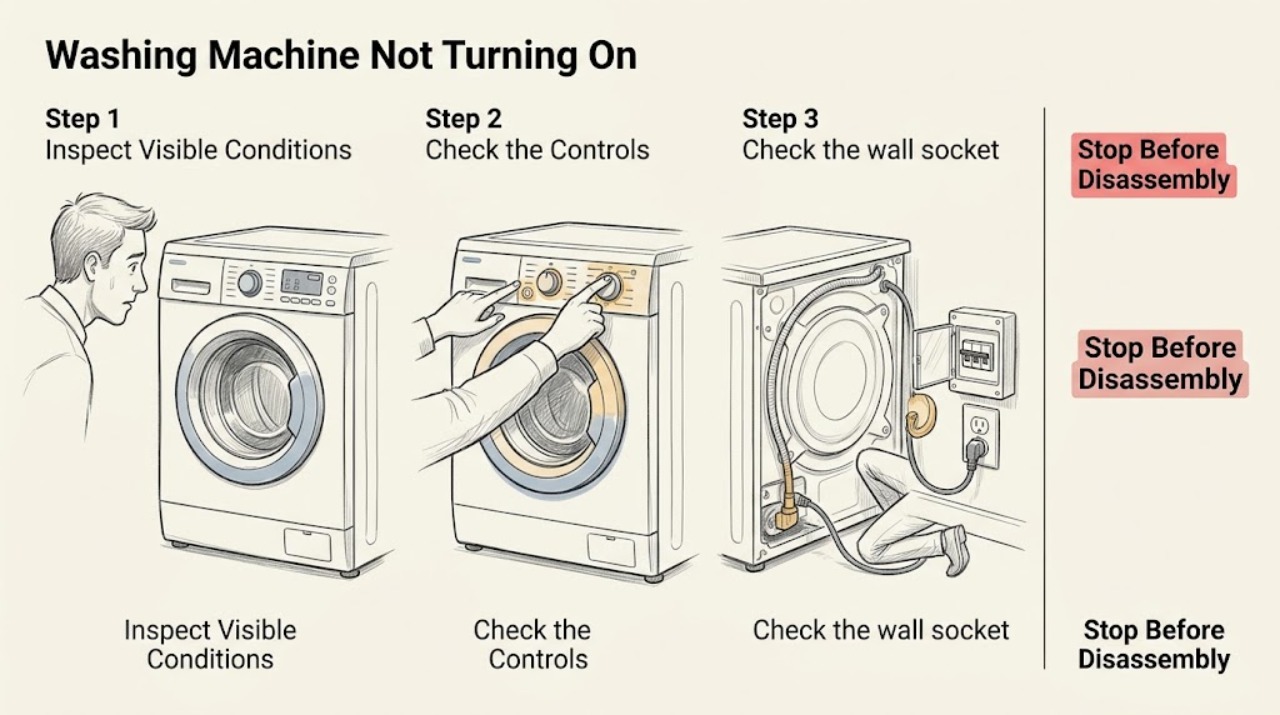
If a Bosch washing machine will not turn on and no lights appear, check the plug, the switched socket, and household circuit protection from outside the appliance. Confirm the socket with a suitable lamp or other appliance, and stop if the cord or connection is hot, wet, scorched, or damaged. If the panel wakes, the original symptom was likely on the supply path; if the socket and plug are sound but the washer remains dark, arrange qualified service. Do not open the washer, bypass protection, or perform live electrical testing.
Work through in order
Diagnostic checks
Use only checks that match the exact appliance or system and its official guide.
-
Check 1
Leave the washer door closed and observe the display, indicator lights, and any control sounds. Note whether everything is dark or whether a light works while the display is unresponsive.
Expected result: No light or display is present, or some indicators work despite an apparently dead control panel.
Next step: For a completely dark panel, proceed to the plug and socket check. For partial illumination, record the symbol or sound and use Bosch's model-specific support path.
Why this matters
Why: A completely dark washer points to the external supply or appliance power path. Partial illumination means power is reaching at least part of the interface and the exact model manual may identify a display or control state.
-
Check 2
Look at the plug, cord, and wall connection without moving the washer. Confirm the plug is fully inserted and the wall switch, if present, is on. Stop if the cord is cut, crushed, discolored, hot, wet, or loose in the socket.
Expected result: The plug and cord look intact and firmly connected, or there is visible damage or an unsafe connection.
Next step: If the connection is unsafe, stop using the washer and arrange qualified electrical service. If it is intact, test the socket without opening the washer.
Why this matters
Why: An intact connection permits a supply test; visible damage can itself explain the no-power symptom and creates a shock or fire risk.
-
Check 3
Check the wall socket with a suitable lamp or other appliance that you know works. Use only the normal household reset point for a tripped breaker or fuse; do not dismantle the socket or washer connection.
Expected result: The socket powers the test appliance and holds its reset, or it is dead / the breaker will not hold.
Next step: If the socket remains dead or protection trips again, contact a qualified electrician. If the socket works, continue with a single safe washer power check.
Why this matters
Why: A dead socket or failed household protection can prevent the Bosch washer from turning on. A working socket with a dark washer shifts the fault to the washer's cord, switch, filter, or internal control path.
-
Check 4
With the socket confirmed safe and powered, reconnect or switch on the washer only through its normal external plug and switch. Observe whether the display returns, an indicator appears, or there is an unusual click, hum, odor, or heat.
Expected result: The control panel wakes normally, or the washer stays dark / produces an abnormal smell, sound, or heat.
Next step: If it wakes, select a programme only after checking the door and controls. If it stays dark or shows a hazard, disconnect only if safe and arrange qualified repair.
Why this matters
Why: A normal wake-up supports an interrupted supply. Persistent darkness at a working socket indicates an appliance-side power or control fault; an odor, heat, or abnormal sound is a stop condition.
-
Check 5
If the panel is now lit but a wash will not begin, confirm the door closes without clothing caught in the seal and that the displayed door or key symbol is not active. Do not force the latch or bypass the interlock.
Expected result: The door closes and locks normally, or it cannot latch / a lock symbol remains.
Next step: Remove only a visible obstruction and retry normal closure once. If the symbol remains or the latch is damaged, stop and request service.
Why this matters
Why: Once power is restored, a door-lock condition can look like a second no-start fault. A door that cannot latch safely requires service rather than a power repair.
-
Check 6
Record the model number, the last time the washer worked, the state of the socket and breaker, and any display, sound, leak, or odor observed. Use Bosch's support hub or manual for the exact model and arrange service if the panel will not return.
Expected result: The washer remains dark after a working socket and intact external connection are confirmed, or it returns to normal operation.
Next step: Do not remove panels or replace internal parts based only on this symptom. Give the recorded details to a qualified Bosch service provider.
Why this matters
Why: Persistent darkness after the supply is confirmed is not a user-setting problem and may involve an internal power or control component. A normal return to operation points to an intermittent supply event but still merits monitoring if repeated.
Use your observations
Decision map
Find the observation that best matches what you see, then follow the next safe action.
-
PATH 01Safety boundary
What you see
The cord, plug, socket, or surrounding area is hot, wet, scorched, loose, or visibly damaged.
Do this next
Stop using the washer, isolate power only if it is safe, keep clear of the damaged connection, and arrange qualified electrical or appliance service.
Why this path and its safety boundary
Safety stop: Continue with the socket and household protection checks.
-
PATH 02Safety boundary
What you see
The wall socket is dead or household protection trips again after a normal reset.
Do this next
Stop resetting it and arrange qualified electrical help; the washer cannot be safely diagnosed until the household supply is stable.
Why this path and its safety boundary
Safety stop: Treat a still-dark washer as an appliance-side power or control issue and continue only with external observations.
-
PATH 03Safety boundary
What you see
The socket works and the Bosch washer remains completely dark.
Do this next
Stop user troubleshooting and arrange qualified Bosch appliance service. Do not open the washer, bridge protection, or test internal wiring.
Why this path and its safety boundary
Safety stop: If the panel wakes, use the door, lock, programme, and Start-control guidance for the remaining no-start symptom.
-
PATH 04Safety boundary
What you see
The panel lights but the door will not safely latch or a door/key symbol remains after visible obstruction is removed.
Do this next
Do not bypass the interlock; request service for the door, seal, lock, or control path.
Why this path and its safety boundary
Safety stop: Select a valid programme and follow the exact model's Start or Start/Reload instruction.
Helpful context
Understand the symptom
A blank panel is a power symptom
Do not start with programme settings when the display and indicators are completely dark. First establish whether the socket can supply power and whether the washer's external plug and cord are intact. If the display works but a cycle will not begin, that is a different door, lock, programme, or Start-control problem.
Stay outside the appliance
The safe user checks stop at the plug, socket, household protection, and visible cord. Do not remove the top or rear panel, bridge a fuse, defeat a door interlock, or probe wiring. A washer that has been wet, overheated, or electrically damaged needs qualified assessment.
Record the model before arranging service
Bosch control layouts and service instructions vary by model. Note the exact model number, what was happening immediately before the loss of power, whether the breaker tripped, and whether there was a smell, sound, or visible damage.
Only after diagnosis
Potential parts
- line filter or power-entry component
Consider this category only after a qualified technician confirms a sound household supply and identifies an appliance-side power-entry fault.
Confirm the exact Bosch model and the manufacturer's fit information before ordering any part. - main control module
Consider this category only after external power, cord, switch, and user controls are confirmed and a qualified diagnosis isolates the control module.
Control modules are model-specific and may require configuration; verify the exact model documentation before purchase.
When checks do not resolve it
Need a professional?
Arrange qualified service when the washer remains dark at a known-working socket, the breaker or fuse trips again, the cord or connection is damaged, there is smoke, heat, a burning smell, water at electrical parts, or the display returns but the door cannot latch. Provide the exact model, power and breaker observations, last-known-working time, and any sounds, symbols, leaks, or odors.
Common questions
FAQ
Why is my Bosch washing machine completely blank?
Check the plug, switched socket, socket power, and household circuit protection from outside the appliance. If the socket works but no washer light returns, arrange qualified service instead of opening the machine.
Can I test the Bosch washer by plugging another appliance into the socket?
Yes, a suitable lamp or other known-working appliance can help confirm whether the wall socket has power. Stop if the socket is damaged, hot, wet, or loose, and have it checked by a qualified electrician.
What if my Bosch washer turns on but still will not start a cycle?
Check that the door closes and locks without clothing caught in the seal, that no key or door symbol is active, and that the model's normal Start or Start/Reload control is used. A door that will not latch safely needs service.
Read the exact guide
Official sources
- Washing machine is not turning onBosch Home Appliances UK · Bosch washing machine no-power checks and repair escalation
- Washing machine programme is not startingBosch Home Appliances UK · Bosch washing machine door-lock and programme-start checks
- Bosch Washing Machine Troubleshooting & RepairBosch Home Appliances · Bosch washer manuals, self-help, error codes, parts, and repair resources
Community feedback
Share a repair observation
Share a plain-text repair observation. Accepted observations are published automatically; this page may take a moment to update.