
On this page
Start here
Quick answer
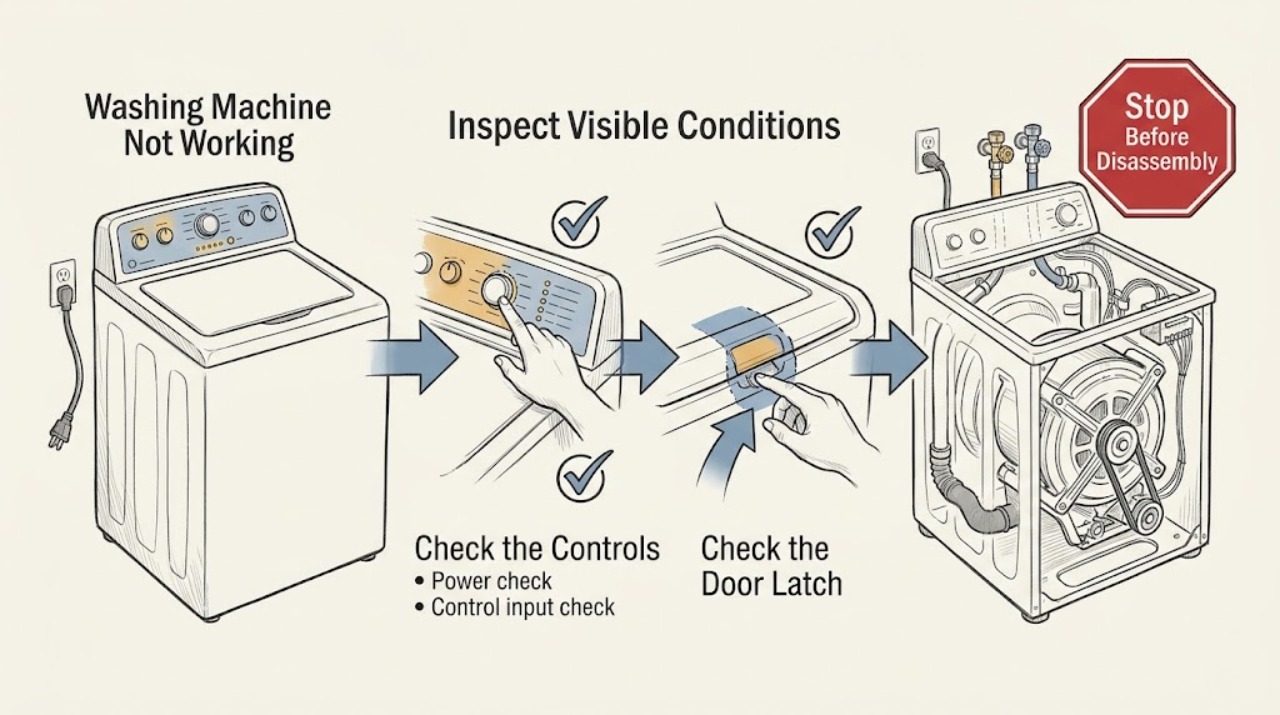
When a Bosch washing machine is not working, first classify the symptom: no lights, a lit panel that will not start, or a programme that starts and then stops. For a blank panel, check the plug, switched socket, and household protection. For a no-start panel, close the door without trapped laundry, clear a documented lock only through the model manual, select a valid programme, and use the normal Start or Start/Reload action. If the machine starts but stops, record the exact symbol or code and check only the model's user-level water, drain, or load guidance. Stop for smoke, burning smell, leaks at electrical parts, repeated trips, or a door that will not lock; do not bypass safety interlocks or open the machine.
Work through in order
Diagnostic checks
Use only checks that match the exact appliance or system and its official guide.
-
Check 1
Observe the washer before selecting a programme. Note whether the display and indicators are completely dark, whether the panel lights but shows a lock or other symbol, or whether a programme begins and then stops.
Expected result: The machine is dead, powered but idle, or it starts and stops with a message or unusual sound.
Next step: Follow the matching branch rather than applying a reset to every symptom.
Why this matters
Why: A dark panel points to supply or appliance power. A powered idle panel points to door, lock, programme, or Start input. A stopped cycle needs the exact display and the point in the sequence where it stopped.
-
Check 2
For a dark panel, check the plug is fully inserted, the wall switch is on, and the socket powers a suitable lamp or other known-working appliance. Check the household breaker or fuse from the normal user-accessible point; do not dismantle the socket or washer.
Expected result: The socket is powered and protection holds, or the socket is dead / protection trips again / the external cord is damaged.
Next step: Arrange qualified electrical help for a dead or unstable socket. If the socket is sound but the washer remains dark, arrange appliance service without opening the machine.
Why this matters
Why: A household supply issue can make the whole washer appear dead. A working socket with a dark washer points to an appliance-side power or control fault, while a repeated trip is a safety stop.
-
Check 3
For a lit panel that will not start, close the door normally and check that no clothing is caught between the door, seal, and housing. Make sure the drum is not so full that the door cannot latch, then observe the door symbol.
Expected result: The door latches and the symbol clears, or the door will not latch / the symbol remains active.
Next step: Remove only a visible obstruction and retry closure once. If the latch does not engage, stop and request service; do not bypass the interlock.
Why this matters
Why: Bosch identifies an improperly locked door, trapped item, or overloaded drum as a reason a programme does not start. A door that still cannot lock after visible obstruction is removed points to the door or lock path.
-
Check 4
Select a valid programme and use the model's normal Start or Start/Reload control. On some Bosch models, the official guidance says the button needs a deliberate hold and that holding it too long can produce a double beep instead of a start.
Expected result: The programme begins, the washer beeps and rejects the input, or the display does not change.
Next step: Follow the exact model manual for the Start control and options. If the normal input continues to fail, stop before opening the control panel and arrange service.
Why this matters
Why: A correct control input can resolve a normal no-start state. Repeated rejection with a latched door and valid programme suggests a control or model-specific fault rather than a need to keep pressing.
-
Check 5
If a programme starts but stops, record the exact code or symbol and whether the drum has water, the washer attempted to fill, or the door remains locked. Use only the documented user-level check for that symbol in the Bosch model support or manual; do not force the door or disconnect a full machine without guidance.
Expected result: The washer shows a door, tap, drain, or other documented condition, or it stops with no clear display.
Next step: Record the code and sequence, apply only the matching manual step, and arrange service if the condition returns or the machine remains stopped.
Why this matters
Why: A displayed condition changes the next step and should be handled by the model's instructions. An unexplained stop after a valid start needs service-level diagnosis rather than random resets.
-
Check 6
Make a final external safety and evidence check. Look for water on the floor, a loose or visibly damaged hose, smoke, a burning smell, abnormal sparking, or a breaker that has tripped again. Record the model number and last-known-working time.
Expected result: A hazard or visible leak is present, or no hazard is visible but the washer still will not complete a normal start.
Next step: Stop for a hazard and arrange qualified help. Otherwise give the technician the model, display, programme, door state, power result, and exact stop sequence.
Why this matters
Why: A hazard can make continued operation unsafe. No visible hazard after all external checks leaves internal valve, pump, lock, control, motor, or wiring causes that cannot be confirmed safely by a user.
Use your observations
Decision map
Find the observation that best matches what you see, then follow the next safe action.
-
PATH 01Safety boundary
What you see
The panel is dark, the external cord is damaged, the socket is unsafe, smoke or burning odor is present, water reaches electrical parts, or the breaker trips again.
Do this next
Stop operating the washer. Isolate power only if safe, keep clear of the hazard, and arrange qualified electrical or appliance service; do not open the machine.
Why this path and its safety boundary
Safety stop: Continue with the appropriate door, programme, Start, and displayed-condition checks.
-
PATH 02Safety boundary
What you see
The socket works but the Bosch washer remains completely dark.
Do this next
Treat the symptom as an appliance-side power or control fault and request qualified service. Do not bridge protection or replace internal electrical parts based only on a blank panel.
Why this path and its safety boundary
Safety stop: If the panel lights, diagnose the door, lock, programme, Start input, and any displayed condition.
-
PATH 03Safety boundary
What you see
The panel is lit but the door will not close and lock after visible clothing obstruction is removed.
Do this next
Stop and arrange service for the door, seal, hinge, lock, or control path. Never bypass the door interlock.
Why this path and its safety boundary
Safety stop: Use the model's valid programme and normal Start or Start/Reload action.
-
PATH 04Safety boundary
What you see
A valid start is attempted but the programme repeatedly stops or returns the same symbol or code.
Do this next
Record the exact message and arrange Bosch-qualified service after applying only the documented user-level step.
Why this path and its safety boundary
Safety stop: Allow the cycle to continue while monitoring for a normal fill, lock, and drum sequence.
Helpful context
Understand the symptom
Start with the visible state
“Not working” can mean no power, no programme start, no water movement, or a cycle that stops. Look at the panel before touching the controls and note any key, door, tap, or error symbol. The visible state determines which safe check is useful next.
A door lock is not an inconvenience to defeat
A Bosch washer must be able to close and lock before a programme can run. Remove only clothing visibly caught at the opening and reduce an overloaded drum if it prevents closure. Never force the door, bridge the lock, or reach into a powered drum.
When a normal check is no longer enough
Persistent silence, repeated error messages, a recurring leak, a breaker trip, or a control that will not respond after the correct model-specific action needs service. Save the exact display and sequence of events so the technician can start with useful evidence.
Only after diagnosis
Potential parts
- door lock or interlock assembly
Consider this category only after a qualified diagnosis confirms that the door closes correctly but the washer does not receive a safe-lock signal.
Confirm the exact Bosch model and the manufacturer's fit information before ordering any part. - main control module
Consider this category only after external power, door lock, programme, and Start controls are confirmed and a qualified diagnosis isolates the control.
Control modules are model-specific and may require configuration; verify the exact model documentation before purchase.
When checks do not resolve it
Need a professional?
Arrange qualified service when the washer remains dark at a known-working socket, household protection trips again, the door cannot latch, a normal Start action is rejected repeatedly, a programme stops with a recurring symbol or error, or internal pump, valve, motor, lock, control, or wiring diagnosis is needed. Provide the exact model, display message, programme, door state, power result, and symptom timeline.
Common questions
FAQ
What should I check first when my Bosch washing machine is not working?
Look at the panel. If it is dark, check the plug, socket, and household protection. If it lights, check the door lock, control lock or displayed symbol, programme selection, and the normal Start or Start/Reload action.
Why does my Bosch washer turn on but not start?
The door may not be locked, laundry may be caught at the opening, the drum may prevent closure, or the Start input may not have been used as the model expects. Remove only visible obstruction and follow the exact model manual.
When should I stop troubleshooting a Bosch washing machine?
Stop for smoke, a burning smell, water at electrical parts, visible cord damage, repeated breaker trips, an unsafe door, or a recurring error after the manual's user-level step. Arrange qualified service and do not bypass an interlock.
Read the exact guide
Official sources
- Washing machine is not turning onBosch Home Appliances UK · Bosch washing machine no-power checks and service escalation
- Washing machine programme is not startingBosch Home Appliances UK · Bosch washing machine door-lock and programme-start checks
- Bosch Washing Machine Troubleshooting & RepairBosch Home Appliances · Bosch washer manuals, self-help, error codes, parts, and repair resources
Community feedback
Share a repair observation
Share a plain-text repair observation. Accepted observations are published automatically; this page may take a moment to update.