
On this page
Start here
Quick answer
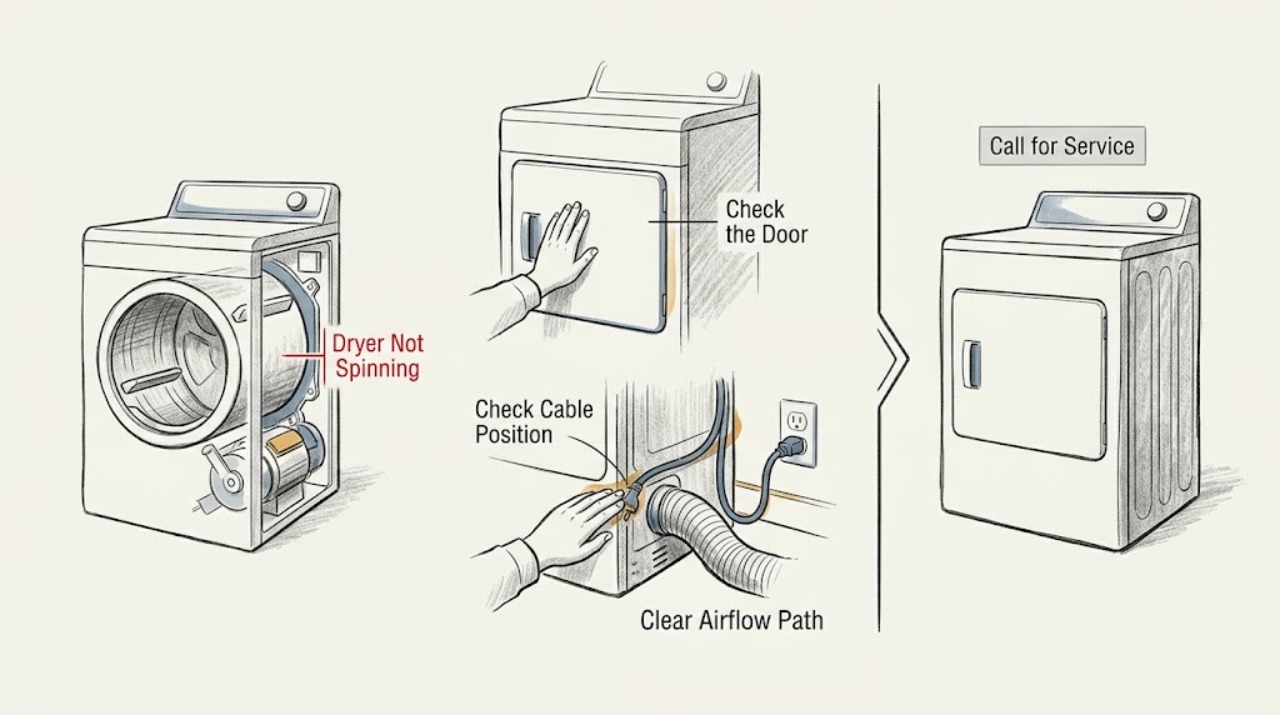
If a Candy dryer runs but the drum does not turn, first stop the cycle and check the load, door closure, and for an object caught in the drum. Clean the lint filter and the applicable condenser or filter drawer, then check that the appliance has room to ventilate. With the appliance switched off and safely disconnected, a drum that turns unusually freely can point to a drive-belt problem, while a drum that is tight, noisy, or obstructed points to a mechanical issue. If the dryer only hums, repeatedly stops, smells hot, or still will not spin after the simple checks, stop using it and arrange qualified Candy service.
Work through in order
Diagnostic checks
Use only checks that match the exact appliance or system and its official guide.
-
Check 1
Stop the programme, remove a few items if the drum is tightly packed, redistribute the remaining load, and close the door firmly before selecting the correct drying cycle for the model.
Expected result: The drum starts with a smaller, balanced load, or the dryer still powers on without any drum movement.
Next step: If the drum starts, avoid overloading and monitor it. If it remains still, continue with the obstruction and filter checks rather than repeatedly restarting a stalled cycle.
Why this matters
Why: A heavy or uneven load can prevent the drive from starting, while a persistent no-spin result after the load and door checks points to a fault beyond cycle setup.
-
Check 2
With the dryer stopped and cool, inspect the drum opening, seal, and reachable gaps for a coin, button, wire, or other object that could interfere with rotation; remove only an object that is safely reachable.
Expected result: A foreign object is visible or the drum area is clear.
Next step: If an object was removed, run only a short supervised retest. If the drum remains blocked, the object is not reachable, or the drum makes scraping or metallic noise, stop and arrange service.
Why this matters
Why: Candy notes that small objects can become caught between the drum and tub and block rotation or create unusual noise; a clear opening makes that particular cause less likely.
-
Check 3
Clean the lint filter and, according to the exact Candy model, the condenser or filter drawer; also check that the dryer has adequate ventilation and that no accessible airflow path is covered.
Expected result: The filters contain a heavy lint deposit or the appliance was crowded or poorly ventilated, or the filters and ventilation are already clear.
Next step: Dry and reinstall any washable filter as directed by the model manual, then perform one supervised retest. If the drum still will not turn or the symptom returns, stop use and continue only with professional diagnosis.
Why this matters
Why: Lint and restricted airflow reduce drying performance and can contribute to overheating or protective shutdown; a clear airflow path makes a blockage-related shutdown less likely but does not confirm the drive is healthy.
-
Check 4
After switching the dryer off, allowing it to cool, and disconnecting it safely, turn the empty drum gently by hand without opening cabinet panels or forcing it.
Expected result: The drum turns with ordinary resistance, turns unusually freely, or feels tight and produces scraping or grinding sounds.
Next step: If movement is abnormal, do not operate the dryer again; provide the observation to a technician. If movement seems normal but powered rotation is absent, continue to the sound and restart check.
Why this matters
Why: Unusually free movement can be consistent with a loose or broken drive belt; tight or noisy movement can indicate a mechanical obstruction, bearing, pulley, or drum-support problem. This check cannot identify the exact failed part.
-
Check 5
Run one brief supervised test only after the accessible checks are complete, and listen from outside the cabinet for the motor starting, a hum without rotation, repeated clicking, or an abrupt stop.
Expected result: The motor hums but the drum does not move, the drum starts and stops, the dryer cuts out after becoming hot, or there is no drive sound at all.
Next step: Stop the test if there is a burning smell, smoke, unusual heat, or loud mechanical noise. Otherwise stop after the brief observation and arrange qualified service if the drum is still not spinning.
Why this matters
Why: A hum without movement can indicate that the motor is not getting the drum moving; repeated stopping can be consistent with a heat or drive protection response; no drive sound can point to a control, door-interlock, motor, or power-path problem. Sound alone is not a part diagnosis.
Use your observations
Decision map
Find the observation that best matches what you see, then follow the next safe action.
-
PATH 01Next step
What you see
The drum spins after reducing and balancing the load, and no unusual noise returns.
Do this next
Use the model's stated load capacity, balance large and small items, and keep the filters clean so the dryer is not repeatedly stressed.
-
PATH 02Next step
What you see
The drum turns unusually freely by hand after safe disconnection.
Do this next
Do not keep running the appliance; a drive belt or related drive component needs professional inspection and exact model identification.
-
PATH 03Next step
What you see
The drum is tight, scrapes, grinds, or is stopped by a reachable obstruction.
Do this next
Remove only the safely reachable obstruction. If the noise or resistance remains, stop use and arrange qualified repair rather than opening the cabinet.
-
PATH 04Next step
What you see
The dryer hums, repeatedly stops, smells hot, or still will not spin after the load, obstruction, and airflow checks.
Do this next
Stop using the dryer and contact qualified Candy service for a drive, motor, control, or thermal diagnosis.
Helpful context
Understand the symptom
What the symptom tells you
Separate a drum that never starts from one that starts and then stops. If the dryer powers on and the heater or fan can be heard but the drum stays still, the drive path becomes more likely. If the complete cycle refuses to start, begin with the door, programme, load, and visible obstruction checks. If the drum turns only after a manual push, do not keep restarting it: that pattern needs a technician to assess the drive system.
Keep the first checks low risk
Stop the programme before opening the door or removing a filter. Let the appliance cool, and disconnect it before any manual drum movement. Do not remove cabinet panels, bridge a door or thermal safety device, or probe live wiring. A lint filter or condenser can be cleaned as described for the exact model, but internal drive repairs should be left to a qualified technician.
Why cleaning matters even when the drum is the complaint
Restricted airflow can make a dryer run hot and can trigger protective shutdowns. Cleaning the accessible filters and keeping the appliance ventilated removes that variable, but it does not prove that a belt, motor, pulley, capacitor, or control board is good. If the no-spin symptom returns after the airflow check, treat it as an unresolved fault rather than repeatedly running the dryer.
Only after diagnosis
Potential parts
- dryer drive belt
Only consider a drive belt after safe inspection shows abnormal free drum movement and a qualified technician confirms belt wear, looseness, or breakage.
Confirm the exact Candy model and product code with the manufacturer's fit information before ordering any component. - dryer motor or motor-start component
Only consider a motor or motor-start component if the load and airflow are correct, the drum is mechanically free, and a technician confirms a motor-side starting fault.
Do not infer compatibility from the appliance appearance; identification must be based on the exact Candy model and technician diagnosis. - drum support or pulley component
Only consider a support or pulley component if the drum has abnormal resistance, scraping, or a confirmed drive-path fault after the appliance is safely isolated.
Use the exact model documentation and qualified service diagnosis to confirm the correct component.
When checks do not resolve it
Need a professional?
A qualified Candy engineer should diagnose a suspected belt, motor, pulley, capacitor, electronic control, bearing, door-interlock, or thermal-safety fault when the accessible checks do not restore drum movement.
Common questions
FAQ
Why does my Candy dryer run but the drum does not spin?
Start with the load, door closure, caught-object, filter, and airflow checks. If the drum still does not turn, a belt, motor, pulley, capacitor, control, or another internal drive fault may require qualified diagnosis.
Should I keep restarting a Candy dryer that only hums?
No. Stop the cycle and avoid repeated attempts. A hum without drum movement can indicate a drive or motor-side fault, and repeated operation can add heat or stress while the fault remains.
Can a full or unbalanced load stop a Candy dryer drum?
It can. Reduce and redistribute the load, follow the exact model's capacity guidance, and retest only once. If the drum remains still with a balanced load, the cause is likely not just loading.
What should I do if the Candy dryer drum turns very freely by hand?
Do not keep running the dryer. Unusually free movement after safe disconnection can be consistent with a loose or broken drive belt, but a technician must confirm the failed component and the correct model-specific replacement.
Read the exact guide
Official sources
- Technical servicesCandy · Candy's official technical-assistance page for product support, manuals, and professional repair.
- How to best maintain the dryerCandy · Candy's maintenance guidance for dryer loading, filters, cleaning, and ventilation.
- Que faire lorsque votre sèche-linge cesse de tournerCandy France · Candy's official troubleshooting article for a tumble-dryer drum that stops turning.
- Cosa fare e perché il cestello dell’asciugatrice non giraCandy Italia · Candy's official article on overloaded loads, doors, caught objects, belts, motors, pulleys, capacitors, and drum rotation.
- User manualCandy · Candy's official model-specific manual lookup for product instructions and maintenance details.
Community feedback
Share a repair observation
Share a plain-text repair observation. Accepted observations are published automatically; this page may take a moment to update.