
On this page
Start here
Quick answer
First separate a completely dead machine from one that has power but will not start. Check the wall outlet and visible cord, then confirm the door is fully closed and the control panel is not in Child Lock. If the display shows an error, use the exact Candy manual and perform one documented power reset; Candy’s support article describes disconnecting power for about 15 minutes before retrying. A lit panel that still will not start may be waiting for a door lock, water supply, or control condition. Stop for a damaged cord, hot outlet, repeated breaker trip, water around electrical parts, or a burning smell, and arrange qualified service. [Source: candy-not-on; candy-manuals; candy-door-lock]
Work through in order
Diagnostic checks
Use only checks that match the exact appliance or system and its official guide.
-
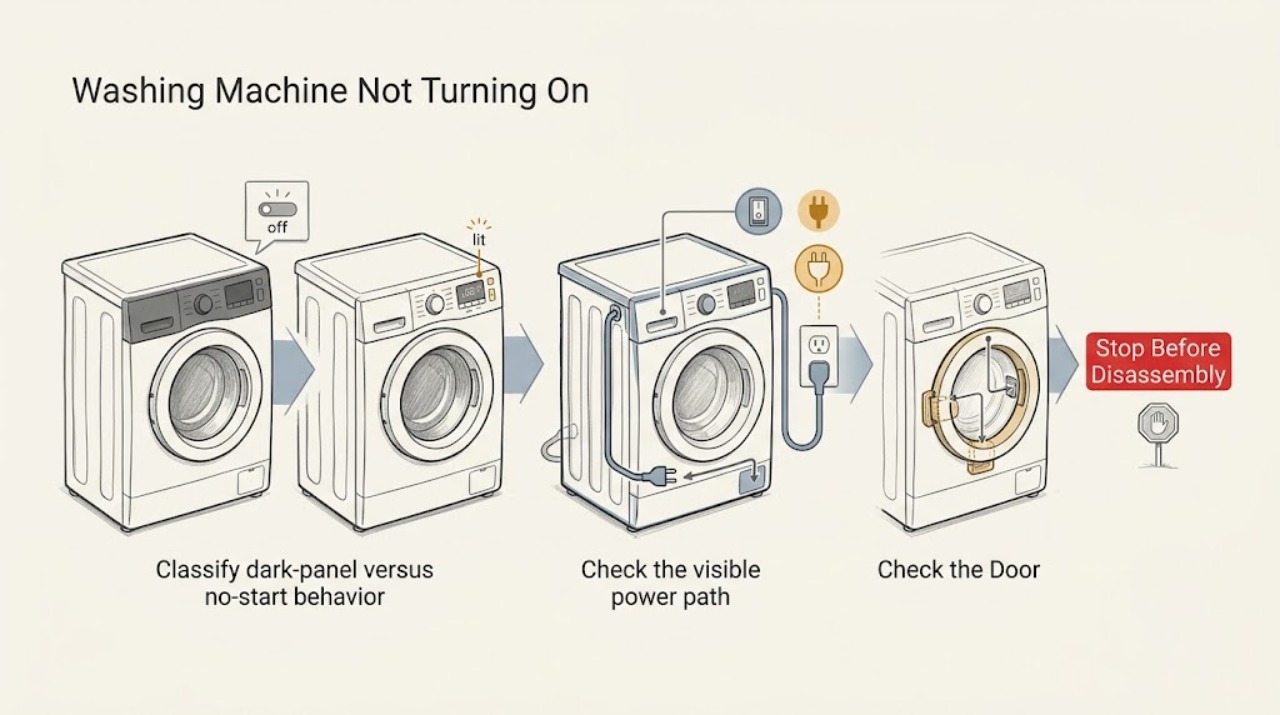
Classify dark-panel versus no-start behavior
Press the normal power control once and observe the display, indicator lights, door-lock indicator, and response from the selector. Do not repeatedly press buttons or start a cycle while the machine is visibly wet around its base.
Expected result: Nothing illuminates; the display illuminates but Start does nothing; or the display shows a lock, delay, or error indication.
Next step: Follow the outlet and cord check for a dark panel. Follow the door/Child Lock and water checks for a lit panel, and record any exact code before resetting.
Why this matters
Why: A completely dark panel points first to the household supply, cord, or internal power path. A lit panel means the appliance has at least some power and is more likely waiting on a control, door, water, or program condition.
-
Check the visible power path
From a dry, safe position, inspect the visible plug and cord for looseness, crushing, cuts, or heat damage. Confirm the wall outlet is controlled by the expected household switch or circuit and try the outlet with a small known-working appliance only when safe. Do not use a damaged cord, extension lead, or overloaded adapter.
Expected result: The outlet is dead, the plug is loose or damaged, the washer returns after the circuit is restored, or the outlet works but the washer stays dark.
Next step: Stop for heat, arcing, visible damage, or a breaker that trips again and call a qualified electrician. If the household supply is stable but the washer remains dark, request Candy service rather than opening the cabinet.
Why this matters
Why: A dead outlet or damaged connection is outside the washer’s internal diagnosis. If the outlet is live and the panel remains dark, the fault may be inside the washer’s power entry, switch, or control system.
-
Confirm the door and panel are not locked
Remove any fabric caught in the door seal, close the door firmly without slamming it, and check the model’s display for a lock symbol. If the panel is lit but ignores commands, look up the exact Child Lock release combination in the Candy manual; do not pry the door or bypass its interlock.
Expected result: The washer starts after the door is correctly closed or Child Lock is released, or the lock indication persists and the controls remain unavailable.
Next step: If there is water in the drum or the lock remains engaged, leave the washer off and follow the model-specific safe release procedure or arrange service. Do not force the handle or access the lock wiring.
Why this matters
Why: Candy describes the door safety as a condition that can prevent a cycle from starting, and its support material identifies Child Lock or a damp panel as reasons controls may not respond. A persistent lock state can indicate an interlock or control fault.
-
Perform one model-appropriate reset
Record the display state or error first. If the exact manual permits it and the appliance is dry and safe, disconnect the plug using the normal plug or circuit control, wait for the manual’s stated interval, restore power once, and select a short empty test program. Do not keep cycling the power if the same fault returns.
Expected result: The panel returns and a test program starts, the same code returns, or the machine remains completely dark.
Next step: If the machine remains dark or the code returns, stop and provide the model, code, and reset result to Candy service. If it starts, monitor one complete test and do not assume the fault is permanently fixed.
Why this matters
Why: A single reset can clear a temporary electronic state, but it does not prove that an internal component is healthy. A returning code or dark panel after a stable supply requires diagnosis.
-
Check water and program conditions when the panel is lit
With the door closed, confirm that the selected program is not in Delay Start and that the external water tap is open. Inspect the accessible inlet hose for a sharp kink and look for an obvious water-inlet warning; do not remove the rear panel or touch internal valves.
Expected result: The program begins after Delay Start, water, or hose correction, or the panel remains lit but the cycle still refuses to begin.
Next step: Run one supervised test with the correct program. If it still will not start, record the lights or code and request service rather than guessing at a control board or valve replacement.
Why this matters
Why: A lit washer may be waiting for a start condition rather than lacking power. If accessible conditions are correct and the machine still will not begin, the door interlock, control, or another monitored input may need service.
-
Stop when the symptom crosses the service boundary
Stop using the washer for smoke, a burning odor, a hot or damaged plug, visible arcing, water near electrical connections, or a breaker that trips again. Leave the appliance isolated only if doing so is safe, keep clear of water or smoke, and contact the appropriate qualified professional.
Expected result: The safety symptom is present, or the washer remains dead or unresponsive after the accessible checks and one documented reset.
Next step: Provide the model and serial, symptom state, exact code, installation history, and checks already performed to Candy or an authorized appliance service provider.
Why this matters
Why: These symptoms can involve mains wiring, water intrusion, the power-entry filter, door interlock, or electronic control and cannot be distinguished safely from the outside.
Use your observations
Decision map
Find the observation that best matches what you see, then follow the next safe action.
-
PATH 01Safety boundary
What you see
The display and all indicators are completely dark.
Do this next
Check the visible plug, cord, outlet, and household circuit once. If the supply is stable but the panel stays dark, request service and do not open the washer.
Why this path and its safety boundary
Safety stop: Continue with door, Child Lock, program, and water start conditions.
-
PATH 02Safety boundary
What you see
The display is lit but Start does not begin a cycle.
Do this next
Close the door correctly, check for Child Lock or Delay Start, confirm the external water tap and inlet hose, and run one model-approved test.
Why this path and its safety boundary
Safety stop: Use the power-path branch for an unresponsive panel.
-
PATH 03Safety boundary
What you see
A lock symbol remains or water is visible in the drum.
Do this next
Do not force the door or bypass the lock. Follow the exact manual’s safe procedure or arrange service after isolating the washer safely.
Why this path and its safety boundary
Safety stop: Continue with one documented reset and program-condition check.
-
PATH 04Safety boundary
What you see
The panel remains dark after one documented reset while the outlet is known to work.
Do this next
Treat this as a likely internal power or control fault and request Candy service; do not guess at a board or power-filter replacement.
Why this path and its safety boundary
Safety stop: Monitor one complete test program and record whether the symptom returns.
-
PATH 05Safety boundary
What you see
There is smoke, burning odor, arcing, water near electrical parts, a damaged cord, or a repeated breaker trip.
Do this next
Stop immediately, keep people away, and use the appropriate electrical, emergency, or authorized appliance-service channel. Do not restore power for additional testing.
Why this path and its safety boundary
Safety stop: Complete only the external checks above; persistent no-start behavior needs service.
Helpful context
Understand the symptom
“Won’t turn on” has two useful meanings: the display and indicators are completely dark, or the panel lights but a selected program will not begin. Start with the first state you can reproduce; it changes the next check.
Candy models and regional control labels differ. Use the exact model manual for button combinations, child-lock release, reset behavior, and installation requirements. This guide stays outside the cabinet and does not ask you to defeat a lock or perform electrical measurements.
If the washer contains water, do not force the door. Keep the appliance off until the water level and door-lock condition are handled according to the model guide or by an authorized technician.
Safety boundary
Stop conditions
- Stop immediately for smoke, burning odor, arcing, a hot or damaged plug/cord, water near electrical connections, or a breaker that trips again.
- Do not pry open a locked door, bypass the door interlock or Child Lock, or access internal wiring.
- Do not keep repeating a reset when the same code or dark-panel symptom returns.
- If the drum contains water, keep the washer off until the model guide or a qualified technician provides a safe next step.
When checks do not resolve it
Need a professional?
Request Candy or authorized appliance service when the washer remains dark after the outlet and visible cord checks, a code or lock condition returns after one documented reset, the panel is lit but no program can start after the door and water checks, or any electrical, water-intrusion, or burning symptom is present. Use a qualified electrician for a damaged outlet, cord, or recurring household circuit trip.
Have this ready
- Exact Candy model and serial or product code
- Whether the display is completely dark or lit but unresponsive
- Door-lock and Child Lock indicators, selected program, and any exact error code
- Whether the outlet and visible cord were checked and whether the household circuit tripped
- Whether water is present in the drum or around the base
- The reset interval used from the model guide and what changed afterward
Common questions
FAQ
Why is my Candy washing machine completely dead?
Check the visible plug, cord, outlet, and household circuit once. If the outlet works but the panel stays dark, leave the washer off and request service rather than opening it.
What if my Candy washer lights up but will not start?
Close the door, check Child Lock and Delay Start, confirm the external water tap and inlet hose, and use the exact model manual for button behavior. A persistent lock or code needs service.
Can I reset a Candy washing machine that will not turn on?
Record any code, then use only the reset procedure in the exact Candy manual. Candy’s support guidance describes a power disconnect before retrying, but a returning code or dark panel is a service boundary.
Read the exact guide
Official sources
- Lavatrice non si accende: cause e soluzioniCandy Italia · Candy washing machines; manufacturer-branded guidance for a washer that does not power on or start
- Pourquoi le hublot de la machine à laver ne s'ouvre pas : que faire ?Candy France · Candy washing machines; manufacturer-branded door-safety, lock, water-level, and service guidance
- After Sales Service - Repair & ServiceCandy · Candy washing machines and household appliances; official repair and service escalation
- Product user manualsCandy · Candy appliances, including front-loading washing machines, top-loading washing machines, and washer dryers
Community feedback
Share a repair observation
Share a plain-text repair observation. Accepted observations are published automatically; this page may take a moment to update.