
On this page
Start here
Quick answer
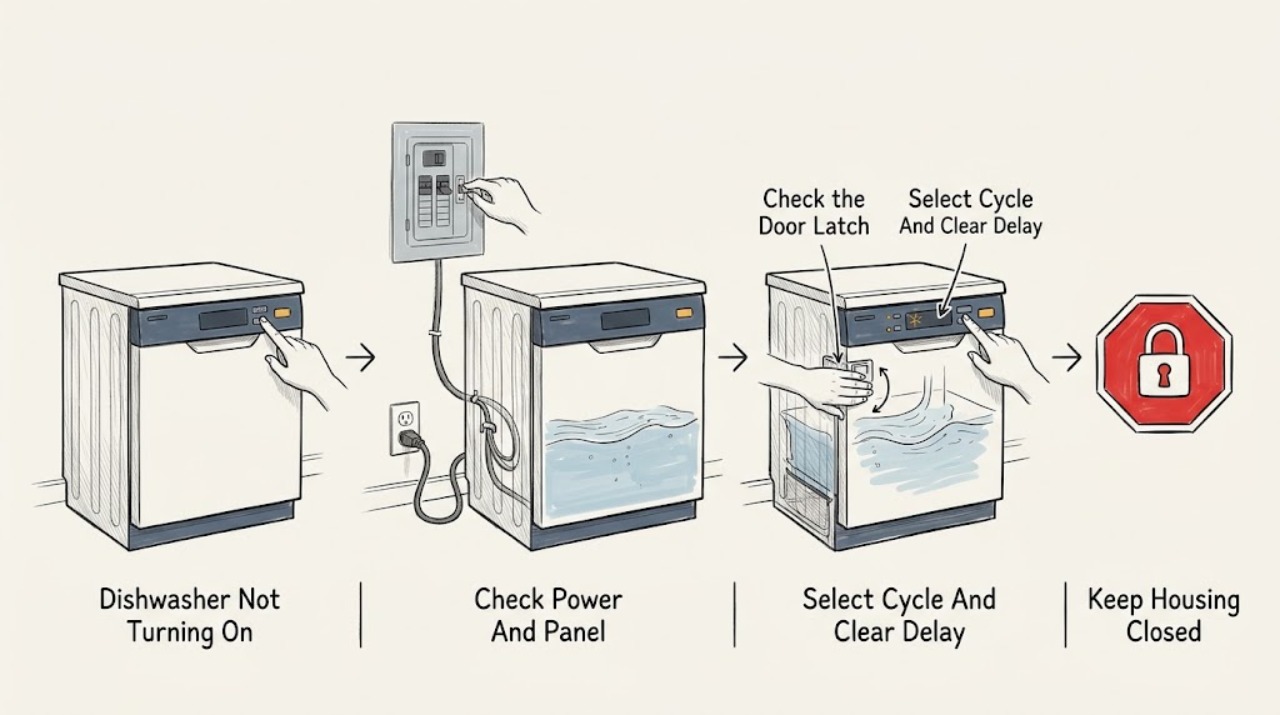
A Crosley dishwasher that appears not to turn on may have no usable household power, an unlatched door, a selected delay or control lock, an incomplete Start command, or a water-supply condition that prevents the cycle from proceeding. Start with the exact model and manual because Crosley uses different controls, delay ranges, and indicators across dishwasher families. From outside the unit, check the outlet and breaker or fuse, close the door until the latch engages, select a cycle and press the model's Start/Cancel control, and cancel any visible delay or lock only as the manual describes. Confirm the water supply is on and the accessible inlet hose is not kinked. If the cord or appliance is wet or damaged, there is a leak, burning odor, smoke, sparking, repeated electrical trip, or persistent no-response, stop using it and arrange authorised service. Do not remove panels, test live wiring, or bypass the door or overflow safety system.
Before you begin
Safety first
- This article covers visible power and water conditions, normal door closure, model-directed cycle and delay controls, and error observation. A qualified technician must handle live electrical diagnosis, wiring, control, latch, pump, valve, fuse, heater, base disassembly, and overflow or water-safety components.
Work through in order
Diagnostic checks
Use only checks that match the exact appliance or system and its official guide.
-
Check 1
From a dry, visible position, note whether any panel light, display, or interior response appears. Check that the accessible plug is seated and inspect the cord and outlet face for moisture, looseness, scorching, or damage. Check the dishwasher's labelled breaker or fuse status only at the normal household control point; do not open the outlet or make a live measurement.
Expected result: The panel is completely dark, the cord or plug is damaged or wet, the outlet or breaker appears unavailable, other devices also lack power, or the visible supply appears normal.
Next step: If the household control has safely tripped, follow normal household guidance to restore it once; if it trips again, or if there is moisture, heat, odor, or damage, stop and call qualified service. If the visible supply is normal, continue with the door and controls without dismantling anything.
Stop if: Do not reset repeatedly, open the outlet or dishwasher, repair the cord, or perform live electrical testing.
Why this matters
Why: No lights or no household power make the supply path or an internal power fault more likely than a programme setting. Crosley troubleshooting lists a tripped breaker or blown fuse and an unconnected power supply among the first causes, but a normal-looking outlet does not prove the dishwasher's internal electrical system is safe.
-
Check 2
Check the racks, dishes, detergent cup, and door gasket for anything preventing the door from meeting the frame. Close the door normally until the latch engages; do not slam it, lean on it, or hold the latch closed by hand. Note whether the panel or start indicator changes when the door is latched.
Expected result: The door was obstructed or open, it now latches and the control responds, the door will not latch, or it latches but the dishwasher remains dark or inactive.
Next step: Remove only an obvious loading obstruction and retry the normal start command once with the door closed. If the latch, hinge, gasket, or door-sensing response is damaged or unchanged, stop using the dishwasher and arrange service.
Stop if: Do not tape, hold, short, or otherwise bypass the door latch or interlock, and do not remove the door panel.
Why this matters
Why: Crosley manuals list an open or unlatched door as a reason a selected cycle will not start. A door that cannot latch or is not recognised after visible obstruction is removed makes an alignment, latch, or door-sensing fault more likely; it is not a reason to bypass the safety switch.
-
Check 3
With the door latched, select a valid cycle and press the exact model's Start/Cancel or Start control. Look for a delay indicator, a control-lock light, a paused or completed-cycle state, or a required close-door step. Cancel delay or unlock controls only with the matching manual; do not guess from another Crosley model.
Expected result: The cycle begins, a delay time is displayed or lit, the control-lock indicator is present, the control accepts selections but not Start, or the controls remain unresponsive.
Next step: Allow an intentionally selected delay to expire or cancel it using the exact manual, then select the cycle and press Start again. If a lock or control remains unresponsive, record the indicators and arrange service rather than repeating resets.
Stop if: Do not force buttons, repeatedly cycle power, open the control panel, or defeat a control lock by disassembly.
Why this matters
Why: A delay or control lock can make a powered dishwasher appear not to turn on. The CDBEH600 and ZDM6502 manuals use different delay ranges and cancellation sequences, so a successful recovery on one model cannot be assumed for another.
-
Check 4
If the dishwasher powers up but does not fill, shows a water or error indication, or only hums, check from outside that the water valve is open and the inlet hose is not kinked or crushed. If the exact manual identifies an accessible inlet filter or overflow protector for the model, disconnect power and close the water supply before inspecting it; do not pull out the unit or open its base. Record the exact code or light pattern.
Expected result: The water valve is closed, the hose is kinked, an accessible filter or protector is visibly obstructed, the machine will not fill or drain, a leak or overflow indication appears, or there is no water-related symptom.
Next step: Correct only an obvious external valve or hose condition and retry the model's start command once with the appliance stable. For a leak, standing water with an error, persistent code, or inaccessible blockage, close the valve, disconnect power if safe, and arrange authorised service.
Stop if: Do not move or tilt the dishwasher while operating, reach into standing water near electrical parts, dismantle the inlet or base, or bypass the overflow protector.
Why this matters
Why: Crosley manuals associate failure to fill with the water valve, restricted inlet, low pressure, or a door latch that is not seated; model-specific manuals also identify overflow and control errors. A code or symptom outside the manual's table should not be guessed.
-
Check 5
After the external checks, record the exact model and serial information, panel state, breaker or outlet observation, door-latch result, selected cycle, delay or lock indicators, water-supply observation, and exact error code or beep pattern. Stop immediately for a leak, smoke, burning odor, sparking, abnormal heat, damaged cord, or repeated electrical trip.
Expected result: The dishwasher starts after a visible correction, remains completely dark, is powered but will not accept a cycle, fails to fill or drain, shows a persistent error, or presents a hazard symptom.
Next step: Use the dishwasher only if it completes a normal cycle without abnormal symptoms. Otherwise stop using it and contact Crosley or the authorised service route with the model, indicator behavior, and recorded observations.
Stop if: Do not remove panels, probe internal circuits, replace a fuse, latch, control, pump, or valve, or keep restarting a unit with an active hazard or persistent fault.
Why this matters
Why: Recovery after correcting power, door, delay, lock, or visible water conditions supports that external condition. Persistent no-turn-on or no-start behavior may involve internal wiring, a latch sensor, control, pump, valve, or protection device; the symptom does not identify a safe replacement part.
Use your observations
Decision map
Find the observation that best matches what you see, then follow the next safe action.
-
PATH 01Safety boundary
What you see
The panel is dark, the outlet or breaker appears unavailable, other devices also lack power, or the cord or plug is wet or damaged.
Do this next
Use normal household help for an outlet or breaker issue and authorised appliance service for a damaged cord or dishwasher. Stop if a breaker trips again.
Why this path and its safety boundary
Why it matters: A visible supply problem or internal power fault is more likely than a door or delay setting.
Safety stop: Do not open the outlet, repair the cord, repeatedly reset protection, or perform live testing.
-
PATH 02Safety boundary
What you see
The door is obstructed, will not latch, or the panel does not respond as expected when a correctly closed door is shut.
Do this next
Remove only an obvious obstruction and retry once with the door latched. Arrange service for damage or a persistent door-recognition problem.
Why this path and its safety boundary
Why it matters: A loading, alignment, latch, or door-sensing condition is more likely than a confirmed control or pump failure.
Safety stop: Do not hold or bypass the latch or remove the door panel.
-
PATH 03Safety boundary
What you see
A delay time or light is active, a control-lock indicator is present, or Start/Cancel is not accepted even though power and door conditions look normal.
Do this next
Use the exact model manual to cancel the delay or unlock the controls, then select and start the cycle again. Arrange service if the controls remain unresponsive.
Why this path and its safety boundary
Why it matters: The dishwasher may be waiting for a scheduled start, an unlock, or an exact model-specific Start/Cancel sequence.
Safety stop: Do not guess reset combinations, force buttons, or open the control panel.
-
PATH 04Safety boundary
What you see
The unit powers up but shows a water or error indication, fails to fill or drain, has a kinked inlet hose, or shows a leak or overflow symptom.
Do this next
Check only the external valve and hose condition with the unit stable. For a leak, standing water with an error, or persistent code, close the water supply, disconnect power if safe, and arrange service.
Why this path and its safety boundary
Why it matters: The water valve, inlet or drain path, door seating, or water-safety response is more likely; error meanings remain model-specific.
Safety stop: Do not tilt the dishwasher, open its base, reach into water near electrical parts, or bypass overflow protection.
-
PATH 05Safety boundary
What you see
The panel is illuminated, the door is latched, no intended delay or lock remains, visible water conditions are normal, but no cycle begins.
Do this next
Stop repeated start attempts and arrange Crosley or authorised appliance service with the exact model, indicators, code, and external-check results.
Why this path and its safety boundary
Why it matters: An internal latch sensor, control, wiring, valve, pump, or protection fault is more likely; user checks cannot safely identify a part.
Safety stop: Do not dismantle the dishwasher, probe internal circuits, or replace electrical or water-control components as a user check.
-
PATH 06Safety boundary
What you see
There is a leak, water near electrical parts, smoke, burning odor, sparking, abnormal heat, a damaged or hot cord, visible appliance damage, or repeated electrical trips.
Do this next
Stop using the dishwasher. If safe without touching the hazard, switch it off, disconnect power, close the water valve, and arrange qualified service.
Why this path and its safety boundary
Why it matters: The immediate issue is an electrical, fire, shock, or water hazard, not a safe no-power adjustment.
Safety stop: Do not touch wet electrical parts, continue the cycle, or attempt live testing or disassembly.
Helpful context
Understand the symptom
Crosley dishwasher controls differ by model
Crosley dishwashers include models with push-button Start/Cancel controls, touch controls, and different delay ranges. The opened CDBEH600 guide documents a 2-, 4-, or 6-hour delay and a three-second Start/Cancel hold to cancel it; the ZDM6502 manual documents a 1- to 24-hour delay and a different Start/Cancel sequence. These are model-specific examples, not universal instructions. Find the model and serial information on the appliance and use the matching Crosley manual before interpreting lights or pressing a reset combination.
Stop before electrical or water-system work
If the dishwasher is leaking, wet around electrical parts, smoky, sparking, unusually hot, burning-smelling, repeatedly tripping protection, or visibly damaged, stop using it. If safe without touching a hazard, switch it off, disconnect power, and close the water supply. Crosley manuals warn that the water supply must be on before starting and that maintenance requires appropriate isolation. Do not remove panels, probe live wiring, repair a cord, defeat the door latch, or bypass the overflow protector.
Safety boundary
Stop conditions
- Stop immediately for a leak, water near electrical parts, smoke, burning odor, sparking, abnormal heat, a damaged or wet cord, repeated electrical trips, or a visibly damaged appliance; disconnect power and close the water supply only if safe.
- Disconnect power and close the water supply before any permitted cleaning or maintenance; do not move or tilt the dishwasher while operating.
- Do not bypass the door latch, control lock, overflow protector, or other water-safety device, and do not open panels or test live electrical parts.
- Persistent no-turn-on, no-start, error, fill, or drain faults requiring access to wiring, the control, latch, pump, valve, or protection components require Crosley or authorised appliance service.
When checks do not resolve it
Need a professional?
Safety scope: This article covers visible power and water conditions, normal door closure, model-directed cycle and delay controls, and error observation. A qualified technician must handle live electrical diagnosis, wiring, control, latch, pump, valve, fuse, heater, base disassembly, and overflow or water-safety components.
Common questions
FAQ
Why will my Crosley dishwasher not turn on or start?
Check the visible power path, close and latch the door, select a cycle and press the model's Start/Cancel control, and look for a delay or control lock. Also check that the water supply is on. Crosley controls and delay behavior vary by model, so use the manual for the product code.
Can the Crosley dishwasher door stop it from starting?
Yes. Crosley guides list an open or unlatched door as a cause of a no-run condition. Remove only an obvious loading obstruction, close the door normally, and arrange service if it will not latch or the dishwasher does not recognise a correctly closed door.
Could Delay Start make my Crosley dishwasher seem not to turn on?
Yes. Crosley models use different delay ranges and cancellation methods. For example, the CDBEH600 guide documents a 2-, 4-, or 6-hour delay, while the ZDM6502 manual documents a 1- to 24-hour delay. Cancel or change it only with the exact model manual.
What should I check if my Crosley dishwasher powers up but will not fill?
From outside the appliance, check that the water valve is open and the inlet hose is not kinked or crushed. Follow the exact manual for any accessible filter or overflow-protector check, isolating power and water first. A leak, persistent error, or inaccessible blockage requires service.
When should I call Crosley service for a dishwasher that will not turn on?
Call when visible power, door, cycle, delay or lock, and water checks do not restore operation, or immediately for a leak, water near electrical parts, damaged or hot cord, smoke, burning odor, sparking, abnormal heat, or repeated electrical trips. Internal electrical, latch, control, pump, valve, fuse, and overflow work is not a user repair.
Read the exact guide
Official sources
- ZDM6502AS Crosley Professional Dishwasher Use & Care ManualCrosley · Official Crosley ZDM6502AS manual; its 1-24 hour delay, touch controls, and error table are model-specific.
- Crosley Dishwasher Product PagesCrosley Home Products · Official Crosley product page for CDBEH351 series; used only to establish that Crosley models have distinct pull-latch and delay features, not to prescribe another model's controls.
- A00051001B.indd — Crosley Dishwasher Use & Care GuideCrosley · Official Crosley CDB350 Use & Care Guide; use as a reference for the documented family and not as a universal Crosley control sequence.
- A05763001A.indd — Crosley CDBEH600 Use & Care GuideCrosley · Crosley CDBEH600 model-specific guide; its 2-, 4-, and 6-hour delay and three-second cancellation sequence do not apply automatically to other Crosley models.
Community feedback
Share a repair observation
Share a plain-text repair observation. Accepted observations are published automatically; this page may take a moment to update.