
On this page
Start here
Quick answer
This topic applies only to a Dacor refrigerator that is actually equipped with an automatic ice maker; feature layout and controls vary by model. First separate a new installation or recent restart from an ice maker that is switched off, a freezer that is not cold enough, a water or filter restriction, an ice bin or dispenser jam, and an internal valve, ice-maker mechanism, or wiring fault. From the dry, user-accessible side, identify the exact model, confirm the model-documented ice function is on, allow only the waiting period stated for that model, check the displayed temperature and door/airflow conditions, inspect the visible water supply and filter seating, and look for an overfilled or clumped ice bin. Dacor’s product information shows that some refrigerators have dual ice makers and water-filter monitoring, so do not assume every Dacor has the same ice architecture. If there is a leak, damaged or hot cord, burning odor, repeated electrical trip, unsafe temperature, or a check that would require opening panels or reaching a powered mechanism, stop and arrange qualified service.
Before you begin
Safety first
- This article covers model identification, visible user controls, waiting guidance, displayed temperature and door/airflow observations, visible water/filter conditions, and safe removable-bin inspection. A qualified technician must handle live electrical diagnosis, internal wiring, valves, tubing, sensors, heaters, motors, controls, fans, and sealed refrigeration.
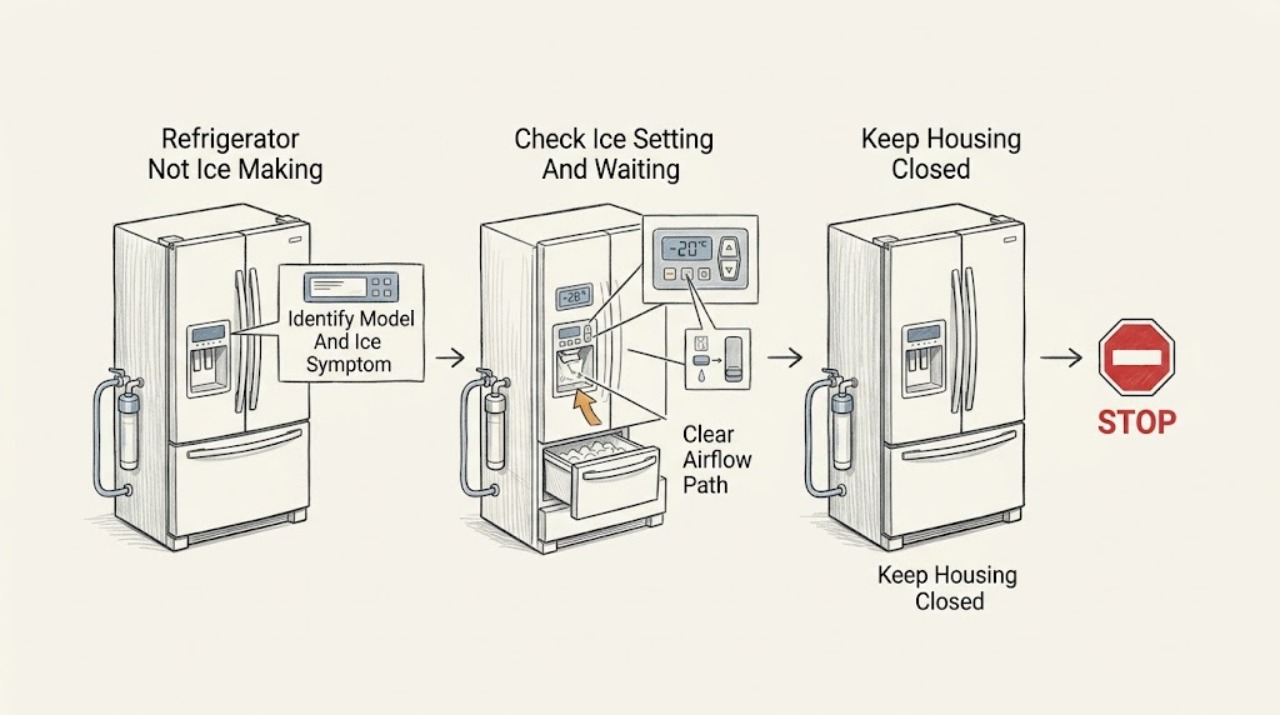
Work through in order
Diagnostic checks
Use only checks that match the exact appliance or system and its official guide.
-
Check 1
Record the exact Dacor model and serial information and describe the symptom from the user-facing side: no cubes, fewer cubes, ice present but not dispensing, one of two ice makers affected, or water and ice both affected. Confirm that the refrigerator has the automatic ice-maker feature shown in its own manual or product specification.
Expected result: The model has no automatic ice maker, has one or two documented ice makers, produces some ice slowly, has ice in the bin but will not dispense, or has no ice and no water flow.
Next step: Use the exact model support and manual for the identified architecture. Continue only with the user-facing checks below when an automatic refrigerator ice maker is confirmed; otherwise stop and use the correct Dacor product support path.
Stop if: Do not guess a control sequence or part from a similar Dacor model, and do not remove a cover to identify the ice-maker assembly.
Why this matters
Why: A missing or different feature means an integrated ice-maker procedure may not apply. One affected ice maker points toward that assembly or its local water/temperature path; both ice and water symptoms make a shared supply, filter, control, or household water condition more likely. Ice in the bin with no dispensing is not the same as failure to make ice.
-
Check 2
With dry hands, inspect only the documented user controls for the confirmed model. Check whether Ice Maker/Ice On is enabled, whether an Ice Off or control-lock indicator is active, and whether the ice bucket or bin is fully seated. For a new installation, power restoration, water connection, or a recently emptied system, use only the waiting period stated in the exact Dacor manual; do not repeatedly press a hidden test button or operate the ejector by hand.
Expected result: The ice function is visibly off or locked, the bin is not seated, the refrigerator was just installed or restarted, or the controls and bin are normal after the model's waiting period.
Next step: Restore only an obvious model-documented setting, unlock the control if the manual permits it, seat the bin without forcing it, and wait as directed. If production still does not begin, continue to the temperature and water checks; if a control will not respond or the manual calls for a service test, arrange service rather than improvising.
Stop if: Do not bypass an interlock, reach into a powered ice maker, repeatedly reset or test the mechanism, or assume a timing value from another Dacor or Samsung model.
Why this matters
Why: An off/locked setting, an unseated bin, or an incomplete initial/restart delay can prevent production or dispensing without proving an internal failure. A normal user setting and a completed model-specific wait move attention to temperature, water/filter, ice blockage, or service.
-
Check 3
Read the freezer temperature on the display if the model provides one and compare it with the exact Dacor manual's ice-making guidance. Check that the freezer door and drawer close fully, the visible gasket contacts the cabinet, food is not blocking cold-air outlets, and the appliance has not just been loaded with a large warm amount of food. Do not remove panels or scrape hidden frost.
Expected result: The freezer is warmer than the model's documented ice-making condition, the door or gasket is visibly open or damaged, vents are blocked, the unit is newly recovering, or the visible temperature and airflow conditions appear normal.
Next step: Correct only visible loading or door obstructions and allow the exact model's recovery period with the doors closed. If the freezer remains warm, frost is extensive, the compressor or fan behaves abnormally, or the display shows a fault, protect food and arrange refrigerator service.
Stop if: Do not set a universal temperature copied from another model, open panels, touch fans, test live circuits, or work on refrigerant or sealed-system parts.
Why this matters
Why: Ice production depends on the freezer reaching the model's operating condition; a warm freezer, leaking door, blocked airflow, or recent recovery can explain slow or absent ice. A normal display does not rule out an internal sensor, fan, defrost, compressor, or sealed-system fault.
-
Check 4
From the accessible exterior, check that the household refrigerator water valve is open, the visible supply line is not kinked or crushed, and the model-specified filter is fully seated and not past its documented replacement indication. If the manual permits user filter replacement, follow its shutoff and pressure-relief instructions; do not force a cartridge or disconnect tubing.
Expected result: Water and ice are both absent or slow, the valve is closed, the line is kinked, the filter warning is active, the filter is unseated, or water flow is normal while only ice production is missing.
Next step: Open only the normal household shutoff if it is safe, straighten an accessible kink without stressing the connection, or reseat/replace the exact model's filter as directed. If there is a leak, no flow after the manual's check, or internal tubing/valve access is needed, stop and arrange service.
Stop if: Do not use an unverified filter, force the housing, disconnect a pressurized line, open a valve near wet electrical parts, or make live electrical measurements.
Why this matters
Why: A shared water restriction or filter condition can affect both dispensing and ice filling. A normal visible supply with an ice-only failure makes the ice-maker setting, temperature, fill valve, ice-maker assembly, or control more likely, but does not identify an internal part safely.
-
Check 5
If cubes are present, remove and inspect only the user-removable ice bin as the exact manual directs. Look for a solid bridge of clumped ice, an overfilled bin, a mis-seated container, or a dispenser chute obstruction that can be seen without reaching into powered machinery. Never use a sharp tool or force the auger.
Expected result: The bin is empty, packed with clumped cubes, overfilled, not seated, visibly blocked at the chute, or the bin is clear but no new ice is being made.
Next step: Follow the exact manual for safe bin removal and thawing or clearing; use no sharp implement and keep hands away from powered moving parts. If the bin is clear but production remains absent, document the prior checks and arrange service for the internal mechanism, fill valve, sensor, or control.
Stop if: Do not force a frozen bin, dismantle the dispenser, bypass a door switch, or reach behind the ice bucket into a powered assembly.
Why this matters
Why: A bin or chute problem can stop dispensing while the ice maker continues to produce. A clear bin with no new cubes returns the diagnosis to the setting, waiting period, freezer condition, water/filter path, or internal ice-maker system.
-
Check 6
After the safe external checks, compile the model, number of ice makers, control state, time since installation or restart, freezer temperature trend, door and airflow observations, filter and water status, bin condition, display messages, leaks, and any unusual sound. Do not attempt to prove a valve, motor, sensor, heater, wiring, or ice-maker mechanism failure by disassembly or live testing.
Expected result: Ice production resumes after an external correction, only dispensing remains affected, water and ice remain absent, the freezer is warm, the ice maker is silent or jammed, a fault code persists, or a leak/electrical hazard is present.
Next step: Protect perishable food and contact Dacor support or a qualified appliance servicer. Provide the exact model and the observation log so the technician can use the correct model documentation and parts path.
Stop if: Stop immediately for smoke, burning odor, sparking, hot or damaged cord, repeated breaker trips, water near electrics, refrigerant concern, or unsafe food temperature. Do not keep cycling the unit or open internal covers.
Why this matters
Why: Recovery after a visible setting, waiting, temperature, water, filter, or bin correction supports that user-facing condition. Persistent failure can involve the internal fill valve, tubing, ice-maker motor or heater, sensor, control, fan, wiring, or sealed cooling system; the symptom alone cannot select a safe replacement part.
Use your observations
Decision map
Find the observation that best matches what you see, then follow the next safe action.
-
PATH 01Safety boundary
What you see
The Dacor refrigerator was just installed, connected to water, emptied, or restarted after an outage or service, and there has not yet been a full model-documented waiting period.
Do this next
Keep doors closed as practical and wait only the period stated in the exact Dacor manual. If no ice appears after that period, continue with the setting, temperature, and water checks.
Why this path and its safety boundary
Why it matters: The ice maker may be awaiting the model's initial fill, temperature recovery, or control sequence; this does not establish a failed part.
Safety stop: Do not borrow a timing or test-button sequence from a different model.
-
PATH 02Safety boundary
What you see
The exact model shows Ice Off, a disabled ice-maker setting, a control lock, or an unseated ice bin.
Do this next
Enable or unlock the documented control and seat the bin as directed, then allow the model's waiting period. If the control is unresponsive, arrange service.
Why this path and its safety boundary
Why it matters: A user-facing state can prevent production or dispensing even when the freezer is cold and water is available.
Safety stop: Do not bypass the lock or interlock and do not reach into the mechanism.
-
PATH 03Safety boundary
What you see
The freezer is warmer than the exact model's ice-making guidance, the door or gasket leaks, vents are blocked, or the unit has abnormal cooling sounds or a persistent temperature fault.
Do this next
Correct only visible loading or door issues and monitor recovery. If the freezer stays warm or internal access would be needed, protect food and arrange service.
Why this path and its safety boundary
Why it matters: Ice production is likely being limited by temperature recovery, door sealing, airflow, defrost, fan, compressor, sensor, or sealed-system behavior rather than by the ice bin alone.
Safety stop: Do not remove covers, touch fans, or work on compressor, refrigerant, or live electrical components.
-
PATH 04Safety boundary
What you see
Water dispensing is also absent or slow, the visible valve is closed, the supply line is kinked, or the filter is unseated or due according to the exact model.
Do this next
Perform only the exact manual's external valve and filter steps, shutting off water and relieving pressure as directed. Arrange service for leaks, no flow, or any valve/tubing access.
Why this path and its safety boundary
Why it matters: A shared water path or filter condition is more likely than an ice-only mechanism failure, although an internal fill valve or tubing fault remains possible.
Safety stop: Do not force the filter, disconnect a pressurized line, or work near wet electrical parts.
-
PATH 05Safety boundary
What you see
The bin contains cubes, but dispensing is blocked, the cubes are fused, the bin is overfilled or unseated, or the chute is visibly obstructed.
Do this next
Use only the model-directed removable-bin and safe clearing steps. If the mechanism is jammed internally or the motor/control needs access, stop and arrange service.
Why this path and its safety boundary
Why it matters: The symptom is primarily a bin, chute, auger, dispenser-lock, or door-state problem and does not prove that ice production has stopped.
Safety stop: Do not force the auger, use a sharp tool, bypass a door switch, or dismantle the dispenser.
-
PATH 06Safety boundary
What you see
The ice setting, model-specific wait, freezer condition, visible water/filter path, and bin are normal, but no ice is produced; a fill, motor, heater, sensor, control, valve, wiring, or display fault is suspected.
Do this next
Stop repeated restarts and arrange Dacor or qualified refrigerator service with the model and observation log. The technician should use the exact model documentation and approved parts path.
Why this path and its safety boundary
Why it matters: An internal ice-maker, water-valve, control, wiring, or cooling-system fault is more likely, but external symptoms cannot safely identify a part or justify live testing.
Safety stop: Do not open panels, probe live circuits, bypass safety switches, handle refrigerant, or replace an internal part based only on this symptom.
Helpful context
Understand the symptom
Confirm the refrigerator has the ice-maker feature you are troubleshooting
Dacor refrigerator families and individual models do not all have the same ice-maker layout. The opened DRF36C500SR product page describes dual ice makers, ice storage, filtered water, and temperature and filter monitoring, but those details are not a universal specification for every Dacor refrigerator. Find the model and serial label and use that model's owner-care manual or Dacor specification before interpreting an Ice Off icon, arm, button, test control, filter location, bin, or production delay. If the refrigerator is a separate countertop or under-counter ice machine rather than a refrigerator-integrated ice maker, use its own product support instead.
Keep powered ice-maker, electrical, and water-line work professional
Keep hands out of the ejector, tray, heater, fan, and other moving or heated parts while the refrigerator is powered. Do not bypass a door or ice-maker interlock, probe live wiring, remove electrical covers, disconnect internal tubing, pierce a sealed system, or repeatedly reset a tripping breaker. For a visible leak, wet electrical area, smoke, burning smell, sparking, hot or damaged cord, repeated trip, or unsafe food temperature, stop using the appliance; disconnect power or close the water supply only when it is safe to do so and arrange qualified service.
Safety boundary
Stop conditions
- Stop immediately for smoke, burning odor, sparking, a hot or damaged cord, repeated electrical trips, water near electrical parts, a refrigerant concern, or unsafe food temperature; disconnect power or close the water supply only if safe.
- Do not reach into a powered ice maker, touch a heater or moving ejector, bypass an interlock, force an auger or frozen bin, or use a sharp tool in the dispenser.
- Do not open electrical panels, probe live wiring, disconnect internal water tubing, handle refrigerant, or select a replacement valve, motor, sensor, heater, or control without exact model service information.
- Persistent no-ice, warm-freezer, leak, control, display, water-valve, ice-maker, or wiring symptoms requiring internal access belong with Dacor or a qualified appliance servicer.
When checks do not resolve it
Need a professional?
Safety scope: This article covers model identification, visible user controls, waiting guidance, displayed temperature and door/airflow observations, visible water/filter conditions, and safe removable-bin inspection. A qualified technician must handle live electrical diagnosis, internal wiring, valves, tubing, sensors, heaters, motors, controls, fans, and sealed refrigeration.
Common questions
FAQ
Why is my Dacor refrigerator not making ice?
Confirm that the exact Dacor model has an automatic ice maker, then check the model-documented ice setting and waiting period, freezer temperature and door sealing, visible water and filter conditions, and the removable ice bin. If those are normal but no ice is produced, an internal valve, ice-maker mechanism, sensor, control, or wiring issue requires service.
How long should a Dacor refrigerator take to make ice after installation?
There is no safe universal Dacor timing for every model. Use the exact owner-care manual for the confirmed model and allow its stated temperature-recovery and initial-production period; do not copy a test sequence or timing from another Dacor or Samsung model. Arrange service if the model's waiting period passes without production and the external checks are normal.
Can a water filter stop a Dacor refrigerator from making ice?
Yes, a filter that is unseated, restricted, or due under the exact model's instructions can reduce water to both dispensing and ice making. Check only the visible, model-documented filter procedure, shut off water and relieve pressure as directed, and stop for leaks or any tubing or valve access.
Why is there ice in the bin but the Dacor dispenser does not work?
That is a dispensing symptom rather than proof that the ice maker stopped. Check the user-facing lock, bin seating, clumped or overfilled cubes, and visible chute obstruction as the exact manual permits. Do not force the auger or reach into a powered mechanism; persistent internal jams or motor/control faults need service.
When should I call a Dacor servicer for a no-ice problem?
Call when the exact model's ice setting and waiting period, freezer and door checks, visible water/filter checks, and safe bin inspection do not restore production, or whenever a leak, warm freezer, persistent display fault, abnormal sound, burning odor, sparking, hot cord, or repeated breaker trip appears. Internal valves, wiring, sensors, heaters, motors, controls, and refrigeration systems are not user live-test repairs.
Read the exact guide
Official sources
- Product SpecificationsDacor · Official Dacor specifications hub; the owner must select the exact refrigerator model before applying a specification or guide.
- Guide to replacing the water filter in your Samsung refrigeratorSamsung · Samsung refrigerator guidance only; apply to a Dacor refrigerator only where the exact Dacor manual gives an equivalent user filter procedure.
- 36-Inch Counter Depth French Door with a Reveal™ DoorDacor · Official Dacor DRF36C500SR/DA product page; dual-ice-maker and temperature details are examples for that model and are not universal to all Dacor refrigerators.
- Steps to get your Samsung ice maker working againSamsung · General Samsung guidance, not a universal Dacor procedure; use only for broad diagnostic categories and defer to the exact Dacor manual for icons, timings, water requirements, and tests.
- DRF427500APSamsung Support for Dacor · Exact DRF427500AP/DA model support page; its linked topics and controls must not be assumed for other Dacor models.
- Find a Dacor ServicerDacor · Official Dacor support path for Dacor appliances; service availability and coverage depend on location and model.
Community feedback
Share a repair observation
Share a plain-text repair observation. Accepted observations are published automatically; this page may take a moment to update.