
On this page
Start here
Quick answer
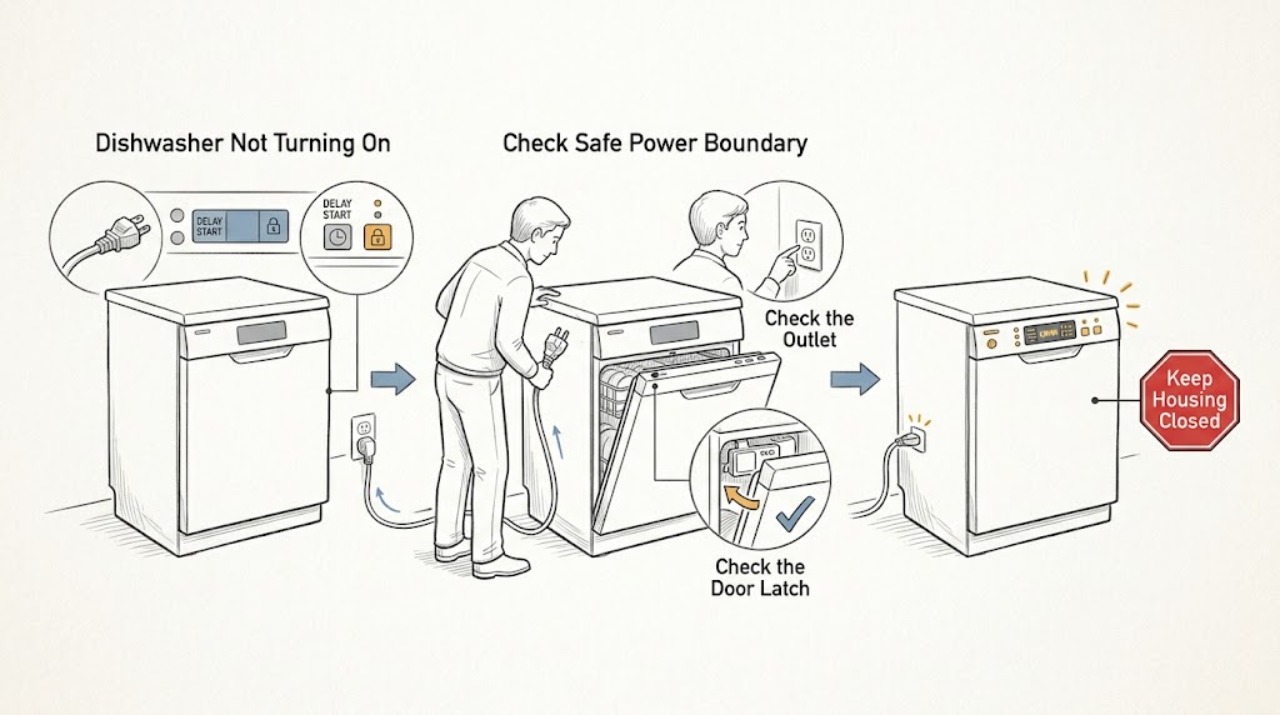
Separate a completely dead Danby dishwasher from one whose display or indicators work but which will not start. From a dry, safe position, check the accessible plug or supply switch, the household breaker or fuse once, and whether the exact model's display responds. Then close the door firmly so its latch engages, select a normal program, and press the model's Start/Pause control. If a child/control lock such as a displayed CL is active, or a delay timer is set, use only the matching Danby manual's documented cancellation. A working display with no cycle, a door that will not latch, a breaker that trips again, or a dishwasher that remains dead after the external checks points to an internal power supply, control, door-interlock, or wiring fault. Do not remove panels, bypass the latch, test live wiring, or keep resetting protection; leave those conditions to qualified service.
Before you begin
Safety first
- The user may inspect the dry accessible supply, make one breaker or fuse observation, check ordinary door closure, and use the exact manual's normal program, lock, delay, and reset controls. Qualified personnel must handle internal power, wiring, door interlock, control-panel, pump, and live electrical work.
Work through in order
Diagnostic checks
Use only checks that match the exact appliance or system and its official guide.
-
Check 1
From a dry position, inspect the accessible cord, plug or service switch, outlet area, control panel, and floor for smoke, burning odor, heat, sparking, damaged insulation, water near electrical parts, or a breaker that has opened. If a plug or outlet is safely accessible and dry, switch the dishwasher off before checking it; do not reach behind wet cabinetry or open a panel.
Expected result: There is an electrical or water hazard, the breaker or fuse has opened, the dishwasher is completely dark, or no hazard is visible and the supply appears available.
Next step: For smoke, odor, heat, sparks, water near electrics, damaged wiring, or a breaker that trips again, leave the dishwasher off and arrange qualified help. Otherwise continue with one accessible supply check and record whether the panel remains dark.
Stop if: Do not touch wet electrical parts, repeatedly reset a breaker, use a damaged cord, operate the dishwasher with water in electrical areas, or remove covers.
Why this matters
Why: A hazard or repeated protection event takes priority over no-start diagnosis. A dark panel with a safe, available supply keeps the dishwasher's power path in view; a lit panel means the appliance has some power and requires a separate start-permission check.
-
Check 2
If the supply is dry and safely accessible, confirm the plug is fully inserted or the normal service switch is on, then check the household breaker or fuse once. Test the outlet with a small known-good device only if that is safe and permitted in the installation; do not open the outlet or pull out a built-in dishwasher. Observe the Danby display, power indicator, and any interior response.
Expected result: The outlet or service switch is off, the breaker/fuse is open, the breaker opens again, the outlet is live but the dishwasher remains dark, or the display/indicator responds.
Next step: Correct only an obvious accessible supply state and make one normal power-on attempt. Use an electrician for a failed outlet or recurring trip; use Danby or qualified appliance service for a dark unit with an available supply.
Stop if: Do not keep resetting protection, use an extension cord as a workaround, bypass grounding, or test voltage inside the dishwasher.
Why this matters
Why: An off supply or single tripped protection device can explain a completely dark panel. A repeated trip or live supply with a dark dishwasher points to an appliance or installation fault. A responding display moves the diagnosis away from total power loss and toward door, lock, delay, program, or internal start control.
-
Check 3
If the display or indicator responds, remove only a loose item that prevents the door from closing. Check that no rack, dish, or utensil projects into the door seal and that the door closes firmly into its normal latch position. Then, using the exact model manual, press Power, select a normal program, and press Start/Pause once.
Expected result: The door cannot close or latch, the door closes firmly but the program will not accept Start, the cycle begins after the documented sequence, or the display changes but the pump or wash action never starts.
Next step: Correct only the loading obstruction and make one model-documented start attempt. If the door will not latch, the latch feels loose, the display reports a door-related condition, or the start command is accepted but the cycle does not begin, stop and arrange service.
Stop if: Do not slam or force the door, bend the latch, tape or bypass the interlock, remove the inner door panel, or reach into a cycle that has started.
Why this matters
Why: A door that is not correctly closed can prevent a cycle from starting even when the panel is lit; the DDW18D1 manual includes this condition in its no-power troubleshooting. A correctly latched door with a responsive program but no operation keeps a lock, control, interlock, or internal power fault in view.
-
Check 4
Read the exact model's display for a child/control-lock indication, such as CL on the DDW18D1 family, and for a delay-start time or indicator. If a lock or delay is shown, use only that manual's documented cancellation; for the opened DDW18D1 manual, the child lock is canceled by holding Extra and Options together for three seconds, while a delay is canceled by holding Start/Pause for three seconds. Do not guess a sequence for another Danby model.
Expected result: CL or another lock indication is present, a delay time is shown, no lock/delay is shown, or the control responds but the state cannot be canceled.
Next step: Apply one exact model-approved cancellation, select the program again, and press Start/Pause once. If the lock or delay remains, or the dishwasher still will not start with a firm latch, arrange service with the displayed state and model number.
Stop if: Do not enter service mode, repeatedly press undocumented combinations, bypass the control lock, or open the control panel.
Why this matters
Why: A child lock can prevent every button from being pressed, and a delay timer can make a healthy dishwasher wait before running. If the exact documented cancellation does not work, the control may have a fault or the model may use a different procedure; this is not proof of a failed motor.
-
Check 5
Record the exact display, indicator pattern, and whether any error appears after the single normal start attempt. For the opened DDW18D1 manual, FF refers to a water-inlet warning and F1 to an overflow/drain warning; do not assume those codes or their reset procedure apply to another Danby model. If the manual permits a reset, perform it only after the dishwasher is safely disconnected and the water line is closed as directed.
Expected result: The panel stays dark, a lock/delay remains, an error code appears, the program indicator responds but the cycle does not begin, or the dishwasher starts normally.
Next step: Follow only the exact model manual's safe user response for a displayed code. If the code recurs, the panel is abnormal, or the dishwasher remains idle after the documented reset, keep it off and arrange qualified service.
Stop if: Do not bypass an error, run a cycle with an overflow condition, open the enclosure, or use live electrical measurements to identify the code's component.
Why this matters
Why: A model-documented code can explain why a cycle is inhibited, but it does not identify the failed component. A responding panel with no start after the door and control checks points toward the door interlock, internal power/control, or another protected appliance function.
-
Check 6
After one safe correction of the supply, loading, lock, delay, or model-documented control state, record whether the dishwasher powers on and begins the selected cycle. Note the full model, whether the panel was dark or lit, breaker behavior, door-latch result, displayed lock/delay/error state, and any sound before stopping. Do not repeat start attempts to reproduce a fault.
Expected result: The cycle starts, the dishwasher remains dark with a known-good supply, the display works but no cycle begins, the breaker trips again, or the door/control remains abnormal.
Next step: Leave the dishwasher off as appropriate and contact Danby or qualified appliance service with the observation record. Keep the water supply closed if a water-related error or leak is present.
Stop if: Do not remove the kickplate or control panel, test live wiring, jumper the door switch, replace a board or latch from the symptom alone, or repeatedly reset the breaker.
Why this matters
Why: A single corrected external state can explain a no-start symptom. Persistent no power or a lit display with no start after the documented sequence makes an internal power supply, control board, door-latch/interlock, wiring, or other protected function more likely; the observations cannot select a safe part.
Use your observations
Decision map
Find the observation that best matches what you see, then follow the next safe action.
-
PATH 01Safety boundary
What you see
The display and indicators are dark, the accessible supply is off or the breaker/fuse is open, or the supply is available but the dishwasher remains dark.
Do this next
Correct one obvious accessible supply state and try power once. Use a qualified electrician for the outlet or recurring protection trip, and Danby or qualified appliance service for a dark dishwasher with available supply.
Why this path and its safety boundary
Why it matters: An accessible supply interruption is possible when the outlet or switch is off. A repeated trip or a dark dishwasher with a known-good supply makes an appliance power, wiring, or control fault more likely.
Safety stop: Do not repeatedly reset protection, open the outlet or dishwasher, use a damaged cord, or bypass grounding.
-
PATH 02Safety boundary
What you see
The display or indicator works, but a rack, dish, seal obstruction, damaged latch, or door alignment issue prevents the door from closing and latching firmly.
Do this next
Remove only a loose loading obstruction and make one normal start attempt. If the latch will not engage or needs force, stop and arrange service.
Why this path and its safety boundary
Why it matters: The dishwasher has some power but no start permission; a door condition is more likely than total power loss.
Safety stop: Do not force, bend, tape, or bypass the latch or door interlock.
-
PATH 03Safety boundary
What you see
The panel is lit but buttons do not respond, CL or another control-lock indication is shown, or a delay-start time/indicator remains active.
Do this next
Use the matching Danby manual's documented lock or delay cancellation once, then select a normal program and press Start/Pause. If the state remains or the cycle still does not begin, call service.
Why this path and its safety boundary
Why it matters: A documented control lock or delayed start can inhibit an otherwise powered dishwasher; the exact model determines the cancellation sequence.
Safety stop: Do not use an undocumented button combination, enter service mode, or bypass the control lock.
-
PATH 04Safety boundary
What you see
Power is available, the door latches, no lock or delay is shown, the correct program and Start/Pause sequence was used once, but the cycle does not begin.
Do this next
Keep the dishwasher off and arrange Danby or qualified appliance service. Provide the model, display behavior, latch result, selected program, and any sounds or codes.
Why this path and its safety boundary
Why it matters: An internal door-interlock, control, power-supply, wiring, or other protected function is more likely; a lit display does not prove those circuits are healthy.
Safety stop: Do not jumper the latch, remove panels, test live terminals, or order a control board, latch, or pump without model-specific diagnosis.
-
PATH 05Safety boundary
What you see
A model-documented inlet, overflow, drain, or other error appears, or the dishwasher starts then stops with a protection event.
Do this next
Follow only the exact model manual's external response, keep water closed for a water-related fault when directed, and arrange service if the code recurs or the dishwasher will not start.
Why this path and its safety boundary
Why it matters: The control may be intentionally inhibiting operation because of a water or safety condition; the code does not by itself identify a failed part.
Safety stop: Do not bypass the code, run through an overflow condition, open the enclosure, or perform live tests.
Helpful context
Understand the symptom
Not turning on can mean no power or no start permission
If the display and indicators are dark, begin with the accessible supply path. If the display or an indicator works, the dishwasher has at least some power, so check the door latch, selected program, child/control lock, delay start, and Start/Pause sequence before suspecting the internal power board. Do not interpret a lit display as proof that the door interlock or wash motor can safely run.
Controls and timing are model-specific
The DDW18D1 manual documents electronic controls, a CL child-lock indication, and a delay timer. Other Danby dishwashers may use different labels or sequences. Record the full model number and follow its manual rather than applying a button combination from another Danby family. A normal program selection is not complete until the door is firmly latched and the model's start control is pressed.
Internal power and door-interlock work is a service task
A dishwasher that stays dark with a known-good supply, or one whose display works but will not start after the documented door and control checks, may have an internal power, control, latch/interlock, or wiring problem. Keep the appliance off if a breaker trips, the cord or casing is damaged, or water is near electrical parts. Do not defeat the latch, remove the kickplate, or perform a live test.
Safety boundary
Stop conditions
- Stop immediately for smoke, burning odor, sparks, abnormal heat, a damaged cord or plug, water near electrical parts, or a breaker that trips again; isolate power only from a safe dry location.
- Do not touch wet electrical parts, repeatedly reset a breaker, use an extension cord as a workaround, or operate the dishwasher with damaged grounding or enclosure panels.
- Do not force or bypass the door latch/interlock, enter undocumented control or service modes, or jumper a switch.
- Do not remove the kickplate, inner door, control panel, or other enclosure; do not perform live electrical tests or replace an internal control, latch, wiring, or power component from the symptom alone.
- If one model-approved supply, door, program, lock, delay, or reset check does not restore starting, keep the dishwasher off and arrange qualified service.
When checks do not resolve it
Need a professional?
Safety scope: The user may inspect the dry accessible supply, make one breaker or fuse observation, check ordinary door closure, and use the exact manual's normal program, lock, delay, and reset controls. Qualified personnel must handle internal power, wiring, door interlock, control-panel, pump, and live electrical work.
Common questions
FAQ
Why is my Danby dishwasher completely dead?
Start with the dry, accessible supply: plug or service switch, outlet, and household breaker or fuse. The opened DDW18D1 manual lists a blown fuse or tripped breaker, power surge, an incompletely inserted plug, and a door that is not closed correctly under its no-power troubleshooting. If the supply is known good but the panel stays dark, leave the dishwasher off and arrange service.
The display is on but my Danby dishwasher will not start. What should I check?
Check that no dish or rack prevents the door from closing and latching, then use the exact manual's normal Power, program, and Start/Pause sequence. Look for a child/control lock or delay-start indication. If the door latches and the documented lock/delay cancellation does not restore starting, the internal control or door-interlock circuit needs service.
What does CL mean on a Danby dishwasher?
On the opened DDW18D1EW/DDW18D1EB/DDW18D1ESS manual, CL indicates that the child lock has locked the control panel. That manual documents holding Extra and Options together for three seconds to cancel it. Do not assume that combination applies to another Danby model; confirm the full model first.
Can a delay timer make a Danby dishwasher look like it is not turning on?
Yes. The DDW18D1 manual documents a delay-start function that waits before running, even though the controls are active. Its manual-specific cancellation uses Start/Pause held for three seconds. Check the exact model's delay indicator and procedure rather than repeatedly pressing controls.
Should I bypass the Danby dishwasher door switch if it will not start?
No. The door must latch as part of the normal start permission, and bypassing the interlock can expose you to moving parts, hot water, and electrical hazards. Check only for a loose loading obstruction and normal door closure. A latch or interlock that will not engage needs qualified service.
Read the exact guide
Official sources
- DISHWASHER Owner's Manual DDW18D1EW / DDW18D1EB / DDW18D1ESSDanby Products Limited / Danby Products Inc. · Official Danby-hosted owner manual; power, CL lock, delay, door, and error details are specific to the listed DDW18D1 family and must not be generalized to another model.
- Product ManualsDanby Appliances · General Danby support page used to establish that the exact SKU/model manual controls the applicable troubleshooting procedure.
- Work using electrically powered equipmentHealth and Safety Executive · Government electrical-safety guidance used for the stop, unplug, and competent-repair boundary; it is not Danby-specific diagnosis.
- Danby 18″ Wide Built-in Dishwasher in Stainless Steel - DDW18D1ESSDanby · Official Danby product page for the DDW18D1ESS; features and installation details are model-specific.
Community feedback
Share a repair observation
Share a plain-text repair observation. Accepted observations are published automatically; this page may take a moment to update.