
On this page
Start here
Quick answer
First separate a Danby wine cooler with no power at all from one whose display or interior light works but whose cabinet is not cooling. From a dry position, check that the plug is fully inserted, the outlet and breaker are available, and the exact model's control is not OFF, standby, or set outside its operating range. Do not defeat the ground, use an adapter or extension cord, or repeatedly reset a breaker. If the cooler was unplugged or power was interrupted, follow the exact manual's restart delay; one Danby wine-cooler manual specifies 3–5 minutes after a power failure. If the display is on but the cabinet is warm, check that the door seals, the exhaust/vent area and condenser are not obstructed, the room is not too hot or cold for the model, and the interior light has not been left on for prolonged display use. Danby's DWC057 troubleshooting table lists a tripped breaker or incompletely inserted plug for no power, and door, vent, warm-bottle load, heat/direct sunlight, ambient conditions, system leak, evaporator-fan failure, or compressor failure for high temperature. A returning HI/LO/CL indication is model-specific and may reflect load, door, ambient, sensor, or evaporator conditions. Stop for smoke, burning smell, sparks, a hot or damaged cord/plug/outlet, water near electrical parts, repeated trips, or a repair requiring panels, live testing, fan/ compressor access, refrigerant, or controls. If the cooler remains dead or powered-but-warm after safe visible checks, arrange qualified service rather than replacing a part by symptom.
Before you begin
Safety first
- The user may observe the display/light, check the outside of the plug and cord from a dry position, use documented controls, inspect the door/gasket and visible ventilation, and follow the exact model's documented restart interval. Supply repairs, internal power/control, sensor, fan, compressor, wiring, live testing, sealed-system, and built-in extraction work are for qualified personnel.
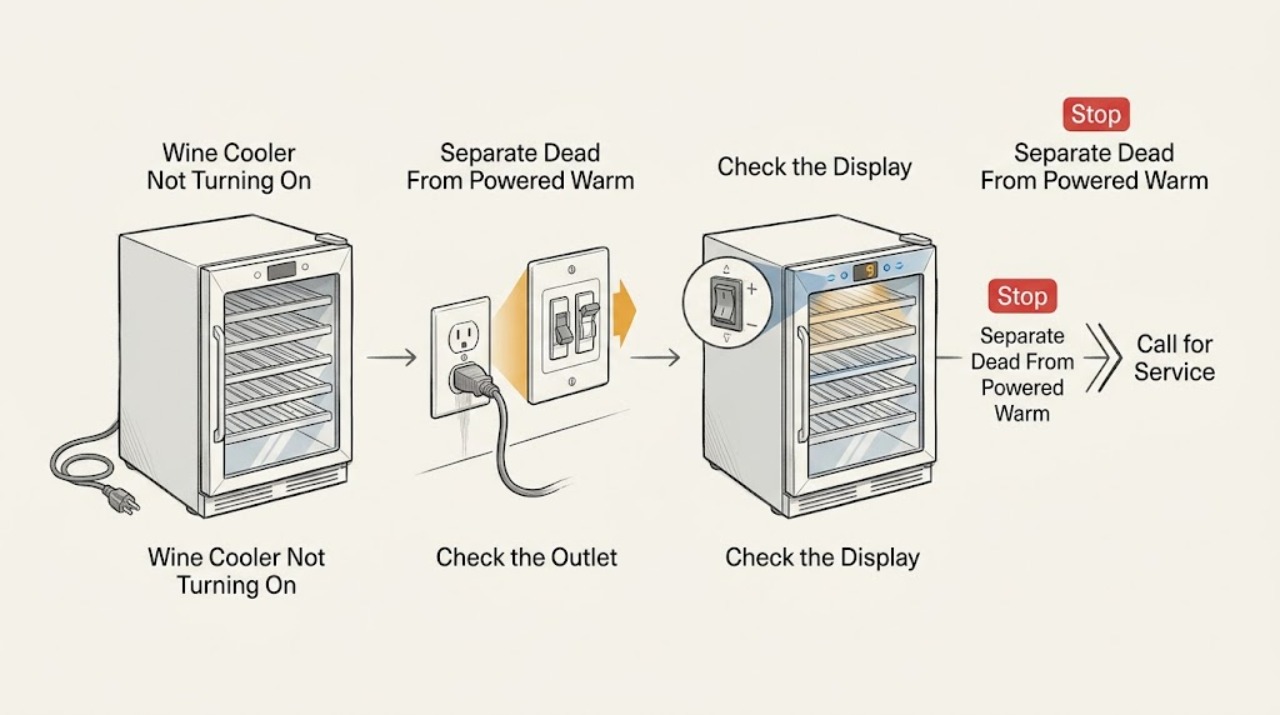
Work through in order
Diagnostic checks
Use only checks that match the exact appliance or system and its official guide.
-
Check 1
From a dry position, note whether the display, interior light, fan sound, and compressor sound are present. Look only for smoke, sparks, a burning/electrical smell, a hot or damaged cord/plug/outlet, water near electrical parts, melted plastic, or a breaker that has tripped. Do not keep trying the power button to reproduce a hazard.
Expected result: Everything is dark and silent, the display/light works but the cabinet is warm, the breaker trips, or a hazard sign is present.
Next step: For smoke, odor, sparks, dangerous heat, water near electrics, or repeated trips, leave the cooler off and isolate power only if safe before arranging service. Otherwise continue to the external supply and control checks appropriate to the observed state.
Stop if: Do not touch a wet/hot/damaged cord or outlet, open the cabinet, or repeatedly reset protection.
Why this matters
Why: A completely dead unit is a supply or internal power/control branch. A lit display or light with no cooling is not a no-power problem and points to settings, door/ventilation, load/environment, fan, sensor, compressor, control, or sealed cooling possibilities. A trip or hazard changes this to stop-use handling.
-
Check 2
With the cooler unplugged and the area dry, confirm the plug is fully seated in the correct grounded outlet and inspect only the outside of the cord and plug. Check whether the breaker or fuse is open and whether the receptacle is loose, scorched, warm, wet, or damaged. Follow the exact manual's restart interval after an interruption; do not use a power strip, adapter, extension cord, or a higher-rated fuse/breaker.
Expected result: The plug was loose, the breaker/fuse is open, the outlet or cord is damaged/abnormal, the outlet is stable with the cooler disconnected, or the power condition is unknown.
Next step: Correct only a loose plug if it can be done safely. Leave the unit disconnected and arrange qualified electrical service for a hot, wet, loose, or damaged supply; arrange appliance service if only the cooler causes the event or remains dead.
Stop if: Do not defeat grounding, change breaker/fuse ratings, open the receptacle, splice the cord, or reconnect repeatedly to test.
Why this matters
Why: Danby's DWC057 manual lists a tripped fuse/breaker and incompletely inserted plug as no-power causes. A damaged or unstable outlet/cord is a supply safety issue. If the supply holds with the cooler disconnected but the cooler remains dead or trips when connected, an appliance-side power/control fault is more likely, but no component is proven.
-
Check 3
Using the exact model manual, check that the power switch or thermostat is not OFF, standby, display-lock, or otherwise disabling cooling. Note the set temperature, zone selection if present, alarm/HI/LO/CL indication, and whether the interior light is on continuously. Change only the documented control setting once; do not open a control panel.
Expected result: The control is OFF/standby or too warm, a zone is disabled, a model-specific alarm is displayed, the light is on for an extended period, or controls appear normal but the cabinet remains warm.
Next step: Restore only the exact documented cooling setting and allow the cabinet to respond with the door closed. If a code or alarm returns, follow that model's manual and arrange service when it directs service or the problem persists.
Stop if: Do not bypass an alarm, short a thermostat, force a button, or repeatedly power-cycle to clear a display.
Why this matters
Why: A control state can make a powered cooler appear not to operate. Danby says prolonged interior-light use can contribute to cabinet temperature on the DWC040 guidance, and DWC057 associates HI/LO/CL states with model-specific load, ambient, sensor, or evaporator conditions. Normal controls with a warm cabinet require airflow and system checks.
-
Check 4
For a powered-but-warm cooler, inspect the door and gasket for a gap and make sure racks or bottles are not preventing closure. Check that the exhaust vent, condenser area, and surrounding clearance are not blocked by dust, cabinetry, curtains, or objects. Note a large recent warm-bottle load, direct sunlight, nearby heat, or an unusually hot/cold or humid room without pulling the unit from cabinetry.
Expected result: The door is not sealing, bottles/racks block closure, the vent/condenser or clearance is obstructed, many warm bottles were added, or heat/ambient conditions are unsuitable; or these conditions are normal.
Next step: Close the door, remove only a visible bottle/rack obstruction, clear loose external dust, and restore the exact model's ventilation. If the unit is built in or the condenser requires panel removal, stop and arrange service.
Stop if: Do not force the door, pull out a built-in unit, remove panels, spray water into the vent, or operate with a damaged seal or blocked ventilation.
Why this matters
Why: Danby's DWC057 manual lists door closure, blocked exhaust vent, warm-bottle load, heat/direct sun, and high ambient temperature or humidity as high-temperature causes. Danby's FAQ also calls out door seal, condenser cleanliness, and ventilation. A powered unit with normal visible conditions and continuing warmth makes an internal cooling fault more likely.
-
Check 5
If the cooler was recently unplugged, moved, delivered, or affected by a power interruption, check the exact model's setup and restart guidance. Keep it upright and allow the documented delay before judging operation; the cited DWC040 manual says to wait 3–5 minutes after a power failure. Minimize door openings while the cabinet recovers.
Expected result: The unit was connected immediately after interruption, was transported on its side/back, has had only a short recovery, or it has been upright and operating for the model's documented period without cooling.
Next step: Follow the exact manual's upright and restart interval once, keep the door closed, and monitor the result. If the cooler remains warm, do not extend the wait indefinitely or keep cycling power; arrange service and protect wine from unsuitable temperatures.
Stop if: Do not connect a cooler that was transported improperly before its documented recovery, repeatedly unplug/replug it, or leave valuable contents in a unit that cannot maintain temperature.
Why this matters
Why: A restart delay or transport recovery condition can explain a temporary no-cooling symptom and protects the compressor. Continued warmth after the exact model's recovery guidance, with normal controls and airflow, makes fan, sensor, compressor, control, or sealed-system service more likely.
-
Check 6
After the supply, control, door, ventilation, environment, and restart checks, record the exact model, display/light state, temperature setting, cabinet temperature, fan/compressor behavior, alarm code, door/vent condition, and any noise, odor, water, or breaker event. Do not open the cooler or perform live electrical or refrigerant tests.
Expected result: The display remains dead, the display is on but the cabinet remains warm, the compressor/fan does not behave normally, a HI/LO/CL indication returns, or a hazard/major leak is present.
Next step: Leave the cooler off for a hazard or repeat electrical event and arrange qualified Danby appliance service; use electrical service when the supply is suspect. Provide the model, display state, timing, settings, temperatures, and completed checks.
Stop if: Do not remove panels, test live voltage, bypass controls, replace internal power/fan/compressor parts, or handle refrigerant.
Why this matters
Why: Persistent dead power can involve the supply, cord, fuse, switch, control, or wiring. Powered-but-warm operation can involve an evaporator fan, sensor, compressor, system leak, control, or ventilation condition. Danby's DWC057 table lists these as possibilities but does not make the symptom a part diagnosis.
Use your observations
Decision map
Find the observation that best matches what you see, then follow the next safe action.
-
PATH 01Safety boundary
What you see
The display, interior light, and fan are all off, and the cooler has no response.
Do this next
Check the outside of the plug and the supply from a dry position. Leave the unit disconnected and arrange qualified electrical/appliance service if the supply is damaged, will not hold, or the cooler remains dead.
Why this path and its safety boundary
Why it matters: A supply, plug, breaker/fuse, switch, control, or internal power fault is more likely than a temperature-setting issue. Danby's DWC057 manual lists a tripped breaker/fuse and incompletely inserted plug as initial no-power causes.
Safety stop: Do not open the control area or repeatedly reset a breaker.
-
PATH 02Next step
What you see
The display or interior light works, but the wine-cooler cabinet is not reaching the set temperature.
Do this next
Check the exact control state, door/gasket, exhaust vent/condenser clearance, bottle load, room conditions, and model-specific alarm. Arrange service if warmth persists.
Why this path and its safety boundary
Why it matters: The cooler has power; door seal, thermostat/zone, ventilation, load, ambient conditions, fan, compressor, sensor, control, or system leak are more relevant than the outlet alone. A lit display does not prove that cooling is engaged.
-
PATH 03Next step
What you see
The control is OFF/standby/too warm, a zone is disabled, the light has been left on, or a model-specific HI/LO/CL indication is present.
Do this next
Follow the exact manual's documented control or alarm action once. If the indication returns or cooling does not recover, arrange service rather than clearing it repeatedly.
Why this path and its safety boundary
Why it matters: A control or alarm state can explain apparent non-operation or high/low cabinet temperature. Danby's DWC057 manual ties HI/LO/CL states to model-dependent load, ambient, sensor, or evaporator conditions; codes cannot be generalized across models.
-
PATH 04Next step
What you see
The door does not seal, racks/bottles block closure, the exhaust vent/condenser or clearance is obstructed, warm bottles were recently loaded, or heat/ambient conditions are unsuitable.
Do this next
Correct only visible load, door, or external ventilation conditions and allow recovery. Do not pull out built-in units or remove panels; arrange service if the condition persists.
Why this path and its safety boundary
Why it matters: Danby lists these conditions as causes of a high cabinet temperature or continuous operation. A clean, sealed, ventilated cooler in a suitable room with persistent warmth makes an internal cooling fault more likely.
-
PATH 05Safety boundary
What you see
The cooler remains dead or powered-but-warm after safe supply, control, door, ventilation, environment, and restart checks, or it has abnormal fan/compressor behavior, repeated trips, odor, heat, water, or a returned alarm.
Do this next
Leave the unit off for hazards and arrange qualified Danby appliance service; arrange electrical service when the outlet/circuit is implicated. Protect wine and provide the exact model and observation record.
Why this path and its safety boundary
Why it matters: An internal power/control, evaporator-fan, sensor, compressor, wiring, or sealed-system fault is more likely. Danby's manual presents these as possible causes, not as permission for user repair or a guaranteed part match.
Safety stop: Do not open the cabinet, test live circuits, bypass a thermostat, replace internal components, or handle refrigerant.
Helpful context
Understand the symptom
No power and no cooling are different symptoms
If the display, interior light, and fan are all off, start with the plug, outlet, breaker, and power controls. If the display or light works but the cabinet is warm, the cooler is powered and needs a temperature, door, ventilation, load, sensor, fan, compressor, or sealed-system decision. Do not diagnose a powered-but-warm unit by repeatedly unplugging it or ordering a compressor.
Controls and display states vary by model
Danby wine coolers can use different thermostats, displays, zones, lights, and alarm conventions. A control set too warm, a standby state, an interior light left on, or a model-specific HI/LO/CL indication can make the cabinet seem not to operate normally. Read the rating label and exact manual before interpreting a display or changing a setting.
Ventilation and door sealing are part of the power-on diagnosis
A powered wine cooler still cannot maintain temperature when the door does not seal, the exhaust vent or condenser area is blocked, too many warm bottles were added, or the room is outside the model's suitable conditions. Danby distinguishes built-in front-venting models from freestanding units; follow the exact clearance instruction and do not fully enclose a freestanding cooler.
Internal power and cooling work stay behind the service boundary
A dead display can result from supply, cord, fuse, switch, control, or internal wiring. A lit display with a warm cabinet can involve a fan, sensor, compressor, control, system leak, or another sealed cooling fault. These are possibilities from the symptom pattern, not a part diagnosis. Do not open the cabinet, test live voltage, bypass a thermostat, or handle refrigerant.
Safety boundary
Stop conditions
- Stop immediately for smoke, burning/electrical odor, sparks, a hot or damaged cord/plug/outlet, water near electrical parts, melted plastic, or repeated breaker trips.
- Stop if the cooler has been dropped, is unstable, or must be pulled from built-in cabinetry to reach power, ventilation, or controls.
- Do not repeatedly power-cycle after an interruption, defeat grounding, use an adapter/extension cord, or change fuse/breaker ratings.
- Do not open panels, perform live electrical tests, bypass controls, replace internal power/fan/compressor parts, or handle refrigerant.
- Arrange qualified service for persistent no-power, powered-but-warm operation, returning HI/LO/CL indications, abnormal compressor/fan behavior, or any water/leak condition.
When checks do not resolve it
Need a professional?
Arrange qualified Danby appliance service when the wine cooler remains dead after a safe plug/supply check, when its display is on but the cabinet remains warm after the exact control, door, ventilation, load, environment, and restart checks, or when a model-specific HI/LO/CL alarm returns. Use electrical service when the outlet, breaker, fuse, or cord is hot, loose, wet, damaged, or will not hold. Stop immediately for smoke, burning odor, sparks, water near electrical parts, melted plastic, repeated trips, a dropped/unstable unit, or a fault requiring panels, live testing, a fan/compressor, wiring, or refrigerant work. Protect wine and do not diagnose or replace internal parts by symptom.
Safety scope: The user may observe the display/light, check the outside of the plug and cord from a dry position, use documented controls, inspect the door/gasket and visible ventilation, and follow the exact model's documented restart interval. Supply repairs, internal power/control, sensor, fan, compressor, wiring, live testing, sealed-system, and built-in extraction work are for qualified personnel.
Common questions
FAQ
Why is my Danby wine cooler completely dead?
Check from a dry position that the plug is fully inserted and that the outlet, fuse, and breaker are available. Danby's DWC057 manual lists a tripped fuse/breaker and incompletely inserted plug as no-power causes. If the supply is damaged, will not hold, or the cooler remains dead, leave it disconnected and arrange qualified electrical/appliance service.
What if my Danby wine cooler display is on but it is not cooling?
That is a powered-but-warm condition, not a simple no-power problem. Check the exact thermostat/zone, door seal, bottle load, exhaust vent/condenser clearance, direct sun/heat, and room conditions. Danby's DWC057 manual also lists possible evaporator-fan, compressor, and system-leak causes; persistent warmth needs qualified service.
How long should I wait before restarting a Danby wine cooler?
Follow the exact model manual. Danby's DWC040 wine-cooler manual says to wait 3–5 minutes after a power failure before restarting. If the cooler was transported on its side or back, use the exact transport guidance and keep it upright before connecting power. Do not repeatedly cycle power.
Can the thermostat make a Danby wine cooler seem like it is not working?
Yes. A control set too warm, OFF/standby, or a disabled zone can leave the cabinet warmer than expected while the display remains on. Use the exact model manual to interpret the controls and change the setting once. If the cabinet remains warm with normal controls, check the door and ventilation and arrange service if needed.
What do HI, LO, or CL mean on a Danby wine cooler?
The meaning is model-specific. On the cited DWC057 manual, HI is associated with a high cabinet-temperature condition and LO/CL with low ambient, sensor, or evaporator-temperature conditions. Check the exact manual rather than copying a code from another model. A returning indication or a code that directs service needs qualified diagnosis.
When should I stop using a Danby wine cooler that will not turn on?
Stop for smoke, burning/electrical odor, sparks, a hot or damaged cord/plug/outlet, water near electrical parts, melted plastic, repeated breaker trips, a dropped or unstable unit, or a powered cooler that cannot protect its contents. Isolate power only if safe and arrange qualified service. Do not open panels, test live voltage, bypass controls, or work on the fan, compressor, wiring, or sealed system.
Read the exact guide
Official sources
- DWC057D1BSS Wine Cooler Owner’s ManualDanby · Model-specific troubleshooting for no power, high cabinet temperature, door/vent/load/ambient conditions, HI/LO/CL indicators, and evaporator-fan/compressor/system possibilities; other Danby models may differ.
- DWC040D2BSSDB Wine Cooler Owner’s ManualDanby · Model-specific examples for power-failure restart delay, plug and breaker checks, thermostat/door/light/load behavior, and service escalation; other Danby wine coolers may differ.
- The wine cooler is not cooling properly. What should I do?Danby USA · General wine-cooler guidance to check power, thermostat, door seal, condenser cleanliness, and ventilation; exact models may differ.
Community feedback
Share a repair observation
Share a plain-text repair observation. Accepted observations are published automatically; this page may take a moment to update.