
On this page
Start here
Quick answer
First decide whether the wine cooler is completely without power or has a display or interior light but is not cooling. Check the plug and household outlet from a dry, safe position, and check whether the unit's display or interior light responds to a normal door opening or control press. Haier's support says a light or indicator that remains off after normal power is confirmed should be sent to service, while wine-cellar warnings and codes vary by series and are not a universal code table. Haier wine-cellar models use a compressor and may have a separate interior light, so a silent compressor does not by itself prove that the cabinet has no power. Do not open the rear panel, move a full wine cooler, reset unknown internal protection, or perform live electrical or sealed-system work. If the outlet and plug are normal but the display stays dead, a code persists, the cooler repeatedly stops, or a leak, burning smell, damaged cord, or overheating appears, leave it off and arrange model-specific Haier service.
Before you begin
Safety first
- This article covers model identification, safe external outlet and plug observation, ordinary display or light observation, and visible setting, door, and ventilation checks. Do not open panels, move a full unit, access electrical or refrigeration components, or perform live or sealed-system work.
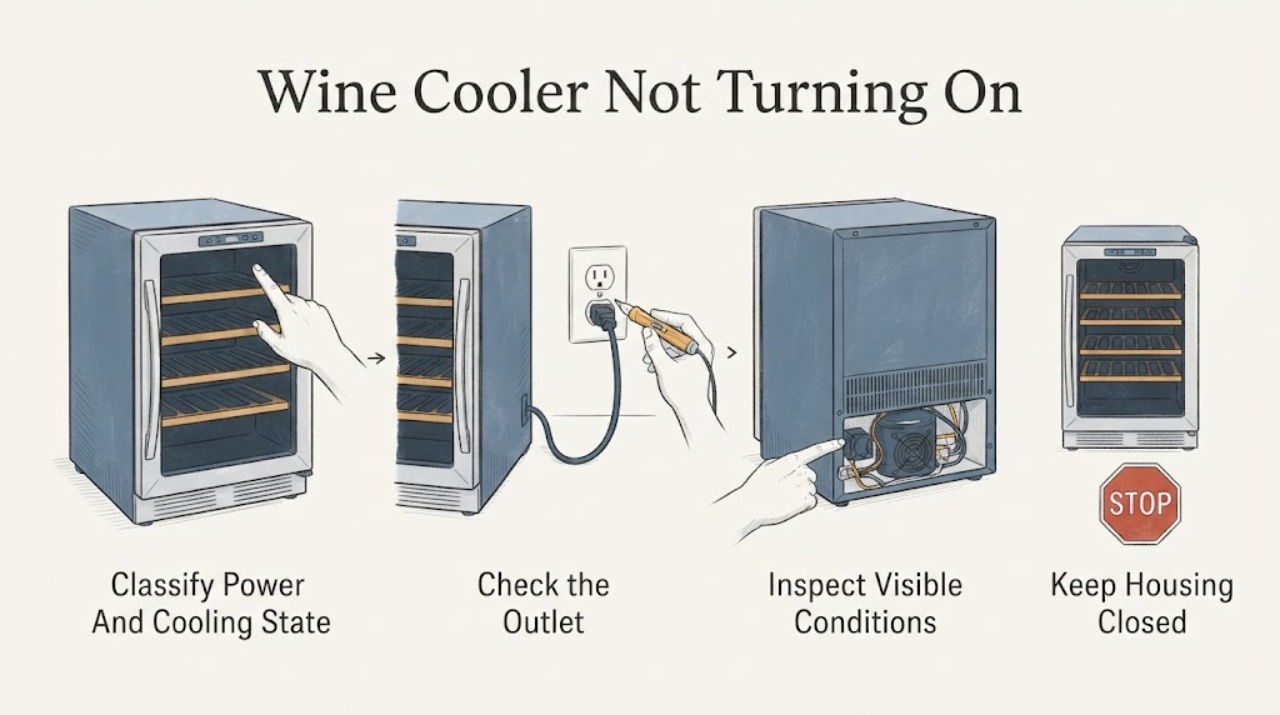
Work through in order
Diagnostic checks
Use only checks that match the exact appliance or system and its official guide.
-
Check 1
Record the full Haier model and whether the wine cooler has no display, no interior light, a working display, a working light, compressor or fan sound, or a warm cabinet. Note any recent outage, move, setting change, or warning.
Expected result: Everything is dark, the display or light responds but cooling is absent, the unit starts after a delay, or a code or hazard appears.
Next step: Use the external power, display, cooling, code, or service branch below. Stop immediately for smoke, burning odor, water near electrics, damaged cord, or repeated breaker operation.
Stop if: Do not continue operation or move a full unit when there is a safety hazard or unstable cabinet.
Why this matters
Why: A no-power symptom follows a different path from a powered-but-warm wine cooler; the exact model and warning state determine the safe next step.
-
Check 2
From a dry, safe position, confirm that the plug is seated and check the household outlet or its switch with an ordinary appliance check if appropriate. Look for a damaged cord or visible heat or water damage without opening the cooler.
Expected result: The outlet is dead, the plug is loose, the outlet works but the wine cooler remains dark, or the cord or area is damaged or wet.
Next step: Restore only a clearly switched-off household outlet when dry and safe. Arrange qualified electrical or Haier appliance service for a dead appliance, damaged cord, or outlet that trips.
Stop if: Do not open the rear, replace a cord, bypass a breaker, or handle a wet or heat-damaged connection.
Why this matters
Why: A dead outlet or loose plug can explain a completely dark cooler; normal household power with a dark cooler points toward the appliance supply, control, or internal wiring and requires service.
-
Check 3
With the cooler stable and powered from a verified outlet, open the door once or press a normal user control and observe the display and interior light. Do not repeatedly cycle power or enter a service mode.
Expected result: The display wakes, the interior light works, both remain dark, only one responds, or a warning or flashing code appears.
Next step: Use the powered-but-not-cooling or model-specific-code branch. Arrange service when the panel and light remain dark or the warning persists.
Stop if: Do not remove the control panel, probe wiring, or treat a refrigerator code chart as a wine-cooler diagnosis.
Why this matters
Why: Haier's indicator guidance treats a persistent dark indicator after normal power as a service condition. A light or display that responds means the cabinet is not simply without power and needs cooling or control diagnosis instead.
-
Check 4
For a cooler with a working display or light, compare the visible temperature or mode setting with the exact Haier manual and inspect only the external ventilation area and door closure. Do not change an unknown mode or move the cabinet to reach the rear.
Expected result: A model-specific standby or non-cooling mode is active, the door does not close, ventilation is obstructed, the setting is normal, or the cabinet remains warm with normal external conditions.
Next step: Correct only a clearly identified model-approved setting or visible obstruction. Arrange service for persistent warmth, an internal fan or compressor symptom, or any rear access requirement.
Stop if: Do not open the sealed system, remove panels, access a fan or compressor, or apply a generic thermostat procedure.
Why this matters
Why: A user setting, door, or ventilation condition can make a powered cooler appear not to operate; normal external conditions with persistent warmth make a compressor, fan, sensor, control, or sealed-system fault more likely.
-
Check 5
If a code, flashing display, or warning appears, record it exactly with the model, display state, and whether cooling or the light still works. Compare only with that model's Haier documentation.
Expected result: The warning is listed for the exact wine-cooler model, the code is unknown, it returns after a normal restart, or the display is blank.
Next step: Give Haier or a qualified appliance technician the exact code, model, symptoms, and restart history. Leave the unit off if it is overheating, leaking, or electrically unsafe.
Stop if: Do not repeatedly clear the code, bypass a warning, or open the control or refrigeration compartment.
Why this matters
Why: Haier states that wine-cellar codes differ by series and routes sensor, temperature, and display warnings to service; an unknown or recurring code cannot safely identify a part.
-
Check 6
After the safe external checks, document whether the outlet is normal, the display and light respond, cooling starts, a code persists, and any cord, leak, odor, heat, or breaker symptom is present. Leave the cooler off when no safe user-level cause explains the failure.
Expected result: The outlet works but the unit is dark, the unit is powered but warm, the compressor or fan never starts, a code persists, or a safety hazard is present.
Next step: Arrange Haier or qualified appliance service, and qualified electrical service for household supply faults. Protect wine and avoid moving a full cooler without assistance.
Stop if: Do not open panels, perform live electrical testing, handle refrigerant, replace internal parts, or continue operation with smoke, burning odor, water near electrics, damaged cord, or overheating.
Why this matters
Why: The remaining possibilities include internal power, control, sensor, fan, compressor, or sealed-system work that depends on the exact Haier wine-cooler model and is not a safe owner repair.
Use your observations
Decision map
Find the observation that best matches what you see, then follow the next safe action.
-
PATH 01Safety boundary
What you see
The outlet or switch is dead, the plug is loose, or the supply area is wet or damaged and the cooler has no display or light.
Do this next
Use qualified electrical service for the outlet or circuit and do not reconnect the cooler until the area is safe.
Why this path and its safety boundary
Why it matters: The symptom can be external to the wine cooler, but a wet, hot, damaged, or repeatedly tripping supply is a safety issue.
Safety stop: Do not bypass a breaker, handle a wet connection, or replace the power cord.
-
PATH 02Safety boundary
What you see
The outlet is normal but the wine cooler remains dark and the display and interior light do not respond.
Do this next
Leave the cooler off and arrange Haier or qualified appliance service with the model and outlet observation.
Why this path and its safety boundary
Why it matters: Haier's indicator guidance routes a persistent dark indicator after normal power to service; the appliance supply or control cannot be identified externally.
Safety stop: Do not open the rear or control area or perform electrical measurements.
-
PATH 03Safety boundary
What you see
The display or light responds, but the cabinet remains warm or the compressor or fan does not start after the model-appropriate operating period.
Do this next
Check only the exact model's visible setting, door, and ventilation conditions, then arrange service for persistent warmth or internal access.
Why this path and its safety boundary
Why it matters: This is not a simple no-power condition; a setting, ventilation, control, sensor, fan, compressor, or sealed-system issue may be involved.
Safety stop: Do not open the refrigeration system, remove panels, or attempt compressor or fan repair.
-
PATH 04Safety boundary
What you see
A wine-cellar code or flashing warning appears, disappears only briefly after a restart, or is not listed for the exact model.
Do this next
Record the code and arrange model-specific Haier service. Leave the cooler off for overheating, leak, or electrical hazard symptoms.
Why this path and its safety boundary
Why it matters: Haier says wine-cellar codes differ by series and directs sensor, temperature, and display warnings to service; the code does not safely identify a replaceable part.
Safety stop: Do not repeatedly clear, bypass, or reinterpret the warning with a different model's code list.
-
PATH 05Safety boundary
What you see
The cord or cabinet is damaged, smoke or burning odor appears, water reaches electrical parts, a breaker trips repeatedly, or the cooler must be moved while full.
Do this next
Stop using the unit, keep clear, isolate power only from a safe external point if feasible, and arrange qualified service or assistance with moving bottles.
Why this path and its safety boundary
Why it matters: The immediate electrical, fire, water, or tip-over risk overrides troubleshooting.
Safety stop: Do not reconnect, open, tip, or move a full or unstable wine cooler.
Helpful context
Understand the symptom
“Not turning on” has two different meanings
A completely dark cabinet with no light or display is an electrical or control symptom. A lit display or interior light with a warm cabinet is a cooling, setting, airflow, or compressor-path symptom. A delayed start after a setting change or a door opening can also look like a dead unit. Record the exact model, display state, interior-light state, sound, and temperature before changing controls. Haier's wine-cellar products and support codes vary by model and region.
Check power only at ordinary external points
Confirm that the plug is fully seated and that the household outlet or its switch supplies power, using a dry, safe position and an ordinary appliance check if appropriate. Do not remove a cover or reach behind a full cooler. Haier warns that moving wine coolers requires care, especially when full, and identifies the data label near the back top of wine coolers; obtain the model from the label or manual without risking a tip or strained cord.
Interpret the display and light separately
Press a normal user control or open the door once, then observe whether the display or interior light responds. Some display behavior is model-specific, and a light can be off while the refrigeration system is still powered. If power at the outlet is normal but the panel and light remain unresponsive, Haier's indicator guidance points to service rather than an internal owner repair. Do not assume that a dark display alone proves a failed compressor.
If it has power but is not cooling
A Haier wine cooler with a working display or light but no cooling needs a different branch. Check that a clearly identified user setting has not been changed to a non-cooling or standby mode, that the door closes, and that visible ventilation openings are not blocked. Do not infer a sealed-system, compressor, fan, or sensor failure from silence alone; the exact manual determines normal cycling and the safe service path.
Treat wine-cellar warnings as model-specific
If a code or warning appears, write it down exactly, including punctuation or flashing behavior, and identify the model. Haier lists separate wine-cellar sensor or temperature warnings and a display-panel warning, and directs owners to service; the same characters can mean something different on another series. Do not clear a warning repeatedly or use a refrigerator code chart for a wine cooler.
Protect the cooler and the wine while arranging service
Stop using the unit for a damaged cord, hot electrical smell, smoke, water near electrics, repeated breaker operation, or a cabinet that is overheating. If the display is dead or cooling is not maintained, limit door opening and move temperature-sensitive bottles only when it is safe to move them; do not move a full cooler alone. Haier provides manual, troubleshooting, and service appointment routes, which should be selected for the exact model and market.
Safety boundary
Stop conditions
- Stop immediately for smoke, burning odor, a hot or damaged cord, water near electrical parts, repeated breaker operation, overheating, or an unstable cabinet.
- Do not open rear, control, electrical, compressor, fan, or sealed-system panels or perform live electrical testing.
- Do not use a refrigerator code chart for a wine cooler or repeatedly clear a wine-cellar warning; code meanings vary by series.
- Do not move a full wine cooler alone or strain, trap, cut, kink, or crush power and other connections.
- Arrange qualified Haier or appliance service when normal external power is present but the cooler stays dark, stays warm, or has a recurring code.
When checks do not resolve it
Need a professional?
Arrange model-specific Haier wine-cooler service when the household outlet is normal but the display and light remain dark, when a powered cooler does not cool after the exact model's normal operating period, when a wine-cellar warning or code persists, or when an internal control, fan, compressor, sensor, wiring, or sealed-system diagnosis is needed. Use qualified electrical service for outlet or circuit faults. Stop immediately for smoke, burning odor, damaged cord, water near electrics, repeated breaker operation, overheating, or an unstable or full cooler that must be moved.
Safety scope: This article covers model identification, safe external outlet and plug observation, ordinary display or light observation, and visible setting, door, and ventilation checks. Do not open panels, move a full unit, access electrical or refrigeration components, or perform live or sealed-system work.
Read the exact guide
Official sources
- Indicators do not lightHaier · Haier India refrigerator support guidance; it supports an external indicator and power distinction, not an internal wine-cooler repair procedure.
- Haier Manual DownloadHaier · Official Haier support page for selecting a product model and its manual; model and regional availability determine instructions.
- Haier Wine Cellars — JC-117AHaier · Official Haier India product page for wine-cellar model JC-117A; it establishes wine-cellar architecture examples, not universal features or repair procedures for every Haier wine cooler.
- Haier Service SupportHaier · Official Haier India support hub; service channels and contacts vary by market and model.
- How to find the model name and the serial number of your Haier productHaier · Haier India support guidance; label location and moving risks vary by product, but the page specifically covers wine cellars and wine coolers.
- The error code for the refrigerator and freezerHaier · Haier India support guidance for named product series; wine-cellar codes and display behavior vary by model and region.
Community feedback
Share a repair observation
Share a plain-text repair observation. Accepted observations are published automatically; this page may take a moment to update.