
On this page
Start here
Quick answer
Start with the exact Haier model and determine whether the cabinet is a thermoelectric, compressor-based, single-zone, or dual-zone wine cellar. Confirm that the unit is on, plugged into a working outlet, and set to a cold temperature within the range for that model. Do not assume a displayed setpoint is the actual cabinet temperature: Haier says thermoelectric wine cellars are strongly affected by room temperature, may not reach the preset temperature in a warm room, and will not operate when the room is colder than the setpoint. Check for frequent or prolonged door openings, a door that is ajar, a gasket that does not seal, recently loaded warm bottles, heat or direct sunlight, and an installation that blocks the required ventilation. For a model whose instructions identify a removable rear fan filter, unplug the cooler before cleaning that filter and let a washed filter dry completely before refitting it. Do not build a thermoelectric diagnosis around compressor noise, and do not assume that a compressor-based error code applies to another model. If the cooler has persistent warm temperatures after safe external checks, a temperature-sensor or control warning, a compressor running continuously, a hot or damaged plug, burning odor, smoke, water near electrics, or a repeatedly tripping breaker, stop using it and arrange qualified Haier appliance service or electrical service. Do not open the sealed cooling system, handle refrigerant, remove panels, or perform live electrical tests.
Before you begin
Safety first
- This article covers model identification, safe external power and setting checks, ambient and door observations, and cleaning only a clearly documented removable fan filter after disconnecting power. Do not remove panels, access a compressor or thermoelectric module, handle refrigerant, bypass controls, or test live circuits.
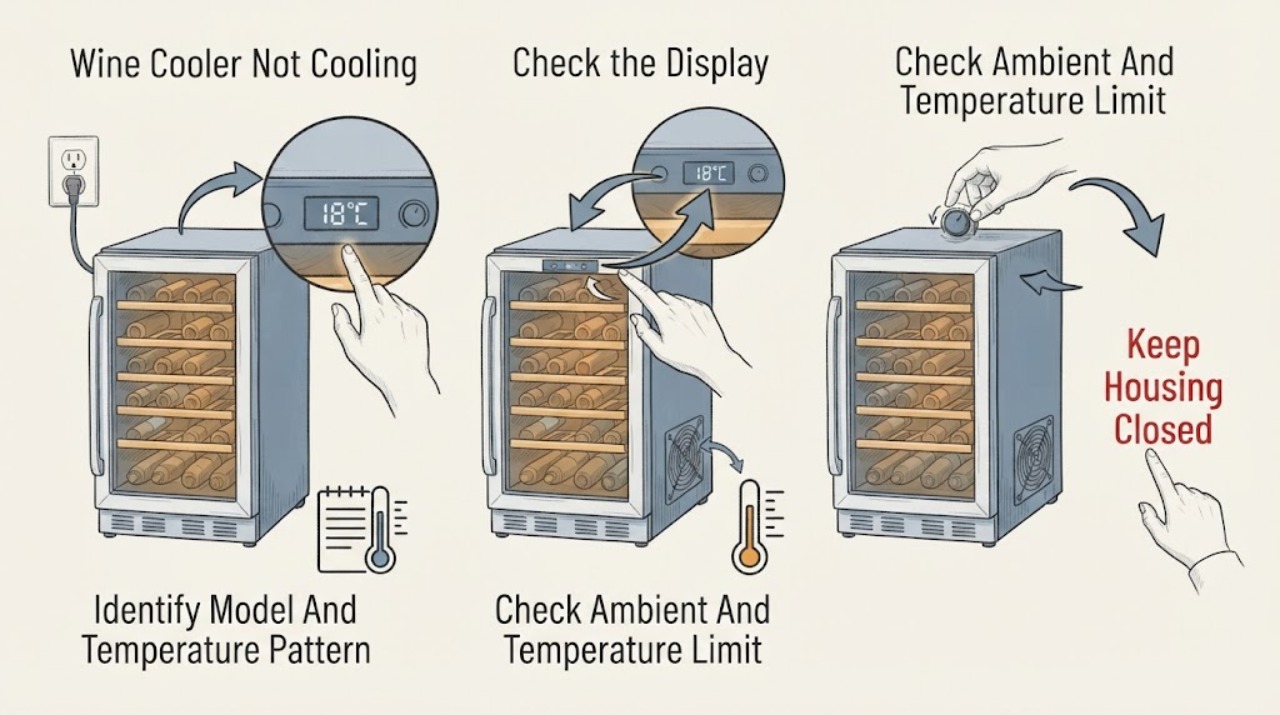
Work through in order
Diagnostic checks
Use only checks that match the exact appliance or system and its official guide.
-
Check 1
Record the complete Haier model and serial information, identify single-zone or dual-zone layout, and use the model manual to determine whether the cooler is thermoelectric or compressor-based. From the display or a safe external thermometer, record the room temperature, setpoint, cabinet temperature, and whether one zone or both zones are warm.
Expected result: The model is thermoelectric, compressor-based, dual-zone, or unknown; the room is unusually warm or cold; one zone differs from the other; the displayed temperature is still settling; or the cabinet remains warm after a stable observation.
Next step: Use the architecture and temperature-range guidance in the exact manual, then follow the matching branch below. Do not infer a component or error code without the model.
Stop if: Stop for smoke, burning odor, sparking, a hot plug or outlet, water near electrical parts, a damaged cord, repeated breaker trips, or a sealed-system leak concern.
Why this matters
Why: Haier's temperature limits and expected operation depend on architecture, zone, ambient conditions, and acclimatization. A zone-specific or ambient-limit symptom is different from a complete cooling-system failure.
-
Check 2
From a dry, safe position, verify that the wine cooler is connected to a working outlet, is turned on, and has a clearly identified cold temperature setting. Note whether the display is normal, blank, repeatedly resetting, or showing a code; do not enter service diagnostics or open the control housing.
Expected result: The outlet is dead, the unit is off, the setting is warm, the display is normal, the display is blank or resetting, or an exact-model code is present.
Next step: Restore only an obvious control setting or household outlet condition when safe. If the outlet is dead, have the circuit checked; if the unit has a persistent blank display, reset, or exact-model code, arrange service with the model and code recorded.
Stop if: Do not repeatedly reset a breaker, substitute a fuse, bypass a control, remove a panel, or measure live voltage.
Why this matters
Why: Haier lists outlet power, on/off status, and a cold setting as first checks. A blank or resetting display or a model-specific code points beyond a simple temperature adjustment and should not be interpreted with another model's instructions.
-
Check 3
Compare the room conditions with the exact model's published range and let the unit acclimatize before changing settings. For a thermoelectric model, note whether the room is too warm for the desired low temperature or colder than the setpoint; for a dual-zone model, compare each zone with its documented range rather than applying one range to both.
Expected result: The room is warm, the room is colder than the setpoint, the desired setting is outside the model range, one zone is warm, or ambient conditions are suitable but both zones remain warm.
Next step: Move the cooler only if the exact installation guidance permits it, avoid heat sources and direct sun, select a documented setting, and allow stabilization. If suitable ambient conditions still produce persistent warmth, continue with door, airflow, and service checks.
Stop if: Do not use the cooler in an unsuitable hot, cold, damp, garage, attic, or enclosed location, and do not force a setting outside the exact manual's range.
Why this matters
Why: Haier says thermoelectric cabinet temperature is room-dependent and that cooling may not operate when the room is colder than the setpoint. Haier also publishes different upper and lower ranges for dual-zone products, so an ambient or zone limit can look like no cooling.
-
Check 4
Inspect the door from outside for bottles, racks, or other items preventing full closure. Check that the gasket contacts the frame continuously and note whether the door has been opened frequently or for long periods and whether warm wine was recently loaded. Do not pull the gasket out or adjust hinges.
Expected result: The door is ajar, the gasket has a visible gap or damage, items obstruct closure, the cooler was opened repeatedly, a large warm load was added, or the door seals normally with a stable load.
Next step: Remove only an obvious loading obstruction, close the door normally, and allow time for the documented model to recover. If the seal remains visibly poor or the cabinet stays warm with a closed door, arrange service rather than dismantling the door.
Stop if: Do not force the door, tape over a gap, remove the gasket, adjust hinges, or continue using a cooler with a damaged door or glass that cannot close safely.
Why this matters
Why: Haier lists frequent or prolonged openings, recently added wine, poor gasket seal, and an ajar door among reasons a running wine cellar remains warm. These conditions can delay recovery without proving a failed cooling module.
-
Check 5
If the exact model identifies a removable rear fan filter, unplug the wine cooler, clean that filter as Haier describes, let a washed filter air-dry completely, and reinstall it before reconnecting power. Also confirm from outside that the cooler is not enclosed against its installation instructions and is away from heat and direct sunlight.
Expected result: The documented filter is visibly blocked, the unit has a clear external airflow path, the installation is enclosed or hot, or no user-accessible filter is identified for the exact model.
Next step: Correct only the external condition allowed by the manual, restore power after the filter is dry and secure, and monitor recovery. If the symptom persists, record the result and arrange qualified service.
Stop if: Do not clean with power connected, operate with a wet filter, remove grilles or covers, insert tools into a fan, or access refrigerant or internal wiring.
Why this matters
Why: A blocked model-specific fan filter or unsuitable installation can reduce cooling performance. Absence of a documented filter means this check should not become grille or panel removal, and cleaning cannot diagnose internal fan, thermoelectric, compressor, sensor, or sealed-system faults.
-
Check 6
After the model, power, setting, ambient, door, load, installation, and conditional filter checks, document whether the cooler is not running, runs but stays warm, has one warm zone, runs continuously, displays an exact code, or shows an electrical or physical hazard.
Expected result: Warm temperatures persist under suitable conditions, a compressor-based model runs continuously, a sensor or temperature code is shown, the display resets, the outlet or plug is hot, or smoke, odor, water, or breaker events occur.
Next step: Arrange qualified Haier appliance service and provide the exact model, architecture, zone, temperatures, timing, code, and checks already completed. Use a licensed electrician for outlet, cord, circuit, or shared-power concerns.
Stop if: Stop using the cooler for smoke, burning odor, sparking, a hot connection, water near electrics, a damaged cord, repeated breaker trips, or evidence of sealed-system damage. Do not open panels, handle refrigerant, or perform live tests.
Why this matters
Why: The remaining possibilities may include a model-specific fan, thermoelectric module, compressor system, sensor, control, wiring, or sealed cooling fault. Haier's error-code article directs sensor and prolonged-compressor conditions to service; those components are not safe general user repairs.
Use your observations
Decision map
Find the observation that best matches what you see, then follow the next safe action.
-
PATH 01Safety boundary
What you see
A thermoelectric cooler is in a warm room, the room is colder than its setpoint, or the desired setting is outside the exact model's published range; a dual-zone unit may have one zone within a different documented range.
Do this next
Place the unit only where the installation instructions allow, away from heat and direct sunlight, select a documented setting, and allow it to stabilize. Escalate if suitable conditions do not improve the measured temperature.
Why this path and its safety boundary
Why it matters: Haier says thermoelectric temperature depends on ambient conditions and that cooling can stop when the room is colder than the setpoint. This pattern does not by itself establish a failed cooler.
Safety stop: Do not use an unsuitable hot, cold, damp, or enclosed location or force a setting outside the model range.
-
PATH 02Safety boundary
What you see
The door has been opened frequently, remains ajar, has a gasket gap, is obstructed by a bottle or rack, or the cooler was recently loaded with warm wine.
Do this next
Remove an obvious obstruction, close the door normally, avoid unnecessary openings, and allow recovery. Arrange service for a damaged gasket, door that will not close, or persistent warm temperatures.
Why this path and its safety boundary
Why it matters: Haier identifies these conditions as reasons wine may remain warm while the cooler itself may still be operating. Recovery time and seal condition matter before a cooling component is blamed.
Safety stop: Do not force, tape, dismantle, or hinge-adjust the door or continue if glass or the closure is unsafe.
-
PATH 03Safety boundary
What you see
The exact model has a blocked removable fan filter, the cooler is enclosed contrary to its instructions, or it is exposed to a heat source, direct sun, unsuitable cold, or heavy moisture.
Do this next
Unplug and clean only the documented removable filter, dry it fully, and correct only an installation condition allowed by the manual. If the cooler remains warm, arrange qualified service.
Why this path and its safety boundary
Why it matters: External airflow and installation conditions can limit cooling and can also cause temperature expectations to be unrealistic. A filter check does not authorize internal fan or panel work.
Safety stop: Do not run with a wet filter, remove grilles, insert tools into a fan, or work on internal electrical or cooling components.
-
PATH 04Safety boundary
What you see
Ambient conditions, power, setting, door, load, and external airflow are suitable, but the cabinet remains warm; the exact model runs continuously, has a sensor warning, or has a persistent one-zone failure.
Do this next
Arrange qualified Haier service with the model, technology, affected zone, temperatures, run pattern, and exact display code. Do not order a cooling part without model confirmation.
Why this path and its safety boundary
Why it matters: A model-specific fan, thermoelectric module, compressor system, sensor, control, or sealed cooling fault becomes more likely. Haier's error guidance sends sensor and prolonged-compressor conditions to service, and thermoelectric models do not use a compressor.
Safety stop: Do not open panels, handle refrigerant, bypass a sensor, replace a control, or perform live electrical tests.
-
PATH 05Safety boundary
What you see
The plug or outlet is hot or damaged, the display resets, the breaker trips, smoke or burning odor is present, water is near electrical parts, or the cord is damaged.
Do this next
Stop using the cooler and arrange licensed electrical or qualified appliance service. Disconnect from a safe accessible outlet only when that can be done without contact with heat, water, smoke, or exposed damage.
Why this path and its safety boundary
Why it matters: This is a power or safety event rather than an ordinary temperature-setting problem. Continued operation can create shock, fire, or equipment risk.
Safety stop: Do not repeatedly reset a breaker, use a damaged extension arrangement, touch wet electrical parts, or open the cooler to find the fault.
Helpful context
Understand the symptom
Confirm whether the temperature is actually outside the model's range
A wine cooler can be running normally while the cabinet is warmer than the number selected. Haier publishes different ranges for dual-zone and thermoelectric cellars, and notes that thermoelectric performance depends on ambient temperature. Record the room temperature, the displayed cabinet temperature after the unit has acclimatized, the setpoint, and whether one zone or both zones are affected. A warm room, a room colder than the setpoint, or a recently loaded group of bottles changes the interpretation before a component fault is suspected.
Separate setting, door, load, and installation causes
Haier's running-warm checks begin with a working outlet, an on control, and a cold setting, then address humidity, frequent or extended door openings, recently added wine, the gasket, an ajar door, and a blocked fan filter. Haier also says some wine cellars are freestanding-only and should be away from heat sources, direct sunlight, unsuitable cold locations, and heavy moisture. Correct only an obvious external installation or loading condition; do not create clearance requirements that are not in the exact manual.
Thermoelectric and compressor-based symptoms are not interchangeable
Haier identifies thermoelectric wine cellars as semiconductor units without a compressor and with minimal noise and vibration. Other Haier wine-cellar support material refers to compressor-running conditions and model-specific error codes. Use the nameplate and exact manual to identify the architecture. A quiet thermoelectric unit is not automatically failed, while a compressor-based unit that runs continuously or shows a code may need service rather than a generic reset.
Filter cleaning is conditional and must be power-off work
The Haier running-warm article describes a rear fan filter on the model covered by that guidance. If your exact manual or unit identifies that removable filter, unplug the wine cellar before taking it out, remove dust with a vacuum or wash it as directed, let it dry completely, and refit it before restoring power. If there is no clearly identified user-accessible filter, do not remove a grille or panel to find one. A clean external path does not establish that a thermoelectric module, fan, compressor, sensor, or sealed system is serviceable by the owner.
When checks do not resolve it
Need a professional?
Arrange qualified Haier wine-cellar service when the cooler remains warm after the exact model's power, setting, ambient, door, load, installation, and documented filter checks; when one zone remains warm; when an exact-model sensor or prolonged-run code appears; or when an internal fan, thermoelectric module, compressor system, control, wiring, or sealed cooling circuit would need access. Use a licensed electrician for a hot or damaged outlet, cord, circuit, synchronized power loss, or repeated breaker trip. Stop immediately for smoke, sparking, burning odor, water near electrical parts, or other fire and shock hazards. Do not open panels, handle refrigerant, bypass controls, or perform live electrical tests.
Safety scope: This article covers model identification, safe external power and setting checks, ambient and door observations, and cleaning only a clearly documented removable fan filter after disconnecting power. Do not remove panels, access a compressor or thermoelectric module, handle refrigerant, bypass controls, or test live circuits.
Common questions
FAQ
Why is my Haier wine cooler running but the wine is still warm?
Check the exact model's temperature range and room temperature first, especially if it is thermoelectric. Then check a cold setting, door closure and gasket, recent warm loading, frequent openings, installation near heat, and any documented fan filter. If suitable conditions persist and the cabinet remains warm, arrange qualified service.
Does a Haier thermoelectric wine cooler use a compressor?
Haier describes its thermoelectric wine cellars as semiconductor units that do not use a compressor and have minimal noise and vibration. Use the exact model documentation before interpreting silence or a compressor-related symptom.
Can I clean the fan filter on a Haier wine cooler?
Only when the exact model identifies a removable fan filter and provides that procedure. Haier's running-warm guidance requires unplugging the wine cellar first; a washed filter must be completely dry before it is reinstalled. Do not remove a grille or panel to search for a filter.
Why does my Haier wine cooler not cool in a cold room?
Haier says a wine cellar will not operate when the room temperature is colder than the wine-cellar set temperature; cooling begins when the room becomes warmer than that setting. Check the exact model's range and installation guidance rather than assuming the cooler has failed.
Read the exact guide
Official sources
- Haier - Wine Cellar Temperature RangeHaier Appliances · Haier wine-cellar models covered by the support article; exact ranges depend on the product architecture.
- Haier Wine Cellar - Installation Location and ClearanceHaier Appliances · Haier wine-cellar installation guidance; exact clearance and model exceptions must be checked in the manual.
- Haier Wine Cellar - Thermoelectric CoolingHaier Appliances · Haier thermoelectric wine-cellar models; not a description of compressor-based wine cellars.
- Haier Wine Cellar - Not Coming On / Not RunningHaier Appliances · Haier wine-cellar support guidance for a unit that is not running at all.
- Haier - Wine Cellar Error CodesHaier Appliances · Only Haier wine-cellar models using the displayed codes in this article; codes must not be transferred to other models.
- Haier Wine Cellar - Running But Not Getting Cold or Wine Is WarmHaier Appliances · Haier wine-cellar guidance; the rear fan-filter procedure is conditional on the model described by the article.
- Haier Wine Cellar - Temperature ControlHaier Appliances · Haier thermoelectric wine-cellar guidance; exact setpoint range varies by model.
Community feedback
Share a repair observation
Share a plain-text repair observation. Accepted observations are published automatically; this page may take a moment to update.