
On this page
Start here
Quick answer
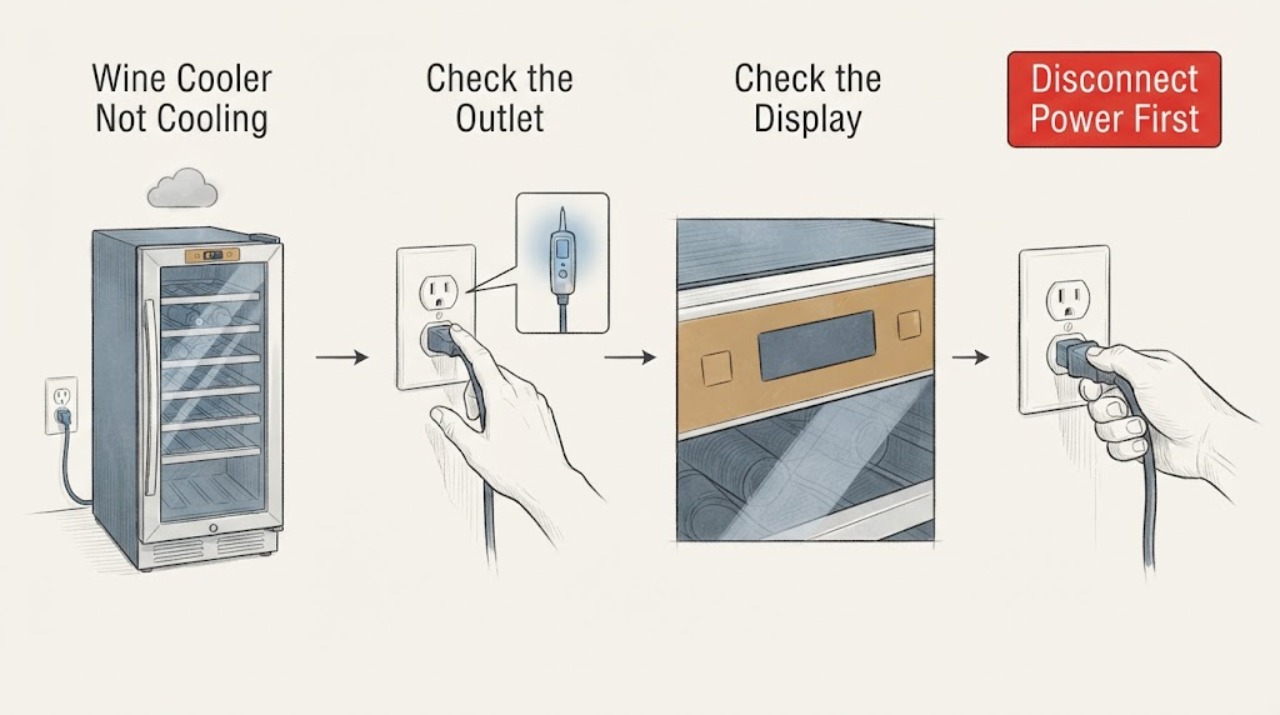
When a Samsung wine cooler is not cooling, first confirm that the cooler has power and that the display and temperature controls respond. Then check the selected zone setting, Cooling Off or demonstration state if your model has one, door closure and gasket contact, blocked interior or exterior ventilation, heavy loading, and exposure to heat. Samsung's wine cooler support guidance starts with the breaker, outlet, and power cord, while its model material identifies dual temperature zones and model-specific controls; the broader Samsung cooling guide says settings, airflow, seals, and recovery time vary by product. Do not assume a refrigerator temperature or reset sequence applies to every wine cooler. If the cooler has a damaged cord, burning smell, smoke, refrigerant or oil residue, water intrusion, repeated tripping, a warm cabinet after the model's recovery period, or a persistent error, leave it off and arrange Samsung or qualified refrigeration service.
Work through in order
Diagnostic checks
Use only checks that match the exact appliance or system and its official guide.
-
Check 1
Check the wine cooler's power without opening the rear or control housing. Confirm that the plug is fully seated in the outlet, the outlet is controlled by a live breaker, and the display or interior light responds when the door is opened or the panel is touched. Inspect the visible cord and plug for cuts, crushing, heat damage, or looseness.
Expected result: The display and light are off, the outlet or breaker is not supplying power, the cord is damaged, or the unit has power but the cabinet remains warm.
Next step: Restore only a confirmed tripped breaker once and observe. Do not use a damaged cord, loose outlet, extension workaround, or repeated breaker resets; if power is present but cooling is absent, continue with the control and airflow checks.
Why this matters
Why: No display or light with a failed outlet or breaker makes a supply problem more likely. A powered display with warm bottles shifts the diagnosis toward settings, airflow, door sealing, or cooling service.
-
Check 2
Read the displayed temperature for each zone and compare it with the full model manual. Check whether a child lock, vacation or standby state, Cooling Off or demonstration state, or another indicator is active, and whether the panel accepts a temperature change. Do not copy a setting or button combination from a different Samsung wine cooler.
Expected result: The setting is warmer than intended, the panel shows a documented non-cooling state, one zone is warm while another cools, or the selected setting is correct and the panel responds normally.
Next step: Use only the exact model's documented control sequence to change the setting or leave the non-cooling state, then allow the model's stated recovery period with the door closed. If the panel will not respond or the same state returns, preserve the display information for service.
Why this matters
Why: A wrong setting or documented non-cooling state can explain a warm cabinet without proving a hardware failure. One warm zone in a dual-zone design narrows the symptom to that zone's control or airflow path; correct settings with no cooling make a physical or refrigeration fault more likely.
-
Check 3
Inspect the door from the outside. Make sure no bottle, shelf, or rack prevents full closure, and look for a dirty, folded, split, or visibly deformed gasket. Clean a dirty gasket with the method in the model manual; do not pull, glue, or remove the seal.
Expected result: The door closes evenly and the gasket contacts the cabinet around its perimeter, or a gap, frost, condensation, or loose seal is visible.
Next step: Rearrange only the obstructing bottle or rack and clean the gasket, then observe the temperature with the door kept closed. If the gasket is split, warped, or still fails a gentle paper-resistance check, arrange service rather than trying to reshape it.
Why this matters
Why: A door that does not seal admits warm humid air and can keep the cabinet from reaching its setting; frost or condensation near the edge supports an air-leak problem. An intact seal makes other airflow or cooling causes more likely.
-
Check 4
Check visible airflow and loading. Keep bottles and shelf liners away from the interior vents, avoid packing the cabinet so tightly that air cannot circulate, and make sure the exterior ventilation area is not covered by cabinetry, packaging, dust, or another appliance. Keep the cooler away from direct sun and other heat sources when the installation allows.
Expected result: Bottles or racks block an interior vent, the cabinet is tightly enclosed, the exterior grille is obstructed, or the vents and installation space are clear.
Next step: Reposition bottles and remove only loose external obstructions without moving a built-in appliance or touching refrigerant tubing. Recheck after the model's normal recovery period; persistent warmth requires service diagnosis.
Why this matters
Why: Blocked internal airflow or restricted heat release can reduce cooling even while the compressor is operating. Clear airflow with a warm cabinet makes a setting, sensor, fan, or sealed-system issue more likely than a loading problem.
-
Check 5
Observe one cooling cycle from outside the cabinet. Note whether the display changes, whether a fan or compressor sound starts and stops, whether only one zone changes, and whether the sides or rear become unusually hot. Keep the door closed during the observation and do not remove panels or touch the refrigerant circuit.
Expected result: Cooling resumes after a setting, seal, or airflow correction; the unit runs but the temperature does not fall; it clicks repeatedly, trips power, or becomes abnormally hot; or no cooling activity is apparent despite power.
Next step: Allow the model's specified recovery time after a legitimate setting change and keep the cabinet closed. If the temperature remains warm or any electrical or heat warning appears, stop using the cooler and request qualified service.
Why this matters
Why: Improvement after a visible correction supports an operating or installation cause. Running without temperature recovery, repeated clicking or tripping, abnormal heat, or no cooling activity with power present points toward a fan, sensor, compressor, control, or sealed-system fault that external checks cannot confirm.
-
Check 6
If you power-cycle the cooler, use the exact model manual or Samsung support instructions first, and record the displayed settings before disconnecting it. Restore power once only after the safe waiting interval in that documentation, then verify both zone settings and observe recovery without repeatedly cycling the unit.
Expected result: The cooler resumes cooling after the documented reset, resumes briefly and becomes warm again, or the same error or non-cooling condition remains.
Next step: Stop at a repeat failure and provide Samsung Support with the full model, zone affected, displayed code or state, power behavior, seal and airflow findings, and recovery time. Do not open the control compartment or sealed system.
Why this matters
Why: A one-time recovery after a documented reset can indicate a control state, but it does not prove the refrigeration system is healthy. A repeat failure or persistent error is evidence for service rather than more resets.
Use your observations
Decision map
Find the observation that best matches what you see, then follow the next safe action.
-
PATH 01Next step
What you see
The display and light are off and the outlet or breaker also fails, or the visible power cord or plug is damaged.
Do this next
Do not use the damaged cord or loose outlet. Have the outlet or cord checked by a qualified electrical or appliance professional; if the breaker trips again, leave the cooler disconnected.
Why this path and its safety boundary
Why it matters: The symptom is consistent with a supply or cord safety problem, so cooling cannot be assessed until safe power is available.
-
PATH 02Next step
What you see
The cooler has power, the panel responds, and a wrong zone setting or documented non-cooling state is found, with no persistent error.
Do this next
Apply only the exact model's control instructions, close the door, and allow the stated recovery period. If cooling does not return or the display state returns, request service.
Why this path and its safety boundary
Why it matters: The control state is a plausible explanation and is more likely than a failed compressor before the model-specific correction and recovery period are observed.
-
PATH 03Next step
What you see
The door seal fails to contact, bottles or racks block vents, or the exterior ventilation space is restricted, and the unit otherwise operates.
Do this next
Clear the accessible obstruction, clean the gasket, and correct only the installation issue that can be changed safely. Recheck after recovery; a damaged gasket or continuing warmth needs service.
Why this path and its safety boundary
Why it matters: Air leakage or heat-transfer restriction is a better-supported cause of low cooling than an unconfirmed sealed-system fault.
-
PATH 04Next step
What you see
The settings, seal, loading, and ventilation are correct but the cabinet remains warm, only one zone stays warm, an error persists, or the unit clicks, trips, or overheats.
Do this next
Leave the cooler off if it is overheating, tripping, or showing an electrical warning, protect the wine according to its storage needs, and arrange Samsung or qualified refrigeration service with the recorded observations.
Why this path and its safety boundary
Why it matters: The remaining possibilities include a sensor, fan, control, compressor, or sealed-system problem that cannot be safely identified through external checks.
Helpful context
Understand the symptom
A warm Samsung wine cooler can have a simple operating cause or a sealed-system, fan, control, or electrical fault. The useful first distinction is whether the interior light and display work, whether the compressor or fan appears to run, whether only one temperature zone is warm, and whether the door and vents are allowing heat exchange. Do not diagnose a sealed refrigeration fault by sound alone.
Samsung sells more than one wine cellar and wine cooler design. Its support pages expose model-specific controls and manuals, and its RW51TS338SR product material shows a dual-zone design. Use the full model code from the rating label when checking a temperature range, lock, Cooling Off state, or reset procedure; this guide keeps the shared checks at the visible, low-risk level.
Only after diagnosis
Potential parts
- door gasket
Consider a gasket only if the exact model's seal fails a visual or gentle paper-resistance check after cleaning and the door is correctly aligned; warm bottles alone do not prove the gasket is defective.
Confirm the complete wine cooler model and the manufacturer's fit information before ordering. Gaskets vary by cabinet and door design. - temperature sensor
Consider this category only after service diagnosis identifies a sensor fault or a documented temperature-reading problem with correct settings, airflow, and door sealing.
Do not infer sensor compatibility from a similar connector or model family; confirm the exact model and approved repair procedure.
When checks do not resolve it
Need a professional?
Request Samsung or qualified refrigeration service when the exact model setting and recovery period do not restore cooling, only one zone remains warm, an error persists, the door gasket is damaged, the compressor or fan does not produce cooling, or the unit repeatedly clicks, trips, overheats, or leaks. Unplug or switch off the cooler and seek urgent service for smoke, burning odor, water intrusion, a damaged cord, refrigerant or oil residue, or any attempt that would require opening the sealed system or control housing.
Common questions
FAQ
Why is my Samsung wine cooler warm even though the display is on?
Check the selected zone setting and any model-specific non-cooling state, then inspect the door seal, blocked interior vents, loading, and exterior ventilation. A powered display does not prove that the compressor, fan, or sealed system is cooling; if the cabinet remains warm after the model's recovery period, request service.
Can I use the temperature setting from another Samsung wine cooler?
No. Samsung wine coolers differ in controls, zone layout, and documented operating ranges. Use the full model number to open the exact manual or support page and follow that model's setting and recovery guidance.
When should I stop troubleshooting a Samsung wine cooler that is not cooling?
Stop when the cooler repeatedly trips, becomes unusually hot, smells burnt, shows smoke or liquid intrusion, has a damaged cord, or remains warm after the model-specific setting, seal, airflow, and recovery checks. Leave it off and arrange qualified service rather than removing panels or working on the refrigerant circuit.
Read the exact guide
Official sources
- Control Panel: RW51TS338SR/AASamsung Support US · Samsung RW51TS338SR/AA wine cellar only; do not generalize its controls to other models.
- RW33 Wine Cellar with Wine Cellar, 148 L, SilverSamsung Support UK · Samsung RW33EBSS1/XEU model support page; model support pages should be used to locate the exact manual for the appliance at hand.
- RW51TS338SR 51-Bottle Capacity Wine CoolerSamsung Electronics America, Inc. · Samsung RW51TS338SR product brochure; specifications and zone design are model-specific.
- Cooling issues with Samsung refrigerator or freezerSamsung Support US · Samsung refrigerator and freezer guidance used here only for shared cooling principles; exact wine cooler controls, ranges, and recovery times remain model-specific.
- Samsung Wine Cooler has no powerSamsung Support US · Samsung Wine Cooler support guidance for a unit with no power or warm wine bottles.
Community feedback
Share a repair observation
Share a plain-text repair observation. Accepted observations are published automatically; this page may take a moment to update.