
On this page
Start here
Quick answer
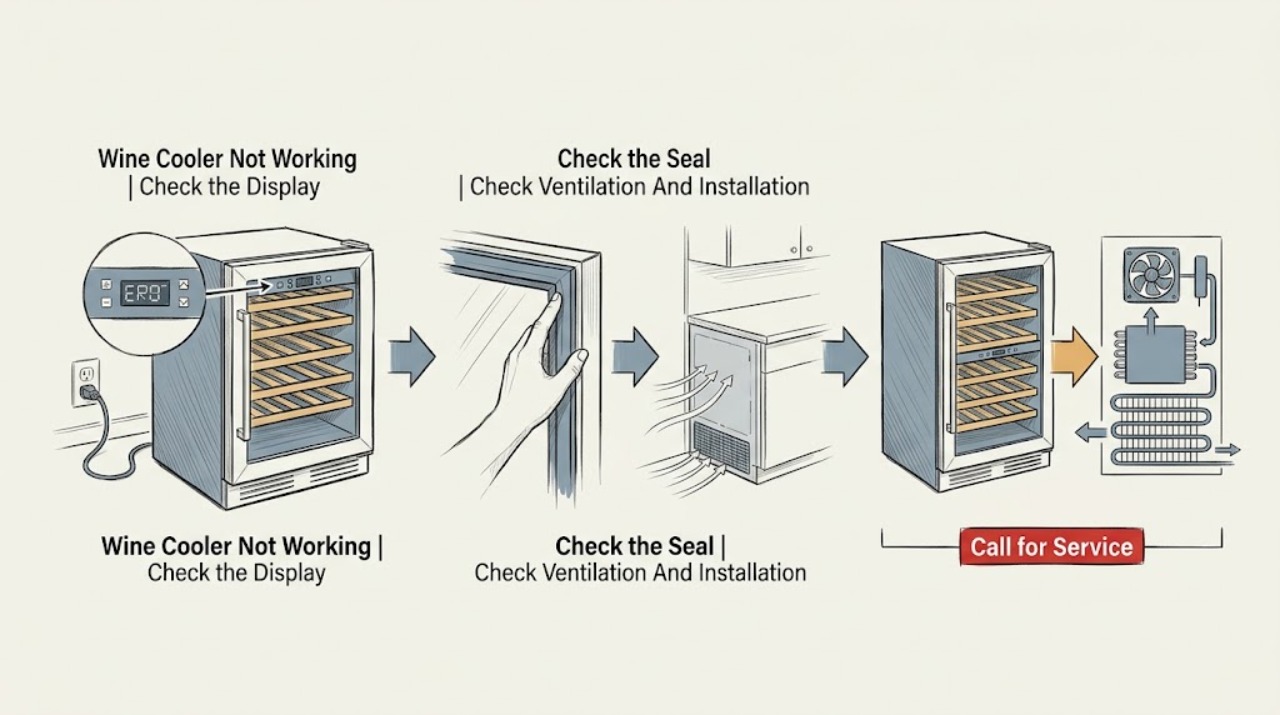
First decide whether the Danby wine cooler has no power, has power but is not cooling, or runs while the cabinet temperature remains high. Check the external plug and protection, the temperature setting, a fully closed door and sealing gasket, the visible exhaust path, and the clearance required by the exact model. Danby wine-cooler guidance identifies power and plug problems, a door that is not shut, an obstructed exhaust vent, warm bottles, heat or sunlight, poor ambient conditions, and possible fan, compressor, or system faults as different causes of poor cooling. Some Danby models display HI, LO, or CL for model-specific temperature or sensor conditions, while a fan cycling every 8–12 seconds can be normal. Make only external adjustments and use the exact manual for controls and codes. If the display remains dead, protection trips again, cooling does not recover, the door cannot seal, or there is smoke, burning odor, abnormal heat, leaking, or a damaged cord, stop using the unit when safe and arrange qualified service. Do not open electrical covers, touch a fan or thermoelectric module, work on a compressor, or open a sealed cooling system.
Before you begin
Safety first
- The user may read the model label, check the external plug and cord, set the documented control, inspect the visible gasket, clear an obvious external obstruction, confirm model-required ventilation, and observe display or fan timing without touching moving parts. Internal electrical parts, fan guards, fan motors, thermoelectric modules, compressors, control boards, sensors, wiring, and sealed refrigerant systems are for qualified service personnel; all energized testing is excluded.
Work through in order
Diagnostic checks
Use only checks that match the exact appliance or system and its official guide.
-
Check 1
Read the full model from the rating label and observe the wine cooler without opening any panel. Note whether the display, interior light, or power indicator is lit, whether the external plug and cord appear secure and undamaged, and whether a household fuse or breaker has operated. If protection is tripped, restore it only once and only when there is no odor, moisture, heat, visible damage, or other hazard.
Expected result: The unit is completely dark; the display is lit but the cooling does not begin; or a fuse or breaker operates again.
Next step: Confirm only the external connection and make one safe reset if appropriate. If the unit remains dark, the cord is damaged, or protection operates again, stop using it and arrange qualified service. If powered, continue with temperature, door, and airflow checks.
Stop if: Do not open the control compartment, replace an internal fuse, keep resetting protection, or perform an energized electrical test.
Why this matters
Why: A dark unit or repeated protection operation makes the supply, cord, or internal electrical path more likely than a thermostat setting. A powered display shifts the next check toward settings, door sealing, airflow, model-specific status codes, or an internal cooling fault.
-
Check 2
With the unit powered, check that the thermostat or digital setpoint is not at an off or unsuitable setting for the exact model. Close the glass door normally and inspect the visible gasket for dirt, gaps, or an item preventing a full seal. Avoid repeated opening and do not press on a door switch or latch.
Expected result: The control is set correctly and the gasket seals evenly; the door does not close fully; the gasket has a visible gap or obstruction; or the setpoint is correct but bottles remain warm.
Next step: Remove only an obvious external obstruction, clean and dry the accessible gasket as the manual permits, and make one normal temperature observation. If the door still cannot seal or temperature remains high, continue to airflow and model-code checks.
Stop if: Do not adjust hinges, remove the gasket, force the door, or open the control or door assembly.
Why this matters
Why: A wrong setting, frequent opening, warm bottles, or a poor seal can raise cabinet temperature without proving a failed cooling component. A correct setting and intact seal with continued warming makes airflow or internal cooling trouble more likely.
-
Check 3
Inspect the visible front, rear, side, or bottom ventilation path specified by the exact model. Make sure bottles or cabinetry do not block the exhaust, the cooler is not pressed against a surface, and the installation has the manual’s required clearance. Check for direct sunlight or a nearby heat source and whether the surrounding location is temperature-controlled.
Expected result: An exhaust path is blocked, clearance is inadequate, the unit is in direct heat or an unsuitable location, or ventilation is open and the environment is appropriate.
Next step: Clear only visible obstructions and restore the model-required clearance; do not convert a freestanding model to built-in without manual approval. Allow one normal cooling period and observe whether the temperature trend improves.
Stop if: Do not remove grilles, reach behind a running unit, move a heavy built-in cooler alone, or alter cabinet ventilation openings.
Why this matters
Why: Restricted exhaust or excess ambient heat can prevent the unit from removing heat and may cause continuous running or a high-temperature indication. If ventilation and surroundings are appropriate but cooling remains poor, a fan, control, cooling module, compressor, or sealed-system fault becomes more likely.
-
Check 4
Without touching the fan or compressor area, listen and observe for a steady or repeating fan cycle, a compressor start attempt, an alarm, or a displayed HI, LO, or CL indication. Compare the exact code and the observed timing with the model manual or the Danby wine-cooler FAQ. Do not infer a failed part from silence alone.
Expected result: The fan cycles briefly and the unit cools; HI appears after warm bottles or a door event; LO or CL appears; the fan never runs; the compressor repeatedly starts and stops; or no signal is present while the cabinet stays warm.
Next step: Correct only the documented door/load/ventilation condition and follow the exact manual for a code or restart. If the signal or no-cooling symptom persists, stop using the cooler when safe and arrange qualified service.
Stop if: Do not remove a fan guard, touch moving parts, bypass a sensor, open a cooling module, or perform live measurements.
Why this matters
Why: Some fan cycling and temporary HI/LO behavior are documented as normal in particular Danby wine coolers. Persistent HI, LO, or CL, no airflow with blocked-temperature symptoms, repeated start attempts, or no cooling with a clear vent points to a model-specific sensor, fan, control, cooling-module, compressor, or sealed-system diagnosis.
-
Check 5
Only when there is no leak, smoke, odor, abnormal heat, cord damage, or other hazard, follow the exact model manual for one restart; applicable Danby guidance describes unplugging briefly after a power surge or persistent HI/LO condition. Record the model, power state, setpoint, door result, ventilation result, code, fan/compressor behavior, and temperature trend after the restart.
Expected result: The display and cooling recover; the cooler runs continuously without reaching its setpoint; the same code or no-cooling condition returns; or a hazard or protection trip appears.
Next step: Use the cooler only if it returns to stable operation without a hazard. Otherwise keep it out of service when safe, protect wine from temperature loss, and arrange qualified Danby or appliance service.
Stop if: Do not keep cycling power, leave the unit unattended after a fault, or continue after smoke, arcing, burning odor, abnormal heat, leakage, or repeated protection operation.
Why this matters
Why: A one-time recovery may clear a transient control state, but a returning fault is not evidence that the underlying issue is fixed. Continuous operation with a warm cabinet and clear airflow requires internal diagnosis, while a hazard or protection trip is an immediate stop condition.
Use your observations
Decision map
Find the observation that best matches what you see, then follow the next safe action.
-
PATH 01Safety boundary
What you see
The display and indicators are dark, the external plug is secure, or a fuse/breaker operates again after one safe reset.
Do this next
Stop using the wine cooler and arrange qualified service with the model and protection behavior recorded.
Why this path and its safety boundary
Why it matters: A supply, cord, protection, or internal electrical fault is more likely than a thermostat, door, or ventilation setting.
Safety stop: Do not open panels, replace an internal fuse, repeatedly reset protection, or test energized wiring.
-
PATH 02Safety boundary
What you see
The display is powered, the setpoint is appropriate, the door seals normally, and the cabinet remains warm while the visible ventilation path is clear.
Do this next
Stop repeated restart attempts and arrange qualified diagnosis. Provide the model, temperature trend, fan/compressor behavior, and any display indication.
Why this path and its safety boundary
Why it matters: A fan, cooling module, compressor, control, or sealed-system issue is more likely than a simple power or door problem; the exact architecture is model-specific.
Safety stop: Do not reach into the fan area, open a compressor compartment, touch a thermoelectric assembly if fitted, or open refrigerant tubing.
-
PATH 03Safety boundary
What you see
The temperature rose after a large warm load, frequent openings, a door that was not tightly closed, blocked exhaust, direct heat, or inadequate model-required clearance.
Do this next
Close the door, clear only visible obstructions, restore the manual’s clearance, and allow a normal cooling period. If the temperature remains high or the condition recurs with normal use, arrange service.
Why this path and its safety boundary
Why it matters: The cabinet may be responding to a correctable load, sealing, ambient, or heat-rejection condition rather than a failed cooling component.
Safety stop: Do not enclose a freestanding unit, alter vents, force the door, or keep warm wine in a cooler that cannot maintain temperature.
-
PATH 04Safety boundary
What you see
HI, LO, or CL persists according to the exact manual, the fan or compressor makes repeated abnormal attempts, or the symptom includes smoke, arcing, burning odor, abnormal heat, leaking, cord damage, or repeated protection trips.
Do this next
For a persistent code or abnormal running, arrange model-matched qualified service. For a hazard, isolate power only from a safe, dry position and keep the cooler out of service until assessed.
Why this path and its safety boundary
Why it matters: A persistent sensor, fan, control, cooling-module, compressor, sealed-system, or electrical issue is more likely; a hazard requires immediate isolation rather than code interpretation.
Safety stop: Do not bypass sensors, remove guards, open electrical covers, work on a compressor or thermoelectric module, or open the sealed system.
Helpful context
Understand the symptom
Start by separating power loss from loss of cooling
A dark display or no interior light is a power path; a lit display with warm bottles is a cooling or airflow path. Record the full model, display state, set temperature, cabinet temperature trend, and whether the fan or compressor appears to run. Danby wine coolers are not one uniform architecture, so use the rating-label model and its manual before interpreting a code or deciding which internal cooling component is present.
Door and airflow checks can explain a warm cabinet
Danby’s wine-cooler guidance repeatedly points to a properly closed gasket, correct thermostat setting, clean condenser area, and adequate ventilation. A door that leaks air, a blocked exhaust, direct heat or sunlight, too many warm bottles at once, or an unsuitable ambient environment can make a working cooler appear ineffective. Correct only what is visible and model-approved; do not remove a fan guard or reach into the cooling assembly.
Codes and fan timing are model-specific clues
The wine-cooler FAQ says a fan cycle of 8–12 seconds may be normal and that HI/LO can follow a large warm load or a door that was not tightly closed. The DWC057D1BSS manual lists HI with several warm-cabinet causes and LO/CL with low ambient, sensor, or evaporator-temperature conditions. Treat these as model-specific clues, not universal Danby diagnoses.
Safety boundary
Stop conditions
- Stop using the wine cooler for smoke, arcing, burning odor, abnormal heat, a damaged cord, leakage near electrical parts, or repeated protection operation; isolate power only from a safe, dry position.
- Do not remove electrical, fan, rear, bottom, or control covers; do not touch fan blades or energized components.
- Do not open refrigerant tubing, alter a sealed system, add refrigerant, or attempt compressor or thermoelectric-module repair.
- Do not bypass a temperature sensor, door switch, or control; do not make live electrical measurements.
- Do not diagnose or order a part from a display code or symptom alone; match the exact model and qualified diagnosis.
Only after diagnosis
Potential parts
- condenser or evaporator fan assembly
Consider this only when the exact model is identified and qualified diagnosis links persistent no-airflow, scraping, or poor cooling to the fan after visible ventilation obstructions are excluded.
Confirm the complete rating-label model and manufacturer fit information; fan location and construction vary among Danby wine coolers. - thermoelectric cooling module or compressor component
Consider this only after qualified service identifies the exact cooling architecture and confirms that power, settings, door sealing, ventilation, and visible load conditions are not the cause.
Do not assume a wine cooler uses a thermoelectric module or compressor, and do not infer fit from the Danby name; verify the exact model and manufacturer fit information. - temperature sensor or control component
Consider this only when a persistent model-specific HI, LO, CL, display, or regulation symptom is confirmed by qualified diagnosis after the safe external checks.
Use the exact model manual and manufacturer fit information; control and sensor components are not interchangeable by brand name alone.
When checks do not resolve it
Need a professional?
Arrange qualified service when the unit has no power after the external connection is checked, a fuse or breaker operates again, the door cannot seal, the display remains in a model-specific fault state, the cooler runs but stays warm after settings and airflow are corrected, or abnormal fan/compressor behavior persists. Stop immediately for smoke, arcing, burning odor, abnormal heat, leakage, cord damage, or repeated protection operation.
Safety scope: The user may read the model label, check the external plug and cord, set the documented control, inspect the visible gasket, clear an obvious external obstruction, confirm model-required ventilation, and observe display or fan timing without touching moving parts. Internal electrical parts, fan guards, fan motors, thermoelectric modules, compressors, control boards, sensors, wiring, and sealed refrigerant systems are for qualified service personnel; all energized testing is excluded.
Common questions
FAQ
What should I check when my Danby wine cooler has no power?
Check the external plug and visible cord connection and observe whether a household fuse or breaker has operated. Danby manuals list a blown fuse, tripped breaker, power surge, or incompletely inserted plug as possible no-power causes. If the display remains dark, the cord is damaged, or protection operates again, stop using the unit and arrange qualified service.
Why is my Danby wine cooler powered but not cooling?
Check the exact model’s temperature setting, door gasket, visible exhaust path, required clearance, warm-bottle load, and surrounding heat or sunlight. Danby guidance also lists possible fan, compressor, or system faults when the unit remains warm after those conditions are corrected. Those internal components need qualified diagnosis.
Is a Danby wine-cooler fan cycling every few seconds normal?
Danby’s wine-cooler FAQ says an 8–12 second fan cycle can be normal, and the DWC94L1B product FAQ repeats that model-specific guidance. Treat it as a clue rather than a universal rule: if the cabinet stays warm, a code persists, the sound is abnormal, or cooling is worsening, use the exact manual and arrange service.
What do HI, LO, or CL mean on a Danby wine cooler?
The meaning is model-specific. The DWC057D1BSS manual lists HI with warm-cabinet causes and LO or CL with low ambient, sensor, or evaporator-temperature conditions; Danby’s broader FAQ says HI/LO can follow a large warm load or a door that was not tightly closed. Record the exact code and match it to the rating-label model manual.
When should I stop using a Danby wine cooler and call for service?
Stop for smoke, arcing, burning odor, abnormal heat, a damaged cord, leakage near electrical parts, repeated protection operation, or significant cooling loss. Also arrange service when no power, a persistent code, abnormal fan or compressor behavior, or a warm cabinet remains after the safe external checks. Do not open the electrical or sealed cooling system.
Read the exact guide
Official sources
- The wine cooler is not cooling properly. What should I do?Danby · General Danby wine-cooler guidance; exact model manuals control when instructions differ.
- Danby 94 Bottle Free-Standing Wine Cooler in Black – DWC94L1BDanby · Fan-cycle, compressor, HI behavior, and built-in/ventilation statements apply to the DWC94L1B model and demonstrate model-specific behavior.
- DWC057D1BSS Wine Cooler Owner’s ManualDanby · No-power, warm-cabinet, HI/LO/CL, fan, compressor, and system-leak troubleshooting applies to the DWC057D1BSS model; other Danby models may differ.
- Wine Coolers FAQsDanby · General Danby wine-cooler guidance for ventilation, cooling, fan cycles, and status indications; exact manuals control model-specific behavior.
- DWC040D2BSSDB Wine Cooler Owner’s ManualDanby · The no-power, temperature, door, exhaust, warm-load, and ventilation troubleshooting applies to the DWC040D2BSSDB model; other Danby wine coolers may differ.
Community feedback
Share a repair observation
Share a plain-text repair observation. Accepted observations are published automatically; this page may take a moment to update.