
On this page
Start here
Quick answer
For a wine cooler that is not working, first separate no power, an off or locked control, and a powered cooler that runs without cooling. Verify the outlet and documented control state, then inspect the accessible door seal, exhaust clearance, and loading. If the display is active but the compressor or fan does not respond, cooling never starts, or the unit has a damaged cord or refrigerant concern, stop testing and arrange qualified refrigeration service.
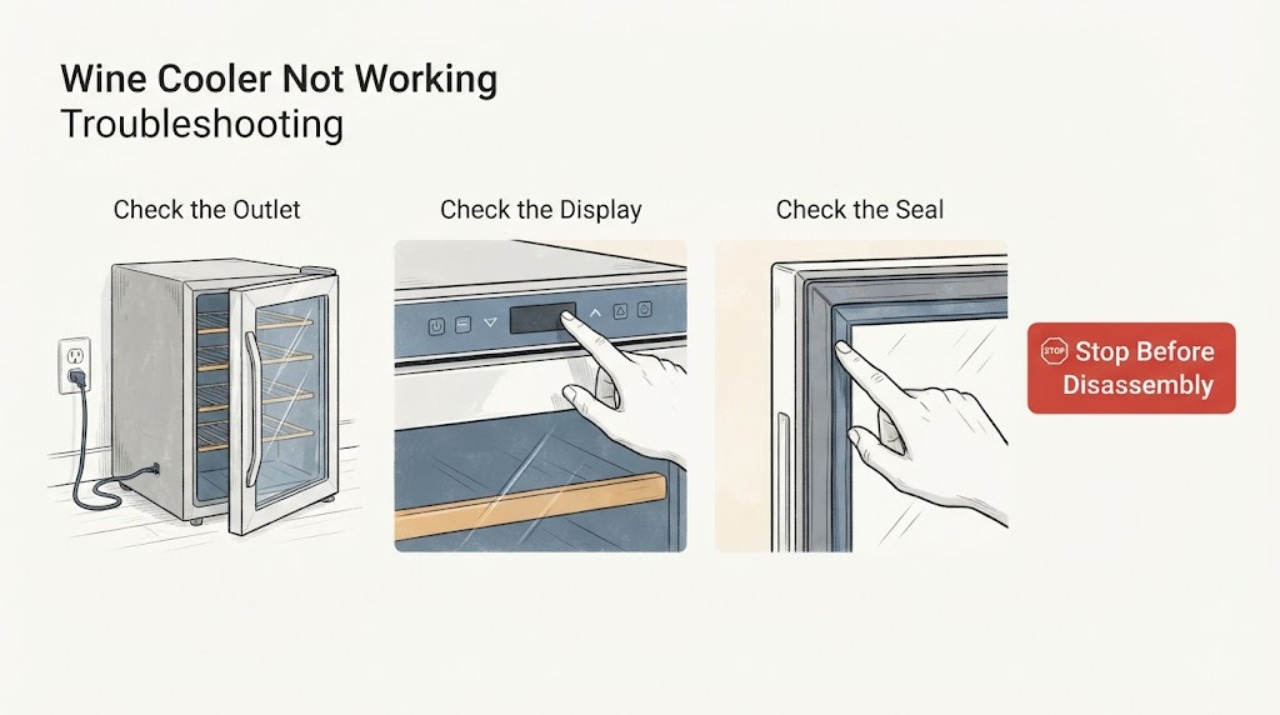
Work through in order
Diagnostic checks
Use only checks that match the exact appliance or system and its official guide.
-
Check 1
Check whether the cooler has any power: confirm the plug is fully inserted, the outlet works with another suitable device, the breaker or fuse is not tripped, and the unit's display or interior light responds. Do not bypass grounding or use a damaged cord.
Expected result: There is no display or light, power is present but the unit is off, or the display is active while cooling does not begin.
Next step: Restore only an obvious power or off-state condition and make one controlled observation. If power is normal and the cooler stays inactive, arrange service.
Why this matters
Why: No indication keeps power, switch, and control state in focus. An active display with no cooling shifts attention to setting, compressor, fan, refrigerant, or control diagnosis.
-
Check 2
Verify the temperature control, zone selection, and any control lock using the exact model manual. Note whether the setpoint changes and whether the compressor or fan starts after the control is enabled.
Expected result: The control was off or locked, the setpoint changes but there is no cooling response, or the control cannot be changed.
Next step: Use only the model's documented control sequence. Do not force a dial, open the control panel, or substitute a control board.
Why this matters
Why: An off, locked, or invalid setting can look like a dead cooler. A normal setting with no mechanical response points to a compressor, fan, sensor, control, or sealed-system fault.
-
Check 3
Inspect the accessible door gasket, vent or exhaust clearance, and load. Confirm the door closes fully, the gasket contacts evenly, and bottles are not blocking the evaporator or exhaust path; do not move a built-in unit without installation guidance.
Expected result: The door seal is uneven, the unit has restricted clearance, the load is excessive, or these conditions are normal.
Next step: Correct only the accessible seal, spacing, or clearance issue described by the manual, then allow the model's normal stabilization period. Escalate if no cooling follows.
Why this matters
Why: A seal, installation, or load condition can prevent temperature recovery, while normal airflow and loading make a cooling-system or control problem more likely.
-
Check 4
Listen and feel from outside for a normal compressor or fan response without touching refrigerant tubing. Record whether the compressor is silent, vibrates briefly and stops, or runs while the cabinet stays warm.
Expected result: There is no compressor response, short cycling, a running compressor with no cooling, or abnormal noise and vibration.
Next step: Do not open the sealed system or add refrigerant. Arrange qualified refrigeration service with the timing and temperature record.
Why this matters
Why: Vinotemp and NewAir route compressor, fan, refrigerant, and control symptoms differently, but none can be confirmed from sound alone. A running compressor with no cooling raises a sealed-system or airflow concern.
Use your observations
Decision map
Find the observation that best matches what you see, then follow the next safe action.
-
PATH 01Next step
What you see
The cooler had no power or was off, and restoring the documented power or control state brings the display and cooling back without damage.
Do this next
Monitor temperature recovery according to the model manual and stop if the unit trips or becomes hot.
Why this path and its safety boundary
Why it matters: A supply or control-state condition is more likely than a confirmed refrigeration failure.
-
PATH 02Next step
What you see
The display is active, settings and airflow are correct, but the compressor or fan never starts or the temperature does not fall.
Do this next
Keep the cooler out of service and arrange qualified refrigeration support; do not open the refrigerant circuit.
Why this path and its safety boundary
Why it matters: A sensor, control, compressor, fan, or sealed-system fault remains possible.
-
PATH 03Next step
What you see
The door seal, exhaust clearance, or loading is visibly wrong and the temperature improves after the accessible correction.
Do this next
Keep the gasket clean, maintain the documented clearance and load, and seek service if cooling fails again.
Why this path and its safety boundary
Why it matters: An installation or operating condition contributed to the symptom.
Helpful context
Understand the symptom
A wine cooler can appear not to work when it is off, locked, set outside its intended range, or still stabilizing. If power and controls are normal, the useful observations are whether the compressor or fan responds and whether the cabinet temperature changes. Sound alone cannot confirm a sealed-system or control part.
When checks do not resolve it
Need a professional?
Stop using the cooler and arrange qualified refrigeration service for a damaged cord, burning odor, repeated circuit trips, refrigerant or sealed-system suspicion, persistent icing, water near electrical parts, or any sealed system, sensor, compressor, fan, or control work.
Common questions
FAQ
Should I add refrigerant if the compressor runs?
No. A running compressor with no cooling can involve airflow, a fan, a sensor, a control, or a sealed system. Refrigeration diagnosis and charging require qualified service.
How long should I wait after correcting the setting?
Use the stabilization time in the exact manual. Do not repeatedly cycle a cooler or interpret an immediate reading as proof of a failed part.
What should I record for service?
Record the model, display state, outlet and control checks, measured cabinet temperature, compressor or fan timing, and door or airflow observations.
Read the exact guide
Official sources
- Not CoolingNewAir Support Center · wine and beverage cooler not cooling, power, controls, compressor and refrigerant service
- Wine Coolers Frequently Asked QuestionsVinotemp · wine cooler operation, temperature control, door seal, ambient conditions, and service boundary
- Wine & Beverage Coolers: Troubleshooting Solutions GuideVinotemp · wine cooler temperature too low, icing, airflow, sensors, controls, compressor, and service
Community feedback
Share a repair observation
Share a plain-text repair observation. Accepted observations are published automatically; this page may take a moment to update.