
On this page
Start here
Quick answer
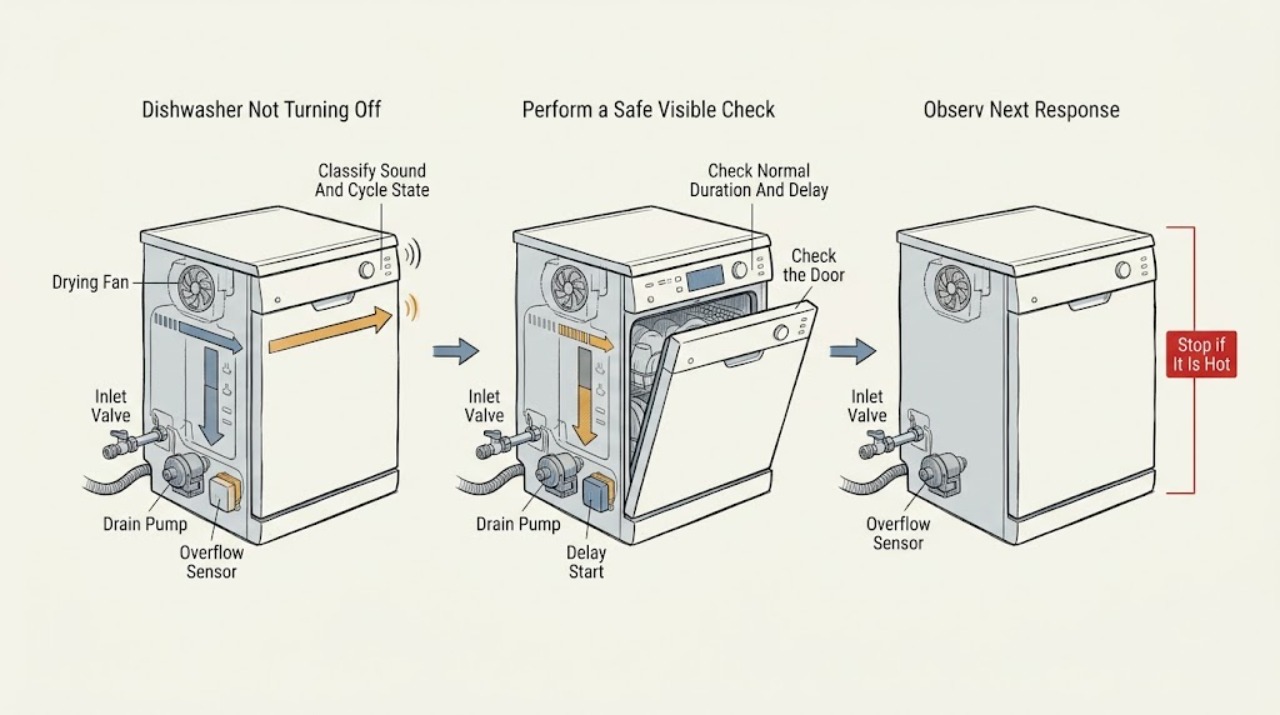
A dishwasher that sounds active after the wash may still be in a model-dependent drying or fan phase; Electrolux says fan-assisted Even Dry or Perfect Dry systems can operate at different times during a cycle, and cycle length varies by programme and options. First read the display and determine whether the cycle is truly finished, paused, delayed, or still drying. If water is entering while the dishwasher is switched off, turn off the water supply, unplug only from a safe dry location, and do not use it until repaired. If the machine is stuck in a programme, use the exact model's RESET/CANCEL or documented cancel sequence once. Water left in the tub, a constantly running drain sound, flashing lights, a PF power indication, or a cycle that repeatedly returns to the same phase changes the diagnosis toward drainage, power, door, heater, sensor, pump, valve, or control faults. Do not remove panels, bypass the door or overflow system, or perform live tests. Stop immediately for a leak near electrical parts, smoke, burning odor, abnormal heat, damaged cord, or repeated breaker operation.
Before you begin
Safety first
- The user may observe the display and sound, close the door normally, clear an obvious loading obstruction, use the exact model's delay/cancel instruction, inspect a visible drain hose, and clean only a documented accessible filter. Pump, inlet valve, heater, sensors, keypad, control board, wiring, base removal, overflow protection, and energized testing belong to qualified service.
Work through in order
Diagnostic checks
Use only checks that match the exact appliance or system and its official guide.
-
Check 1
Observe the dishwasher from a safe position and record the display, status light, selected programme, whether the door is latched, and the sound source if it can be identified without opening the machine. Note whether the cycle is complete, the fan is still running, water is circulating, the drain pump is running, or the unit is heating. Stop immediately if there is smoke, burning odor, abnormal heat, a damaged cord, a leak near electrical parts, or a breaker trip.
Expected result: Only a drying fan or normal end-of-cycle indication remains; water is circulating or draining; the display shows a delay, lock, PF, or other message; water is entering while OFF; or a hazard is present.
Next step: If the sound is a documented drying phase with no water or hazard, wait according to the exact manual. For active filling while OFF, shut off the water and isolate power safely; for a hazard, leave the dishwasher out of service and arrange urgent qualified service.
Stop if: Do not open the door into hot steam or water, touch wet electrical parts, or run the dishwasher to reproduce a hazardous sound or leak.
Why this matters
Why: Fan operation and a long selected programme can be normal on applicable models. Water entering while OFF indicates a supply or inlet fault rather than a normal drying delay. A display message or hazard changes the path immediately.
-
Check 2
Compare the selected programme and options with the exact model manual. Check for Delay Start, high-heat, sanitize, scour, ECO, AirDry, Dry Plus, or other extended settings and note whether the delay countdown is advancing. Do not judge completion from a generic time estimate or repeatedly press controls.
Expected result: A delay is active, an extended drying or heat option is selected, the cycle is within the model's expected behavior, or the timer remains unchanged well beyond the manual's guidance.
Next step: Cancel the delay or programme only with the exact model's documented control and make one normal cycle attempt. If the timer remains stuck or the appliance will not respond to OFF, stop and arrange service.
Stop if: Do not guess a button sequence, disable a safety control, or continue a cycle that is abnormally hot, leaking, or electrically unsafe.
Why this matters
Why: A delay or extended drying/heat phase can make the dishwasher seem as if it will not turn off. An unchanged timer or repeated long run after settings are normal makes water temperature, drain, sensing, heater, or control faults more likely.
-
Check 3
Check that the door is fully closed and latched without forcing it, and look for CL/Cd, a lock symbol, a flashing cycle indicator, or a programme that cannot be changed. Remove only an obvious rack or dish obstruction. If the exact model supports RESET/CANCEL or a documented OFF/cancel hold, use it once and observe whether the programme aborts and the appliance drains.
Expected result: The door is not latched; CL/Cd or another door indication clears after normal closure; reset returns to programme selection; the dishwasher drains and stops; or it ignores the documented cancel action.
Next step: Correct only the visible obstruction and follow the exact manual. If the door will not latch, the controls remain stuck, or the unit does not stop after one correct cancel, leave it unused and arrange service.
Stop if: Do not tape, hold, or bypass the latch, remove the inner door, or repeatedly force the OFF or cancel control.
Why this matters
Why: A door state or a programme already in progress can hold the controls in a start or pause state. Electrolux identifies CL/Cd as an unsuccessfully closed and latched door and says cancel controls vary. Failure after the correct action makes a latch, keypad, or control fault more likely.
-
Check 4
With hot water avoided and power handled safely, note whether water is standing above the normal filter area, the drain pump runs continuously, the unit stops during drain, or fresh water enters while the dishwasher is switched off. Inspect only the visible drain hose for a kink and the model-documented accessible filter or glass trap; if the dishwasher fills while OFF, close the water supply before doing anything else.
Expected result: Only a small amount of water remains below the filter; water covers the filter or returns after drain; the drain hose/filter is obstructed; the pump continues running; or water enters while OFF.
Next step: Clear only a documented accessible filter/trap or obvious hose kink with power and water handled safely. For active filling, turn off the water supply, unplug only from a safe dry location, do not use the dishwasher, and arrange authorized service.
Stop if: Do not remove the pump or inlet valve, reach under the base, disconnect a pressurized hose, use chemical drain cleaner, or keep resetting a water-protection response.
Why this matters
Why: Electrolux says some water at the bottom can be normal, while water over the filter, a kinked hose, clogged trap/filter, or a missing disposer knockout can prevent draining. Active filling while OFF points to a water-inlet fault and carries flooding risk; a continuously running drain response can reflect a water-level or overflow condition.
-
Check 5
Record the exact error code or flashing-light pattern, programme phase, water level, and whether the machine is heating, circulating, draining, or drying. Compare it with the exact Electrolux manual or official support page. If PF appears, treat it as a model-specific power condition; if the cycle stops in heating or drying, do not open the electrical base or test components.
Expected result: The code clears after one model-supported action; PF or a power-failure message returns; a drain, keypad, door, or other code persists; the dishwasher remains active with no code; or smoke, burning odor, abnormal heat, leak, or breaker operation appears.
Next step: Use only the exact model's documented action once. Leave the appliance out of service for a recurring code, unexplained continuous operation, or any hazard and arrange qualified Electrolux or appliance service with the recorded details.
Stop if: Do not generalize codes, remove panels, perform live tests, bypass water-level or overflow protection, or leave the dishwasher running unattended to reproduce the issue.
Why this matters
Why: Electrolux documents different meanings and actions by model: PF can indicate loss of power, flashing lights can indicate power, door, or keypad conditions, and persistent faults should be serviced. A no-code continuous run after external checks makes a pump, heater, sensor, inlet valve, or control fault more likely.
Use your observations
Decision map
Find the observation that best matches what you see, then follow the next safe action.
-
PATH 01Safety boundary
What you see
The display shows a valid cycle or drying phase, no fresh water is entering, there is no hazard, and the sound is a documented fan or normal circulation sound.
Do this next
Allow the exact model's cycle to finish and use the manual's end indication. If the fan continues well after the documented phase or the unit heats abnormally, arrange service.
Why this path and its safety boundary
Why it matters: A drying fan, AirDry-related phase, heat option, or long programme is more likely than a dishwasher that is electrically stuck ON.
Safety stop: Do not interrupt a hot phase by reaching into the tub, and stop for smoke, odor, abnormal heat, leak, or repeated breaker operation.
-
PATH 02Safety boundary
What you see
A delay countdown, lock or door indication, flashing control state, or already-started programme prevents a new selection or normal OFF action.
Do this next
Close the door normally and use the exact model's delay-cancel or RESET/CANCEL procedure once. If the state returns or the door will not latch, arrange service for the latch, keypad, or control path.
Why this path and its safety boundary
Why it matters: A user-selectable or door-control state is more likely than a failed pump, heater, or valve.
Safety stop: Do not bypass the latch, guess button sequences, or repeatedly force the controls.
-
PATH 03Safety boundary
What you see
The drain pump runs continuously, the dishwasher stops with water covering the filter, water returns after drain, or an accessible drain obstruction is found.
Do this next
Clear only the documented accessible filter/trap or visible hose kink with power safely handled. Reset once; if the pump continues, water remains, or the problem returns, leave the unit unused and arrange service.
Why this path and its safety boundary
Why it matters: A drain restriction or water-level/overflow response is more likely than a drying delay; a small amount of water below the filter alone can be normal.
Safety stop: Do not open the pump or base, remove a water-level sensor, use chemical drain products, or repeatedly run cycles to force a drain.
-
PATH 04Safety boundary
What you see
Fresh water continues entering while the dishwasher is switched OFF, or the tub level rises while the controls are not requesting a cycle.
Do this next
Turn off the dishwasher's water supply, unplug only from a safe dry location, do not use the product, and arrange an Authorized Service Center visit.
Why this path and its safety boundary
Why it matters: A water-inlet or valve fault and flooding risk are more likely than a normal fan or end-of-cycle state.
Safety stop: Do not reconnect power, open the inlet valve, disconnect a hose under pressure, or leave the water supply on while the fault is unresolved.
-
PATH 05Safety boundary
What you see
The machine ignores a model-supported cancel or OFF action, runs or heats continuously after the cycle should end, repeatedly stops or resumes at the same phase, or shows a persistent keypad, PF, heater, sensor, or control indication.
Do this next
Leave the dishwasher out of service and arrange qualified Electrolux or appliance service with the exact model, phase, display pattern, water level, and reset result.
Why this path and its safety boundary
Why it matters: An internal pump, heater, temperature or water-level sensor, inlet valve, keypad, wiring, or control-board fault is more likely; the symptom does not identify a compatible part.
Safety stop: Do not remove panels, perform live electrical tests, bypass protection, or keep cycling the dishwasher to locate the internal fault.
Helpful context
Understand the symptom
A running sound is not always a failure to switch off
Check whether the display says the cycle is complete, whether the end indicator has appeared, and whether the sound is a fan, water circulation, or drain pump. Electrolux notes that some fans run at different times during drying, and programme options can make a cycle much longer. A fan or quiet control state after washing is different from water continuing to enter, a pump running with standing water, or a machine that ignores OFF and keeps heating.
Use cancel and delay controls only for the exact model
Electrolux's general stuck-cycle guidance says RESET/CANCEL should abort a programme and drain the appliance, but it also warns that interfaces differ. Some models use a long press, while built-in and freestanding panels can have different cancel combinations. Delay start and a power-outage acknowledgement can also make the dishwasher look active or unresponsive. Record the model and use its manual instead of repeating random button presses.
Water entering while off is a stop condition
A small amount of water remaining below the filter can be normal after a completed cycle, but active filling while the dishwasher is off is different. Electrolux says to turn off the water supply, unplug the product, and not use it until the issue is fixed. A drain or overflow response can likewise leave a pump running; do not access the pump or water-level system to silence it.
Safety boundary
Stop conditions
- Stop the dishwasher for smoke, burning odor, abnormal heat, damaged cord, arcing, a leak near electrical parts, or repeated breaker operation; isolate power only from a safe, dry location.
- If water enters while the dishwasher is OFF, turn off the water supply, unplug safely, and do not reconnect or use it until repaired.
- Do not reach into hot water or steam, remove a built-in unit by the door, or run repeated cycles to reproduce a continuous-running or drain fault.
- Do not bypass the door latch, water-level or overflow protection, remove panels, disconnect pressurized hoses, or perform live electrical tests.
- Do not generalize Electrolux programme durations, drying-fan behavior, delay/cancel sequences, PF or other code meanings to another model.
Only after diagnosis
Potential parts
- door latch or interlock assembly
Consider this only when the exact model is identified and qualified diagnosis confirms the door or latch path prevents normal cancellation or end-of-cycle behavior after visible obstructions are removed.
Verify the full model and manufacturer fit information; never bypass or hold the interlock. - drain pump or drain hose
Consider this only after the accessible filter/trap and visible hose path are clear and qualified diagnosis confirms a persistent drain or continuously running pump fault.
Match the exact model and documented fit; internal pump work is service work. - water inlet valve or water-level sensor
Consider this only when qualified diagnosis confirms active filling while OFF or a repeat water-level fault after the household supply and visible hose are safe and correct.
Confirm exact model, ratings, and manufacturer fit information; do not disconnect pressurized water or bypass protection. - heating element or temperature sensor
Consider this only when a repeat heating or end-of-cycle fault is confirmed by qualified diagnosis and visible programme settings are normal.
Heating and sensing parts are model-specific and safety-critical; do not test them live. - keypad or control board
Consider this only when persistent controls, flashing lights, or a no-cancel condition remain after the exact model's door, programme, drain, and power checks and qualified diagnosis confirms the control path.
Control components are not interchangeable by brand or symptom; verify the exact model and service documentation.
When checks do not resolve it
Need a professional?
Arrange qualified service when the dishwasher ignores its model-supported OFF or cancel action, runs or heats continuously beyond the documented programme, repeatedly runs the drain pump, stops with standing water, shows a persistent door, keypad, power, heater, or sensor indication, or resumes the fault after one safe reset. If water enters while OFF, turn off the water supply, unplug only from a safe dry location, and do not use the dishwasher. Stop immediately for smoke, burning odor, abnormal heat, a leak near electrical parts, damaged cord, arcing, or repeated breaker operation.
Safety scope: The user may observe the display and sound, close the door normally, clear an obvious loading obstruction, use the exact model's delay/cancel instruction, inspect a visible drain hose, and clean only a documented accessible filter. Pump, inlet valve, heater, sensors, keypad, control board, wiring, base removal, overflow protection, and energized testing belong to qualified service.
Common questions
FAQ
Is it normal for an Electrolux dishwasher fan to keep running after washing?
Some Electrolux models have fan-assisted drying that operates at different times during a cycle, and options can lengthen the programme. Check the exact model's end indication. A fan that runs indefinitely, heats abnormally, or accompanies a fault message needs service.
How do I turn off an Electrolux dishwasher stuck in a programme?
Use RESET/CANCEL or the documented cancel sequence for the exact model once. Electrolux warns that controls differ between models and built-in/freestanding layouts. If it will not cancel or returns to the same running state, arrange service.
Why does my Electrolux dishwasher keep draining?
Water covering the filter, a kinked hose, a clogged trap/filter, or a drain or water-level response can keep the pump active. Check only the visible hose and documented accessible filter. If the pump continues after one safe reset, do not open the base; arrange service.
What should I do if my Electrolux dishwasher fills while switched off?
Turn off the dishwasher's water supply, unplug it only from a safe dry location, and do not use or reconnect it until repaired. Electrolux directs this symptom to an Authorized Service Center because of the flooding risk.
Can a delay or long cycle make the dishwasher seem like it will not turn off?
Yes. Delay Start, ECO, heat, sanitize, scour, AirDry, and other programme settings can change when the dishwasher starts or finishes. Check the exact model's display and manual before treating a long cycle as a fault.
Should I replace the pump, heater, or control board if the dishwasher will not turn off?
Not from this symptom alone. Normal drying, drain, door, power, inlet, heater, sensor, keypad, and control conditions can look similar. A qualified technician should identify the phase-specific cause and verify the exact model before selecting a part.
Read the exact guide
Official sources
- Dishwasher repair serviceElectrolux UK · Supports professional handling of drainage, pump, heating, drying, door-seal, electrical, recurring, and leak faults.
- Dishwasher does not dry or dries poorlyElectrolux UK · Supports model-dependent drying phases and options; does not diagnose a persistent control or heater fault.
- Dishwasher Error Code CL or Cd - Door is openElectrolux · The CL/Cd meaning applies only to models using that indication.
- Dishwasher Runs Too LongElectrolux · Supports programme, option, delay, and incoming-water observations; listed times are not universal for every model.
- Dishwashers - What are normal dishwasher operations sounds?Electrolux · Supports normal circulation and fan-assisted drying sound distinctions; exact cycle and fan behavior vary by model.
- Why is water in the dishwasher after it runs?Electrolux · Supports the distinction between a small amount of normal sump water and water covering the filter screen.
- Dishwasher is stuck mid-cycle and won't allow me to select a different programmeElectrolux UK · Supports RESET/CANCEL and delay-cancel concepts; exact button combinations vary by model and installation type.
- Water is being filled into the dishwasher even when it is turned offElectrolux UK · Supports the immediate water-shutoff, safe-unplug, no-use, and authorized-service boundary for active filling while OFF.
- SupportElectrolux UK · Supports using model-specific troubleshooting and documentation; it does not diagnose an unspecified internal part.
- Dishwashers - Not DrainingElectrolux · Supports visible drain-hose, filter/trap, disposer, and mid-cycle pump observations; internal pump and sensing faults need service.
- Dishwasher Error Code PF - Loss of PowerElectrolux · PF meaning and reset action are specific to models covered by this article.
- Dishwashers Flashing LightsElectrolux · The listed power, door, and keypad patterns apply to the applicable model family; other panels differ.
Community feedback
Share a repair observation
Share a plain-text repair observation. Accepted observations are published automatically; this page may take a moment to update.