
On this page
Start here
Quick answer
A GE dishwasher that seems not to turn off may be in a long wash, heating pause, drying fan period, or a sensor-adjusted cycle rather than failed. GE says many dishwashers can run two hours or more, the timer can pause for up to 30 minutes while heating, and clean-sensor or Auto Hot Start models can change cycle time. Heated Dry, Dry Boost, Power Dry, Added Heat, and sanitizing options can add substantial time; on certain GDF/GDT/PDT/CDT/DDT/ADT/ZDT models, the fan can continue quietly for 30 minutes to 4 hours after the CLEAN light comes on. Check the displayed status, selected options, door latch, standing water, and any error code. Use Start/Reset or a model-specific power reset only as the Owner's Manual directs. Stop for LEAK DETECTED, water near electrical parts, smoke, burning odor, sparks, a hot cord, or repeated breaker trips; do not remove panels, bypass the door/float/leak sensor, or make live tests.
Before you begin
Safety first
- Do not open panels, reach into pumps, force the timer, bypass door/float/leak/thermal protection, run a leaking unit, or make live measurements. Isolate power and water only when safe.
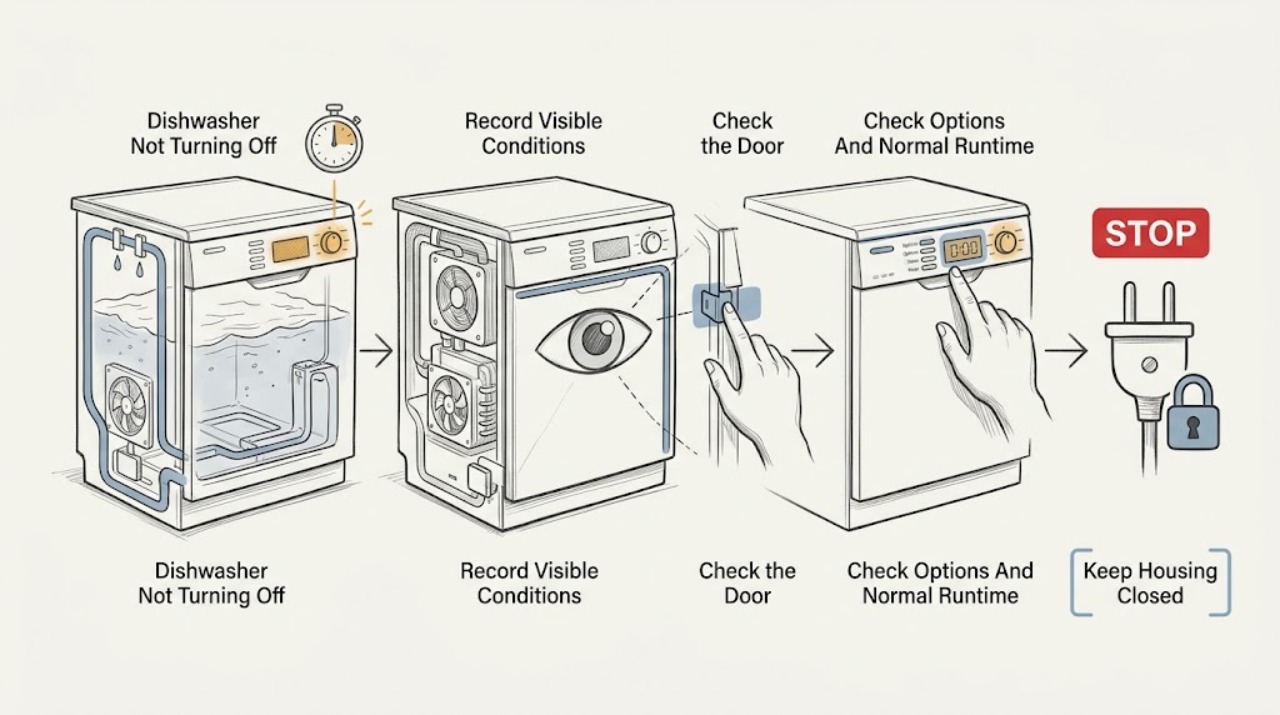
Work through in order
Diagnostic checks
Use only checks that match the exact appliance or system and its official guide.
-
Check 1
Record the GE dishwasher model number, displayed time/status, cycle, options, CLEAN or other indicator, and whether you hear a wash motor, drain pump, or only a quiet fan. Note the total elapsed time and whether the door was opened during the cycle.
Expected result: The CLEAN light is on with a fan, the timer is changing, the timer is paused, the cycle has no end indication, or the door was opened and not re-latched.
Next step: Compare the observed state with the exact model manual and the branches below before resetting or cutting power.
Stop if: Stop for leak, smoke, burning odor, sparks, hot/damaged cord, or water near electrical parts.
Why this matters
Why: A post-CLEAN fan or heating pause can be normal, while an interrupted door can leave the cycle incomplete. GE says cycle time varies with options, sensors, and incoming water temperature.
-
Check 2
Check the selected cycle and options through the normal control panel for Heated Dry, Dry Boost, Power Dry, Added Heat, Sanitize, Steam, or other heat/sensor options. Do not change wiring or open the console.
Expected result: A long/heated option is active, a heavy/sensor cycle is active, or the cycle is ordinary with no option that explains the elapsed time.
Next step: Allow the documented cycle to finish and use the model manual for expected timing. If the machine exceeds the model sequence or develops an error, move to drain/door/error checks and service.
Stop if: Do not force the timer, disable a heater, or open a hot door to inspect internal parts.
Why this matters
Why: GE says heat and sensor options extend cycle time; certain drying systems continue a fan after CLEAN. A long option-supported run is less suggestive of a control failure than an indefinite run with no end state.
-
Check 3
Confirm the door is fully latched and that no rack, pan handle, or item prevents closure. If the door was opened, close and latch it normally and observe whether the cycle resumes or the end indication appears; do not force the latch.
Expected result: The door was unlatched, the rack or dish blocks closure, the dishwasher beeps periodically, or the door is closed and the cycle still does not progress.
Next step: Remove only the visible loading obstruction and latch the door as the manual directs. If the door cannot latch or the cycle remains stuck, stop and arrange service.
Stop if: Do not bypass the latch switch, remove hinges, or run a door that cannot close and seal.
Why this matters
Why: GE says an unlatched door can interrupt a cycle and produce periodic beeps. A blocked or misaligned door can prevent completion, while a properly latched door shifts attention to water, drain, heating, or control state.
-
Check 4
Observe whether water remains in the tub and inspect only accessible drain hose, air gap, disposer connection, inlet hose, and visible filters/sump area as the model manual permits. Do not reach into a pump or remove panels while powered.
Expected result: The tub has standing water, the drain path is kinked/blocked, the inlet hose is restricted, or the tub is empty and no accessible restriction is visible.
Next step: Correct only an accessible hose, air-gap, disposer, or filter issue supported by the manual, then use Start/Reset once if directed. If water remains or the issue returns, call service.
Stop if: Do not run a leaking unit, dismantle the sump, or touch a pump or wiring.
Why this matters
Why: A drain or low-water condition can prevent a cycle from reaching its end; GE's code guidance associates C1-C5, FTD/F56, and H2O with drain/pump-out or water conditions. A clear external path does not prove the pump, valve, float, or sensor works.
-
Check 5
Record any code or words, including C1-C8, FTD/F56, H2O, PrS, LEAK DETECTED, PF, or 999, and compare it with the exact model manual. Do not apply a 999 procedure unless the model is one of GE's explicitly listed models.
Expected result: A code returns, LEAK DETECTED appears, 999 is on a listed model, 999 is on an unlisted model, or no code is displayed.
Next step: Follow only the applicable model-specific correction. For leak, sensor, persistent, or unlisted codes, leave the dishwasher off and arrange service.
Stop if: Do not bypass leak/float/pressure sensors, clear a code repeatedly, or remove panels.
Why this matters
Why: GE says code meanings are model-dependent. Drain, water, temperature, pressure-sensor, leak, and power conditions require different actions; a code alone cannot identify a part.
-
Check 6
Only with no leak or electrical hazard and when the exact manual permits it, press Start/Reset as directed or interrupt appliance power at the breaker for the documented interval. Restore power once and observe one complete start/end attempt.
Expected result: The cycle cancels and drains, the dishwasher completes normally, the display/code returns, the dishwasher continues indefinitely, or a hazard appears.
Next step: Monitor only a normal, leak-free cycle. If the code or endless-run symptom returns, leave the unit off and contact GE or qualified appliance service with the model and observations.
Stop if: Do not repeat resets, restore power to a wet/hot-damaged unit, or make live electrical tests.
Why this matters
Why: A reset may clear an interrupted or transient control state but does not prove the timer, heater, pump, sensor, or control is healthy. GE recommends service when blinking indicators or codes persist.
Use your observations
Decision map
Find the observation that best matches what you see, then follow the next safe action.
-
PATH 01Safety boundary
What you see
A heat, sanitize, sensor, heavy, or drying option is active; the timer pauses during heating or CLEAN is lit while only a fan runs.
Do this next
Allow the model-specific sequence to finish; open the door or press a keypad only if the exact model guidance says that interrupts post-CLEAN fan drying.
Why this path and its safety boundary
Why it matters: An extended cycle or post-cycle fan is more likely than a dishwasher that cannot turn off. GE documents long cycles and, on certain models, fan operation for up to 4 hours after CLEAN.
Safety stop: Do not unplug or open a hot door merely because the fan is quiet or the timer appears paused.
-
PATH 02Safety boundary
What you see
The door was opened mid-cycle, is not fully latched, or periodic beeps continue while the end indication is absent.
Do this next
Remove a visible loading obstruction, close/latch the door normally, and observe one resume attempt. Service is needed if the latch or cycle still fails.
Why this path and its safety boundary
Why it matters: The wash may be waiting for the door to be re-latched; GE says an unlatched door can interrupt the cycle.
Safety stop: Do not bypass the latch or force a misaligned door.
-
PATH 03Safety boundary
What you see
Standing water, a drain/water code, repeated pumping/filling, or a visible external hose/air-gap restriction accompanies the endless cycle.
Do this next
Correct only the accessible, model-supported restriction and reset once if directed; call service for recurrence or standing water.
Why this path and its safety boundary
Why it matters: A drain or water-level condition is more likely than a pure timer fault, although pump, valve, float, and sensor faults remain possible.
Safety stop: Do not dismantle the drain system or run a leaking machine.
-
PATH 04Safety boundary
What you see
The dishwasher has no CLEAN/end indication after the exact model's normal sequence, repeatedly returns a code, or continues indefinitely after one permitted reset.
Do this next
Leave the dishwasher off and arrange qualified service with the exact model, status, code, cycle/options, water level, and timing.
Why this path and its safety boundary
Why it matters: An internal timer/control, heater, pump, sensor, latch, or wiring fault is possible, but the symptom cannot select a part.
Safety stop: Do not open panels, bypass thermal or leak protection, or order a component from the symptom alone.
-
PATH 05Safety boundary
What you see
LEAK DETECTED, floor water, water near electrical parts, smoke, burning odor, sparks, hot/damaged cord, or repeated breaker trips is present.
Do this next
Keep clear, isolate water/power only if safe, call emergency services for active fire, and contact qualified appliance/electrical service.
Why this path and its safety boundary
Why it matters: This is an immediate stop-use condition, not a normal cycle-duration issue.
Safety stop: Do not restore power, touch wet controls, remove the toe-kick, or continue the cycle.
Helpful context
Understand the symptom
Decide whether the wash ended or only the motor stopped
Record the model number, displayed time or status, CLEAN/amber indicators, selected cycle and drying/heat options, and whether the fan, pump, or water is still present. A quiet fan after CLEAN is not the same as an active wash cycle. GE says display and beep meanings vary by model, so use the exact Owner's Manual before assuming a universal end state.
Long does not automatically mean stuck
Heating, sanitizing, soil sensing, water-temperature recovery, and drying can extend the program or make the timer appear stopped. A cycle that has no CLEAN/end indication, retains water, repeatedly refills, shows an error, or continues indefinitely after the model's expected sequence is different from a normal post-cycle fan. These observations narrow the cause but do not identify a timer, heater, pump, sensor, or control board.
Stop for leaks or electrical danger
If LEAK DETECTED appears, water is on the floor or near electrical parts, or there is smoke, burning odor, sparking, a hot/damaged cord, or repeated breaker tripping, stop the dishwasher. Isolate power and water only when safe, keep clear of wet controls, and arrange qualified service. Never bypass leak, float, door, or thermal protection and never open the toe-kick or control area to force a shutdown.
When checks do not resolve it
Need a professional?
Call qualified service when the dishwasher has no end state after the model-specific timing and one permitted reset, a persistent code, a latch or drain fault, or LEAK DETECTED. A fan after CLEAN may be normal only for models and cycles documented by GE; smoke, burning odor, sparks, hot/damaged cord, or water near electrical parts requires immediate stop-use.
Safety scope: Do not open panels, reach into pumps, force the timer, bypass door/float/leak/thermal protection, run a leaking unit, or make live measurements. Isolate power and water only when safe.
Have this ready
- Complete model and serial information, cycle/options, elapsed time, timer behavior, CLEAN/end indicator, whether only a fan runs, door/latch history, tub water level, code/flash pattern, reset result, and any leak or electrical symptoms.
Common questions
FAQ
Is it normal for a GE dishwasher to run for two hours or more?
It can be. GE says many dishwashers run two hours or more, and heating, sensor, heavy, sanitizing, or drying options can extend the time. Use the exact model manual and judge by the end indicator, water level, and error status.
Why does my GE dishwasher keep running after CLEAN appears?
On certain GDF/GDT/PDT/CDT/DDT/ADT/ZDT models, GE says a high-efficiency drying fan can run quietly for 30 minutes to 4 hours after CLEAN. Confirm the model and cycle; if the wash motor or pump continues, or the fan never ends beyond the documented behavior, call service.
Can I reset a GE dishwasher that will not turn off?
Use Start/Reset or a brief breaker reset only when the exact model guidance permits it and there is no leak or electrical hazard. A reset can clear a transient state but a recurring endless cycle or code needs service.
What if my GE dishwasher has standing water and will not finish?
Check only the accessible drain hose, air gap, disposer connection, and model-approved filter/sump area. GE associates several codes with drain or water conditions. If water remains or the machine leaks, stop using it and arrange service.
Does a 999 display have one universal reset?
No. GE publishes its 999 reset for a specific list of models. Verify the model first; for an unlisted dishwasher, use its Owner's Manual or service rather than applying another model's key sequence.
Read the exact guide
Official sources
- Dishwasher - End of Cycle Light Not WorkingGE Appliances · General GE dishwasher guidance; light colors and indicators vary by model.
- Dishwasher - Normal Run TimeGE Appliances · General GE dishwasher guidance; exact cycle time and options vary by model.
- Dishwasher - Water Shut-Off LocationGE Appliances · General GE dishwasher installation/service guidance; location can vary by home.
- Dishwasher - Error, Fault or Function CodesGE Appliances · Not all listed codes occur on all models; exact Owner's Manual controls.
- Troubleshooting for GSD2600GWWGE Appliances · Exact GSD2600GWW model identity and support layout only; included to reinforce model-specific documentation.
- Dishwasher - Blinking Lights or Beeping SoundsGE Appliances · Electronic GE dishwashers; indicator meanings vary by model.
- Dishwasher - Option DefinitionsGE Appliances · Option names and availability vary by GE model; use the exact Owner's Manual.
- Dishwasher - End-of-Cycle BeepGE Appliances · Only models beginning with the listed prefixes; not a universal GE dishwasher behavior.
- Dishwasher - 999 Error Code Appears in DisplayGE Appliances · Only the model list published by GE; not a universal reset.
Community feedback
Share a repair observation
Share a plain-text repair observation. Accepted observations are published automatically; this page may take a moment to update.