
On this page
Start here
Quick answer
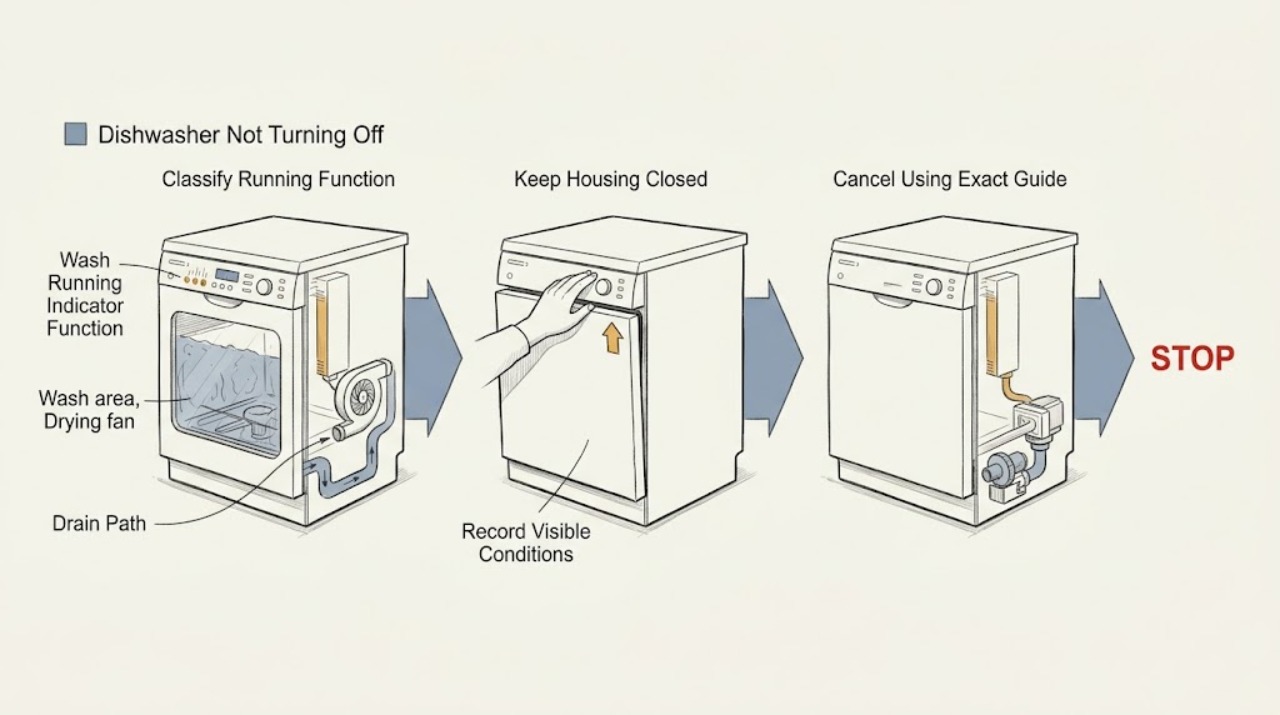
First decide what is still running. On Fisher & Paykel DishDrawer models, fan noise after a completed program can be normal: the fan assists drying and should stop after a set time or when the drawer is opened. If a wash or drain pump is still active, use the cancel procedure in the exact User Guide; some current guides require holding CANCEL, and a drawer with water may drain before it turns off. If the controls do not respond, a fault display or control lock may be involved. With power disconnected, check only the ordinary-access drain hose, sink connection, filter, and visible water or leak condition. A bent or blocked drain path can be associated with the documented A20 drain fault on applicable full-size models. If cancel does not stop the machine, the pump runs continuously, a fault returns, water is leaking, or smoke, burning smell, damaged wiring, or a wet electrical area is present, keep water and power off and arrange Fisher & Paykel or qualified service. Do not open the control, heater, pump wiring, or sealed cabinet to force a repair.
Before you begin
Safety first
- This article covers symptom classification, model-guide cancellation, recording indicators, external drain observations, owner-accessible filter care where the exact guide permits it, and safe isolation of leaks. Pump internals, heater, sensors, controls, flood protection, wiring, cabinet panels, and energized testing belong to qualified service.
Work through in order
Diagnostic checks
Use only checks that match the exact appliance or system and its official guide.
-
Check 1
From a safe position, identify what remains active after the displayed program appears finished: a light fan noise, circulating wash spray, drain-pump hum, heating or steam, repeated beeps, or a flashing fault pattern. Do not put hands into the tub or open an integrated drawer while it is operating; use the exact model User Guide to interpret indicators.
Expected result: Only a fan can be heard after the wash, or the wash motor, drain pump, heater, beeper, or fault indicators remain active.
Next step: If it is only the drying fan, allow the model's documented post-cycle period to finish. Otherwise continue to the cancel step without touching hot water, the filter plate, or moving parts.
Stop if: Stop and disconnect power if there is smoke, burning smell, sparking, a damaged cord, exposed wiring, or water reaching an electrical area.
Why this matters
Why: A post-cycle fan can be normal drying behavior on DishDrawer models. Continued pumping, washing, heating, or fault signaling is not explained by the normal fan note and needs the cancellation and fault path.
-
Check 2
Use the cancellation instruction for the exact Fisher & Paykel model. On a full-size model whose guide labels the control CANCEL, press and hold it to stop the beeping and follow the guide's clear/off sequence. On a DishDrawer, follow the guide's pause/cancel control; if there is water, remain clear while it drains. Integrated models may require the documented knock-to-pause step before opening.
Expected result: The cycle cancels and the dishwasher turns off after its normal drain; the controls remain unresponsive; or the pump, beeps, or fault display continues.
Next step: If it cancels normally, leave the unit off and inspect for standing water before the next load. If it does not, record every displayed light/code and continue with power-off checks.
Stop if: Do not keep pressing random controls, force a drawer or door open, or open the appliance while a hot or pressurized wash is active.
Why this matters
Why: A normal cancellation makes a stuck user program less likely. Unresponsive controls can reflect keylock or a fault, while continued pumping or a returned code requires the model-specific fault and drain checks rather than repeated button presses.
-
Check 3
With the dishwasher stopped as far as the controls allow, record the exact model, serial information, display text, flashing indicators, beeps, and whether one drawer or both drawers are affected. Check the exact guide for keylock/childlock and fault-reset instructions; do not map an F or A pattern from another Fisher & Paykel family.
Expected result: A fault code or defined indicator pattern is present; controls are locked but there is no fault pattern; or no code appears and the unit still will not cancel.
Next step: Apply only the documented lock release or fault-clear sequence once. If the code returns or the machine remains active, keep it out of service and give the recorded pattern to service.
Stop if: Do not clear a recurring fault by repeatedly restarting the dishwasher or by disconnecting and reconnecting power while a leak or electrical hazard is present.
Why this matters
Why: Fisher & Paykel guides use model-specific F and A fault displays. Keylock can make controls unresponsive, while a no-code persistent run leaves a control, sensor, pump, or other internal fault unresolved.
-
Check 4
Turn the dishwasher off and disconnect it from power before cleaning or maintenance. If the model permits owner access, inspect the visible drain hose for a kink or crush, the sink trap or waste connection for an obvious blockage, and the accessible filter for food debris. Remove only loose debris allowed by the exact guide; wear protection because broken glass may be present.
Expected result: The hose is bent, the sink connection is blocked, the filter is clogged, standing water remains, or the visible drain route is clear.
Next step: Correct a safe hose position or clear an owner-accessible filter as the guide specifies, then leave the unit off until the water level and leak condition are known. Arrange service if water remains or the pump still runs.
Stop if: Do not reach into an unknown pump obstruction, remove electrical covers, or use tools near glass or standing water unless the exact manual explicitly authorizes that owner step and power is disconnected.
Why this matters
Why: Fisher & Paykel documents hose, drain-connection, filter, and pump restrictions in its drain-fault guidance. A clear external path makes an internal pump, sensor, control, or installation problem more likely; it does not justify live testing.
-
Check 5
Look around the floor, under the sink, the inlet and drain connections, and the drawer or door perimeter without removing panels. If you find a leak, pooled water near wiring, a disconnected hose, or water entering the cabinet, shut off the dishwasher's water supply and electrical supply from a dry, safe location.
Expected result: There is no leak and the floor is dry; a hose or connection is visibly leaking; or water is near electrical parts or the unit continues pumping with a leak indication.
Next step: For a visible connection that can be safely isolated, leave the water and power off and arrange service. Do not restart to see whether the leak repeats.
Stop if: Do not touch plugs, junctions, wiring, or wet controls with wet hands, and do not operate the dishwasher while a leak is present.
Why this matters
Why: A dry exterior supports continuing only with model-approved drain checks. Any leak or water near electrics changes the problem to a stop-use service condition; drying or resetting without finding the source can allow another flood.
-
Check 6
Only after the exact guide's owner checks are complete, the filter is correctly refitted, the drain route is safe, and there is no leak or electrical hazard, run one short normal test while remaining nearby. Stop the test if the pump, wash motor, heater, beeper, or fault indication remains active beyond the documented program behavior.
Expected result: The program completes and only the documented fan period follows; the same pump or wash activity continues; or a fault, leak, heat, or abnormal smell returns.
Next step: Leave a repeat-fault dishwasher disconnected and book Fisher & Paykel or qualified service with the model, code, running function, water level, leak observations, and checks already performed.
Stop if: Do not bypass a fault, keep restarting a continuously pumping machine, or perform energized electrical tests.
Why this matters
Why: A normal completion supports a temporary drain or control-state issue. Repeat running after a clear drain path points to an unresolved pump, sensor, control, heater, flood-protection, door/drawer-sensing, or wiring fault.
Use your observations
Decision map
Find the observation that best matches what you see, then follow the next safe action.
-
PATH 01Safety boundary
What you see
The wash has ended, there is no fault or leak, and only a quiet fan remains; the fan stops after the documented period or when the drawer is opened as the applicable guide describes.
Do this next
No repair is needed. If the fan never stops, starts with no new wash, or is accompanied by a code, record the model and continue to service review.
Why this path and its safety boundary
Why it matters: Normal assisted drying is more likely than a dishwasher that is stuck on.
Safety stop: Do not dismantle the fan or control to make a normal drying phase silent.
-
PATH 02Safety boundary
What you see
The exact model's cancel command is accepted, any water drains normally, and the dishwasher turns off without a returning code or leak.
Do this next
Leave the unit off, confirm the filter and drain area are correctly reassembled, and use the correct start/cancel sequence on the next load.
Why this path and its safety boundary
Why it matters: A selected program or transient control state is more likely than a persistent hardware fault.
Safety stop: Do not resume use if the same symptom returns or water appears outside the tub.
-
PATH 03Safety boundary
What you see
Water remains after cancellation, the drain pump continues, the hose or sink connection is kinked or blocked, or an applicable full-size model shows A20.
Do this next
With power off, correct only a visible hose/connection issue and clean the owner-accessible filter as the exact guide allows. If water remains, the pump is jammed, or the code returns, arrange service.
Why this path and its safety boundary
Why it matters: A drain restriction or blocked filter/pump path is more likely. A20 is not a universal code across every Fisher & Paykel dishwasher family.
Safety stop: Do not run a blocked or leaking dishwasher, probe the pump with power connected, or assume A20 applies to an unverified model.
-
PATH 04Safety boundary
What you see
Buttons do not respond, a lock indicator is active, beeps repeat, or F/A indicators flash after the documented cancel attempt.
Do this next
Use the exact model guide once to release the lock or clear the documented fault, then stop using the appliance if the pattern returns and provide the code to service.
Why this path and its safety boundary
Why it matters: Keylock or a model-specific fault is more likely than a simple unfinished cycle.
Safety stop: Do not substitute a reset sequence from another model or repeatedly cycle the breaker to suppress a recurring fault.
-
PATH 05Safety boundary
What you see
A hose or tub leaks, water reaches electrical areas, smoke/burning smell/sparking occurs, the pump or heater will not stop, or the unit needs panel, wiring, sensor, control, or pump access.
Do this next
Turn off water and power from a safe dry location, keep the dishwasher out of service, and contact Fisher & Paykel or a qualified appliance technician with the full model and symptom record.
Why this path and its safety boundary
Why it matters: This is a stop-use and professional-service condition. Owner-accessible drain checks cannot safely isolate an internal leak, control, heater, pump, or protection fault.
Safety stop: Do not operate, open, dry with a heat source, bypass protection, or perform live electrical testing.
Helpful context
Understand the symptom
A fan after the cycle is not the same as a wash that will not end
Fisher & Paykel DishDrawer documentation lists fan noise after a wash as normal drying behavior. The fan may run after the program and may resume when the drawer is closed, but the guide says it stops after the set time. A continuously running wash motor, drain pump, active heating phase, repeated beeping, or a fault display is a different symptom. Note which sound or function continues before trying to cancel the program.
Cancellation and fault clearing vary by dishwasher family
Fisher & Paykel sells full-size dishwashers and DishDrawer models with different controls. The exact User Guide controls whether the drawer is paused by a knock, whether a cancel command is a press-and-hold, and how a fault is cleared. On the cited DD24 full-size guide, holding CANCEL stops the beeping and a second press clears the code; on the cited DishDrawer guide, canceling with water present drains before shutoff. Do not substitute a button sequence from another model.
Persistent running often needs a drain or service decision
If the dishwasher keeps pumping, check the visible drain route only after disconnecting power. Fisher & Paykel's full-size guides call out a kinked drain hose, blocked drain connection, blocked filter, or pump obstruction in the A20 drain-fault path. A clear hose and filter do not prove that the pump, sensor, control, heater, flood protection, or wiring is healthy; a repeat symptom belongs with an authorized or qualified technician.
Safety boundary
Stop conditions
- Stop using the dishwasher and isolate water and power from a safe location for a leak, water near electrical parts, smoke, sparking, burning smell, damaged cord, or exposed wiring.
- Do not open the tub or drawer during an active hot or pressurized program, defeat a lock or fault, repeatedly restart a continuously pumping unit, or perform energized electrical tests.
- Control, heater, drain-pump wiring, sensor, flood-protection, door/drawer-sensing, cabinet, and sealed-system work belongs to Fisher & Paykel or qualified service for the exact model.
Only after diagnosis
Potential parts
- drain hose or drain-connection components
Consider this only if the exact model's installation guidance and service diagnosis identify a kinked, split, or incorrectly routed hose or connection.
Hose routing, fittings, and connection type vary by full-size and DishDrawer model; match the complete model code and installation guide. - filter or filter plate
Consider this only when the exact guide identifies a damaged, missing, or uncleanable filter or plate after safe owner-accessible cleaning.
Do not run without the specified filter or plate; fit and cleaning procedure are model-specific. - drain pump or pump cover assembly
Consider this only after qualified diagnosis isolates a blocked or failed pump or damaged cover; a continuously running pump alone does not identify the part.
Pump assemblies differ between full-size dishwashers and DishDrawer products and require exact-model confirmation and professional service. - door/drawer sensor, control, or flood-protection assembly
Consider this only after service diagnosis finds a persistent fault after the documented cancel, lock, drain, and leak checks.
These are internal or safety-related components; do not order or bypass them from a symptom description alone.
When checks do not resolve it
Need a professional?
Arrange Fisher & Paykel or qualified appliance service when the exact cancel procedure does not stop the wash or pump, a fault returns, water remains after the model-approved drain checks, a leak or electrical hazard is present, or the diagnosis would require panels, wiring, the heater, pump, sensors, controls, or protection devices.
Safety scope: This article covers symptom classification, model-guide cancellation, recording indicators, external drain observations, owner-accessible filter care where the exact guide permits it, and safe isolation of leaks. Pump internals, heater, sensors, controls, flood protection, wiring, cabinet panels, and energized testing belong to qualified service.
Common questions
FAQ
Is it normal for a Fisher & Paykel dishwasher to keep running after the cycle ends?
A DishDrawer drying fan may continue after a completed program and should stop after the model's documented period. A wash motor, drain pump, heater, repeated beeps, fault display, or fan that never stops is a different symptom and needs model-specific cancellation and service checks.
How do I cancel a Fisher & Paykel dishwasher that is still running?
Use the exact User Guide for the model. The cited full-size guide uses press-and-hold CANCEL to stop beeping and clear a fault; the cited DishDrawer guide documents canceling the program and draining water before shutoff. Button sequences differ among families and markets.
Could a blocked drain make the dishwasher keep running?
It can be part of a drain-fault pattern. Fisher & Paykel full-size guides list a kinked or blocked drain hose, blocked drain connection, blocked filter, dirty turbidity sensor, or blocked pump under applicable A20 drain-fault guidance. Check only the owner-accessible path with power disconnected and use service if water remains or the pump continues.
Should I keep resetting the dishwasher if it will not turn off?
No. Record the exact model and fault indicators, apply the model's documented reset once, and stop if the fault returns. Fisher & Paykel requires power isolation before maintenance and directs persistent faults to Customer Care or a trained and supported service technician.
Read the exact guide
Official sources
- Dishwasher User Guide: DW60FC1X2, DW60FC1X3, DW60FC1B2Fisher & Paykel · Model-specific AU/NZ full-size dishwasher guide used to corroborate the drain-fault pattern; it does not define controls for other families or markets.
- Series 11 Integrated Tall Single DishDrawer DishwasherFisher & Paykel · The product page confirms that a listed integrated DD24 model has a DishDrawer form factor, knock-to-pause, electronic fault indicator, fan-assisted drying, flood protection, and SmartDrive motor; these features are not universal across all Fisher & Paykel dishwashers.
- Help & SupportFisher & Paykel · Brand support page directing owners to model manuals and Fisher & Paykel technicians or authorized service partners.
- Dishwasher User Guide: DW24UNT2X2Fisher & Paykel · Model-specific full-size dishwasher guidance; use the complete appliance model before applying the controls or maintenance steps.
- DishDrawer Dishwasher User Guide: DD24DTX6HI1, DD24DTX6I1, DD24STX6HI1, DD24STX6I1Fisher & Paykel · Use only for the listed DD24 DishDrawer models or as a model-family example; do not treat its button symbols or code mapping as universal.
Community feedback
Share a repair observation
Share a plain-text repair observation. Accepted observations are published automatically; this page may take a moment to update.