
On this page
Start here
Quick answer
First separate a completely dark Electrolux dishwasher from one whose panel lights up but will not begin a cycle. For a dark unit, check the accessible plug, outlet, and breaker or fuse from a safe, dry position; a hardwired connection and any repeated trip require qualified electrical service. For a lit panel, select a cycle, press START/CANCEL, and close the door immediately so the latch can engage. Check that DELAY START or CHILD LOCK is not active and use only the model's documented unlock or cancel control. Inspect the door and gasket externally for a rack, utensil, kick plate, or soil preventing full closure, but do not tape down, bypass, or probe the latch. Confirm the water supply is on and look only for an obvious external drain-hose kink or a full tub that prevents normal start. Read any CL/Cd, delayed-start, PF, i20, i40, or flashing-light indication against the exact model guide. If the dishwasher remains dead, the panel resets, the latch does not engage, the drain/water problem persists, a breaker trips, or there is water near electrics, smoke, burning odor, heat, or damaged wiring, stop and arrange qualified service. Do not remove panels, make live measurements, or bridge the door interlock.
Before you begin
Safety first
- The user may observe panel state, check an accessible plug/cord and household breaker from a dry safe position, clear an obvious door obstruction, use documented controls, and inspect visible water/drain conditions. Internal power, console, latch/interlock, wiring, water valve, drain pump, and hardwired connections are for qualified personnel.
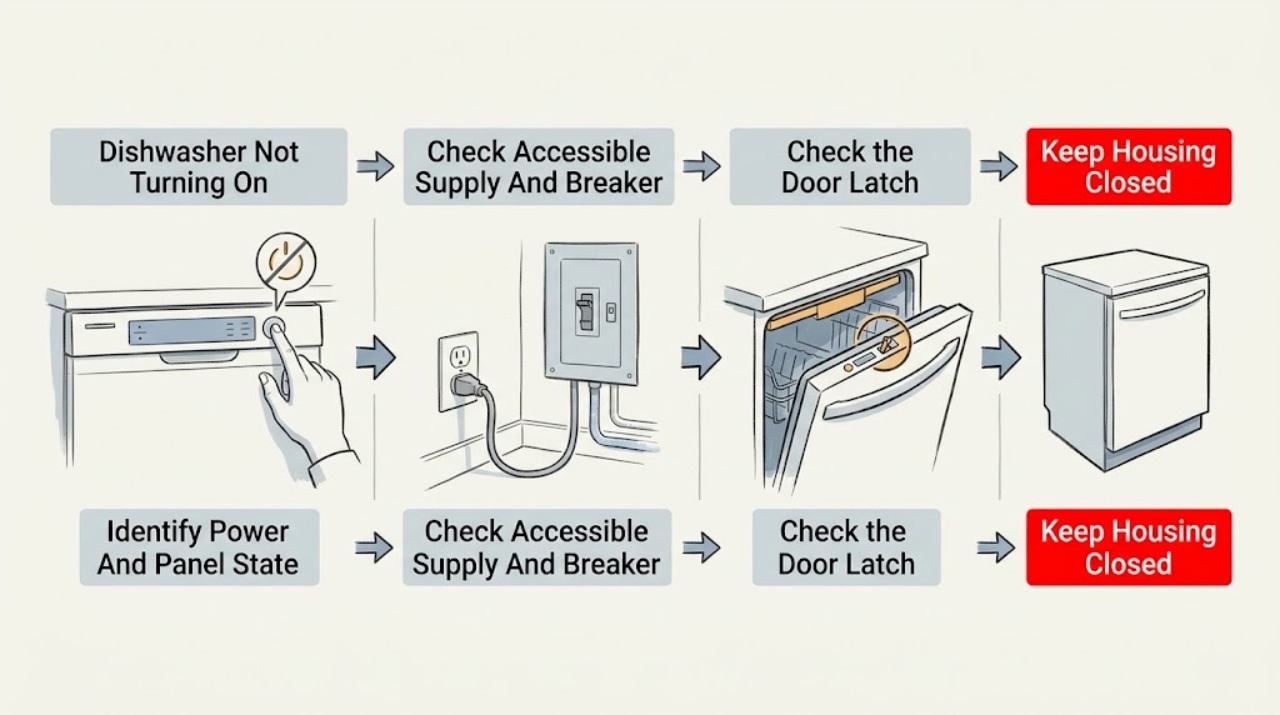
Work through in order
Diagnostic checks
Use only checks that match the exact appliance or system and its official guide.
-
Check 1
Read the full Electrolux model and observe the dishwasher before pressing controls. Note whether the display and indicator lights are completely dark, the panel lights/beeps but no cycle starts, the panel flashes, or a code such as CL/Cd, PF, 01–24, i20, or i40 appears. Record whether the symptom followed an outage, cleaning, installation, or an interrupted cycle.
Expected result: The panel is fully dark, the panel is lit but idle, a door/lock/delay/power/drain indication appears, or the model cannot be identified.
Next step: Use the exact model guide and follow the matching external branch. If a hazard is present or the model is unknown, stop using the dishwasher and arrange service.
Stop if: Do not remove the console or use live measurements to identify the fault.
Why this matters
Why: A dark panel points first to supply or protection. A lit panel shifts attention to the start sequence, door latch, control lock, delay, water, drainage, or a control fault. An indication is model-specific evidence, not permission to open the console.
-
Check 2
With the floor and hands dry, check the accessible plug and cord, confirm the dishwasher has not been unplugged, and inspect for scorching, looseness, moisture, or heat. Check the household breaker or fuse once after a recent outage. If the dishwasher is hardwired, do not remove a cover; treat the supply connection as an electrician's task.
Expected result: The plug is loose/unplugged, the outlet or breaker/fuse has no power, the cord/plug is damaged or hot, the supply is hardwired, or the external supply appears normal.
Next step: For a dead or repeatedly tripping household circuit, use qualified electrical service. For a damaged/hot/wet cord or plug, stop using the dishwasher and arrange service. If supply is normal, continue with the lit-panel start checks.
Stop if: Do not reset protection repeatedly, open a junction/outlet, use an extension to bypass the circuit, or continue with a hot/damaged cord.
Why this matters
Why: A disconnected supply or single protection event can explain a dark panel. Heat, damage, moisture, a hardwired fault, or a repeated trip is an electrical safety boundary. A normal external supply makes an appliance-side control, latch, or internal power issue more likely.
-
Check 3
Inspect the door, gasket, racks, utensils, kick plate, and tub edge for an obvious obstruction that prevents full closure. Select a cycle, press START/CANCEL once, and close the door immediately as the model's start instructions require. Observe whether the door latches normally and whether the panel clears a CL/Cd or flashing-door indication.
Expected result: The door is obstructed or not fully closed, the latch engages and the cycle begins, CL/Cd or door lights remain, the door springs open or will not latch, or the visible closure path is clear.
Next step: Clear only the obvious external obstruction and make one normal start attempt. If the door will not latch, remains misaligned, or the indication persists, stop and arrange service.
Stop if: Do not tape, hold, short, or bypass the latch/interlock, force the door, remove hinges, or probe the switch.
Why this matters
Why: Electrolux states that the dishwasher will not start without a securely closed and latched door. A visible rack or kick-plate interference is an external setup issue; a persistent CL/Cd or latch failure makes the door hardware/interlock or alignment more likely and does not identify a safe replacement part.
-
Check 4
With the door closed and no hazard, check the display for LOC/lock or a delay time. Use only the documented model control to release CHILD LOCK, cancel DELAY START, acknowledge a power-failure state, or reselect the cycle after an interruption. Press START/CANCEL once and close the door immediately; do not hold unrelated buttons or repeatedly cycle power.
Expected result: A lock indicator or LOC is present, a 01–24/delay time is displayed, the cycle was interrupted, the panel shows a power-failure or flashing-light state, or no lock/delay indication is present.
Next step: Apply the model-specific unlock/cancel/start sequence once. If the state will not clear, the panel resets, or the dishwasher still does not start, record the display and arrange service.
Stop if: Do not bypass the control lock, short keypad contacts, or repeatedly reset the dishwasher to clear a persistent state.
Why this matters
Why: A control lock, delayed start, or power-outage acknowledgement can intentionally prevent an immediate wash. Electrolux documents different lock behaviors by tub/control style, so the icon and exact model guide matter. A normal panel with no lock/delay state shifts attention to water, drainage, latch hardware, or internal control.
-
Check 5
Confirm the dishwasher's water supply valve is open and inspect only the visible inlet/drain routing for an obvious kink, obstruction, or recent installation change. If the tub has excessive standing water or the display shows i20/i40, follow the model manual for accessible filter/glass-trap care and the drain path; do not disconnect hoses or remove pump covers.
Expected result: The water supply is off, the drain hose is kinked or incorrectly routed, the tub is full or water covers the filter, i20/i40 appears, or water and visible drainage conditions are normal.
Next step: Correct only an obvious accessible valve or hose-routing issue and clean the user-accessible filter as the exact manual permits; then make one normal start/drain attempt. If water remains, returns, leaks, or the code persists, stop and arrange appliance/plumbing service.
Stop if: Do not pull out a built-in dishwasher, disconnect plumbing, reach into a pump/sump, or repeatedly run a cycle with standing water.
Why this matters
Why: Electrolux says the unit may not run without incoming water and that drain-hose, filter, sump, or disposer conditions can prevent starting. A small amount of water may be normal on some models, while excessive water or a returning drain indication points to incomplete drainage rather than a proven control-board failure.
-
Check 6
Record the model, panel state, supply/breaker result, door-latch result, lock/delay/start sequence, water supply, visible drain condition, code or flashing pattern, and any leak, smell, heat, smoke, or unusual sound. Keep the dishwasher off if the fault persists and protect the floor from standing or leaking water.
Expected result: The dishwasher starts after a safe external correction, or remains dark, shows stable lights but does not start, cannot latch, resets/flashes, retains a drain or power code, leaks, or trips protection.
Next step: Provide the record and exact model to Electrolux or qualified appliance service; use a qualified electrician for the household supply. Stop immediately for smoke, burning odor, water near electrics, hot/damaged wiring, or repeated protection trips.
Stop if: Do not remove panels, perform live tests, bridge the latch, replace internal parts, or keep resetting protection or error states.
Why this matters
Why: A stable recovery supports a supply, door closure, lock/delay, water, or visible drain-state cause. Persistent no-start after those checks makes the control, latch/interlock, internal power, wiring, drain, or water-valve path more likely; the failed component cannot be identified safely from outside.
Use your observations
Decision map
Find the observation that best matches what you see, then follow the next safe action.
-
PATH 01Safety boundary
What you see
The display and all indicators are dark, the accessible plug is loose, the outlet/breaker has no power, or a cord/plug is hot, wet, scorched, or damaged.
Do this next
Stop using the dishwasher. Arrange qualified electrical service for the circuit or qualified appliance service for the cord/connection, and protect dishes/food as needed.
Why this path and its safety boundary
Why it matters: An external supply or protection issue is more likely for a completely dark unit. Heat, moisture, damage, hardwiring, or a repeated trip is an electrical hazard.
Safety stop: Do not repeatedly reset protection, open a hardwired connection, or use a damaged cord or extension.
-
PATH 02Safety boundary
What you see
The panel lights, but LOC/child lock, a delay time, a power-failure state, or a cycle-resume state is displayed and the door can close normally.
Do this next
Use the exact model's unlock/cancel/START sequence once, close the door immediately, and observe a normal start. If the state persists, arrange service.
Why this path and its safety boundary
Why it matters: A documented control state is more likely than a failed motor or internal power component. Exact lock and cancellation behavior varies by model.
Safety stop: Do not short the keypad, bypass the lock, or repeatedly cycle power.
-
PATH 03Safety boundary
What you see
The panel responds but the cycle does not begin, CL/Cd or door lights remain, the door springs open, or a rack/kick plate/gasket prevents full closure.
Do this next
Clear only the visible obstruction and make one normal start attempt. If the door will not latch or the code remains, keep the dishwasher out of service and arrange qualified appliance service.
Why this path and its safety boundary
Why it matters: Door closure, latch alignment, or the door interlock is more likely than a no-power fault. A visible obstruction is user-removable; a persistent latch symptom needs service.
Safety stop: Do not force, tape, hold, short, or probe the latch/interlock.
-
PATH 04Safety boundary
What you see
The door closes and the panel is usable, but water is off, the tub has excessive standing water, the drain hose/filter/sump condition is abnormal, or i20/i40/PF/flashing indicators persist.
Do this next
Use only accessible model-approved water, filter, drain, and error-cancel checks once. If water remains/returns, the line must be disconnected, or the code persists, arrange appliance/plumbing service.
Why this path and its safety boundary
Why it matters: An incoming-water, incomplete-drainage, filter/sump, or power-failure state is more likely. The code does not by itself prove a drain pump or control-board failure.
Safety stop: Do not reach into the sump, remove pump covers, disconnect hoses, or repeatedly start a cycle with standing water.
-
PATH 05Safety boundary
What you see
The supply, door closure, lock/delay/start sequence, water supply, and visible drain checks are normal, but the dishwasher remains dead or lit-but-inactive, resets, trips protection, leaks, or develops smoke/burning odor/abnormal heat.
Do this next
Stop using the dishwasher and arrange qualified Electrolux/appliance service; use qualified electrical service for the household circuit. Provide the model and complete symptom record.
Why this path and its safety boundary
Why it matters: An internal control, power, wiring, latch, valve, drain, or other appliance fault is more likely after the external checks. Hazard signs make continued operation unsafe.
Safety stop: Do not open panels, perform live tests, bypass interlocks, repeatedly reset the breaker, or restore power after water or electrical damage.
Helpful context
Understand the symptom
Decide whether the dishwasher has power
A completely dark panel is a supply-path question first. A panel that lights, beeps, or shows a code has at least partial power and should be investigated through the start sequence, door latch, lock, delay, water, and drain states. Do not assume that a lit panel means the motor or control board is healthy, and do not use a live test to prove it.
A lit panel still may be intentionally waiting
Electrolux documents several non-fault states that look like a dishwasher that will not start: CHILD LOCK, DELAY START, a power-failure acknowledgement, a door that is not latched, or a cycle that was interrupted and needs START again after the door closes. The exact buttons and display vary by model. Use the model guide and make one normal start attempt rather than holding random keys.
Water and drainage can prevent a cycle from beginning
Electrolux lists an open water supply and an incorrectly installed or clogged drain path among no-start causes. An i20 or i40 indication points toward drainage, filter, sump, or disposer-connection checks, not an immediate control-board diagnosis. Inspect only visible hoses and accessible filters as the manual permits; do not pull out a built-in unit or open the pump area.
Safety boundary
Stop conditions
- Stop using the dishwasher for smoke, burning/electrical odor, arcing, abnormal heat, a hot/wet/damaged cord or plug, water near electrical parts, or repeated breaker/GFCI trips; isolate power only from a safe, dry position.
- Do not bypass, tape, hold, short, or probe the door latch/interlock or control lock, and do not open the console or internal panels.
- Do not pull out a built-in unit, disconnect water/drain hoses, remove pump covers, or perform live-voltage, continuity, or component tests.
- Do not repeatedly reset protection, error codes, or the dishwasher to force a start, especially with standing water or a leak.
- Protect the floor and stop for wastewater return, persistent water covering the filter, an active leak, or a fault that remains after the exact model's external checks.
When checks do not resolve it
Need a professional?
Arrange qualified Electrolux/appliance service when the dishwasher remains dark with a normal household supply, the panel lights but the model-specific START/unlock/delay sequence and door closure do not begin a cycle, CL/Cd or flashing indicators persist, water or drain conditions remain abnormal, or the panel resets. Use qualified electrical service for a dead, loose, hot, scorched, wet, hardwired, or repeatedly tripping supply. Stop immediately for smoke, burning odor, arcing, abnormal heat, water near electrical parts, or an active leak.
Safety scope: The user may observe panel state, check an accessible plug/cord and household breaker from a dry safe position, clear an obvious door obstruction, use documented controls, and inspect visible water/drain conditions. Internal power, console, latch/interlock, wiring, water valve, drain pump, and hardwired connections are for qualified personnel.
Common questions
FAQ
Why is my Electrolux dishwasher completely dark?
Check the accessible plug, outlet, and household breaker or fuse from a dry, safe position, especially after an outage. If the circuit is dead, repeatedly trips, or the cord/plug is hot, wet, loose, or damaged, stop using the dishwasher and arrange qualified electrical or appliance service.
Why does my Electrolux dishwasher have lights but not start?
Check the selected cycle, START/CANCEL action, immediate door closure, CHILD LOCK, DELAY START, and any code or flashing-light state. If the door will not latch or the panel remains inactive after the model-specific sequence, arrange service rather than bypassing the latch or control.
What does CL or Cd mean on an Electrolux dishwasher?
Electrolux uses CL/Cd to indicate that the door has not been successfully closed and latched. Check for an obvious rack, utensil, gasket, or kick-plate obstruction and close the door normally. If the code remains or the latch will not engage, arrange service; do not bypass it.
How do I cancel a delayed start on an Electrolux dishwasher?
Use the exact model's cancel control. Electrolux documents 01–24 as a delayed option and describes cancel actions that may cancel the cycle, start a drain routine, or shut the unit off. Do not hold unrelated buttons or repeatedly reset power.
Can a drain problem stop an Electrolux dishwasher from starting?
Yes. Electrolux lists an incorrectly installed or clogged drain path, filter/sump debris, and incomplete drainage among no-start or error conditions. Inspect only visible routing and accessible filters as the manual permits. If water remains, returns, leaks, or the hose must be disconnected, arrange service.
When should I stop trying to start my Electrolux dishwasher?
Stop for smoke, burning odor, arcing, abnormal heat, a hot/damaged cord or plug, water near electrical parts, repeated breaker trips, an active leak, wastewater return, or a latch that cannot close safely. Isolate power only from a safe, dry position and arrange qualified service.
Read the exact guide
Official sources
- Dishwasher Error Code 01-24 - Delayed option has been activatedElectrolux · Models that display the 01–24 delayed-option state; exact cancel behavior can vary.
- Dishwasher Not StartingElectrolux · General Electrolux dishwasher guidance; exact door, water, drain, and control details vary by model.
- Dishwasher Error Code CL or Cd - Door is openElectrolux · Models displaying CL or Cd; other models may use a different door indicator.
- Dishwashers Flashing LightsElectrolux · Models with the listed flashing-light patterns; exact indicators vary by model.
- Dishwashers - Not DrainingElectrolux · General Electrolux drainage guidance; accessible filters, hoses, and reset controls vary by model.
- What should I do if my dishwasher is not starting?Electrolux · General Electrolux dishwasher guidance; controls and cycle behavior vary by model.
- Dishwasher - Water LeakingElectrolux · General Electrolux dishwasher leak guidance; installation and access vary by model.
- User manualsElectrolux · Manual lookup route; applicable controls, error codes, and wiring depend on model/PNC and market.
- Dishwasher Error Codes and Alarms GuideElectrolux · Models using the listed Electrolux error/display conventions; codes and reset behavior vary by model.
- Book Electrolux Appliance RepairElectrolux · Electrolux USA service route; regional service eligibility may vary.
- Dishwashers - How do I set the child lock feature?Electrolux · Models with the described plastic-tub or stainless-steel control-lock behavior; other models may use different buttons or displays.
Community feedback
Share a repair observation
Share a plain-text repair observation. Accepted observations are published automatically; this page may take a moment to update.