
On this page
Start here
Quick answer
First separate a completely dead Electrolux dishwasher from one that has power but will not start, fill, wash, drain, heat, or finish. Check the outlet and breaker from a safe position, then confirm a programme is selected, the door closes and latches, Delay Start or Demo mode is not active, and a model-appropriate reset is used once. If it does not fill, check the open water tap, visible inlet-hose condition, and model-permitted inlet filter; if it stops with water, inspect only the accessible filters, spray arms, drain path, and sink connection. Record the full code or flashing pattern rather than guessing: Electrolux maps families of codes to inlet, drain, leak, wash-motor, water-level, and heating conditions, but controls vary by model. A leak, repeated code, hot or damaged electrical connection, burning smell, smoke, repeated trip, or unresolved pump, valve, heater, control, or wiring symptom requires stopping the appliance and arranging qualified service.
Before you begin
Safety first
- The user may inspect power availability from a safe position, select a programme, close the door normally, follow the exact model's ordinary reset, check the tap and visible hose, clean permitted filters and spray arms after shutdown, and inspect visible drain or gasket conditions. Qualified service must handle the inlet valve, wash or drain pumps, heater, temperature or water-level sensors, control electronics, internal wiring, leak base, door hardware beyond ordinary adjustment, and energized testing.
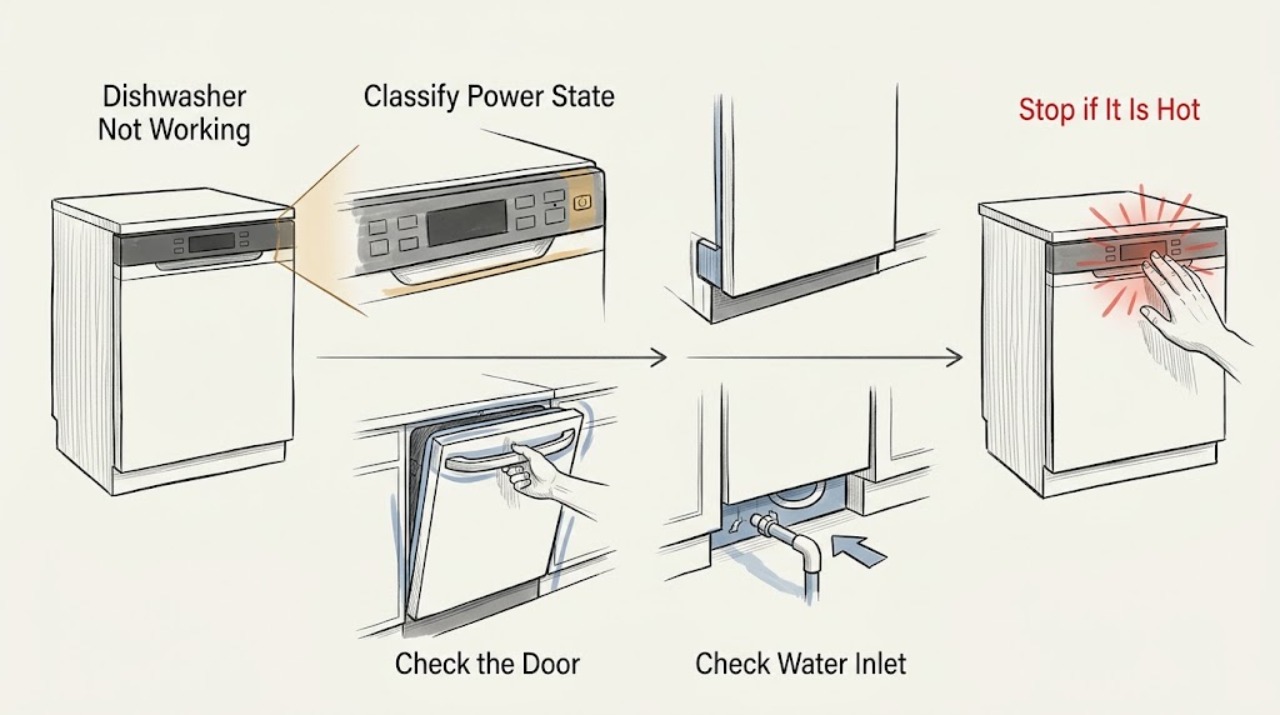
Work through in order
Diagnostic checks
Use only checks that match the exact appliance or system and its official guide.
-
Check 1
From a dry, accessible position, check whether the control panel, indicators, or interior light respond. Inspect the plug and cord only for obvious looseness or damage. If the socket is safely accessible, test it with a known-good appliance; do not remove an outlet cover or pull an integrated dishwasher out.
Expected result: The panel and lights are completely dark, the socket also has no power, a breaker or safety switch has operated, or the dishwasher has power but responds to controls.
Next step: For a safe, resettable household protection event with no damage, follow the home's normal reset procedure once and observe without opening the appliance. If supply remains absent, use a qualified electrician; if the socket works but the dishwasher stays dead, arrange authorised appliance service.
Stop if: Do not use a damaged cord or outlet, bypass grounding, keep resetting protection, or open the dishwasher electrical compartment.
Why this matters
Why: A dark panel with a dead socket points to household supply, plug, fuse, or breaker territory. A working panel means the dishwasher has at least some power, so a door, programme, water, drain, control, or subsystem condition is more likely. A damaged cord, hot connection, smoke, or repeated trip is a safety issue.
-
Check 2
If the dishwasher has power, select a normal programme before closing the door. Confirm that the door closes fully with its normal click, then inspect the display for Delay Start, a previous programme, a lock, Demo mode, or a flashing programme indicator. Use only the exact model manual for reset or cancel keys.
Expected result: No programme was selected, the door does not latch or is obstructed, Delay Start or a previous cycle is active, Demo mode is shown, or the correct programme is selected and the door closes.
Next step: Remove only an item that prevents closure, cancel a delay or old cycle with the documented model procedure, and make one normal start attempt. If the door remains misaligned or the programme will not start after the model-specific reset, arrange service.
Stop if: Do not bend the cabinet, bypass the door latch, enter undocumented service mode, or repeat resets while water or electrical warnings are present.
Why this matters
Why: Electrolux says a programme starts only when the door is detected as fully closed and that an old programme, delay, or Demo mode can make a powered dishwasher appear not to work. A correctly closed door and normal selection make a latch, control, water, or other cycle fault more likely if the machine still does not start.
-
Check 3
For a powered dishwasher that starts but does not fill, note the complete code or beep pattern. Check that the appliance water tap is open, the home's water is flowing, and the visible inlet hose is not kinked, twisted, or damaged. Close the tap before any model-permitted inlet-filter access; do not loosen a damaged hose.
Expected result: The tap is closed, water pressure is low, another appliance is using the supply, the inlet hose is kinked or damaged, the inlet filter is scaled or blocked, or these checks are normal.
Next step: Restore the tap or household supply, straighten an undamaged visible hose, and clean only the inlet filter procedure specified by the exact manual. Make one test cycle; if the code or no-fill symptom returns, close the tap and arrange service.
Stop if: Do not run with a damaged hose, remove a pressurised connection, probe the inlet valve, or keep cycling a dishwasher that is leaking or repeatedly showing a water fault.
Why this matters
Why: Electrolux identifies i10/i11 and related indications as water-inlet problems and lists a closed tap, low supply, restricted hose, or clogged inlet filter as possible causes. A damaged hose needs inspection. Normal visible supply conditions make an inlet valve, sensor, control, or other internal water-path problem more likely, but do not identify it.
-
Check 4
If the dishwasher fills but does not wash properly or appears to stop during washing, switch it off and wait for hot water or steam to settle. Remove and clean only the user-removable filters as the model manual shows, confirm the sump area is free of visible food debris, and check that the spray arms are unobstructed and can move freely by hand when the machine is off.
Expected result: Filters or the accessible sump are blocked, a spray arm is obstructed by a dish or debris, excess foam is present, or the visible wash path is clear but circulation is absent or abnormal.
Next step: Correct the load, clear only removable debris, and use the exact manual's filter and spray-arm procedure before one normal test. If the pump remains silent, runs abnormally, or a wash-motor indication returns, stop and arrange service.
Stop if: Do not reach into a running tub, force a pump impeller, remove internal covers, or use household hand-washing detergent to test a foamy dishwasher.
Why this matters
Why: Electrolux links blocked filters or sump, obstructed spray arms, incorrect loading, excess foam, and programme choice with poor washing or interruptions. A clear accessible path with absent circulation makes a wash motor, pump, water-level, control, or internal obstruction problem more likely.
-
Check 5
If water remains in the tub, the cycle stops at drain, the drain pump hums continuously, or a leak indication appears, close the water tap before investigating. With power off, inspect only the accessible filters, sump, door gasket, visible drain hose, and sink connection for blockage, kinks, or a connection issue. Do not tilt or pull out an integrated unit.
Expected result: The filters or sump are blocked, the drain hose or sink connection is restricted, the door gasket is damaged, water is visible at the base, the drain pump runs continuously, or the visible path is clear.
Next step: Clear only accessible debris and correct an obvious visible hose or sink connection issue according to the exact manual. For a leak, base water, continuous pump, or returning i30 pattern, keep the tap closed and arrange service rather than repeating cycles.
Stop if: Do not operate with a leak, bypass anti-flood protection, dismantle the pump, pull out a heavy integrated dishwasher, or place hands into standing water near electrical parts.
Why this matters
Why: A drain restriction can leave water and interrupt a cycle. Electrolux says i30 or three indications can mean water in the base and anti-flood operation, and a continuously returning leak condition needs service even if the code temporarily clears. A clear visible path does not rule out an internal pump, valve, hose, or leak fault.
-
Check 6
If the programme runs but dishes and the tub remain cold, drying fails, or a code or flashing pattern appears, record the full code exactly and match it to the exact model's support page or manual. Do not infer a heater failure from a short or quick programme alone; check the selected programme and accessible filters first.
Expected result: The programme is a low-temperature or quick option, filters or the sump are blocked, an i60/i61/i69/i6C heating indication appears, PF is shown, another code appears, or the code returns after the permitted reset and cleaning checks.
Next step: Use the matching manual, select an appropriate programme, and complete only its ordinary filter or reset guidance once. If heating remains absent, PF returns, any code repeats, or the appliance cannot complete a programme, leave it off and arrange qualified service.
Stop if: Do not expose or bridge the heating element, measure live voltage, bypass a temperature sensor, or keep using an appliance with a supply-voltage or heating warning.
Why this matters
Why: Electrolux says programme choice and blocked filters can affect results, while its support maps the i60 family to heating problems and PF to low or out-of-range supply voltage. Other code families point toward inlet, drain, leak, water-level, or wash-motor paths. Code meanings and button behavior remain model-dependent.
-
Check 7
After one safe correction to power, door, programme, water supply, accessible filter, spray arm, drain connection, or model-specific reset, supervise one normal cycle from outside the machine. Record whether it fills, sprays, drains, heats, completes, and leaves any code, leak, unusual noise, smell, or electrical warning.
Expected result: The cycle completes normally, the same stage fails again, the same code returns, water remains, heat is absent, or a leak or electrical warning appears.
Next step: Stop if the fault returns, close the water tap for leak symptoms, isolate power only if safe, and provide the technician with the model, full code, failing stage, water status, and checks already completed.
Stop if: Do not run repeated cycles to force a result, open the base, defeat a safety device, or perform any energized internal test.
Why this matters
Why: Recovery after an external condition supports that condition as the immediate cause. A repeat failure at the same stage makes an internal inlet valve, pump, motor, drain system, heater, sensor, control, wiring, or leak fault more likely; the symptom alone cannot identify the component.
Use your observations
Decision map
Find the observation that best matches what you see, then follow the next safe action.
-
PATH 01Safety boundary
What you see
The control panel and indicators are dark, and the safely tested socket has no power or the household protection device has operated.
Do this next
Use the home's safe power check or reset procedure once when there is no damage. If the socket remains dead, use an electrician; if the socket works but the dishwasher remains dark, arrange authorised appliance service.
Why this path and its safety boundary
Why it matters: A household supply, plug, fuse, breaker, or electrical connection is more likely than a water or wash-stage fault.
Safety stop: Do not use a hot or damaged connection, bypass protection, or open the dishwasher electrical compartment.
-
PATH 02Safety boundary
What you see
The panel responds, but no programme begins, a cycle indicator flashes, the door does not latch, or Delay Start, a prior cycle, or Demo mode is active.
Do this next
Close the door normally, remove only an obstruction, cancel the delay or prior cycle using the exact manual, and make one start attempt. Escalate if the latch or control still prevents starting.
Why this path and its safety boundary
Why it matters: A selection, door-detection, timer, stored programme, Demo, or model-specific control state is more likely than a no-power condition.
Safety stop: Do not bypass the latch, deform the cabinet, or copy a reset combination from another model without checking the manual.
-
PATH 03Safety boundary
What you see
The dishwasher starts but does not fill, or it fills but does not circulate water; an inlet indication, silent wash action, or poor spray result is present.
Do this next
Check the tap, visible hose, model-permitted inlet filter, filters, sump, spray arms, and loading with power and water safety observed. If the condition or code returns, arrange service.
Why this path and its safety boundary
Why it matters: For no fill, supply, inlet hose, inlet filter, inlet valve, water-level sensing, or control causes are possible. For a filled tub with no circulation, accessible loading and filters may be involved, but a wash pump or motor fault becomes more likely when those are clear.
Safety stop: Do not loosen a pressurised hose, force a pump, access internal valves, or run a leaking appliance.
-
PATH 04Safety boundary
What you see
The programme stops with water left inside, the drain pump hums continuously, water is leaking, or i30/three indications appear.
Do this next
Close the water tap, inspect only accessible filters, sump, gasket, visible hose, and sink connection, and follow the exact manual. Keep the tap closed and arrange service for any leak, base water, continuous pump, or recurring code.
Why this path and its safety boundary
Why it matters: An accessible drain restriction or foaming/loading condition is possible, but continuous pumping or a returning i30 pattern makes base water, leak protection, drain pump, hose, or another internal fault more likely.
Safety stop: Do not bypass anti-flood protection, tilt or pull out an integrated appliance, or reach into water near electrical parts.
-
PATH 05Safety boundary
What you see
A cycle completes cold, dishes remain wet, an i60-family or PF indication appears, the same code returns, or the dishwasher has a hot connection, burning smell, smoke, spark, or repeated trip.
Do this next
Leave the appliance off, isolate power only if safe, and arrange qualified appliance or electrical service. Record the complete code and the stage at which it appeared.
Why this path and its safety boundary
Why it matters: Programme choice and filters can affect results, but a recurring heating or supply indication points toward the heater, temperature sensing, control, or electrical supply. A smell, smoke, spark, hot connection, or repeat trip is a stop condition regardless of the code.
Safety stop: Do not continue cycles, expose the heater, test live wiring, bypass a sensor, or keep resetting a supply protection device.
-
PATH 06Safety boundary
What you see
The safe external checks and one model-specific reset do not restore a complete cycle, or an inlet valve, wash pump, drain pump, heater, sensor, control, or wiring symptom persists.
Do this next
Stop using the dishwasher and arrange authorised Electrolux or qualified appliance service with the model, code, failing stage, and observed checks.
Why this path and its safety boundary
Why it matters: The remaining fault is likely inside the appliance or its installed supply and cannot be identified safely from the broad phrase not working.
Safety stop: Do not remove panels, bridge safety components, access the base, or perform energized testing.
Helpful context
Understand the symptom
Start with the symptom, not the brand name
Not working can mean no lights, no start, no water, no spray action, water left in the tub, a mid-cycle stop, cold water, or an error indication. These are different decision paths. Check the model and rating label before using a control combination or interpreting a flashing light; Electrolux says its general reset examples may represent a different interface.
Stop for water or electrical danger
Close the water tap and leave the dishwasher off if it is leaking, an anti-flood indication returns, or water is collecting where it should not. If there is a burning smell, smoke, sparking, a hot or damaged cord or outlet, or a repeated electrical trip, isolate power only from a safe dry position and arrange qualified service. Do not remove panels, reach into a running machine, defeat a door or leak sensor, or test live wiring.
Model and installation differences matter
Electrolux support covers both integrated and freestanding dishwashers, but programme names, reset keys, error displays, door hardware, inlet filters, drain routing, and AirDry installation differ. Use the exact user manual for the appliance, and treat the checks below as external, low-risk triage rather than a universal repair procedure.
Only after diagnosis
Potential parts
- door latch or door-closure assembly
Consider this only when the exact model is identified and qualified diagnosis confirms that the door cannot be detected as closed after the gasket, loading, alignment, and ordinary closure checks.
Confirm the complete model and manufacturer fit information; integrated and freestanding door hardware varies. - water inlet valve or inlet hose filter
Consider this only when qualified diagnosis confirms a no-fill condition after the tap, household supply, visible hose, and model-permitted inlet-filter checks are complete.
Verify the exact model and manufacturer fit information; do not infer valve compatibility from an i10 or i11 indication alone. - wash or drain pump
Consider this only after qualified diagnosis confirms absent circulation or draining with the filters, sump, spray arms, visible drain path, and installation checks clear.
Pump assemblies vary by platform and model; confirm the rating-label model and manufacturer fit information. - heating element or temperature sensor
Consider this only when the exact model's heating guidance and qualified diagnosis confirm a persistent no-heat condition after programme and filter checks.
Do not expose or test the heater as an owner repair; verify the exact model and service documentation. - electronic control or water-level sensor
Consider this only when a qualified technician confirms a recurring model-specific control, sensing, or multi-stage fault after supply, door, water, drain, and heater checks.
Control and sensor parts are model-specific and must be matched using manufacturer fit information.
When checks do not resolve it
Need a professional?
Safety scope: The user may inspect power availability from a safe position, select a programme, close the door normally, follow the exact model's ordinary reset, check the tap and visible hose, clean permitted filters and spray arms after shutdown, and inspect visible drain or gasket conditions. Qualified service must handle the inlet valve, wash or drain pumps, heater, temperature or water-level sensors, control electronics, internal wiring, leak base, door hardware beyond ordinary adjustment, and energized testing.
Common questions
FAQ
Why is my Electrolux dishwasher completely dead?
If the panel and indicators are dark, first separate a dead socket or household protection event from an appliance fault. Check the socket from a safe position with a known-good appliance and inspect the plug and cord without opening the dishwasher. If the socket works but the dishwasher stays dark, arrange authorised service; do not keep resetting a breaker or use a damaged connection.
Why does my Electrolux dishwasher have power but not start?
Confirm that a programme is selected, the door closes and latches normally, and Delay Start, a previous cycle, or Demo mode is not active. Use only the exact model manual for reset or cancel keys. If the door or programme still prevents starting, arrange service rather than bypassing the latch.
What should I check if my Electrolux dishwasher does not fill?
Record the full code first. For i10, i11, and related inlet indications, check that the appliance tap is open, household water is flowing, the visible inlet hose is not kinked or damaged, and the model-permitted inlet filter is not blocked. Close the tap for hose damage and arrange service if the no-fill condition returns.
Why does my Electrolux dishwasher stop with water inside?
A blocked accessible filter or sump, restricted drain hose or sink connection, or loading issue can interrupt draining. With the dishwasher off, check only the visible and model-permitted areas. If there is a leak, base water, a continuously running drain pump, or a returning i30 indication, close the water tap and arrange service.
What do Electrolux dishwasher i-codes mean?
The family overview groups i10/i11 with water inlet, i20 with draining, i30 with leak protection, i40 with water-level sensing, i50 with wash motor or circulation, i60-family codes with heating, and iF0-family codes with water level. Treat this as a routing aid, not a universal repair chart: record the complete code and use the exact model article or manual.
Why is my Electrolux dishwasher not heating the water?
Check whether the selected programme is intended to heat, and with the appliance off clean the permitted filters and sump. Electrolux identifies a faulty heating element as a service condition; an i60-family indication, cold dishes after an appropriate programme, a repeated code, or a supply warning should end user testing. Do not expose or test the heater.
When should I stop using an Electrolux dishwasher?
Stop for a leak, returning anti-flood indication, smoke, sparks, burning smell, hot or damaged electrical connection, repeated protection trip, PF or heating warning, or any fault that returns after the safe model-specific checks. Close the water tap for leak symptoms and isolate power only from a safe dry position. Internal pumps, valves, heaters, controls, sensors, wiring, and leak systems need qualified service.
Read the exact guide
Official sources
- PF error code is displayed on the dishwasher's displayElectrolux · Official Electrolux UK support article for PF indications; local supply and model behavior should be confirmed against the appliance manual.
- Dishwasher displays error code i30Electrolux · Official Electrolux UK support article for i30 or three indications; water-supply shutoff and service boundaries apply when leak protection is involved.
- Dishwasher is not heating up waterElectrolux · Official Electrolux UK support article for dishwasher heating symptoms; programme behavior differs by model.
- Dishwasher displays error code i10, i11, AL5, C1, beeps once, or the warning light flashes onceElectrolux · Official Electrolux UK support article for the listed inlet indications; exact code behavior and filter access may vary by model.
- Dishwasher does not switch on, no light on the control panelElectrolux · Official Electrolux UK support article for dishwashers with no control-panel lights; household electrical work and appliance faults are separated.
- Dishwasher does not switch on, does not start a cycle, does not automatically open the door at the end of a cycleElectrolux · Official Electrolux UK support article for a specific door-alignment condition; it does not authorize general cabinet deformation or internal latch work.
- Program not starting and cycle indicator light flashing on dishwasherElectrolux · Official Electrolux UK support article; programme controls and reset details vary by dishwasher model.
- Dishwasher is stuck mid-cycle and won't allow me to select a different programmeElectrolux · Official Electrolux UK general guide; reset keys differ by built-in, freestanding, and exact model interface.
- Dishwasher displays an error code, how to fix it?Electrolux · Official Electrolux UK overview for dishwashers; it points to individual model or symptom articles rather than replacing the exact manual.
- Dishwasher does not / will not start but the power is onElectrolux · Official Electrolux UK support article for integrated and freestanding dishwashers; reset keys and controls vary by model.
Community feedback
Share a repair observation
Share a plain-text repair observation. Accepted observations are published automatically; this page may take a moment to update.