
On this page
Start here
Quick answer
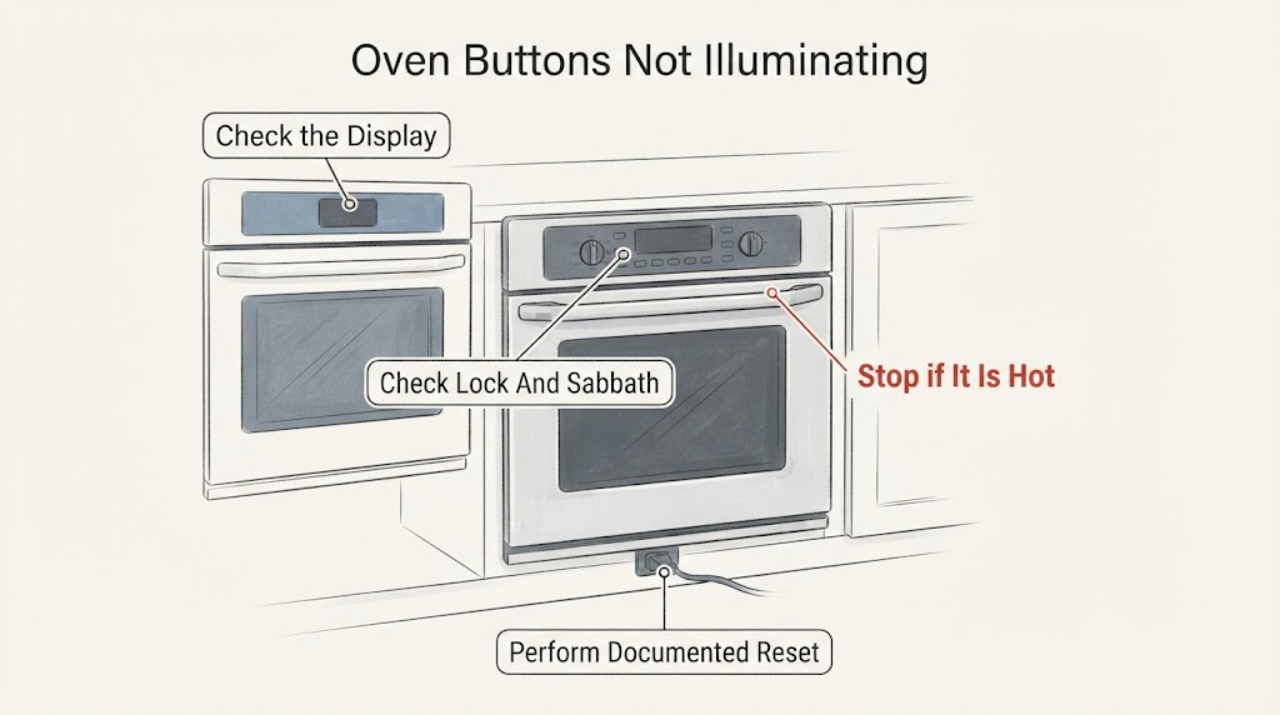
First determine whether the entire display is dark, the buttons work without backlighting, or the oven is in a mode that intentionally suppresses visual changes. Electrolux says Sabbath mode, when available, disables visual display changes and locks the oven controls; its lock feature can also lock the oven door and display controls. Check the owner's manual for the exact model before using a mode-specific sequence. If the control is unresponsive or the display remains dark, use the manufacturer's documented power reset by disconnecting power for up to 30 seconds or switching the breaker off and back on only when safe. If the oven is hot, shows an error, smells burnt, sparks or behaves unpredictably, turn it off, let it cool and stop using it until qualified service checks it. Do not open the control panel or guess a replacement display or board from missing illumination alone.
Work through in order
Diagnostic checks
Use only checks that match the exact appliance or system and its official guide.
-
Check 1
With the oven cool and off, note whether the clock/display is completely dark, whether touch or buttons respond without visible illumination, and whether heating or the interior light was active.
Expected result: Only visual illumination is missing, the display is fully blank, or the controls are unresponsive or behave unexpectedly.
Next step: Continue to the model-specific lock/mode check when the oven is safe. Stop and seek service for unexpected heating, smoke, sparks or burning odor.
Why this matters
Why: These patterns distinguish a possible mode/display setting from a broader power or control problem; the symptom alone does not identify a failed board or fuse.
-
Check 2
Use the exact Electrolux owner's manual to check whether Sabbath mode, an oven lock or another display/control setting is active; do not use a sequence from a different model.
Expected result: The manual confirms a mode or lock that suppresses display changes or controls, or no applicable mode is active.
Next step: Follow only the manual's model-specific procedure to exit the mode. If no mode applies or the controls remain dark/unresponsive, proceed to the documented power reset or service boundary.
Why this matters
Why: Electrolux says Sabbath mode can suppress visual display changes and lock controls, while its lock feature can lock the display controls; availability and steps vary by model.
-
Check 3
If the oven is cool and free of smoke, heat or electrical warning signs, disconnect its power for up to 30 seconds, or switch the appliance breaker off and back on when unplugging is not possible, following the model guide.
Expected result: The display and buttons return to normal, or the same missing illumination or unresponsive control remains after power is restored.
Next step: Do not repeat the reset as a repair. Record the model and arrange service if the control problem persists.
Why this matters
Why: Electrolux lists this reset for certain oven control errors, but a successful reset does not prove the display hardware is sound and a failed reset does not name a particular component.
-
Check 4
Check for an error message, excessive heat, smoke, sparks, burnt odor or heating that starts without a valid command, without opening the control panel.
Expected result: A safety symptom is present, or the oven is cool and otherwise behaves normally apart from the missing illumination.
Next step: For a safety symptom, turn the oven off, let it cool and keep it out of use until qualified service. For illumination-only symptoms, use the model support path rather than testing live wiring.
Why this matters
Why: Electrolux treats unusually high temperature as a safety alert requiring the oven to be turned off and cooled; missing illumination alone is a control symptom, not a permission to continue cooking tests.
-
Check 5
Record the exact model, oven style, which buttons or display areas are dark, whether a lock or mode indicator appears, the result of one documented reset, and any error or heat symptom.
Expected result: The issue resolves after the model-specific mode change or remains after the reset and manual checks.
Next step: Use Electrolux support or a qualified oven servicer. Do not open the panel, bypass controls or order a display component without exact model evidence.
Why this matters
Why: A mode correction supports a settings explanation; persistent missing illumination needs model-specific diagnosis and does not prove a display board, fuse or keypad failure.
Use your observations
Decision map
Find the observation that best matches what you see, then follow the next safe action.
-
PATH 01Next step
What you see
The oven responds normally but its visual changes and tones are suppressed, and the exact manual confirms Sabbath mode.
Do this next
Use the exact manual's procedure to leave Sabbath mode; do not treat the behavior as a failed display until the mode is cleared.
Why this path and its safety boundary
Why it matters: Electrolux describes Sabbath mode as intentionally disabling audible tones or visual display changes and locking the controls.
-
PATH 02Next step
What you see
A lock indicator or locked control state is present and the model's lock instructions match the symptom.
Do this next
Follow the model manual to cancel the lock. If the lock will not clear or the display remains abnormal, request service.
Why this path and its safety boundary
Why it matters: Electrolux says some ovens can lock the oven door and display controls, with model-dependent activation and cancellation steps.
-
PATH 03Next step
What you see
The display returns after one documented 30-second power reset and no heat or electrical warning is present.
Do this next
Monitor the controls and retain the model/error details. Request service if the symptom returns rather than repeatedly cycling power.
Why this path and its safety boundary
Why it matters: The observation is consistent with a temporary control state, but it does not establish that a hardware fault cannot recur.
-
PATH 04Next step
What you see
The display remains dark or buttons remain unresponsive after the mode/manual check and reset, or the oven heats unexpectedly.
Do this next
Turn the oven off and arrange qualified service. Do not open the control panel, bypass a lock or test live circuits.
Why this path and its safety boundary
Why it matters: The problem is outside safe user-level mode correction; Electrolux's error guidance places persistent or high-temperature problems at the support boundary.
Helpful context
Understand the symptom
Identify what is actually dark
“Buttons not illuminating” can mean a dark clock/display, missing backlight while touch input still works, or an intentionally quiet visual mode. Note whether the clock, error message, interior light and heating respond, and whether only the printed button labels are unlit. Electrolux documents mode and lock behavior by model, so this observation is more useful than assuming a failed control board.
Check lock and Sabbath mode in the owner's manual
Electrolux says Sabbath mode, when fitted, disables audible tones or visual display changes and locks the controls. Its lock guidance also says some ovens can lock the display controls and that instructions vary by model. Use the exact manual to identify whether a lock, Sabbath or related display setting is active; do not apply a button sequence from another Electrolux model.
Use one documented power reset
If the control is frozen and the oven is cool with no smoke, burning smell or other hazard, follow Electrolux's documented reset boundary for the relevant error guidance: disconnect power for up to 30 seconds, or switch the appliance circuit breaker off and back on if unplugging is not possible. A reset can clear a control state, but it does not prove the illumination or control hardware is healthy.
Separate a display issue from an unsafe oven condition
Do not keep testing the oven if it is overheating, shows a thermal-runaway warning, sparks, smells burnt, or turns heating on unexpectedly. Electrolux says to turn off a standard oven reporting unusually high temperature and allow it to cool before using it again, with support if the issue persists. Missing illumination alone is not evidence for a specific board, fuse or wiring fault.
Escalate with exact model information
If the manual does not explain the display state, the reset does not restore normal controls, or only some buttons respond, record the model and serial information and request Electrolux service. A qualified technician can distinguish a mode setting, power/control issue and failed user interface without the homeowner opening the panel or working near live oven circuits.
When checks do not resolve it
Need a professional?
Arrange Electrolux or qualified oven service when the buttons/display remain unlit or unresponsive after the model-specific mode check and one documented reset, or whenever the oven overheats, sparks, smells burnt or heats without a valid command. Do not select a keypad, display board, fuse or control board from missing illumination alone.
Common questions
FAQ
Can Sabbath mode make Electrolux oven buttons appear not illuminated?
On models that have it, Electrolux says Sabbath mode disables audible tones and visual display changes and locks the oven controls. Check the exact owner's manual before changing the setting.
Could the oven lock be the reason the controls are not responding?
It could be on models with a lock feature. Electrolux says the lock can affect the oven door and display controls, and the activation/cancellation steps vary by model.
What if a power reset does not restore the display?
Do not keep cycling power or open the panel. Record the model and symptoms and arrange qualified service, especially if the oven is hot, shows an error, sparks or smells burnt.
Read the exact guide
Official sources
- Oven Error Codes and Alarms GuideElectrolux · Official Electrolux oven guidance for a documented 30-second power reset, model-manual reference, over-temperature response and persistent-error support.
- Ovens - What is Sabbath mode and how do I use it?Electrolux · Official Electrolux oven guidance stating that Sabbath mode is model-dependent, disables visual display changes and audible tones, and locks controls.
- Ranges - What does the Lock feature do and how can I activate it?Electrolux · Official Electrolux range guidance that some models lock the oven door and display controls and that instructions vary by model.
- How to Use Your Wall Oven: Display & SettingsElectrolux · Official Electrolux support article applying to ovens and wall ovens and directing users to model-related display/settings guidance.
Community feedback
Share a repair observation
Share a plain-text repair observation. Accepted observations are published automatically; this page may take a moment to update.