
On this page
Start here
Quick answer
An Electrolux oven is not supposed to cool instantly. Its cooling fan normally runs while cooking and can continue while the cavity is warm; Electrolux's opened support guidance says it should normally stop within about an hour after cooking. During Self Clean, the door staying locked until the oven cools is also normal. If the fan never runs, the oven remains abnormally hot, an F10 thermal-runaway message appears, the fan continues beyond the expected period, or the controls or door behave abnormally, turn the oven off, let it cool without forcing the door, and use a safe 30-second power reset only as the model instructions allow. If the symptom persists, arrange Electrolux-authorized service.
Before you begin
Safety first
- This article covers identifying the operating state, observing fan timing and the display, waiting for a normal Self Clean cool-down, and one safe power reset when the model permits it. It does not authorize forced-door release, cabinet removal, live electrical work, thermal-safety bypass, or internal component testing.
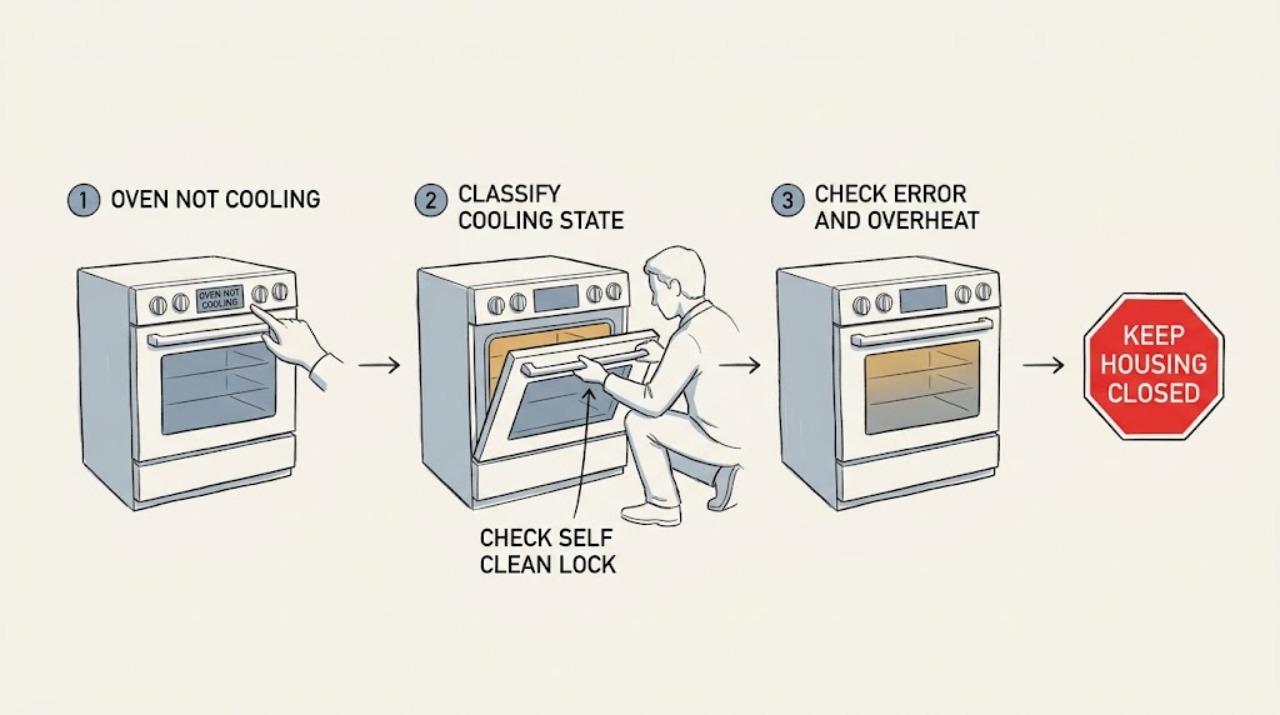
Work through in order
Diagnostic checks
Use only checks that match the exact appliance or system and its official guide.
-
Check 1
With the controls left untouched, record whether the oven is actively heating, has just finished cooking, is in Self Clean, or has been idle and cool. Note the selected mode, how long ago it ended, whether the cooling fan is audible, and whether the front glass or handle is only warm or becoming abnormally hot.
Expected result: The fan runs during cooking or shortly afterward while the cavity and front are gradually cooling; the oven is in Self Clean with a locked door; or the oven is idle, still heating, unusually hot, or has no fan when heat is present.
Next step: Follow the Self Clean, error-code, extended-fan, or service branch that matches the observed pattern. Do not repeat a cycle merely to reproduce a suspected overheating condition.
Stop if: Stop immediately for smoke, burning odor, uncontrolled heat, a damaged door or control, or a hot condition that cannot be safely observed from outside.
Why this matters
Why: A fan during cooking and continued fan operation while warm fit Electrolux's normal cooling mechanism. A Self Clean lock can be normal. An idle oven that continues heating, an oven that is abnormally hot, or a fan that never runs while hot is outside that normal pattern.
-
Check 2
If Self Clean was selected, leave the oven off after the cycle and wait for the model's cool-down to complete. Observe the display and latch from outside; do not pull on the door or try to defeat the lock.
Expected result: The door remains locked during or immediately after Self Clean and the oven is gradually cooling; the door unlocks after cooling; or it remains locked after the oven is fully cool or shows another fault.
Next step: Allow normal cooling for the first pattern. For a persistent lock or warning after cooling, leave the oven unused and request model-specific service rather than forcing the latch.
Stop if: Never force the door, insert tools into the latch, or open the cabinet to release it.
Why this matters
Why: Electrolux says Self Clean keeps the door locked until the oven cools sufficiently, then unlocks automatically. A lock that remains after a confirmed cool-down, or a lock with smoke, damage, or an error, is not explained by the normal safety behavior.
-
Check 3
Read the display from outside and record any error exactly, especially F10 or a thermal-runaway warning. If the oven is still hotter than expected, switch it off at the controls and let it cool; do not restart a high-heat mode to test it.
Expected result: F10 or a high-temperature warning is displayed; there is no code but the oven is heating while off or remains abnormally hot; or the temperature falls normally with no warning.
Next step: For F10, uncontrolled heat, or a warning that returns, keep the oven off and contact Electrolux or an authorized technician after it is safe to do so. For normal cooling, continue observing only until the expected cool-down ends.
Stop if: Stop and seek urgent professional help for smoke, fire signs, a burning smell, melted controls, or heat that continues with the oven switched off.
Why this matters
Why: Electrolux defines F10 as Thermal Runaway, meaning the appliance is detecting higher-than-normal temperatures. Heating while off or persistent abnormal heat is likewise not a normal fan cool-down. Normal temperature decline without a warning is more consistent with post-cooking heat.
-
Check 4
If the issue is a fan that will not stop, wait until the cooking cycle has ended and measure the post-cook run time without blocking the appliance or disconnecting wiring. Confirm whether the oven is actually cooling and whether the fan stops within about an hour, as described in Electrolux's opened support guidance.
Expected result: The fan stops as the cavity cools; it continues beyond about an hour after cooking; or it continues indefinitely after the oven has cooled and a normal control reset has not changed it.
Next step: If the fan is still running past the expected period, switch the oven off at the mains or breaker for at least 30 seconds only when it is safe and the exact model guidance permits it. Restore power once; if the fan behavior returns, leave the oven unused and arrange service.
Stop if: Do not repeatedly cycle power, unplug a hot built-in oven, remove panels, or disconnect the fan as a workaround.
Why this matters
Why: A fan that runs while warm and then stops fits normal cooling. Electrolux says operation for more than an hour after cooking can indicate an issue. An indefinitely running fan after a cool oven and reset needs service, but the timing alone does not identify a particular part.
-
Check 5
When the oven has cooled, there is no smoke or visible damage, and the model instructions allow it, turn off its electrical supply at the switch, plug, or breaker for at least 30 seconds, then restore power once. Record whether the display, fan behavior, heating, and door state return to normal.
Expected result: The issue clears and the oven cools normally; the same symptom or code returns; the oven is hard-wired or cannot be safely isolated; or a safety symptom remains.
Next step: Use the oven only if it passes the model's normal operation checks and no safety symptom remains. Otherwise keep it off, provide the exact model number and observations to Electrolux-authorized service, and do not open the cabinet.
Stop if: Do not perform live electrical tests, bypass thermal protection, force a door, or disconnect a hard-wired appliance without qualified service.
Why this matters
Why: Electrolux uses a short power reset as a basic troubleshooting step, but a reset cannot correct a failed cooling, temperature-sensing, control, latch, or heating-safety system. A recurring error or symptom needs model-specific diagnosis.
Use your observations
Decision map
Find the observation that best matches what you see, then follow the next safe action.
-
PATH 01Safety boundary
What you see
The fan runs during cooking or after it ends, the cavity and front gradually cool, there is no error, and the fan stops within the expected period described by the model guidance.
Do this next
Leave the oven closed and let the fan finish. Use the exact manual for model-specific cool-down behavior, and escalate if the fan begins running indefinitely or the oven heats while off.
Why this path and its safety boundary
Why it matters: This pattern is consistent with Electrolux's normal cooling-fan safety function rather than an oven that is failing to cool.
Safety stop: Stop using the oven for smoke, burning, uncontrolled heat, or an error message.
-
PATH 02Safety boundary
What you see
Self Clean has just run and the door remains locked while the oven is hot but cooling, without smoke, damage, or a persistent fault code.
Do this next
Wait for automatic release. Do not force the door. If it remains locked after the oven is fully cool, arrange service.
Why this path and its safety boundary
Why it matters: The lock is a normal safety interlock until the oven cools sufficiently; it is not evidence that the oven is unable to cool.
Safety stop: Do not insert tools, defeat the latch, or open panels.
-
PATH 03Safety boundary
What you see
The fan runs beyond about an hour after cooking, never stops after a safe reset, or does not run while the oven is hot and the oven remains unusually warm.
Do this next
Keep the oven off, record the timing and model number, and arrange Electrolux-authorized diagnosis. Do not order a fan or control from the symptom alone.
Why this path and its safety boundary
Why it matters: Electrolux's guidance makes an extended run beyond about an hour a possible fault. A missing fan with abnormal heat can also indicate a cooling, sensor, control, or thermal-safety problem, but the exact failed part is model-specific.
Safety stop: Stop immediately for smoke, burning, damaged wiring or controls, or heat that continues while switched off.
-
PATH 04Safety boundary
What you see
F10 or another high-temperature warning appears, the oven heats while switched off, or heat remains uncontrolled after a cycle.
Do this next
Turn the oven off, allow it to cool, and contact Electrolux or an authorized service provider. Give the exact code, mode, timing, and model number; do not restart a high-heat cycle.
Why this path and its safety boundary
Why it matters: The opened Electrolux error guide identifies F10 as Thermal Runaway; uncontrolled heat is not a normal cool-down and can involve a temperature-sensing, control, heating, or safety system fault.
Safety stop: For smoke, fire signs, burning odor, or continuing heat with power off, keep clear and seek urgent professional help.
Helpful context
Understand the symptom
Cooling after cooking can be normal
Do not judge an oven by whether the fan stops as soon as the heating elements turn off. Electrolux describes the cooling fan as a safety feature that helps keep the front glass and handle cool, and says it can keep running while the oven senses warm air. The expected period depends on the heat and model, but the opened Electrolux guidance says it should normally stop within about an hour after cooking. This is different from an oven that is still heating when it should be off or a fan that never operates while the oven is hot.
Separate normal heat from an overheating fault
First record the mode and timing: ordinary bake or broil, a recent high-temperature cycle, Self Clean, or an idle oven. A warm cavity and a running fan immediately after cooking are expected. A locked door during Self Clean is also a safety behavior; do not force it. Smoke, a burning smell, uncontrolled heat, a damaged control, or an F10 message is not a routine cool-down symptom. Turn the oven off and keep people away from hot surfaces while it cools.
Use only ordinary-access checks
Check the display, selected mode, elapsed time since the cycle ended, fan sound or airflow at the front, and whether the door is locked because Self Clean is active. Do not remove panels, reach into the oven, force a latch, bypass a thermal device, or test wiring. If the oven is cool enough and there is no smoke, burning, or visible damage, a power reset of at least 30 seconds is an allowed first step in Electrolux support guidance; model instructions control, and a reset is not a repair.
Safety boundary
Stop conditions
- Do not force a Self Clean door lock or insert tools into the latch.
- Do not remove panels, bypass a thermal safety, disconnect the cooling fan, or perform live electrical tests.
- Do not restart a high-heat cycle to reproduce F10, uncontrolled heating, smoke, or a burning smell.
- Do not repeatedly cycle power or unplug a hot built-in oven; isolate power only when safe and when the exact model instructions allow it.
- Do not order a fan, sensor, control, latch, or heating part until the exact model and failed component are confirmed by qualified diagnosis.
Only after diagnosis
Potential parts
- cooling fan or fan-control assembly
Consider this category only after the exact model and a qualified diagnosis confirm a failed fan or fan-control circuit. A fan running after cooking can be normal, and an F10 code does not by itself identify the fan as the failed part.
Electrolux oven fan and control designs vary by model and market; confirm the exact model and part number before ordering. - temperature sensor, control, or heating-safety component
Consider these categories only if model-specific service diagnosis confirms abnormal temperature sensing, control, or heating behavior. Do not infer a particular component from 'not cooling' or F10 alone.
Use the exact Electrolux model documentation and technician diagnosis to confirm compatibility and safety.
When checks do not resolve it
Need a professional?
Arrange Electrolux-authorized or qualified appliance service if the fan runs for more than about an hour after cooking or returns after one safe reset, the fan does not operate while the oven is hot and abnormal heat remains, F10 or another high-temperature warning appears, the oven heats while off, the Self Clean door stays locked after the oven is fully cool, or the controls or door are damaged. Stop immediately for smoke, fire signs, burning odor, uncontrolled heat, melted controls, or water or electrical damage. Do not force the door, remove panels, bypass thermal protection, or perform live electrical work.
Safety scope: This article covers identifying the operating state, observing fan timing and the display, waiting for a normal Self Clean cool-down, and one safe power reset when the model permits it. It does not authorize forced-door release, cabinet removal, live electrical work, thermal-safety bypass, or internal component testing.
Common questions
FAQ
Why does my Electrolux oven fan keep running after cooking?
Electrolux says the cooling fan can run during cooking and afterward while the oven detects warm air, helping keep the front glass and handle cool. Its opened guidance says it should normally stop within about an hour after cooking. If it runs beyond that period, continues after a safe reset, or the oven is not actually cooling, keep the oven off and arrange service.
Is it normal for an Electrolux oven door to stay locked after Self Clean?
Yes, while the oven is still hot. Electrolux says the Self Clean door stays locked until the oven cools sufficiently and then unlocks automatically. Never force it; request service if it remains locked after the oven is fully cool or a fault appears.
What does F10 mean on an Electrolux oven?
Electrolux's error-code guide labels F10 Thermal Runaway, meaning the oven is detecting higher-than-normal temperatures. Turn the oven off and let it cool. If the warning returns or the oven heats while off, keep it out of service and contact Electrolux or an authorized technician.
Can I reset an Electrolux oven that will not cool?
When the oven is cool enough, there is no smoke or visible damage, and the exact model instructions allow it, Electrolux support guidance describes switching off power for at least 30 seconds and restoring it. Do this once only; a recurring fan, overheating, door, or error-code problem still needs qualified diagnosis.
Read the exact guide
Official sources
- Oven Error Codes and Alarms Guide | ElectroluxElectrolux · Official Electrolux owner-support guidance for supported US oven and range families; exact codes and recovery steps vary by model.
- Ovens - How do I set my oven or range to self-clean? | ElectroluxElectrolux · Official Electrolux owner-support guidance; Self Clean availability and exact controls depend on the model.
- Oven cooling fan runs all the time | ElectroluxElectrolux · Official Electrolux support page; it is a UK page, so exact cool-down timing and service instructions can vary by model and market.
- Oven - Is too Hot | ElectroluxElectrolux · Official Electrolux owner-support guidance for range and wall ovens; installation, calibration, and service instructions are model-specific.
Community feedback
Share a repair observation
Share a plain-text repair observation. Accepted observations are published automatically; this page may take a moment to update.