
On this page
Start here
Quick answer
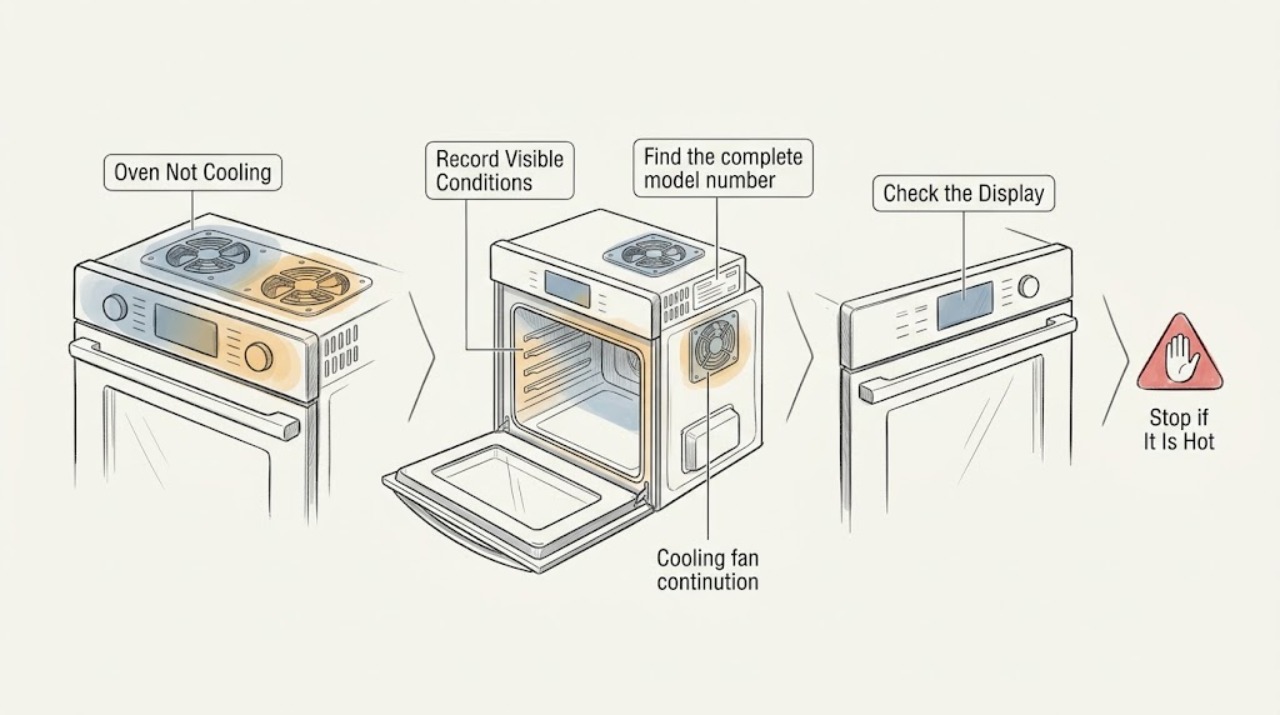
A GE oven that still feels warm after cooking is not necessarily failing: on many GE ranges and wall ovens, a thermostat-controlled cooling fan may run during baking and continue after the oven is turned off while internal controls cool. Gas and dual-fuel freestanding ranges may not have a cooling fan, so the exact model and appliance type matter. First distinguish a warm cavity from a fan or control symptom, then note whether the cycle was bake, broil, or self-clean and whether the fan eventually stops. Do not remove panels, reach into a hot oven, or test live wiring. If the oven remains abnormally hot, the expected fan never runs, controls overheat, an error appears, or the fan runs indefinitely with other symptoms, stop using the oven and arrange model-specific service.
Work through in order
Diagnostic checks
Use only checks that match the exact appliance or system and its official guide.
-
Check 1
With the oven switched off, write down what “not cooling” means: the cavity is still warm, the control area feels unusually hot, the cooling fan is silent, or the fan is running longer than expected. Record whether the last cycle was bake, broil, or self-clean and whether an error or flashing display is present.
Expected result: Only the cavity is warm; the fan is running; the fan is silent; the control display is abnormal; or smoke or a burning smell is present.
Next step: Continue to identify the model and expected fan behavior when there is no hazard. If smoke, burning odor, damaged wiring, or a control fault is present, keep the oven off and arrange professional service.
Why this matters
Why: Residual cavity heat alone does not prove a cooling-system fault. A running fan can be normal, while a silent fan matters only if the model is equipped with one and the control area is calling for cooling. Smoke, burning odor, or a display fault is a stop-use symptom.
-
Check 2
Find the complete model number and identify the appliance type from the rating label or owner manual: electric wall oven, electric range, gas range, or dual-fuel freestanding range. Check the manual's cooling-fan description without starting another high-heat cycle just to test it.
Expected result: The manual says the appliance has a cooling fan; it describes only a convection fan; or it is a gas or dual-fuel freestanding range with no cooling fan listed.
Next step: Use the manual's expected behavior for the next observation. Do not substitute another GE model's fan timing or assume a fan exists because the oven has a convection mode.
Why this matters
Why: A listed cooling fan gives a model-specific expectation for when it may run. A convection fan circulates cooking air and is not the same as the control-cooling fan. GE notes that gas and dual-fuel freestanding ranges may not have a cooling fan, so silence on those models is not by itself proof of a fault.
-
Check 3
After a normal bake or broil cycle has ended, leave the door closed and listen from outside for the cooling fan while the appliance completes its normal cooldown. Do not touch the cavity, door glass, or control area to judge temperature, and do not repeatedly restart the oven.
Expected result: The fan runs during or after the cycle and later stops; the fan cycles on and off; the cavity remains warm but controls behave normally; or the fan never runs on a model whose manual expects it.
Next step: If the fan follows the manual and the controls remain normal, allow the cooldown to finish. If the fan never starts, the control area becomes unusually hot, or the symptom repeats, stop high-heat use and arrange service.
Why this matters
Why: Thermostat-controlled cooling can run through baking and after shutoff, and cycling can be normal. A warm cavity with normal controls is different from a control area that overheats. A missing fan on a model that specifies one needs model-specific diagnosis rather than a guessed part replacement.
-
Check 4
If the symptom followed a self-clean cycle, compare the fan behavior with the self-clean section of the exact owner manual and allow the oven to cool without opening panels or interrupting the appliance's normal sequence.
Expected result: The fan runs after self-clean and then stops; the fan does not run although the model specifies post-clean cooling; or the oven remains abnormally hot with a control or fault indication.
Next step: If the fan is following the manual and no hazard is present, let the cooldown complete. If the expected fan is absent, the oven does not cool, or a fault appears, leave it off and request service.
Why this matters
Why: GE says current built-in models with electronic clocks may keep a fan running after self-clean until the oven is cool. A model without that feature may behave differently. A persistent abnormal temperature or fault indication is not resolved by another self-clean cycle.
-
Check 5
If the cooling fan runs continuously after the oven is cool, or the oven's controls become hot or unresponsive, record the cycle, duration, model number, and any display code. Do not disconnect or reconnect internal fan wiring and do not keep cycling power as a workaround.
Expected result: The fan stops once the appliance cools; it continues indefinitely; an error code appears; or the control panel becomes unresponsive or overheated.
Next step: If the fan continues with any abnormal control or heat symptom, stop using the oven and arrange a qualified inspection. Provide the recorded model, cycle, display state, and symptom duration.
Why this matters
Why: A fan that stops with cooldown is consistent with normal thermostat control. Indefinite operation together with overheating, a fault code, or an unresponsive control points beyond normal fan timing and requires diagnosis. GE states that fault codes are model-specific and should be handled through service guidance.
Use your observations
Decision map
Find the observation that best matches what you see, then follow the next safe action.
-
PATH 01Next step
What you see
The oven is warm after baking, the cooling fan runs or cycles, and the controls remain normal.
Do this next
Leave the oven off and let the model's normal cooldown finish. Use the exact owner manual if the fan timing or sound differs from the documented behavior.
Why this path and its safety boundary
Why it matters: This pattern is consistent with GE's normal cooldown design rather than proof that the oven is failing to cool.
-
PATH 02Next step
What you see
The appliance is a gas or dual-fuel freestanding range and the issue is only that no cooling fan can be heard.
Do this next
Check the exact manual for the model's heat and control behavior. If the control area overheats, an error appears, or cooking performance changes, stop using it and request service.
Why this path and its safety boundary
Why it matters: GE notes that these models may not have a cooling fan, so the absence of fan noise alone does not establish a failure.
-
PATH 03Next step
What you see
The fan never starts on a model whose manual specifies a control-cooling fan, or the control area becomes unusually hot or unresponsive.
Do this next
Stop high-heat operation, do not open the control area, and arrange model-specific appliance service. Share the model number and whether the symptom occurs during bake, broil, or self-clean.
Why this path and its safety boundary
Why it matters: The observed pattern is less consistent with normal residual heat and more consistent with a cooling-control, fan, thermostat, or related fault that cannot be safely isolated from outside.
-
PATH 04Next step
What you see
The fan continues indefinitely after the oven is cool, or the symptom includes smoke, a burning smell, a damaged cord, a fault code, or a control display problem.
Do this next
Stop using the oven. If power can be isolated without touching damage or live parts, leave it isolated; otherwise do not investigate further and contact a qualified professional.
Why this path and its safety boundary
Why it matters: This combination is not a simple normal cooldown and raises a safety or control concern.
Helpful context
Understand the symptom
Define what is not cooling
“Not cooling” can describe a warm oven cavity after a cycle, a cooling fan that does not start, or a fan that never stops. GE treats continued fan operation after shutoff as normal on many models because the fan cools electronic controls. It is not a universal feature: gas and dual-fuel freestanding ranges may not have a cooling fan at all.
Use the model and cycle to set expectations
Cooling behavior depends on whether the appliance is a wall oven, electric range, gas range, or dual-fuel model, and whether it has just completed baking or self-cleaning. GE directs owners to the manual for the specific model, so record the full model number and the cycle before deciding that a normal cooldown is a failure.
Keep the boundary external
The fan and control area can remain hot after cooking. Do not remove covers, probe wiring, or attempt to bypass a thermostat or safety device. If there is smoke, a burning smell, a damaged cord, or a control display fault, leave the oven off and use qualified service.
When checks do not resolve it
Need a professional?
The model specifies a cooling fan but it never starts, or the control area becomes unusually hot or unresponsive., The fan continues indefinitely after the oven is cool, or a fault code appears., There is smoke, a burning smell, damaged wiring or cord, or any need to open the control area or test live parts.
Have this ready
- The complete GE model number and whether the appliance is a wall oven, electric range, gas range, or dual-fuel range.
- The cycle in use, whether self-clean was involved, whether the fan ran or cycled, and how the cavity or control area behaved.
- Any fault code, flashing display, unusual sound, burning odor, or change after the oven was switched off.
Common questions
FAQ
Is it normal for a GE oven to stay warm after I turn it off?
Yes, residual heat alone does not prove a fault. GE says many ranges and wall ovens use a thermostat-controlled cooling fan that may run through baking and after shutoff while internal controls cool. Check the exact model and cycle before treating normal warmth or fan operation as a failure.
Why is my GE oven fan still running after cooking?
On many GE models, the cooling fan protects electronic controls and may continue after the oven is turned off. It should follow the model's thermostat-controlled behavior and eventually stop as the appliance cools. If it runs indefinitely with overheating, a fault code, or an unresponsive display, stop use and request service.
Do all GE ovens have a cooling fan?
No. GE notes that gas and dual-fuel freestanding ranges may not have cooling fans, while many electric ranges and wall ovens use them to protect controls. A convection fan is a separate feature, so use the exact owner manual for the appliance type and model.
Should I run self-clean again if my GE oven is not cooling?
No. GE says some current built-in models keep a fan running after self-clean until the oven is cool, but self-clean behavior varies by model. Do not repeat the high-heat cycle to test cooling. If the expected fan is absent, the oven stays abnormally hot, or a fault appears, leave it off and arrange service.
Read the exact guide
Official sources
- Frequently Asked Questions About GE Ranges and Wall OvensGE Appliances · GE Appliances ranges and wall ovens; exact behavior varies by model and appliance type
- Range and Wall Oven - Self Clean Oven Fan OperationGE Appliances · Current built-in GE models with electronic clocks; older models and configurations may differ
- Range and Wall Oven - Oven Cooling Fan is Running Too LongGE Appliances · GE models equipped with an electronic-control cooling fan
- Range & Wall Oven - Electronic Control FanGE Appliances · GE models with electronic controls; the owner manual determines exact fan behavior
- Range & Wall Oven - Fan Noise and Normal OperationGE Appliances · GE range and wall oven fan behavior; gas and dual-fuel freestanding models may not have cooling fans
Community feedback
Share a repair observation
Share a plain-text repair observation. Accepted observations are published automatically; this page may take a moment to update.