
On this page
Start here
Quick answer
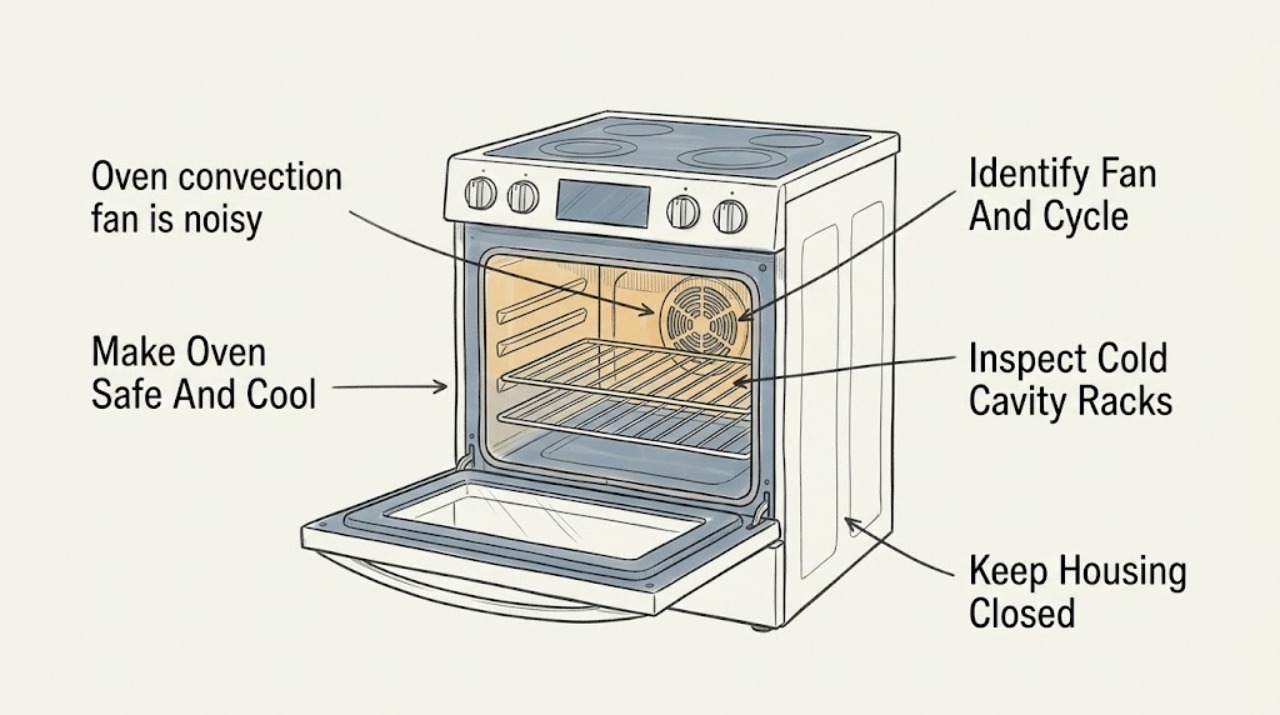
Some GE ovens make a normal fan sound: the convection fan may start at a model-specific point, cycle during convection cooking, change direction or speed on some designs, and stop when the door opens; a separate cooling fan may continue after cooking until the controls cool. A new harsh rattle, scrape, grind, squeal, wobble, or electrical sound is different. Let the oven cool, turn all controls off, and inspect only the cold cavity, racks, cookware, door position, and visible vent area for a loose item or obstruction. Do not reach through the fan guard, spin the fan, remove the rear cover, run self-clean to test it, or work on wiring. If the noise is worsening, occurs with smoke or a burning or electrical odor, the fan does not run correctly, a blade or guard is damaged, or the sound remains with a clear cold cavity, stop using the affected function and arrange qualified appliance service with the exact model and a recording of the sound.
Before you begin
Safety first
- This article covers normal control observation and a cold, ordinary-access visual check only. A qualified technician handles fan-guard and motor access, electrical testing, controls, hot surfaces, gas components, and any part replacement.
Work through in order
Diagnostic checks
Use only checks that match the exact appliance or system and its official guide.
-
Check 1
Turn the oven function off, keep hands and combustibles away from the hot cavity and vent, and wait until the oven is fully cool before inspecting. From a safe position, note smoke, a burning or electrical odor, sparking, a gas odor, a flame abnormality, a damaged cord or control, or a breaker that trips.
Expected result: The oven cools normally with no warning sign, or smoke, odor, sparking, flame abnormality, electrical damage, or a repeated power interruption is present.
Next step: For gas odor, leave the area as appropriate and obtain emergency or gas help from a safe location. For smoke, sparking, electrical odor, abnormal flame, or damaged wiring, stop using the oven and arrange qualified service; do not reproduce the sound.
Stop if: Do not touch hot surfaces, reach into the cavity while it is hot, restart a hazardous oven, or remove an electrical cover.
Why this matters
Why: A cold oven without warning signs permits a limited visual check. Smoke, sparking, burning or electrical odor, gas odor, abnormal flame, or damaged wiring is a stop-use condition rather than a fan diagnosis.
-
Check 2
Using the exact model manual and only normal controls, identify whether the sound occurs during Convection Bake, Convection Roast, preheat, regular baking, self-clean, door opening, or cooldown; record whether it starts immediately, after preheat, cycles with heat, reverses or changes speed, or continues after the oven is off.
Expected result: The sound follows the model's documented convection or cooling cycle, or it is a new sound that appears in one function, at startup, at a speed change, continuously, or after the oven is otherwise cool.
Next step: If the timing matches the manual and the sound is a smooth fan sound, monitor it without intervention. If it is new, harsh, intermittent with rubbing, or present after cooldown, stop testing and document it for service.
Stop if: Do not use self-clean as a diagnostic test, leave the door open to force a fan change, or repeatedly start and stop the oven to chase the noise.
Why this matters
Why: GE says fan cycling and some direction or speed changes are normal and model-dependent, and a cooling fan may continue after cooking. A new harsh sound or a sound that remains outside the expected cycle is not explained by normal cycling alone.
-
Check 3
When the oven is fully cool and controls are off, inspect the rear fan guard, rack positions, cookware, foil, pans, and visible food residue from ordinary access without touching the fan or removing the guard.
Expected result: A rack, pan, foil edge, loose object, or hardened residue is visibly near the fan path, or the cavity and guard look clear but the noise was a scrape, rattle, grind, or wobble.
Next step: Remove only a loose item that can be lifted out without force, restore the rack or cookware position per the manual, and make no more than one normal observation. For a persistent mechanical sound, arrange service.
Stop if: Do not reach through the guard, spin or bend the fan, scrape residue toward the assembly, use a tool to retrieve an object, or remove the rear cover.
Why this matters
Why: A contact or resonance from cookware or a rack can create a function-specific sound. A clear cavity with a mechanical sound keeps the fan blade, motor, bearing, mount, or hidden debris in question.
-
Check 4
From outside the oven, observe whether the sound changes when the door is opened or closed during a normal, safe cycle and whether the control-panel cooling fan continues after cooking; do not hold the door open, touch the vent, or place anything over an opening.
Expected result: The convection fan stops and resumes as the model manual describes, the cooling fan runs after the oven is off while the controls cool, or the noise continues with a harsh sound independent of door and cooldown behavior.
Next step: Allow expected cooling to finish without interference. If the sound remains after the documented cycle, becomes louder, or occurs when no fan should be operating, leave the oven out of service and request qualified appliance service.
Stop if: Do not bypass the door switch, hold the door open during cooking, block the vent, or touch hot air or metal around the vent.
Why this matters
Why: GE states that convection and cooling-fan timing varies by model and that a cooling fan can continue after the oven is off. A mechanical noise independent of those expected changes is more likely to require fan or mounting inspection.
-
Check 5
With the oven cool, inspect the accessible front, side, and control areas for a loose-looking trim piece, vent grille, rack, pan, or nearby cabinet that could vibrate; listen from a safe distance during one normal function rather than pressing panels or moving the appliance.
Expected result: The sound is localized to a rack, pan, trim, or vent resonance, or it is strongest at the rear fan area with no visible external source.
Next step: Remove or reposition only a loose accessory without force and check the model instructions. Do not remove trim or panels; arrange service when the source is the fan area or the noise persists.
Stop if: Do not tighten inaccessible fasteners, wedge objects against the oven, pull out a built-in oven, or work behind the control panel.
Why this matters
Why: A loose accessory or trim resonance can mimic a fan fault. A sound strongest at the fan area with no external source supports a fan assembly, motor, bearing, mounting, or hidden obstruction assessment.
-
Check 6
Record the complete GE model and serial information, sound recording, selected cooking function, door position, startup and shutdown timing, whether the sound is smooth or mechanical, visible objects or damage, display messages, and any smoke, odor, heat, or power symptom.
Expected result: The sound is a stable, documented fan cycle with no abnormal signs, or it is new, worsening, function-independent, mechanically harsh, or accompanied by a warning sign.
Next step: Use the model manual and provide the record to qualified GE appliance service. Keep the affected convection or oven function off if the noise is persistent or unsafe.
Stop if: Do not order or install a fan motor, blade, bearing, control, or wiring part from sound alone, and do not perform live electrical testing.
Why this matters
Why: A documented normal cycle can be monitored. A changed or hazardous sound requires an appliance diagnosis rather than a generic fan or motor purchase.
Use your observations
Decision map
Find the observation that best matches what you see, then follow the next safe action.
-
PATH 01Next step
What you see
The sound is a smooth fan sound that follows the model's convection timing, including expected cycling, speed change, reversal, or stopping when the door opens, and there is no rubbing, scraping, odor, smoke, or damage.
Do this next
Monitor the sound and use the exact owner's manual for the model. Arrange service if its character changes or a warning sign appears.
Why this path and its safety boundary
Why it matters: GE describes these model-dependent fan behaviors as normal operation rather than evidence of a failed fan.
-
PATH 02Next step
What you see
The sound starts after baking or self-cleaning, comes from the control or vent area, and gradually stops as the oven and controls cool without a harsh mechanical quality.
Do this next
Keep the vent unobstructed and allow the fan to finish. Request service if the sound becomes harsh, the oven does not cool, or the fan continues in an unexplained pattern.
Why this path and its safety boundary
Why it matters: A separate cooling fan may be operating as designed after the oven is off; GE notes that run time varies with how hot the oven became.
-
PATH 03Next step
What you see
The noise occurs only with one rack or pan arrangement and a cold inspection finds a loose accessory, foil edge, residue, or other visible source near the rear guard.
Do this next
Remove only the loose item without force, restore the arrangement according to the manual, and stop if the mechanical noise remains.
Why this path and its safety boundary
Why it matters: An accessory or visible contact can resonate or interfere with airflow without proving that the fan motor has failed.
-
PATH 04Next step
What you see
A new scrape, grind, wobble, squeal, harsh rattle, or pulsing sound persists with a clear cold cavity and no loose accessory, or it is strongest at the rear fan area.
Do this next
Leave the affected convection function off and arrange qualified appliance service. Do not remove the fan cover or attempt to straighten, lubricate, or spin the assembly.
Why this path and its safety boundary
Why it matters: A fan blade, motor, bearing, mount, guard, control, or hidden debris issue is more likely than normal cycling, but the sound cannot identify the failed part.
-
PATH 05Next step
What you see
There is smoke, burning or electrical odor, gas odor, sparking, abnormal flame, a damaged cord or control, a broken fan guard or blade, repeated breaker trips, or a need to open the oven cabinet.
Do this next
Stop using the oven, leave the area as appropriate for a gas or fire hazard, and obtain emergency, electrical, gas, or qualified appliance service from a safe location.
Why this path and its safety boundary
Why it matters: The fire, gas, electrical, hot-surface, or mechanical hazard takes priority over identifying the noise.
Helpful context
Understand the symptom
First decide which fan you are hearing
GE ranges and wall ovens can have an in-cavity convection fan and a separate cooling fan for the controls. The convection fan circulates air during a convection function; the cooling fan may run during baking or after the oven is turned off until the controls cool. A fan that starts immediately, cycles frequently, changes speed, or reverses may still be operating as designed for that model. The useful distinction is a documented normal cycle versus a new scrape, grind, wobble, or harsh rattle.
Use a cold, ordinary-access inspection
After the oven is fully cool, look for cookware, foil, a rack, food residue, or another loose object that could contact or resonate near the rear fan area. Do not assume that a visible object can be pulled past the guard, and do not clean by pushing tools toward the fan. Keep the door and vent openings unobstructed; GE's manuals warn that the interior, door edges, and vent areas can remain hot after use.
A sound that stays after the simple checks needs service
A clear cold cavity does not rule out a bent or unbalanced fan, worn motor or bearing, a loose mounting part, a damaged guard, a control issue, or debris behind the cover. GE's public support material explains normal fan behavior but does not authorize a generic homeowner motor or wiring repair. If the changed sound persists, leave the oven out of the affected function and have a qualified technician inspect the fan assembly and controls using the exact model documentation.
The model number changes the interpretation
GE offers traditional convection, True European Convection, Precise Air reversing fans, and Direct Air systems. Gas and electric models can start and cycle the fan at different points, while cooling-fan behavior also varies. Record the complete model and serial information, the selected function, door position, when the sound starts and stops, and any display message before ordering parts or asking for service.
Safety boundary
Stop conditions
- Stop using the oven for smoke, sparking, burning or electrical odor, gas odor, abnormal flame, repeated breaker trips, damaged wiring, or a broken fan guard or blade.
- Do not reach through the convection fan guard, spin or bend the fan, remove the rear cover, bypass the door switch, perform live electrical tests, or run self-clean to reproduce a noise.
- Do not block the oven vent, hold the door open during cooking, press hot panels, or touch the interior until it is fully cool.
- If a new scrape, grind, wobble, squeal, or harsh rattle remains after the cold visual checks, leave the affected function off and arrange qualified appliance service.
Only after diagnosis
Potential parts
- convection fan blade or wheel
Consider only when a qualified diagnosis confirms a bent, damaged, unbalanced, or otherwise failed fan blade or wheel after excluding normal cycle sound and loose accessories.
Confirm the complete GE model, fan design, rotation, mounting, and manufacturer fit information; do not straighten or replace it from appearance alone. - convection fan motor or bearing assembly
Consider only when professional inspection confirms motor, bearing, shaft, or mounting wear as the source of a persistent mechanical noise.
Confirm the exact model, voltage, mounting, and approved replacement; installation requires access to hot and electrical components. - fan guard or mounting hardware
Consider only when a qualified technician finds a damaged guard or mounting hardware causing contact or resonance.
Confirm model-specific guard shape, fasteners, clearances, and safe installation procedure. - oven cooling fan or control component
Consider only when the sound occurs during cooldown or from the control area and a qualified diagnosis confirms a cooling-fan or control fault.
Confirm the model and whether the observed fan is the cooling fan or convection fan before selecting any component.
When checks do not resolve it
Need a professional?
Call qualified appliance service for a new, worsening, harsh, rubbing, grinding, squealing, or function-independent fan sound; a fan that does not follow the model cycle; a damaged blade, guard, control, cord, or cabinet; an oven that overheats or will not cool; or any repair requiring panel removal or electrical work. Treat smoke, gas odor, abnormal flame, sparking, or burning or electrical odor as an immediate stop-use and emergency or licensed-service condition.
Safety scope: This article covers normal control observation and a cold, ordinary-access visual check only. A qualified technician handles fan-guard and motor access, electrical testing, controls, hot surfaces, gas components, and any part replacement.
Common questions
FAQ
Is it normal for a GE convection fan to be noisy?
A smooth fan sound, frequent cycling, a speed change, or reversal can be normal depending on the GE model and cooking mode. A new scrape, grind, wobble, squeal, or harsh rattle is not explained by normal cycling alone. Let the oven cool, inspect only the cold cavity and accessories, and arrange service if the mechanical sound persists.
Why does my GE oven fan keep running after I turn it off?
GE distinguishes the convection fan from the cooling fan. The cooling fan can continue after cooking while the control area cools, and GE says this may take roughly 15 minutes to 2 hours depending on heat and model. If the sound is harsh, the oven does not cool, or it continues in an unexplained pattern, arrange service.
Can I spin the GE oven convection fan by hand to find the noise?
No. Do not reach through the guard or spin the fan. Inspect the cold cavity and rack or pan arrangement visually, then have a qualified technician assess the blade, motor, bearing, mount, and guard if the noise remains.
Does a GE convection fan always run in the same direction?
Not always. GE says some systems use a one-direction fan, while Precise Air systems can reverse direction; speed and cycling also vary by model and mode. Use the exact owner's manual before deciding that a direction or timing change is a fault.
When should I stop using a noisy GE oven?
Stop for smoke, gas odor, sparking, burning or electrical odor, abnormal flame, repeated breaker trips, visible fan or wiring damage, overheating, or a new harsh mechanical noise. Leave the area as appropriate for a gas or fire hazard and obtain qualified help. Do not keep restarting the oven to reproduce the sound.
Read the exact guide
Official sources
- Frequently Asked Questions About GE Ranges and Wall OvensGE Appliances · GE range and wall oven support routing and model-specific owner-manual use
- Range & Wall Oven - Oven Fan Run TimeGE Appliances · GE oven cooling-fan operation after cooking and model-dependent cooldown duration
- Range & Wall Oven - Normal Sounds During UseGE Appliances · GE oven normal sound context during baking, convection, self-cleaning, and cooldown
- Range & Wall Oven - Traditional and Convection Cooking SystemsGE Appliances · GE convection-system types, fan direction, speed, cycling, and model-specific owner's-manual applicability
- Range & Wall Oven - Fan Noise and Normal OperationGE Appliances · GE range and wall oven convection-fan and cooling-fan timing, cycling, direction, and normal-operation guidance
- PROBLEM SOLVERGE Appliances · GE oven owner-manual safety, convection fan operation, hot-surface precautions, vent clearance, and model-specific fan-noise troubleshooting example
Community feedback
Share a repair observation
Share a plain-text repair observation. Accepted observations are published automatically; this page may take a moment to update.