
On this page
Start here
Quick answer
Some KitchenAid oven fan sound is normal: the convection fan may run during preheat or a convection cycle, cycle on and off, and stop when the door opens; a separate cooling fan may run during or after cooking. A new loud rattle, scraping, rubbing or metal-on-metal sound, vibration, or a fan that runs with the door open is not normal. First identify whether the sound stops or changes when the door is opened, when it occurs in the cooking cycle, and whether heat or airflow is otherwise normal. With the oven off and cool, check only for an accessible rack, foil, pan, or visible debris touching the fan area; do not remove covers, reach toward blades, or run self-clean to test it. Stop using the oven and arrange qualified service for rubbing, grinding, exposed or damaged parts, smoke, sparking, burning odor, a door or switch problem, or a noise that persists after the safe checks.
Before you begin
Safety first
- This article supports identifying fan timing from a safe position, checking the cool oven for loose visible obstructions, and reading the exact owner manual. Do not access fan blades, internal wiring, motor, control, heating elements, gas components, door switches, or cabinet panels.
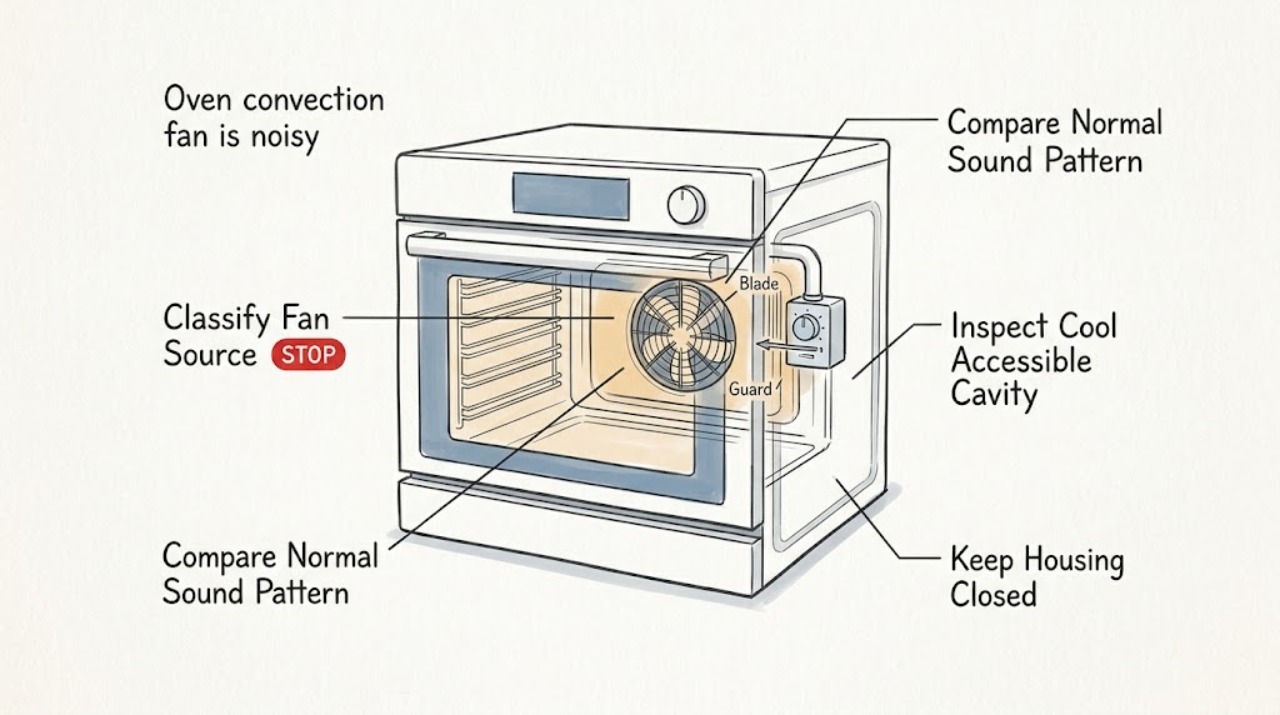
Work through in order
Diagnostic checks
Use only checks that match the exact appliance or system and its official guide.
-
Check 1
From a safe position, note whether the noise occurs during preheat, convection bake or roast, broil, ordinary bake, cooling after the cycle, or self-clean; if the oven is cool and the manual permits a brief test, observe whether the sound changes when the door is opened without reaching inside.
Expected result: The sound stops or reduces with the door open, continues with the door open, appears only after cooking, cycles with heat, or occurs in every mode including when no cooking fan should be active.
Next step: Record the mode and door response, then continue only with a cool-oven visual check. Do not keep opening a hot door, remove panels, or use the door switch as a repeated test.
Stop if: Stop immediately for smoke, sparking, burning odor, abnormal heat, exposed wiring, a loose door, or a fan that runs with the door open and makes a harsh noise.
Why this matters
Why: A door-open response supports the convection-fan path; continued movement or noise can indicate the cooling fan or another source. Mode-specific cycling may be normal, while a sound in every state or after cooling ends needs model-specific diagnosis.
-
Check 2
Describe the sound without touching the oven: soft airflow or hum, brief relay click, pulsing, rattling, buzzing, squealing, scraping, grinding, or metal-on-metal contact. Note whether it follows fan speed, heat cycling, or a change in door position.
Expected result: The sound is a steady airflow or brief click that matches the manual's operating sequence, or it is a new, loud, rough, metallic, vibrating, or worsening sound.
Next step: Keep a short recording from outside the cavity if it can be made safely. Stop using the oven and arrange service for scraping, grinding, loud vibration, or a sound that is worsening rather than trying to lubricate or straighten a part.
Stop if: Do not insert a utensil, cloth, probe, or hand through the rack openings to locate the sound.
Why this matters
Why: Air movement, brief control clicks, and model-specific cycling can be normal. A rough or metallic sound is not the normal convection-fan pattern described by KitchenAid and may involve a blade, guard, mount, motor, bearing, or foreign object.
-
Check 3
When the oven is switched off and fully cool, remove only loose cookware and racks as the manual permits and look for foil, a pan edge, spill residue, or a foreign object visibly touching or blocking the fan guard; do not remove the guard or rear panel.
Expected result: A rack, pan, foil, residue, or loose object is visibly contacting the fan area, or the visible cavity and guard are clear but the noise remains.
Next step: Remove only the loose item, clean accessible residue according to the manual, and run one normal cycle only if no hazard remains. If the sound returns or the obstruction was not clearly the cause, stop and arrange service.
Stop if: Do not remove the fan cover, baffle, rear wall, insulation, or wiring, and do not use a knife or abrasive tool near the fan.
Why this matters
Why: An accessible obstruction can create a rattle or contact sound without proving that the fan assembly is damaged. A clear cavity with persistent noise makes an internal blade, mount, motor, bearing, guard, switch, or control issue more likely.
-
Check 4
With the oven cool, check that the door closes and latches normally and that the display and selected cooking mode respond normally; during one safe observation, note whether opening the door stops the convection fan as the model manual describes.
Expected result: The fan continues with the door open, the door does not close or latch, the display shows an error, the fan starts late or cycles as documented, or the door response is normal.
Next step: Follow only the exact owner manual for clearing a nonrecurring display message. If the fan/door response is abnormal, the error returns, or the door does not latch, keep the oven off and arrange qualified appliance service.
Stop if: Do not defeat the door switch, tape the latch, clear a recurring code by repeated power cycling, or run self-clean to test the fan.
Why this matters
Why: Fan operation with an open door, a door-switch fault, or an error display can indicate a control or safety problem. A model-specific delay or cycle can be normal, but it does not explain rubbing or metal-on-metal noise.
-
Check 5
Note whether the noisy fan is accompanied by slow or uneven preheating, uneven browning, food taking longer, a fan that stops before the mode ends, unusual heat around controls, or otherwise normal cooking; do not change calibration or wiring to compensate.
Expected result: Cooking performance is normal, or the oven has uneven heat, poor circulation, an error, overheating controls, repeated shutoff, or a new odor or smoke.
Next step: Stop using the affected cooking mode for a persistent noisy fan or performance change and give the technician the mode, timing, sound, and result. Use the oven only as the manual permits if the sound is confirmed normal and no hazard is present.
Stop if: Stop for smoke, burning odor, sparking, abnormal flame, melted material, or overheating around the controls.
Why this matters
Why: Noise without a performance change can still be an early mechanical fault, but performance changes increase concern for a fan, element, sensor, control, airflow, or door problem. The symptom combination is more useful to service than a guessed part name.
-
Check 6
Record the complete KitchenAid model number, oven type, cooking mode, whether the fan is convection or cooling, when the noise began, and any service or installation change; obtain the model information from the rating label or paperwork without dismantling the oven.
Expected result: The model and mode are known, the noise is repeatable and localized to the convection fan, the fan source is uncertain, or the oven has a damaged part or safety symptom.
Next step: Keep the oven off for abnormal or persistent noise and arrange qualified service with the recording and observations. If the sound is documented as normal air movement and cooking is normal, monitor for change rather than modifying the assembly.
Stop if: Do not remove the oven from a wall cabinet, open the control console, disconnect power at internal terminals, or order a part based only on the sound.
Why this matters
Why: KitchenAid fan timing and door behavior vary by model and function. A repeatable metallic noise or uncertain source needs model-specific service; model information helps avoid ordering an incompatible fan or control.
Use your observations
Decision map
Find the observation that best matches what you see, then follow the next safe action.
-
PATH 01Next step
What you see
The fan sound is soft airflow or a brief click, occurs during a documented preheat or convection function, stops with the door open, and cooking remains normal.
Do this next
Use the oven normally according to the manual and monitor for a change in sound, vibration, door behavior, or cooking performance. Arrange service if a metallic or worsening sound appears.
Why this path and its safety boundary
Why it matters: Normal convection-fan operation or control cycling is more likely than a mechanical failure. The exact timing remains model-specific.
-
PATH 02Next step
What you see
The noise is scraping, rubbing, grinding, or metal-on-metal, or it includes strong vibration and persists after loose cookware, foil, or visible debris is removed from the cool cavity.
Do this next
Stop using the oven and arrange qualified appliance service. Do not reach behind the guard, bend the blade, lubricate the motor, or remove the fan assembly.
Why this path and its safety boundary
Why it matters: A fan blade, guard, mount, motor, bearing, or internal obstruction is more likely than normal air movement. KitchenAid identifies rubbing or metal-on-metal fan noise as abnormal.
-
PATH 03Next step
What you see
The noise continues with the door open, the fan runs when it should stop, the door does not latch, or the source seems to be a cooling fan rather than the convection fan.
Do this next
Keep the oven off if the response is abnormal or the sound is harsh, record the mode and door behavior, and arrange model-specific service. Do not defeat the door switch or run the oven with a loose or open panel.
Why this path and its safety boundary
Why it matters: A cooling-fan, door-switch, control, or other appliance issue is more likely; the convection-fan diagnosis cannot be assumed from a general fan sound.
-
PATH 04Next step
What you see
The noisy fan is accompanied by uneven heating, slow preheat, an error message, fan stoppage, overheating controls, smoke, odor, or abnormal heat.
Do this next
Turn the oven off and arrange qualified appliance service, preserving the error and sound record. For smoke, sparking, fire, or a burning odor, disconnect only if safe and leave the area as appropriate.
Why this path and its safety boundary
Why it matters: A fan, control, sensor, element, door, or electrical fault may be affecting safe cooking. The combination warrants service even if the fan still turns.
-
PATH 05Next step
What you see
A loose rack, pan, foil, spill residue, or foreign object visibly contacted the fan area and the sound disappears after the cool-oven, manual-approved cleanup.
Do this next
Keep cookware and foil clear of the fan area and use only the rack positions and circulation described in the manual. Stop and request service if any noise returns or the fan behavior changes.
Why this path and its safety boundary
Why it matters: The obstruction was the likely immediate source, although the fan should still be monitored for recurring contact, vibration, or damage.
Helpful context
Understand the symptom
First separate the convection fan from the cooling fan
KitchenAid ovens can have more than one fan. KitchenAid's support guidance uses the door-open response as a clue: if the fan or air-movement noise reduces or stops when the door opens, it is likely the convection fan; if it continues, a cooling fan may be the source. Do not hold the door open during a hot cooking cycle just to chase a noise. Use the model manual and a brief, safe observation instead.
Normal cycling is different from rubbing or scraping
A convection fan may start in preheat, run in a selected convection mode, cycle with the heating elements, or pause when the door opens. The timing varies by model and function. A metallic scrape, repeated rattle, grinding sound, strong vibration, or fan operation with the door open is a different pattern and should not be normalized as ordinary cycling.
Use only cool-oven, visible checks
After the oven is switched off and fully cool, look for a rack, pan, foil, spill residue, or visible foreign object that could contact or obstruct the fan area. Do not remove the fan cover, rear panel, baffle, motor, or wiring. An unobstructed visible area does not rule out a bent blade, worn bearing, loose mount, motor, door switch, or control problem.
Cooking performance changes raise the priority
A noisy fan accompanied by uneven browning, poor preheat, an error message, a fan that stops unexpectedly, overheating controls, smoke, or an abnormal odor deserves service. Record the mode, timing, sound, and performance change so a technician can compare the symptom with the exact KitchenAid wiring and fan sequence.
Safety boundary
Stop conditions
- Stop using the oven for scraping, grinding, metal-on-metal contact, strong vibration, a fan that runs with the door open, or a door that will not latch normally.
- Do not reach toward fan blades, remove a fan guard, baffle, rear panel, control console, wiring, or insulation, or attempt to lubricate, bend, or straighten the fan assembly.
- Do not run self-clean, defeat a door switch, tape a latch, repeatedly power-cycle an error, or operate the oven with smoke, sparking, burning odor, melted material, or overheating controls.
- Do not insert utensils or probes into the fan area, use forced air or abrasive tools, or use foil or cookware in a way that blocks fan circulation or contacts the guard.
- Arrange qualified KitchenAid appliance service for persistent or worsening noise, abnormal door response, recurring errors, cooking-performance changes, or any fan, motor, control, or electrical fault beyond the cool-oven visible checks.
Only after diagnosis
Potential parts
- KitchenAid convection fan motor or blade assembly
Consider this category only when qualified inspection confirms a damaged, rubbing, seized, or noisy convection fan assembly after visible obstructions are ruled out.
Confirm the exact KitchenAid model, oven type, blade arrangement, and manufacturer's fit information; do not order from sound alone. - KitchenAid convection fan guard or mounting component
Consider this category only if service finds a loose, bent, displaced, or damaged guard or mount causing contact or vibration.
Confirm exact model and service diagnosis before ordering; do not bend or remove a guard as a user adjustment. - KitchenAid oven door switch or fan-control component
Consider this category only if the fan continues with the door open, the door response is abnormal, or qualified testing identifies a control or switch fault.
Confirm exact model, control revision, and diagnostic result; do not defeat a door switch or substitute a control.
When checks do not resolve it
Need a professional?
Arrange qualified KitchenAid appliance service when a new rubbing, scraping, grinding, metal-on-metal, or strongly vibrating fan sound persists after the cool-oven visible check, when the fan/door response is abnormal, when an error or cooking problem accompanies the noise, or when the fan source is uncertain. Stop immediately for smoke, sparking, burning odor, fire, exposed wiring, or overheating controls.
Safety scope: This article supports identifying fan timing from a safe position, checking the cool oven for loose visible obstructions, and reading the exact owner manual. Do not access fan blades, internal wiring, motor, control, heating elements, gas components, door switches, or cabinet panels.
Common questions
FAQ
Is a noisy convection fan in a KitchenAid oven always a problem?
No. Airflow, a brief click, and model-specific cycling can be normal during preheat or convection cooking. A new scraping, rubbing, grinding, metal-on-metal sound, strong vibration, or fan that runs with the door open is not normal. Record the mode and timing and arrange service for those patterns.
How can I tell whether the noise is the convection fan or cooling fan?
Use timing and the cool-door response rather than reaching into the oven. KitchenAid says noise that reduces or stops when the door opens points toward the convection fan, while noise that continues can be the cooling fan. The exact behavior is model-specific, so confirm it in the owner manual.
Can a rack or foil make a KitchenAid convection fan rattle?
A loose rack, pan, foil, spill residue, or foreign object can create a rattle or contact sound if it reaches the fan area. With the oven off and fully cool, remove only loose accessible items and check the manual's rack and circulation guidance. Do not remove the guard or insert tools to find the source.
Why does my KitchenAid convection fan stop when I open the door?
KitchenAid manuals and Product Help describe the convection fan turning off when the oven door opens during convection operation. That behavior is a useful identification clue, not a reason to repeatedly open a hot oven. If the fan continues with the door open or makes metallic contact noise, stop and arrange service.
When should I stop using a KitchenAid oven with a noisy fan?
Stop for scraping, grinding, metal-on-metal noise, strong vibration, abnormal door response, recurring errors, uneven heating, smoke, sparking, burning odor, or overheating controls. Do not run self-clean or remove panels to test the fan. Arrange qualified appliance service with the model and sound observations.
Read the exact guide
Official sources
- Owner's ManualKitchenAid · The named KitchenAid double-oven manual; exact oven model and fan behavior may differ.
- Gas Double Oven Range Owner's ManualKitchenAid · The named KitchenAid gas double-oven range manual; use only applicable operating principles and defer to the exact model manual.
- Normal Convection Fan Sounds - Wall OvenKitchenAid Product Help · KitchenAid wall-oven support guidance; exact timing and fan design vary by model.
- Fan Noise - Convection - RangeKitchenAid Product Help · KitchenAid range support guidance; exact fan behavior depends on the oven model and cooking function.
Community feedback
Share a repair observation
Share a plain-text repair observation. Accepted observations are published automatically; this page may take a moment to update.