
On this page
Start here
Quick answer
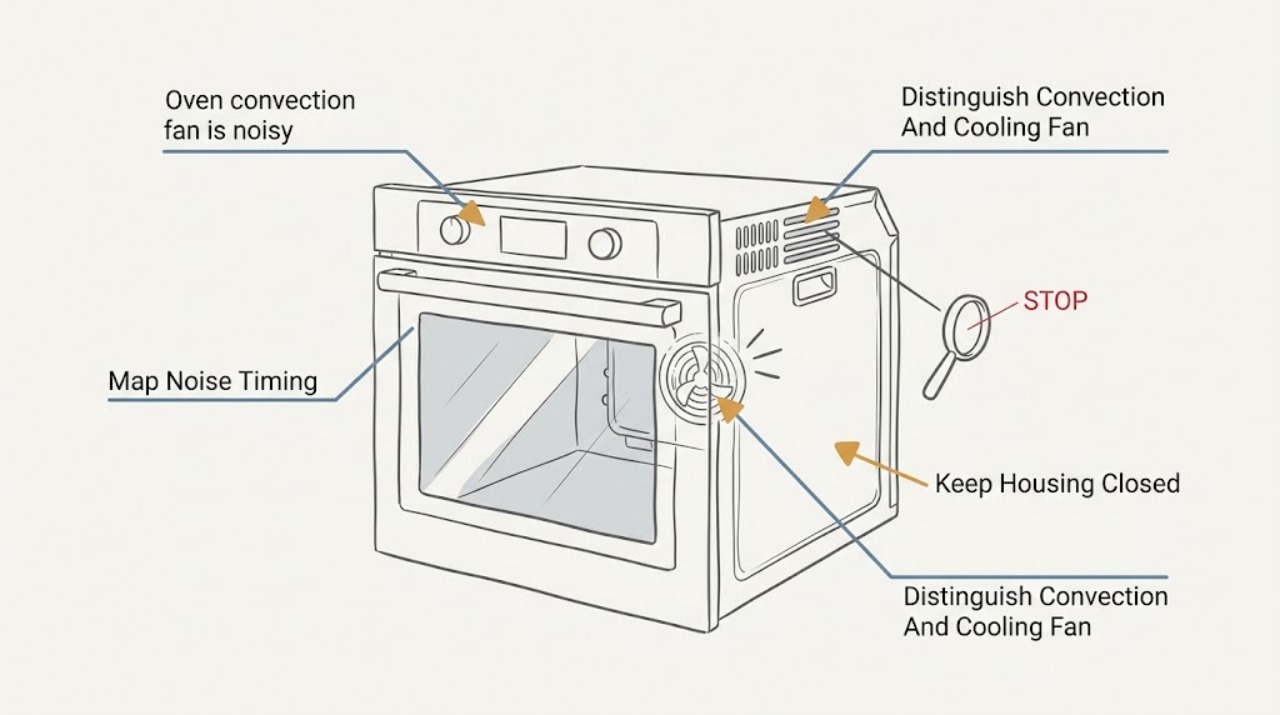
First determine whether the sound is the Bosch convection fan or the separate cooling fan. A fan sound during convection, a fan that stops when the door is opened on applicable models, warm air from the vent, or fan operation after cooking can be normal model behavior. A new scraping, rattling, grinding, wobbling, or speed-related sound is not something to diagnose by reaching through the fan cover. Turn the oven off, let it cool, keep the vents clear, and inspect only for a loose rack, pan, foil, or visible debris without removing the fan cover. If the noise persists with the cavity empty, occurs in multiple modes, is accompanied by an error, uneven heating, smoke, burning odor, vibration, or a fan that strikes its shroud, disconnect power only as the exact manual directs and arrange Bosch or qualified appliance service.
Before you begin
Safety first
- This article covers safe observation of mode timing, vents, racks, and visible cavity conditions only. A technician should handle fan-cover or shroud removal, fan and motor diagnosis, electrical testing, control work, and any repair inside the oven cabinet.
Work through in order
Diagnostic checks
Use only checks that match the exact appliance or system and its official guide.
-
Check 1
From outside the oven, note the sound during a normal, supervised use of the mode in which it occurs, then note whether it continues briefly after the oven is turned off. Do not place a hand near the vent or open the hot door to listen more closely.
Expected result: Record whether the sound occurs only in convection, during bake preheat, during all cooking modes, only after cooking, or even when no cooking mode is selected; describe it as a steady airflow sound, clicking, buzzing, rattling, scraping, grinding, wobbling, or intermittent vibration.
Next step: Compare the timing with the exact Bosch manual and continue only with the cool, powered-off visual check if no safety symptom is present. Save a short audio or video recording from a safe distance for the technician.
Stop if: Stop immediately for smoke, burning odor, sparks, a tripped breaker, visible damage, severe vibration, or an oven that becomes unsafe to operate.
Why this matters
Why: A sound tied to a documented fan mode or post-cooking cool-down can be normal for that model. A new mechanical sound, a noise present when the fan should be off, or a sound that worsens with operation makes ordinary fan behavior less likely and calls for service diagnosis.
-
Check 2
Using only a cool, empty oven and the exact Bosch operating instructions, compare the noise in the affected convection mode with a permitted non-convection mode; observe whether the noise changes when the oven door is closed or opened only as the manual allows, without touching the fan or placing anything in the cavity.
Expected result: Note whether the noise follows convection mode, follows every cooking mode, stops or changes with the door state, or continues after the mode ends as the appliance cools.
Next step: Use the model manual to label the likely fan path in the service report. If the sound is mechanical or the timing does not match the manual, do not run additional tests and arrange service.
Stop if: Do not open a hot door, defeat a door switch, run self-clean to test a noisy fan, or reach through the rear cover.
Why this matters
Why: A sound that follows convection points more toward the convection-fan path; a sound in every mode or after cooking may involve the cooling fan instead. Bosch manuals state that behavior varies by model, so timing alone cannot identify a failed part.
-
Check 3
After the oven is fully cool, switch it off and disconnect power only as the exact Bosch manual directs before any ordinary-access inspection. Remove only a loose rack, pan, or foil that is clearly safe to handle, and inspect the visible rear fan cover and oven vent for a loose object or surface debris without removing the cover.
Expected result: Record whether an accessory or foil was touching the fan-cover area, debris is visibly resting against the cover, the vent is obstructed, or the cavity and vent are clear; do not spin the fan by hand.
Next step: Restore only the model-approved rack or accessory arrangement and make one normal observation after power is restored. If the noise remains or the cover appears loose or damaged, disconnect power as directed and request service.
Stop if: Do not remove the fan cover, reach behind it, bend a blade, tighten hidden hardware, spray cleaner into the fan, or work while the oven is powered or hot.
Why this matters
Why: A loose accessory or visible obstruction can explain a contact-like sound and may stop the noise once removed. A clear cavity with continuing rattling, scraping, or vibration makes a fan blade, shroud, motor, mount, or control issue more likely, but the observation cannot select the part.
-
Check 4
With the cavity clear and the door and vents unobstructed, observe whether the oven still heats evenly and whether the control displays an error or repeatedly interrupts the mode; do not reset the breaker repeatedly or test internal wiring.
Expected result: Record whether the fan noise occurs with normal heating, accompanies uneven or incomplete heating, appears with a displayed code or beeping, or is accompanied by a breaker trip, smoke, or an unusual odor.
Next step: Photograph the display and note the mode, temperature setting, timing, and heating result. Arrange Bosch or qualified appliance service for a code, uneven heating, repeated interruption, or a noise that persists after the visible check.
Stop if: Stop using the oven for smoke, burning smell, sparks, a tripped breaker, exposed wiring, severe vibration, or any need to remove panels or test energized parts.
Why this matters
Why: Noise with normal heating may still be a mechanical fan issue, but a code, interrupted operation, or heating failure broadens the fault beyond the fan sound. Bosch directs owners to record recurring error codes and use service support rather than guessing at a repair.
-
Check 5
From a safe position, verify that the oven door closes normally and that the vent is not covered by cookware, foil, towels, or nearby objects; keep the door and vent in the configuration required by the exact Bosch manual.
Expected result: Note whether the sound changes because the door is not fully closed, the vent is obstructed, a seal or door part is visibly damaged, or the door and vent are normal while the fan remains noisy.
Next step: Remove only an obvious external obstruction when the oven is cool, then make no more than one model-approved observation. Request service for a damaged door, seal, vent, or persistent noise.
Stop if: Do not force the door, defeat a door switch, remove the seal, cover the vent, or continue cooking when hot air cannot escape normally.
Why this matters
Why: Door position and blocked vents can change fan operation and airflow, but they do not prove a damaged convection-fan component. A normal door and clear vent with persistent mechanical noise keeps service as the safe next step.
-
Check 6
Locate the Bosch model number or E-Nr from the rating plate or paperwork without opening unsafe panels, and prepare the mode, noise description, recording, visible inspection result, error code, and heating outcome for a service request.
Expected result: Record whether the model information is available, whether the manual identifies separate convection and cooling fans, and whether the noise is still present after the cavity and vent were cleared.
Next step: Keep the oven off if the sound is severe or accompanied by a safety symptom and arrange Bosch or qualified appliance service. Give the technician the model, mode, timing, sound recording, and all observations.
Stop if: Do not order or install a fan part from a generic appearance match, remove panels, or continue operating an oven with smoke, sparks, a burning odor, severe vibration, or a fault code.
Why this matters
Why: A model number is needed to distinguish the installed fan arrangement and compatible parts. Persistent noise after ordinary checks is evidence for diagnosis, not evidence that a particular blade, motor, or shroud is defective.
Use your observations
Decision map
Find the observation that best matches what you see, then follow the next safe action.
-
PATH 01Safety boundary
What you see
The sound is a steady airflow or soft hum, occurs only in a mode where the exact Bosch manual says a fan operates, and there is no scraping, vibration, error, smoke, or heating problem.
Do this next
Keep vents clear, use the oven normally, and monitor for a change in character or new performance symptom. Keep the model manual with the appliance record.
Why this path and its safety boundary
Why it matters: Normal convection or cooling-fan operation is more likely than a failed fan component. Fan timing differs by Bosch model, including operation during preheat or after cooking.
Safety stop: If the sound becomes mechanical, louder, intermittent, or accompanied by a code or heating change, stop normal use and request service.
-
PATH 02Safety boundary
What you see
With power off and the cavity cool, a rack, pan, foil, or visible loose object was contacting the fan-cover area or blocking the vent, and the sound stops after the model-approved item is removed or repositioned.
Do this next
Use only the rack and accessory arrangement shown in the exact manual and make one normal observation. If the noise returns, stop and arrange service.
Why this path and its safety boundary
Why it matters: The removed accessory or obstruction plausibly caused the contact or airflow sound; this does not establish that the fan assembly is undamaged if scraping or vibration returns.
Safety stop: Do not bend accessories, remove the fan cover, or use foil as a workaround for a fit or airflow problem.
-
PATH 03Safety boundary
What you see
The cavity and vent are clear, the sound is specifically tied to convection, and a scraping, rattling, grinding, wobbling, or repeating vibration persists.
Do this next
Stop running convection and arrange Bosch or qualified appliance service with the model, recording, timing, and sound description. Keep the oven off if the noise is severe or worsening.
Why this path and its safety boundary
Why it matters: A mechanical issue in the convection-fan path becomes more likely, but the observation cannot distinguish a blade, shroud, motor, mount, bearing, or control fault.
Safety stop: Do not spin the fan by hand, straighten a blade, remove the shroud, or replace a motor or blade without model-specific professional diagnosis.
-
PATH 04Safety boundary
What you see
The noise occurs in bake and convection, during cool-down, or when the convection setting is not active, rather than only during the documented convection interval.
Do this next
Use the exact Bosch manual to identify expected fan behavior and request service if the sound is mechanical or newly changed. Provide the full timing pattern rather than ordering a convection part first.
Why this path and its safety boundary
Why it matters: The separate cooling-fan path, vent airflow, mount, or another appliance component may be involved; a convection-fan part should not be assumed from the word fan.
Safety stop: Do not block the vent, defeat the door switch, or run self-clean as a diagnostic test.
-
PATH 05Safety boundary
What you see
Fan noise is accompanied by an error code, beeping, uneven or incomplete heating, a breaker trip, smoke, burning odor, or repeated mode interruption.
Do this next
Turn the oven off; record the code and symptom. For smoke, sparks, a burning odor, or a breaker that trips, leave the appliance off and arrange qualified service; do not repeatedly reset it.
Why this path and its safety boundary
Why it matters: The symptom is not safely attributable to fan noise alone and may involve electrical, heating, control, or mechanical faults.
Safety stop: Do not open panels, test live circuits, continue cooking, or clear a code by repeated power cycling when an unsafe symptom is present.
-
PATH 06Safety boundary
What you see
The fan was noisy or intermittent, then no longer runs in a mode where the exact manual expects it, or the oven no longer heats as expected.
Do this next
Cancel the mode, keep the oven off if operation is abnormal, and arrange service with the exact model, mode, prior noise recording, and current symptom.
Why this path and its safety boundary
Why it matters: A stopped fan or heating change may indicate a technical fault, but the prior noise does not identify whether the blade, motor, shroud, control, or another component failed.
Safety stop: Do not bypass a door switch, force the fan, run self-clean, or replace a fan component without professional diagnosis.
Helpful context
Understand the symptom
Identify the fan and the timing of the sound
Bosch ovens can have a convection fan that circulates heat during convection modes and a cooling fan that moves air around the appliance during cooking or after it is switched off. Their sounds can overlap. Note whether the noise begins only in a convection mode, occurs during preheating, continues after cooking, changes when the door is closed, or appears in every mode. A steady airflow sound in the timing described by the exact manual may be normal; a new mechanical scraping or rattle deserves a stop-and-service boundary.
Use a cool, empty cavity for the only ordinary-access check
Once the oven is fully cool and power is off as the model instructions require, remove ordinary racks or pans only if they are safe to handle and look for foil, cookware, or visible debris that could be touching the rear fan cover or blocking a vent. Do not remove the fan cover, reach into the fan, spray cleaner through the cover, or try to straighten a blade. Bosch warns that vents are important for air circulation and that accessories are model-specific, so a loose part should be handled through the exact manual or service path.
Persistent mechanical noise is a service decision
If the cavity is clear but the fan still scrapes, rattles, grinds, wobbles, or produces a repeating vibration, the observation does not identify whether the blade, shroud, motor, bearing, mount, or control is at fault. Bosch's support guidance treats unresolved oven faults as a technical issue and asks for the model information. Record the sound, mode, timing, heating result, and any displayed code, then stop rather than testing the fan with panels removed.
Safety boundary
Stop conditions
- Turn the oven off and let it cool before any ordinary-access inspection; disconnect power only as the exact Bosch manual directs before access.
- Do not remove the convection-fan cover or shroud, reach into the fan, spin or bend a blade, lubricate a motor, test energized wiring, or defeat a door switch.
- Do not run self-clean, block the oven vent, or use foil or an accessory as a workaround for a noisy or obstructed fan.
- Stop for smoke, sparks, burning odor, a tripped breaker, exposed wiring, severe vibration, visible fan damage, an error code, or incomplete or uneven heating.
- Do not order or install a fan blade, motor, or shroud from a generic appearance match; confirm the exact Bosch model and professional diagnosis first.
- If the noise persists after the cavity and vent are clear, stop repeated tests and arrange Bosch or qualified appliance service.
Only after diagnosis
Potential parts
- oven convection fan blade
Consider this category only when a qualified diagnosis finds a bent, damaged, loose, or otherwise failed convection fan blade after the cavity and accessory checks are complete.
Confirm the exact Bosch model or E-Nr, blade geometry, mounting method, and manufacturer's fit information before ordering or installing. - oven convection fan motor
Consider this category only when a qualified technician confirms a motor, bearing, or motor-drive fault; a noisy oven alone does not identify the motor.
Confirm the exact Bosch model, voltage and connector arrangement, fan design, and technician-diagnosed fit before ordering or installing. - oven fan shroud
Consider this category only when service inspection finds a loose, distorted, damaged, or contacting shroud that is causing the persistent fan noise.
Confirm the exact Bosch oven model, cavity configuration, mounting points, and manufacturer's fit information; do not remove or reshape the shroud as a homeowner test.
When checks do not resolve it
Need a professional?
Arrange Bosch or qualified appliance service when scraping, rattling, grinding, wobbling, or vibration persists after the cool, powered-off cavity check; the sound occurs in unexpected modes or during cool-down; the fan stops or heating changes; a code, breaker trip, smoke, burning odor, or visible damage appears; or diagnosis would require removing a fan cover, shroud, panel, or energized component.
Safety scope: This article covers safe observation of mode timing, vents, racks, and visible cavity conditions only. A technician should handle fan-cover or shroud removal, fan and motor diagnosis, electrical testing, control work, and any repair inside the oven cabinet.
Common questions
FAQ
Is it normal for a Bosch oven fan to make noise?
A steady airflow sound can be normal when a Bosch convection or cooling fan is operating, including some preheat or post-cooking periods that vary by model. A new scraping, grinding, rattling, wobbling, or speed-related sound is not proven normal; keep the oven off if severe and arrange service after the safe visual check.
How can I tell whether the Bosch convection fan or cooling fan is noisy?
Record when the sound occurs: only in convection, in bake preheat, in every cooking mode, or after cooking while the appliance cools. Bosch manuals distinguish these fans and note that timing varies by model; use the exact manual and do not reach through the fan cover.
Can a rack or foil cause a Bosch convection-fan noise?
A loose rack, pan, foil, or visible object near the rear fan cover can plausibly cause contact or airflow noise. Inspect only when the oven is cool and power is off as the manual directs; remove only an ordinary-access item and do not remove the fan cover or bend a blade.
Why does my Bosch oven fan run after I turn the oven off?
Bosch states that the cooling fan may continue after the appliance is off, and some models have other model-dependent fan timing. A steady cool-down sound may therefore be normal, but a new mechanical scrape, rattle, or vibration needs service rather than a blocked vent or improvised repair.
Should I remove the Bosch convection-fan cover to clean or inspect it?
No. Keep the cover in place. From a cool, powered-off cavity you may inspect for a visible loose accessory or debris, but removing the cover, reaching into the fan, straightening a blade, or testing the motor requires model-specific service access.
What if the Bosch fan noise comes with uneven heating or an error code?
Treat the combination as a technical fault rather than a fan-only noise. Turn the oven off, record the exact code and heating symptom, and arrange Bosch or qualified service; do not repeatedly reset the breaker or open the oven cabinet.
When should I call for Bosch convection-fan service?
Call when mechanical noise persists after the cavity and vent are clear, the sound occurs in unexpected modes, the fan stops, heating changes, a code or breaker trip appears, or there is smoke, burning odor, sparks, visible damage, or severe vibration. Have the model or E-Nr and a safe sound recording ready.
Read the exact guide
Official sources
- Use and Care Manual HBNxxx1UC, HBLxxx1UC, HBLxxx2UCBosch Home Appliances · Bosch use-and-care manual for specified HBN/HBL oven families; the exact installed model manual controls fan timing, access, and service steps.
- Oven & Microwave | Error Codes | BoschBosch Home Appliances · Bosch U.S. owner-support error-code guidance; exact code meaning and reset procedure depend on the installed model.
- Common Oven Problems and How to Fix ThemBosch Home Appliances · Bosch U.S. owner-support overview for common oven issues; it directs unresolved appliance faults to Bosch or authorized service.
- Oven Troubleshooting: Convection Oven Not Heating UpBosch Home Appliances · Bosch U.S. owner-support guidance for convection ovens that do not heat; it supports escalation when noise is accompanied by a heating fault but does not identify a particular fan part.
- Bosch Range Use and Care Manual (9000430953_B.pdf)Bosch Home Appliances · Bosch freestanding and slide-in range manual; fan behavior varies by model, so use it as model-family context and verify the exact appliance manual.
Community feedback
Share a repair observation
Share a plain-text repair observation. Accepted observations are published automatically; this page may take a moment to update.