
On this page
Start here
Quick answer
Write down the complete message exactly as shown, including letters, numbers, dashes, and whether the display is blinking. If there is smoke, a burning or gas smell, sparking, uncontrolled heat, or a door that will not behave safely, stop using the oven and isolate it only if you can do so safely. Otherwise, check the door, selectors, clock or lock state, and the model-specific manual, then perform one safe restart if the manual calls for it. A code that returns after the restart needs an authorised service assessment rather than repeated resets or internal disassembly.
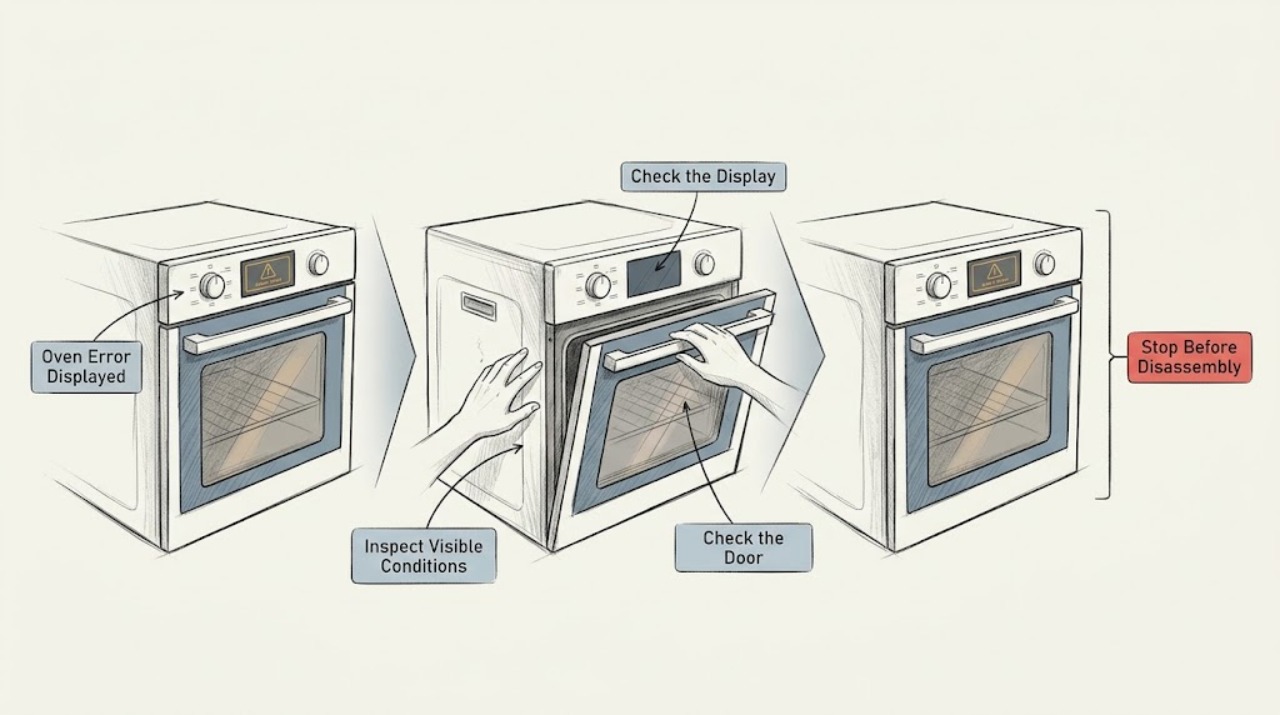
Work through in order
Diagnostic checks
Use only checks that match the exact appliance or system and its official guide.
-
Check 1
Make the oven safe before touching the controls. Look for smoke, sparking, a burning smell, a gas smell on a gas model, an unusually hot fascia or door, or heat that continues after the controls are off.
Expected result: Record whether any hazard is present and whether the door closes and opens normally without force.
Next step: If any hazard is present, stop using the oven, keep clear of the appliance, and arrange professional help. If there is no hazard, continue with the oven switched off and cool enough to inspect safely.
Why this matters
Why: A hazard or unsafe door condition takes priority over identifying the code; continuing to run the oven could worsen an electrical, gas, thermal, or mechanical fault.
-
Check 2
Copy the complete display exactly as shown and note when it appears: at power-up, when a function is selected, during heating, during a self-clean cycle, or after the oven has been interrupted.
Expected result: Capture letters, numbers, dashes, blinking behavior, and any accompanying lock symbol or blank display; also note the selected function and whether the oven was already hot.
Next step: Use the exact code and model information to open the matching Electrolux support article or the user manual for that oven; do not substitute a similar-looking code.
Why this matters
Why: The complete code and timing determine which Electrolux guidance applies. A partial code or a guessed interpretation can send the diagnosis down the wrong branch.
-
Check 3
With the oven not in a hazardous state, check the user-facing setup: both selectors at their off position, the door fully closed without forcing it, and the clock, timer, child lock, or demonstration setting as described for the exact model.
Expected result: The message clears when a selector is returned to off or the door is correctly closed, or it remains unchanged with the controls in a normal state.
Next step: If the message clears after the model-directed setup correction, run only the normal low-risk function described in the manual. If it remains or the door does not close correctly, stop testing and use the service branch.
Why this matters
Why: Some displayed states are caused by a selected function or door condition rather than a failed part. Electrolux specifically links F1 on some pyrolytic ovens to a door that cannot close while cleaning is on, and links F102 to a door-lock or electronics condition.
-
Check 4
If the manual recommends a restart and there is no hazard, switch the oven off, isolate it from power for the model's stated interval, reconnect it, and check the display once. Do not repeatedly cycle the supply or defeat a safety switch.
Expected result: After the single restart, the display returns to normal, the same code returns immediately, or the display remains blank.
Next step: If it clears, test only a normal, supervised oven function. If it returns or the display stays blank, record the result and arrange authorised service; do not open the control area.
Why this matters
Why: A cleared message can be a temporary state; a recurring message is evidence that the underlying condition remains. A blank display after a safe power check needs electrical diagnosis rather than more resets.
-
Check 5
Compare the code with the exact model manual or Electrolux code guidance, paying attention to the code family and the operating state. For example, the Electrolux guidance treats F10 as a high-temperature or thermal-runaway condition, F21 as too high a starting temperature, F90–F94 as door-lock-related, and F102 as a door-lock or electronics condition on applicable models.
Expected result: The code matches a documented thermal, door-lock, setup/display, or other model-specific category, or it is not listed for this oven.
Next step: For thermal or abnormal-heat messages, leave the oven off and cool and seek service if the message persists. For a door-lock message, do not force the door. For an unlisted or recurring message, provide the exact code and model details to an authorised technician.
Why this matters
Why: A documented category tells you which safe branch to follow; it does not prove which component failed. The same-looking family of codes must not be transferred from another model.
-
Check 6
Prepare the service handoff without dismantling the oven: gather the model number, PNC, serial number, exact error text, when it occurs, selected function, whether the oven was hot, and the checks already completed.
Expected result: You can provide a complete, repeatable description and tell the technician whether the code cleared or returned after one safe check.
Next step: Use Electrolux support or an authorised appliance technician. Keep the oven out of service when the code recurs, the display stays blank, or any unsafe symptom was present.
Why this matters
Why: Those details let the service team identify the correct manual and distinguish a transient display state from a recurring fault; guessing a part before that information is available is not reliable.
Use your observations
Decision map
Find the observation that best matches what you see, then follow the next safe action.
-
PATH 01Next step
What you see
Smoke, sparking, gas smell, burning smell, uncontrolled heat, or an unsafe door is present
Do this next
Stop using the oven. If it is safe, switch it off and isolate power; do not dismantle it or work on gas components. Arrange professional help and follow local emergency guidance for an active gas or fire hazard.
-
PATH 02Next step
What you see
The message identifies a high-temperature or over-temperature condition, or the oven is hotter than the selected setting
Do this next
Turn the oven off, keep the door closed if opening it would expose you to abnormal heat, allow it to cool without further testing, and request service if the message returns. Do not keep resetting a thermal warning.
-
PATH 03Next step
What you see
The code is associated with the door lock or the door will not close normally
Do this next
Do not force or bypass the door. Confirm only the visible, model-directed door position check; if the code persists, leave the oven unused and arrange authorised service.
-
PATH 04Next step
What you see
The code clears after the documented setup correction or one safe restart and no hazard is present
Do this next
Record what cleared it and use only a normal, supervised function from the manual. Stop again if the message returns or any abnormal heat, smell, noise, or door behavior appears.
-
PATH 05Next step
What you see
The code is unlisted, returns immediately, or the display remains blank
Do this next
Do not guess a code meaning or replace a part. Keep the oven out of service and give Electrolux or an authorised technician the exact display, model, PNC, serial, timing, and restart result.
Helpful context
Understand the symptom
Why the exact display matters
An Electrolux oven message is a symptom, not a universal diagnosis. The meaning can change with the appliance family, cleaning function, door-lock state, and when the message appears. Treat the complete code and the event that preceded it as one diagnostic clue. A message that clears after a safe, model-directed restart is different from one that returns immediately or appears with abnormal heat.
Safety boundary
Do not remove covers, make live electrical measurements, bypass a door lock, relight or adjust gas components, or keep testing an oven that is smoking, sparking, overheating, or giving off a gas smell. Electrolux advises disconnecting power before maintenance and not dismantling internal components. For a gas model, leave gas-line work to a qualified professional and follow the appliance manual.
Use the result to choose the next check
A one-time message after a power interruption may be a temporary state, while a repeat message can point to a door-lock, temperature-sensing, or control fault. The goal of the checks below is to separate those paths without guessing a part or repeating a potentially unsafe test.
Only after diagnosis
Potential parts
- oven temperature sensor or probe
Consider this category only if an authorised diagnosis links a recurring temperature-related code or abnormal temperature reading to the sensor circuit.
Confirm the exact model and PNC and have the technician verify the fault before selecting a part. Do not infer fit from the error code alone. - oven door-lock assembly
Consider this category only when the exact model guidance and service diagnosis point to a door-lock fault after the door is correctly closed.
Door-lock parts vary by model and cleaning configuration; verify the model and PNC with the manufacturer or technician. - oven electronic control module
Consider this category only after the recurring code, wiring and connected components have been professionally assessed and the control is identified as the cause.
Control modules are model-specific and may require configuration; do not order one from a code match alone.
When checks do not resolve it
Need a professional?
Stop and seek professional help for smoke, gas smell, burning smell, sparking, uncontrolled heat, a door that will not close or unlock safely, a blank display after a power check, or any code that returns after the exact model-directed restart.
Have this ready
- Provide the model number, PNC, serial number, complete display message, when it appears, selected function, whether the oven was hot, and the result of the one safe restart. Do not dismantle the oven before the visit.
Common questions
FAQ
What should I write down when my Electrolux oven shows an error?
Record every letter, number, dash, and symbol, whether it blinks, when it appears, the selected function, whether the oven was hot, and whether the door behaves normally. Also note the model, PNC, and serial number for service.
Can I reset an Electrolux oven error?
Only perform the restart described for the exact model and only when there is no safety hazard. A single power restart may clear a temporary state, but a returning code needs service rather than repeated resets.
Does an F1 or F102 display always mean the same failed part?
No. Electrolux describes F1 differently depending on whether the oven has pyrolytic cleaning, and F102 can involve the door being not fully closed or an electronics condition. Use the exact model guidance and do not assume a part from the code alone.
When should I stop troubleshooting and call for service?
Stop for smoke, gas or burning smells, sparking, abnormal heat, an unsafe door, a blank display that does not recover, or a code that returns after the model-directed checks. Give the technician the complete code and appliance identifiers.
Read the exact guide
Official sources
- What to check before contacting Electrolux consumer serviceElectrolux · Electrolux appliances; power checks, safe restart, error-code recording, manuals, appliance identifiers, and maintenance safety
- Oven repairElectrolux · Electrolux oven repair assessment and unsafe-use boundaries
- Oven displays error code F1Electrolux · Electrolux ovens; F1 guidance for pyrolytic and non-pyrolytic appliances
- Oven shows – - – C on the displayElectrolux · Electrolux integrated ovens and freestanding cookers; display-state reset guidance
- Oven displays code F102Electrolux · Electrolux ovens and cookers; F102 door-close, isolation, and service guidance
- Oven Error Codes and Alarms GuideElectrolux · Electrolux ovens; model-dependent error-code and alarm examples
- Delivery and Installation Guide: Dual Fuel or Gas RangeElectrolux · Electrolux gas ranges; gas shutoff and qualified installation boundaries
- Oven shows error code F21Electrolux · Electrolux built-in ovens and freestanding cookers; F21 starting-temperature guidance
Community feedback
Share a repair observation
Share a plain-text repair observation. Accepted observations are published automatically; this page may take a moment to update.