
On this page
Start here
Quick answer
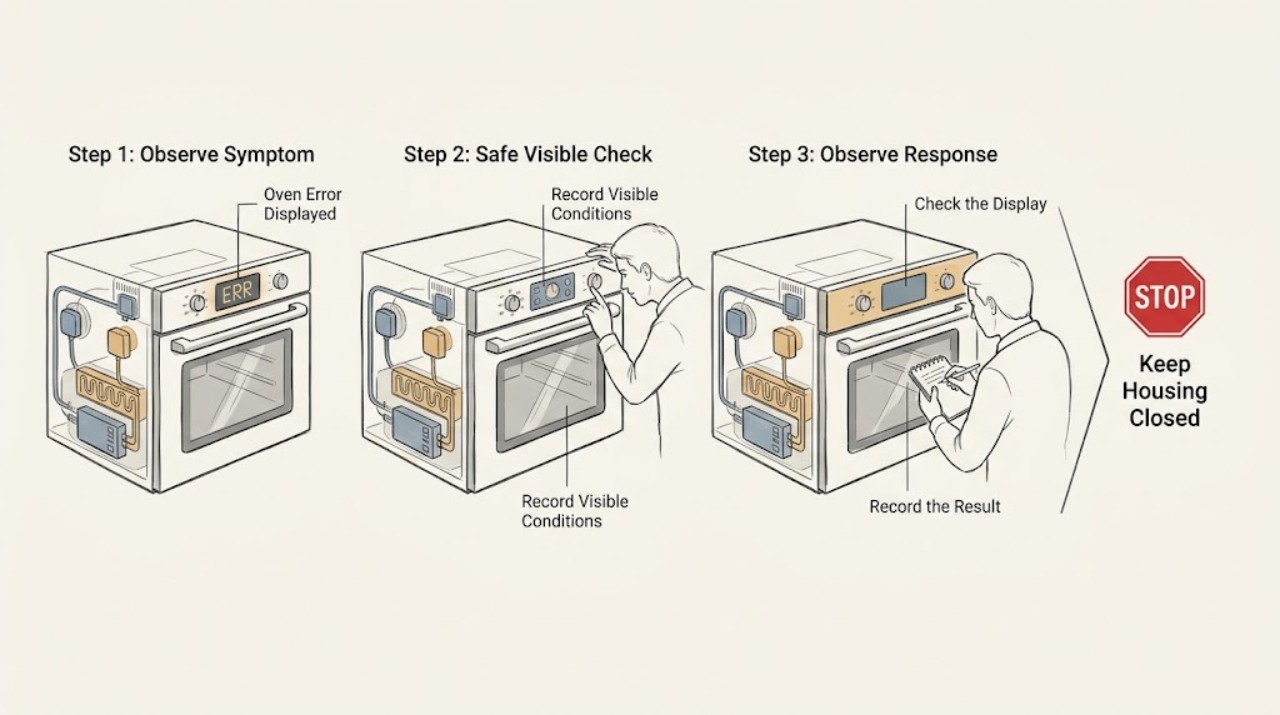
When a Beko oven displays an error, write down the exact code or message and the model before switching anything off. Beko manuals use different code ranges for communication, sensor, heating, component, safety, and timer faults, so a generic code list cannot safely identify a part. If the code remains after the model-specific user step, the oven will not heat, the display is blank, or there is smoke, scorching, sparking, a burning smell, or a damaged cord, stop using the oven and contact authorized service; do not open the cabinet or bypass a safety control.
Work through in order
Diagnostic checks
Use only checks that match the exact appliance or system and its official guide.
-
Check 1
Read the display exactly as shown, including every letter, number, dash, and symbol, and record whether the message is an error code, a hot-temperature warning, a timer indication, or a flashing clock symbol.
Expected result: The display shows a code such as a letter followed by characters, a heat-related message, a timer or clock indication, or an unclear/blank display.
Next step: Keep the exact display record and continue with the matching branch; do not erase the code before recording it. If the display is unclear or blank, stop using the oven and arrange service if normal power is not restored.
Stop if: Do not enter a random code, remove the display, or open the control panel to read a component.
Why this matters
Why: Beko manuals distinguish model-specific error categories from a hot-cavity message and from timer or clock states after a power interruption. A partial code or a guessed interpretation can send the repair down the wrong path.
-
Check 2
Find the oven model information only at the normal user-accessible identification location described by Beko, typically behind the door on the lower inside frame, and match it to the manual before applying any code-specific user step.
Expected result: The complete model is available, only a partial model is visible, or the identification label cannot be accessed without moving or disassembling the oven.
Next step: Use the complete model and exact display text to consult the model manual or authorized support. If the label is inaccessible on a built-in installation, provide the visible information to a technician rather than pulling the oven out.
Stop if: Do not remove trim, pull out a built-in oven, or dismantle a door or control panel to find the label.
Why this matters
Why: Beko's support guidance uses the model number to find the correct manual, while code meanings and permitted user actions can differ between oven models.
-
Check 3
If the message is a flashing clock, timer symbol, or another non-fault setup indication, check the model manual's normal time and function settings; after recording the display, turn the oven off and restart it once using ordinary controls.
Expected result: The display returns to normal operation, the oven still shows the same message, or a new error appears after the single restart.
Next step: If normal operation returns, monitor the oven. If the code returns or the oven still will not start or heat, stop using it and arrange authorized service with the recorded code.
Stop if: Do not repeatedly power-cycle the oven, defeat a lock, or continue a cycle if the display is accompanied by smoke, scorching, or abnormal odor.
Why this matters
Why: Beko documentation notes that a previous power outage can leave the timer display flashing and that an oven must have the intended function, temperature, and where applicable time set. A persistent or new code is not a setting issue to keep resetting.
-
Check 4
With the oven cool, observe whether the door closes normally and whether the chosen cooking function and temperature are visible in the controls; do not touch heaters, sensors, or wiring.
Expected result: The door is open or obstructed, no function or temperature is selected, the oven shows a normal selection but does not heat, or the code remains.
Next step: Close the door and correct only the ordinary function, temperature, or timer setting once. If the code or no-heat symptom remains, stop and contact authorized service rather than testing a heater or sensor.
Stop if: Do not open the rear panel, test energized wiring, bypass the door interlock, or touch a hot element.
Why this matters
Why: Beko lists an open door, missing function or temperature, and timer or power conditions among reasons an oven may not heat. A correct external setup with a persistent code or no heat points to a technical fault requiring service.
-
Check 5
Compare the displayed code with the exact model manual's troubleshooting table and note whether it is classified as a communication, sensor, heating, component, security, or timer fault.
Expected result: The manual gives a clear user action, assigns the code to a technical category, or does not list the code for the model.
Next step: Follow only the manual's explicitly user-permitted step. For a technical or unlisted code, stop using the oven and provide the code, model, and symptoms to authorized service.
Stop if: Do not substitute another model's code table, clear a safety error by repeated resets, or order a component based only on the code.
Why this matters
Why: Beko manuals direct authorized service for the listed technical categories, including oven heating and component errors. An unlisted code cannot safely be mapped to a replacement part from a generic chart.
Use your observations
Decision map
Find the observation that best matches what you see, then follow the next safe action.
-
PATH 01Next step
What you see
The display was a clock, timer, or setup indication and normal operation returns after the documented setting is restored.
Do this next
Use the oven while monitoring the display. If the indication returns without another power event, arrange service and report the recurrence.
-
PATH 02Next step
What you see
The model manual identifies the message as a communication, sensor, heating, component, security, or timer error.
Do this next
Stop relying on generic code lists and contact authorized service with the exact code, model, and symptoms. Do not open the oven or bypass a control.
-
PATH 03Next step
What you see
The code is not listed for the exact model, the model cannot be confirmed, or the display is blank or unreadable.
Do this next
Stop using the oven and arrange authorized diagnosis. Do not pull out a built-in oven or attempt to identify the fault by internal testing.
-
PATH 04Next step
What you see
The code is accompanied by no heat, a failed start, smoke, scorching, visible sparks, burning odor, damaged cord, or gas odor.
Do this next
Stop using the oven. For gas odor, leave immediately without operating switches or appliance controls and contact the gas supplier or emergency services from a safe location. For other hazardous signs, keep clear and arrange qualified appliance or electrical service.
Helpful context
Understand the symptom
Do not diagnose a Beko code by the first letter alone
Beko oven code meanings vary by model and configuration. A displayed code can identify a sensor, heating, communication, component, safety, or timer category, but it does not by itself prove which part has failed. Record the exact characters and use the manual for the exact model.
Make safety the first branch
If the display is accompanied by smoke, scorching, visible sparks, an electrical burning smell, a damaged cord, or gas odor on a gas model, stop using the oven. For gas odor, leave the area without operating switches or appliance controls and contact the gas supplier or emergency services from a safe location. Do not remove panels or try to clear a code by touching internal wiring.
Safety boundary
Stop conditions
- Gas odor: leave immediately, avoid flames and electrical switches or appliance controls, and contact the gas supplier or emergency services from a safe location.
- Smoke, scorching, visible sparks, electrical burning odor, damaged cord, blank display, or a repeated protective-device trip: stop using the oven and arrange qualified service.
- Do not remove panels, pull out a built-in oven, probe live wiring, bypass door or thermal controls, or map a code to a part without the exact model diagnosis.
Only after diagnosis
Potential parts
- oven temperature sensor
Consider this category only if the exact model manual and qualified diagnosis identify a sensor error; a displayed code alone is not enough to select a part.
Confirm the complete oven model and manufacturer fit information before selecting any component; do not infer compatibility from a code range. - oven control or timer component
Consider this category only after qualified diagnosis links the exact code and symptoms to the control or timer rather than a power, setting, sensor, or heating cause.
Control and timer components are model-specific and require qualified installation; do not order or install from a generic error message.
When checks do not resolve it
Need a professional?
Contact authorized Beko appliance service when the exact code persists, is unlisted for the model, is classified as a sensor, heating, component, security, or communication error, or is accompanied by no heat or a failed start. Also call for smoke, scorching, sparks, electrical damage, or gas odor after leaving the area safely. Provide the exact model, code or message, when it appeared, and whether the oven still heats.
Common questions
FAQ
What does an error code on a Beko oven mean?
The meaning depends on the exact model. Beko manuals group codes into categories such as communication, sensor, heating, component, security, and timer errors, so record the complete code and use the model manual rather than a generic list.
Can I clear a Beko oven error by switching it off and on?
After recording the code, one normal restart may distinguish a temporary setup indication from a persistent fault when the model manual allows it. If the code returns, the oven will not heat, or a safety symptom appears, stop using it and contact authorized service.
Should I replace a part based on a Beko oven error code?
No. A code category does not prove which component failed or which part fits. A qualified technician should confirm the exact model and diagnosis before any sensor, control, timer, or heating component is selected.
Read the exact guide
Official sources
- How to I fix a range or an oven that does not heat?Beko · Applicable when a Beko oven error is accompanied by no heat or a failed cooking start.
- Help Center ResultBeko · Applicable as Beko support-center context; use the exact model manual for a specific display message.
- Built-in Oven / User ManualBeko · Applicable as Beko model-manual guidance; exact oven model manual takes precedence for a displayed code.
Community feedback
Share a repair observation
Share a plain-text repair observation. Accepted observations are published automatically; this page may take a moment to update.