
On this page
Start here
Quick answer
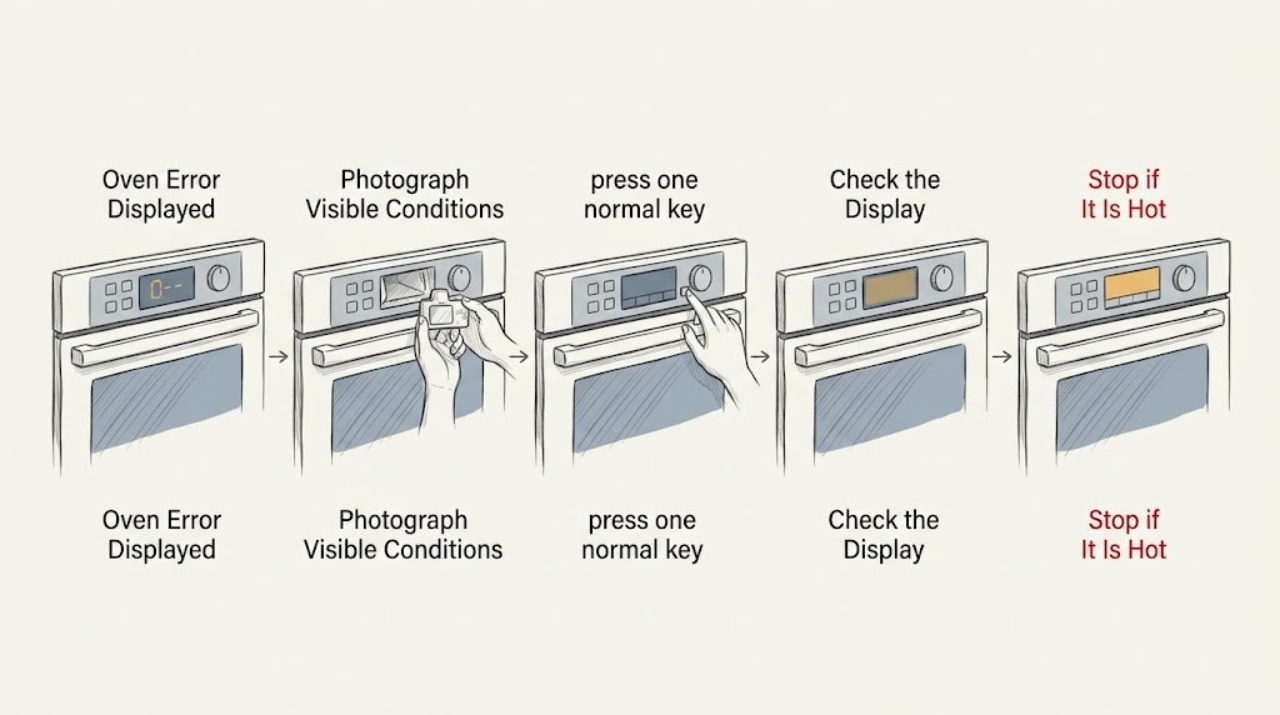
When a Bosch oven displays an error, write down the complete code and note whether the control is beeping or the keys are unresponsive. Press a key to stop the beeping if the panel permits it, then follow the reset procedure for the exact model in its owner information. Bosch identifies an E followed by a number as a malfunction or fault condition; if the same code returns after a safe reset, turn the oven off and arrange qualified service. Do not open the control area or test live wiring yourself.
Work through in order
Diagnostic checks
Use only checks that match the exact appliance or system and its official guide.
-
Check 1
Pause the oven and record the entire message exactly as shown, including every letter, number, punctuation mark, and whether the control panel is beeping. If the display is still readable, take a photo before pressing anything.
Expected result: An E followed by a number is a Bosch fault or malfunction indication. A code accompanied by beeping is still needed even if the beeping stops after a key is pressed.
Next step: Keep the code with the model and product information, then continue with the non-invasive panel and reset checks below.
Why this matters
Why: The exact code narrows the branch; a generic description such as error or service is not enough to identify a component safely.
-
Check 2
If the control is responding and the panel is beeping, press one normal key to silence the alert. Do not press random combinations or start a cooking or cleaning program while the fault is present.
Expected result: The beeping stops but the code remains when the fault is still stored. If no key responds, treat the control as unresponsive rather than forcing it.
Next step: Use the exact model owner's instructions for a reset. If the message continues, switch the oven off and arrange qualified service.
Why this matters
Why: Silencing the sound does not repair the underlying condition; it only makes it possible to read the display and follow the correct model procedure.
-
Check 3
If the code is E11 or the touch keys became unreliable after moisture or steam, turn the oven controls off and wipe the exterior control panel with a clean, dry cloth. Do not spray cleaner into seams or remove the panel.
Expected result: A dry panel and normal key response support the condensation-related branch described by Bosch. Keys that remain unresponsive or an E11 that returns indicate that the fault has not cleared.
Next step: With the panel dry, follow the model-specific power reset instruction once. If E11 returns, stop and request service.
Why this matters
Why: Moisture at the keypad can interfere with touch sensing, but a recurring code should not be assumed to be moisture without further diagnosis.
-
Check 4
For a general E code, turn the oven off using its normal control if possible. If Bosch's instructions for the model call for a breaker reset, switch off only the oven's identified circuit, wait the stated interval, and restore it once; do not work inside the electrical panel or appliance.
Expected result: The oven returns to its normal display and accepts a simple bake selection when the reset clears a transient control state. The same code, a blank display, or continued beeping means the fault remains.
Next step: Run one supervised low-temperature test only if the code is gone and the oven behaves normally. If the code comes back, stop using the affected function and arrange service.
Why this matters
Why: A reset can clear a temporary electronics state, but it cannot prove that a board, sensor, wiring connection, or power supply is healthy.
-
Check 5
If the display identifies an overheated control, such as E302 on a supported Bosch range, stop cooking, remove heat sources from the control area without touching hot surfaces, and allow the appliance to cool. Check externally that room air openings are not blocked and that cookware is not positioned against the control panel.
Expected result: The message may disappear after the controls cool and a single reset is completed as directed. A returning overheat message, hot or distorted controls, or a persistent blank display is abnormal.
Next step: Do not continue using the oven if the message returns. Arrange qualified service and provide the exact code and what was hot near the control panel.
Why this matters
Why: The code branch points to heat affecting the power or control board, not a generic keypad annoyance; continued operation can worsen the fault.
Use your observations
Decision map
Find the observation that best matches what you see, then follow the next safe action.
-
PATH 01Next step
What you see
The code disappears after one model-approved reset and the oven accepts normal controls.
Do this next
Record what happened and monitor one ordinary cooking cycle. If the code returns, stop and arrange service.
-
PATH 02Next step
What you see
An E code remains, returns after reset, or the panel stays unresponsive.
Do this next
Turn the oven off and arrange qualified Bosch appliance service. Do not remove the control panel or test wiring.
-
PATH 03Next step
What you see
The code is E11 and the panel is damp or the touch keys are unreliable.
Do this next
Dry the exterior control panel, perform the model-approved brief power reset once, and request service if the code or key failure persists.
-
PATH 04Next step
What you see
The display indicates an overheated control or power board.
Do this next
Stop cooking, allow the appliance to cool, keep heat and cookware away from the control area, and arrange service if the message returns.
-
PATH 05Next step
What you see
The code indicates a power-supply or electronics fault, or the breaker trips when the oven is used.
Do this next
Stop resetting the circuit and have the electrical supply and appliance examined by qualified professionals.
Helpful context
Understand the symptom
Why the exact code matters
Error displayed is a symptom category, not one diagnosis. Bosch uses different messages for touch-key problems, electronics faults, temperature-sensor faults, overheated controls, and power-supply problems. The characters, capitalization, beeps, and whether the oven still accepts commands determine which branch is appropriate. Photograph the panel or copy the code before resetting it.
Safe reset boundary
User checks can be limited to the dry exterior control panel, the displayed code, and a normal circuit-breaker reset when Bosch gives that instruction for the model. Keep hands out of the control compartment, do not measure voltage, and do not remove wiring covers. A reset that clears the message once is useful information; a recurring message is a service signal, not an invitation to keep cycling power.
When checks do not resolve it
Need a professional?
Qualified service is appropriate for any recurring Bosch oven error, a persistent electronics or sensor code, an overheated control message, or a fault that cannot be cleared through the model's owner instructions.
Common questions
FAQ
What does an E followed by a number mean on a Bosch oven?
Bosch treats an E followed by a number as a malfunction or fault indication. Record the exact code, follow the reset instructions for the model once, and arrange service if the code returns.
Can I clear a Bosch oven error myself?
You can silence the alert with a normal key when the panel responds and perform only the power reset described for your model. Do not open the control area or test live wiring. A recurring message needs qualified service.
What should I do if the Bosch oven panel is not responding?
Record the message if possible, keep the oven off, and follow the model's owner-support reset instruction once. If the panel remains unresponsive or the code returns, arrange qualified service instead of forcing buttons or removing the panel.
What does E302 indicate on a Bosch range?
Bosch lists E302 as an overheated control panel on supported ranges. Let the appliance cool, keep cookware away from the control area, perform the listed reset once, and request service if the message persists.
Read the exact guide
Official sources
- Freestanding Range | Error CodesBosch Home Appliances · Bosch guidance for electronics, sensor, overheated control, and power-supply error branches on supported freestanding ranges.
- Get Support - Ovens & Ranges | Bosch Home AppliancesBosch Home Appliances · Bosch routes oven owners to model-specific error codes, owner manuals, troubleshooting, and authorized service.
- Common Oven Problems and How to Fix ThemBosch Home Appliances · Bosch guidance to seek customer service or an authorized servicer when an oven problem requires repair.
- Bosch Oven & Microwave Error CodesBosch Home Appliances · Bosch guidance for E11 touch-key behavior, generic E-number malfunctions, beeping fault codes, reset boundaries, and service escalation.
Community feedback
Share a repair observation
Share a plain-text repair observation. Accepted observations are published automatically; this page may take a moment to update.