
On this page
Start here
Quick answer
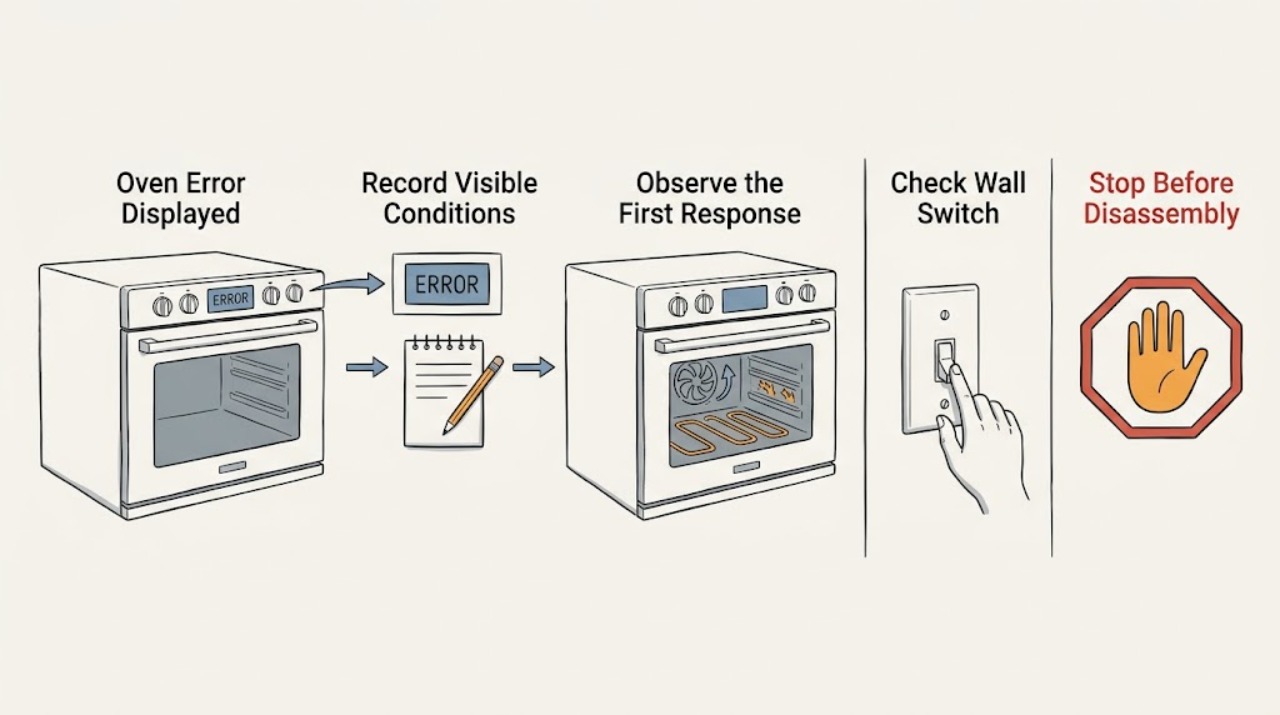
When a Fisher & Paykel oven beeps and displays an alert or fault code, record the exact code and follow the on-screen instruction or the fault-code table for the exact model. Do not switch off the wall power while the oven is hot unless that model's instructions specifically say to do so, because cooling fans may still be protecting the oven and cabinetry. An overheat alert generally calls for cooling before reuse; a self-clean door-lock alert has a separate model-directed branch; an F code followed by a number is treated in the user guides as a technical fault that needs the code recorded and qualified service if it persists. Stop for gas smell, smoke, flames outside the normal burner area, damaged wiring, a cracked door pane, or an alert that returns after the prescribed correction.
Work through in order
Diagnostic checks
Use only checks that match the exact appliance or system and its official guide.
-
Check 1
From a safe position, read the complete display and write down the alert exactly as shown, including any letter, number, or message. Note whether the oven is hot, whether the cooling fan is running, whether the door is locked, and whether there is smoke, a gas smell, or visible damage. Do not touch hot surfaces or open a locked door by force.
Expected result: There is a clear code with no immediate hazard, or there is smoke, a gas odor, an uncontrolled flame, damaged wiring, a cracked door pane, or another urgent safety condition.
Next step: If an urgent hazard is present, stop using the oven, leave the area and contact the appropriate emergency or qualified service provider as needed; do not operate switches if gas may be present. If there is no hazard, keep the code and model identity for the next check.
Why this matters
Why: The exact code determines the model-specific branch, but an immediate gas, fire, electrical, or glass hazard takes priority over code interpretation.
-
Check 2
Find the exact Fisher & Paykel model code in the user guide, rating-label information, or product record, then compare the displayed alert with that model's fault-code table. Follow the on-screen steps only; do not substitute a procedure from another oven family or assume that a similar-looking code has the same cause.
Expected result: The code is listed with a clear owner action, or it is absent from the model's documentation or keeps returning after the listed action.
Next step: For a listed code, carry out only the documented correction and monitor whether the alert disappears. For an unknown or recurring code, leave the oven unused as appropriate and arrange Fisher & Paykel or qualified service with the exact code.
Why this matters
Why: A listed code may have a safe user correction, while an unknown or recurring code needs a service diagnosis rather than a guessed component replacement.
-
Check 3
If the code indicates overheating or the oven is still hot, cancel no controls beyond the model guidance and allow the oven to cool with its cooling system unobstructed. Keep combustible items away from the vent area and do not switch off the wall supply while hot unless the exact fault table instructs it.
Expected result: After the prescribed cool-down, the door unlocks and the alert clears without returning, or the alert remains, the door stays locked, or the oven shows another code.
Next step: If the alert clears and the oven is otherwise normal, resume use only as the exact model guide permits and monitor it. If it remains, returns, or the door does not unlock, stop using the oven and request qualified service; do not force the lock.
Why this matters
Why: An overheat alert can clear after safe cooling on applicable models. A persistent alert or locked door indicates that the documented recovery did not resolve the condition.
-
Check 4
If the display shows a door-lock alert associated with Self Clean, verify only the external conditions named by the model guide: the cycle has ended or was stopped as instructed, the oven has cooled, and the door was closed firmly when the cycle was started. Do not pull the door, insert tools, or remove the lock cover.
Expected result: The door unlocks and the alert disappears after the exact model-directed recovery, or the lock remains engaged and the alert reappears.
Next step: If the alert clears, use the oven only according to the user guide. If the door stays locked or the alert returns, keep the oven out of service and arrange qualified help; never force the door or bypass a safety interlock.
Why this matters
Why: A Self Clean lock alert concerns the locking state and safe temperature, not a general invitation to reset every oven control. Repeated failure suggests a lock, sensing, or control diagnosis.
-
Check 5
If the display is an F code followed by a number, wait until the cooling fans have stopped and the oven is completely cool, then follow the exact model guide's power-isolation and service instruction. Do not open the control area, probe wiring, replace a sensor, or perform a live test.
Expected result: The F code clears and does not return after the documented recovery, or it returns, another fault appears, or the oven cannot complete the recovery safely.
Next step: If the code is gone and the model guide permits use, monitor cautiously. If it returns or recovery fails, leave the oven unused and contact a trained service technician or Customer Care with the code and model information.
Why this matters
Why: F-plus-number is identified in the reviewed Fisher & Paykel guides as a technical fault. Clearing a display once does not establish that the underlying electrical or control condition is safe to ignore if it recurs.
-
Check 6
Before requesting service, document the model and serial information, exact code, time it appeared, operating mode or Self Clean status, oven temperature state, door-lock state, power interruptions, and any gas, smoke, flame, smell, or visible damage. Take a photo of the display only if this can be done without reaching over heat or interrupting a safety response.
Expected result: The record is complete and the oven is safe to leave unused, or the issue has cleared but the same code or symptom returns during later use.
Next step: Use Fisher & Paykel Product Help or its service-booking route and provide the record. Do not keep cycling the oven to reproduce a fault that has already returned.
Why this matters
Why: A code tied to a mode, heat state, or door condition gives the technician better diagnostic context. A returning code is evidence that the cause was not resolved by a one-time reset or cool-down.
Use your observations
Decision map
Find the observation that best matches what you see, then follow the next safe action.
-
PATH 01Next step
What you see
Smoke, gas odor, flames outside the normal burner area, damaged wiring, a cracked door pane, or another immediate safety hazard is present
Do this next
Stop using the oven and leave the area if needed. Do not operate electrical switches where gas may be present; contact the appropriate emergency or qualified service provider. Do not use an oven with cracked or shattered door glass.
-
PATH 02Next step
What you see
The displayed code identifies overheating and clears after the oven cools as the exact model guide describes
Do this next
Use the oven only if the model guide permits it after the alert clears, keep vents unobstructed, and stop if the code returns or heating behavior is abnormal.
-
PATH 03Next step
What you see
The displayed code is a Self Clean door-lock alert and the door remains locked after the prescribed cool-down or recovery
Do this next
Do not force or bypass the lock. Keep the oven out of service and request Fisher & Paykel trained service with the code and model identity.
-
PATH 04Next step
What you see
The display shows F followed by a number, or an unknown code is not resolved by the model guide
Do this next
Record the full code, allow the oven and cooling fans to finish safely, and follow the exact guide's power instruction before contacting qualified service. Do not open the oven electronics.
-
PATH 05Next step
What you see
The alert disappears after the documented correction and does not return
Do this next
Resume use only as permitted by the exact model guide, keep the record of the event, and stop if the same alert or a related symptom returns.
-
PATH 06Next step
What you see
The alert returns, the oven cannot heat or complete its cycle, or the door, controls, or cooling behavior remains abnormal
Do this next
Stop repeated resets and arrange Fisher & Paykel or qualified appliance service. Provide the exact model, code, operating mode, and recovery steps already attempted.
Helpful context
Understand the symptom
Treat the code as a model-specific clue
Fisher & Paykel uses alert and fault codes across different oven families, but the same-looking code can have different instructions on another model. The model code and exact display text matter. Start with the user guide for that oven rather than guessing that every A or F code has the same cause.
Do not interrupt a hot oven carelessly
A displayed alert may suspend oven functions while the cooling system continues to run. Fisher & Paykel warns in its oven guides not to turn off mains power while the oven is hot unless the fault table specifically instructs it. Keep clear of hot surfaces and the cooling outlet, and do not remove panels or attempt live electrical checks.
When a service visit is appropriate
If the code returns, the oven will not complete its prescribed recovery, the door remains locked after the model-directed cool-down, or an F-plus-number technical fault appears, qualified Fisher & Paykel service is the safe next step. The support site can identify product help, manuals, and an authorized service route; the technician needs the model, serial information, and exact code.
Only after diagnosis
Potential parts
- oven door-lock or latch assembly
Consider this category only after qualified service confirms a recurring Self Clean lock fault or a failed lock mechanism for the exact model.
Door-lock components are model-specific and safety-critical. Do not force the door or select a replacement from the alert code alone. - temperature sensor or control diagnosis
Consider this category only after qualified service confirms that the recurring alert is caused by temperature sensing or control hardware rather than an installation or operating condition.
Sensor and control compatibility depends on the complete model identity and revision. Internal access and electrical testing belong to qualified service. - ignition or heating-system component
Consider this category only when qualified service confirms a heating or ignition fault associated with the displayed code on a gas or electric model.
Gas and mains-voltage components require model-specific diagnosis and qualified handling. Do not test or replace them based only on a generic error display.
When checks do not resolve it
Need a professional?
Stop and seek professional help for gas odor, smoke, uncontrolled flames, damaged wiring, a cracked or shattered door pane, repeated overheating, an F-plus-number or unknown code, a locked door that does not recover as directed, or any alert that returns after the model-specific correction.
Have this ready
- Provide the full model and serial information, exact alert text, when it appeared, operating mode, heat and cooling-fan state, door-lock state, power interruptions, visible symptoms, and the exact model-directed steps already attempted. Do not remove covers, force a lock, bypass an interlock, or perform live tests.
Common questions
FAQ
What should I do first when my Fisher & Paykel oven displays an error?
Record the exact alert and model identity, check for immediate gas, smoke, electrical, heat, or glass hazards, and follow the exact user guide or on-screen instruction. Do not switch off wall power while the oven is hot unless that model's fault table specifically instructs it.
Can I reset a Fisher & Paykel oven error by turning off the power?
Only when the exact model's fault instructions tell you to do so and the oven has cooled as directed. Fisher & Paykel warns that cutting power while the oven is hot can interfere with cooling and may damage the oven or surrounding cabinetry.
What does an F code followed by a number mean on a Fisher & Paykel oven?
In the reviewed Fisher & Paykel oven guides, F followed by a number indicates a technical fault. Record the code, wait for the oven and cooling fans to finish safely, follow the exact guide's power instruction, and contact trained service if the fault persists or returns.
Why is my Fisher & Paykel oven door locked after an error?
The door can remain locked while the oven is hot or during a Self Clean lock condition. Allow the exact model's prescribed cool-down and follow its door-lock steps. Never force the door; arrange service if it remains locked or the alert returns.
Read the exact guide
Official sources
- Spare Parts | Fisher & Paykel USAFisher & Paykel USA · Fisher & Paykel parts information and technician/service boundary
- Fisher & Paykel Professional Range Oven User GuideFisher & Paykel · Fisher & Paykel professional range ovens; alert display, hot-oven cooling safety, and A1/A2/A3/F-plus-number branches
- Fisher & Paykel Oven User Guide OB24SMPTNB1Fisher & Paykel · Fisher & Paykel OB24 oven; fault-code display, overheating, Self Clean door-lock, and technical-fault guidance
- Fisher & Paykel Built-In Oven User Guide OB30-DPTFisher & Paykel · Fisher & Paykel built-in ovens; alert-code handling, cooling-fan safety, and service boundary
- Help & Support | Book A Service | Repair | TechnicianFisher & Paykel USA · Fisher & Paykel product help, manuals, troubleshooting, and authorized service pathway
Community feedback
Share a repair observation
Share a plain-text repair observation. Accepted observations are published automatically; this page may take a moment to update.