
On this page
Start here
Quick answer
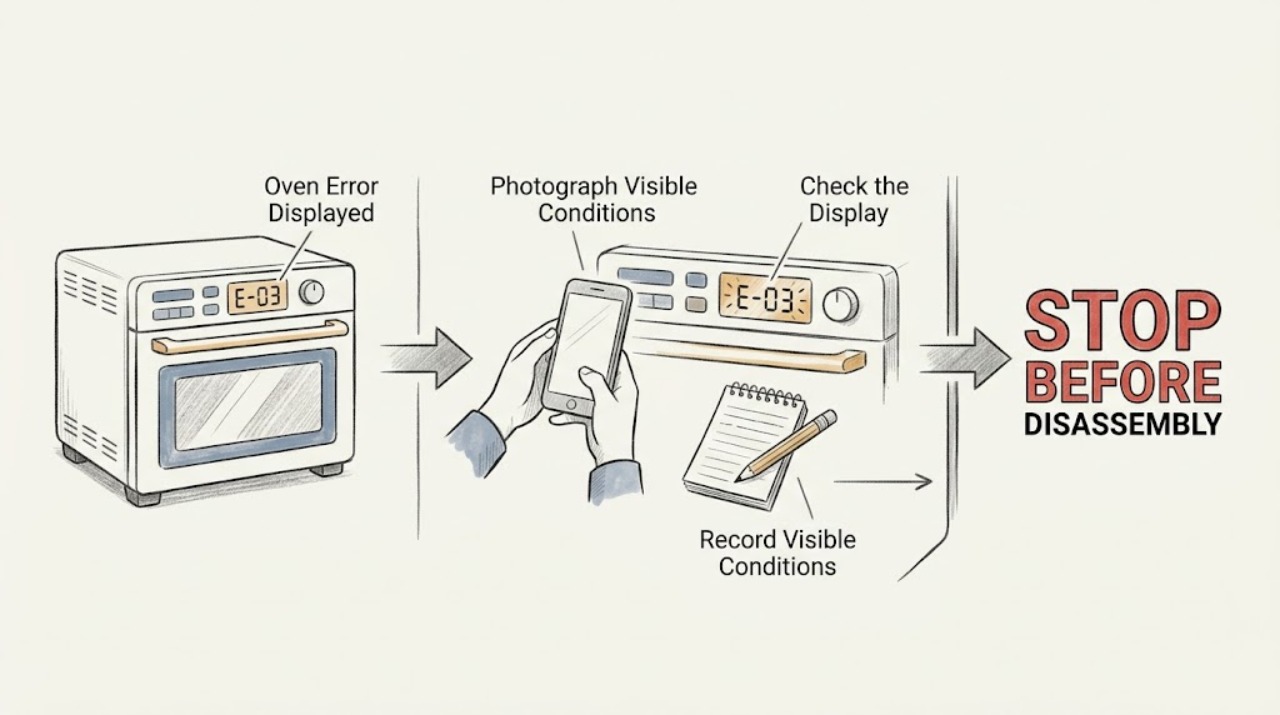
An Amana oven error display does not have one universal meaning: the exact characters, the oven model, and what the oven was doing determine the next step. Record the full code or message before clearing it. Amana's cooking-appliance guide distinguishes ordinary states such as a power-failure display, control lock, Sabbath mode, or calibration message from F# E# or E# F# fault codes. Use the matching owner's manual, then try one documented power reset only if the code guidance permits it. If the code returns, the oven will not heat, the door will not latch, the controls behave erratically, or there is smoke, burning odor, gas odor, or a breaker trip, stop using the oven and arrange qualified service.
Work through in order
Diagnostic checks
Use only checks that match the exact appliance or system and its official guide.
-
Check 1
Photograph or write down the complete Amana display, including letter-number order, dashes, symbols, flashing behavior, and the cooking function or event that preceded it.
Expected result: The display is a readable F# E# or E# F# code, a named state such as lock or power failure, or an intermittent or incomplete message.
Next step: Keep the code and context available, then locate the owner's manual using the oven's model identification. Do not press random keys or start a hot cycle merely to reproduce the message.
Why this matters
Why: The display form determines whether the next step is a setting check, power-event check, model-manual lookup, or service boundary. An incomplete display is still evidence and should not be replaced by a guessed code.
-
Check 2
Compare the recorded display with the exact model manual and Amana's cooking-appliance guide, checking whether it is a power-failure clock, Control Lock, Sabbath mode, calibration state, or an F/E fault code.
Expected result: The guide gives a user setting change or clear action, or it identifies a code as an electrical, door, sensor, control, or service-related fault.
Next step: Follow only the user-level instruction for the exact model. If the guide does not list the display, treat it as unresolved and move to the service boundary rather than applying a code from another Amana oven.
Why this matters
Why: A setting or power-event display can clear without a component repair. A fault code points to a diagnostic path but does not by itself prove which internal part has failed.
-
Check 3
With the oven cool, check that the control lock is not intentionally active, the door is fully closed without an obstruction, and the selected function and Start control match the model manual; do not remove the door or control panel.
Expected result: The display clears after the documented setting or door correction, or the door does not latch, the controls remain locked, or the same code returns.
Next step: Do not force the door or defeat a lock. If the latch or control remains abnormal, leave the oven off and arrange service; do not test the switch or wiring while energized.
Why this matters
Why: A lock, door position, or selection can prevent a cycle without proving a component failure. A persistent latch or control indication can involve the switch, latch assembly, wiring, or electronic control.
-
Check 4
Only when the oven is not hot and there is no smoke, gas odor, water, or electrical damage, switch the oven's circuit breaker or fuse off for the interval stated by the exact Amana guidance, restore power, and observe the display before attempting normal operation.
Expected result: The display stays clear and the oven operates, or the code returns during the observation period or when a function is selected.
Next step: Do not repeat the reset cycle. If the message returns, the breaker trips, the oven does not heat, or the control behaves erratically, switch it off and arrange qualified service.
Why this matters
Why: A clear display after one reset supports a temporary power or control state, but it is not proof that the oven's internal controls, sensor, latch, or heating circuit are sound. A returning code is a repeatable fault.
-
Check 5
Before requesting service, record the model identification, exact display, whether the oven was hot, the selected function, what happened after one documented reset, and any smell, sound, smoke, or breaker response.
Expected result: The code is repeatable, the oven will not heat or operate normally, the display is unlisted, or the appliance now works without the message.
Next step: Use the oven only if the exact manual confirms normal operation and no warning returns. Otherwise keep it off and arrange qualified appliance service; do not open the control area or replace a part from the code alone.
Why this matters
Why: Repeatable details help a technician choose a safe diagnostic path. A temporarily clear display may represent a one-off event, but a recurring code or operation fault still needs assessment.
Use your observations
Decision map
Find the observation that best matches what you see, then follow the next safe action.
-
PATH 01Safety boundary
What you see
The display shows a flashing clock, PF, or another power-failure state rather than an F/E code.
Do this next
Follow the model manual to clear the display or restore the clock. If the message persists or the supply is suspected to be miswired, arrange qualified electrical or appliance service.
Why this path and its safety boundary
Safety stop: Continue with the fault-code branch.
-
PATH 02Safety boundary
What you see
The display shows Control Lock, LOC, Locked, Sabbath mode, or calibration.
Do this next
Use the exact model manual for the setting. Do not infer a failed control until the documented setting check is complete.
Why this path and its safety boundary
Safety stop: Continue with the F/E code or unlisted-display branch.
-
PATH 03Safety boundary
What you see
The code or symptom involves the door latch, door switch, controls, or failure to begin a cycle.
Do this next
Check only the cool, visible door and control state. Do not force the door, bypass the lock, remove panels, or test wiring; request service if the indication remains.
Why this path and its safety boundary
Safety stop: Continue with the power-reset and recurrence branch.
-
PATH 04Safety boundary
What you see
The exact Amana guidance permits a single breaker or fuse reset and there is no active safety symptom.
Do this next
Perform one documented reset, then observe the display and operation. Stop if the code returns or the appliance behaves abnormally.
Why this path and its safety boundary
Safety stop: Do not reset or operate the oven; arrange qualified service.
-
PATH 05Safety boundary
What you see
The same code returns, the display is unlisted, or the oven will not heat or operate normally after one user check.
Do this next
Turn the oven off, preserve the display and context, and arrange qualified appliance service.
Why this path and its safety boundary
Safety stop: A clear display supports a temporary state, but stop and reassess if the message or operation fault returns.
Helpful context
Understand the symptom
Record the display before clearing it
Write down every letter, number, dash, and symbol, and note whether it appeared during preheat, baking, broiling, cleaning, or after a power interruption. Amana uses different code forms and display states, so a guessed code can send the diagnosis in the wrong direction.
Separate an operating state from a fault code
A flashing clock or power-failure message, a control lock, Sabbath mode, or calibration notice may be a setting or event rather than a failed component. An F# E# or E# F# display, a door-latch message, or a recurring control error needs the exact model manual and a clear service boundary.
Do not turn a reset into a repair
A power reset can clear a one-off control state, but it cannot prove that a sensor, latch, heating circuit, wiring, or electronic control is healthy. If the same message returns, preserve the evidence and stop using the oven until it is assessed.
Safety boundary
Stop conditions
- Stop using the oven for smoke, burning odor, gas odor, a damaged cord, water near electrical parts, unusual heat, or a breaker that trips again.
- Do not remove control or rear panels, test live wiring, bypass a door lock, or disassemble the latch or heating system.
- Do not force the oven door or start a hot cycle to reproduce an unlisted display.
- Stop after one model-directed user check or power reset if the same code returns, the oven does not heat, or the controls behave abnormally.
- If a supply or wiring fault is suspected, leave the appliance off and arrange qualified electrical or appliance service.
When checks do not resolve it
Need a professional?
Arrange qualified appliance service when an error code returns after the model-directed reset, the display is unlisted, the oven will not heat or start, the door or controls remain abnormal, a supply fault is suspected, or smoke, gas odor, unusual heat, water, cord damage, or repeated breaker operation occurs.
Common questions
FAQ
What should I do first when my Amana oven shows an error?
Record the full display and the cooking function or event before clearing it. Use the exact model manual because Amana display forms and remedies vary by appliance.
Can an Amana oven error be a setting rather than a failure?
Yes. Amana lists power-failure displays, Control Lock, Sabbath mode, and calibration states as possible messages. Follow the model manual for the setting before assuming a component has failed.
Is it safe to reset an Amana oven at the breaker?
Only when the oven is cool, there is no smoke, gas odor, water, or electrical damage, and the exact Amana guidance permits it. Perform one documented reset and monitor; do not keep repeating it if the code returns.
What if the error involves the oven door?
Check only that the cool door is fully closed and visibly unobstructed. Do not force or bypass its latch. A recurring door-related code can involve the latch, switch, or wiring and needs qualified service.
When should I stop troubleshooting an Amana oven display?
Stop after one model-directed check or reset if the code returns, the oven will not heat or start, the controls remain abnormal, or there is smoke, gas odor, unusual heat, water, cord damage, or a repeated breaker trip. Arrange qualified service.
Read the exact guide
Official sources
- Error Codes for Cooking Appliances - Product HelpAmana · Amana oven and cooking-appliance error display guidance
- F5 E0 - Error Code - Range - Product HelpAmana · Amana oven door-latch error guidance
- Owner's ManualAmana · Amana oven owner's manual and troubleshooting guidance
Community feedback
Share a repair observation
Share a plain-text repair observation. Accepted observations are published automatically; this page may take a moment to update.