
On this page
Start here
Quick answer
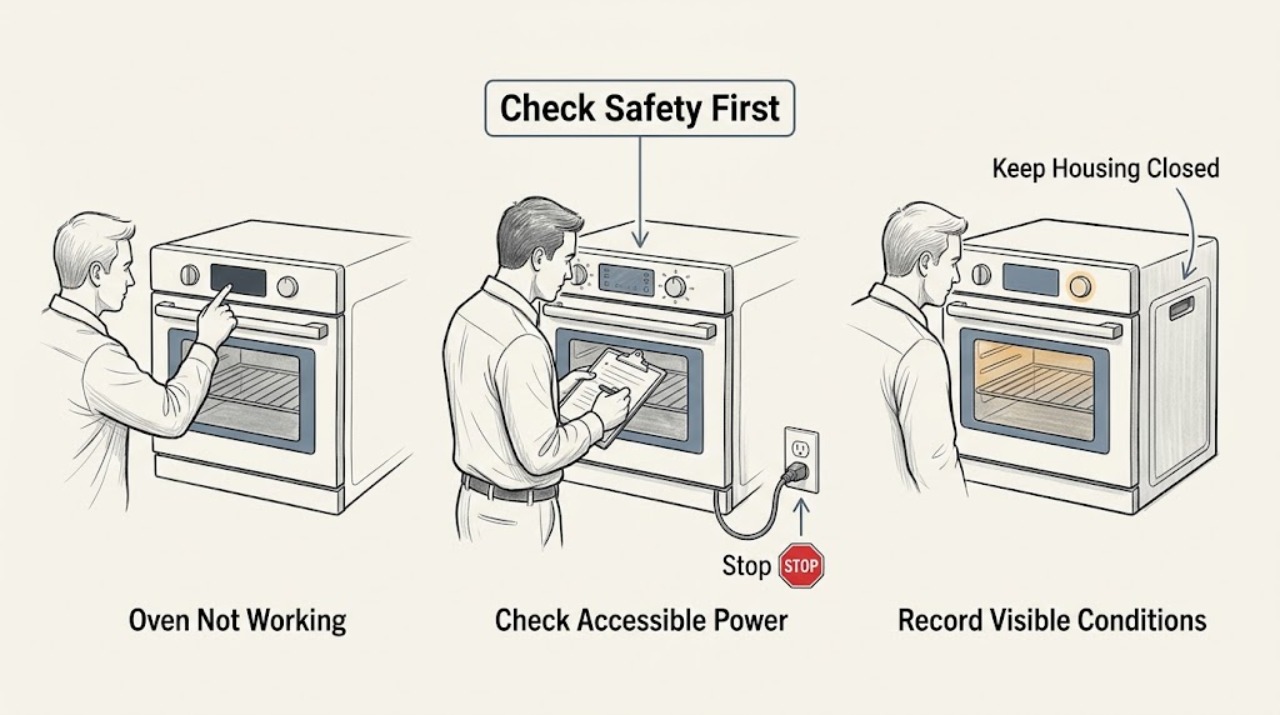
First separate a dead display, a control or door-lock problem, and an oven that runs but does not heat. Stop for gas odor, smoke, sparks, arcing, a hot or damaged cord, a cracked glass surface, an uncontrolled self-clean or overheating, or a door that cannot be handled safely. For gas odor, leave the building and contact the gas supplier or emergency services from outside. If there is no hazard, record the Electrolux model, display or error, selected function and temperature, and whether the oven light, fan, heating element, or burner responds. Check only the accessible breaker or fuse condition, the control lock or demonstration mode, the door closure, and the exact model guide. Electrolux support identifies incomplete power, door sealing, lock, thermal alerts, and model-specific reset or calibration procedures as possible paths. If the oven remains dead or cold, an error returns, the door stays locked, or diagnosis needs cabinet access or live electrical or gas testing, stop and arrange qualified appliance service.
Before you begin
Safety first
- This article supports ordinary-access observation and model-approved controls only. Do not open panels, access terminals, perform live gas or electrical tests, force a lock, or alter heating or protective components.
Work through in order
Diagnostic checks
Use only checks that match the exact appliance or system and its official guide.
-
Check 1
Stop using the Electrolux oven and inspect only from a safe distance for gas odor, smoke, sparks, arcing, scorching, a hot or damaged cord or receptacle, cracked glass, an uncontrolled self-clean or overheating condition, or a door that cannot be handled safely.
Expected result: Record whether the problem includes gas, fire, electrical, glass, heat, or lock danger without touching a hot, wet, cracked, or damaged area.
Next step: For gas odor, leave immediately and contact the gas supplier or emergency services from outside; for smoke, sparks, scorching, cracked glass, or electrical damage, keep the oven off and arrange qualified service.
Stop if: Do not restart a gas-smelling, smoking, sparking, scorched, cracked, overheating, or unsafe oven.
Why this matters
Why: A safety hazard overrides diagnosis. A normal exterior permits documentation and ordinary-access checks, but it does not make cabinet access or live testing appropriate.
-
Check 2
Record the Electrolux model and serial information, the complete display or error, selected cooking function and temperature, and whether the clock, light, fan, heating element, gas ignition, and door lock respond normally.
Expected result: Classify the event as a blank display, controls unresponsive, no start, no heat, weak heat, unexpected shutdown, error alert, or locked door; note whether the cooktop or other oven functions still work if present.
Next step: Use the exact model's Electrolux use-and-care and installation guide before changing settings, resetting, or testing a heating function.
Stop if: Stop if the model or display cannot be established without removing a panel or opening the oven cavity while it is hot.
Why this matters
Why: The symptom and scope distinguish an external power or control-state issue from a heat, lock, sensor, gas, or internal control fault. A generic code list cannot safely identify the cause or part.
-
Check 3
With no gas, fire, heat, or electrical hazard, inspect the accessible breaker or fuse and plug or receptacle condition without opening an enclosure; follow the exact model guide for one permitted power reset.
Expected result: Record whether the display is completely dead, whether a breaker appears tripped or a fuse condition is indicated, whether other appliances on the circuit work, and whether the plug or receptacle is loose, hot, scorched, or damaged.
Next step: Use only the household and model instructions for a single accessible reset; if the oven remains dead, the protection trips again, or damage is visible, keep it off and arrange service.
Stop if: Do not remove outlet or oven covers, measure live voltage, replace a fuse with a different type, or repeatedly reset a tripping circuit.
Why this matters
Why: Incomplete power can prevent an oven from starting or heating, while heat damage, a repeat trip, or a normal-looking supply with a dead display needs qualified electrical or appliance diagnosis.
-
Check 4
Confirm that a cooking function and temperature are selected, the control or oven lock is not active, and demonstration mode is not enabled, using only the exact Electrolux guide's button sequence.
Expected result: Record whether the display shows a lock, demo, timer-only, delayed-start, or error state and whether the controls respond normally after the documented change.
Next step: Clear only the documented mode or lock and perform one model-approved start; if the oven still will not operate, preserve the display and request service.
Stop if: Do not force a locked door, defeat a lock, use an undocumented key combination, or continue when controls operate erratically.
Why this matters
Why: A mode or lock can inhibit cooking functions without a failed heater. A normal control state with no start or a returning error points toward a door lock, control, sensor, power, or other fault.
-
Check 5
When the oven is cool and powered off, inspect the visible door gasket, latch area, racks, and cavity for a torn or detached seal, obstruction, spilled material, or a door that fails to close evenly; do not pull the gasket or reach near an element or burner.
Expected result: Record whether the seal is intact and seated, the door closes fully, the lock indicator clears, and the cavity is free of an obstruction that could prevent closure or airflow.
Next step: Remove only a loose visible obstruction when cool, follow the model guide's door or lock instructions, and run one supervised test if permitted; arrange service for a damaged seal, persistent lock, or abnormal closure.
Stop if: Do not force the door, pry the latch, pull or tape the gasket, enter a hot cavity, or operate with damaged glass or a door that cannot close safely.
Why this matters
Why: Electrolux notes that a compromised door gasket can allow heat loss and that a locked door prevents cooking functions on applicable models. A normal seal with no heat or a persistent lock alert needs model-specific service diagnosis.
-
Check 6
If the oven was unusually hot or shows a thermal alert, turn it off normally and let it cool completely; after cooling, check only that the visible cavity, vents, and surrounding clearances are not blocked as specified by the installation guide.
Expected result: Record whether the oven returns to normal control operation after cooling, whether the same alert recurs, and whether heat was absent from the start or stopped after warming.
Next step: Perform only the exact guide's one-time test after cooling; if the alert returns or heating remains abnormal, keep the oven off and arrange service.
Stop if: Do not cover vents, add improvised cooling, continue through an over-temperature alert, or remove panels to inspect a sensor or element.
Why this matters
Why: Electrolux describes an over-temperature alert as a built-in safety condition and directs owners to cool the oven; a repeat alert or persistent no-heat result indicates a thermal, sensor, control, airflow, or heating fault.
-
Check 7
After the applicable external checks and cool-down are complete, run one supervised preheat or function test from the exact Electrolux guide, stopping at the first smoke, odor, abnormal flame, excessive heat, error, or unsafe door behavior.
Expected result: Record whether the oven starts, whether the relevant element or burner responds, whether the temperature indicator changes, whether the fan runs normally, and whether the display or symptom returns.
Next step: Keep the oven off and provide the technician with the model, display, settings, power, door, gasket, temperature, and test observations.
Stop if: Do not repeat failed tests, relight repeatedly, bypass a lock or thermal protection, open panels, or replace a heater, igniter, sensor, control, or wiring by symptom alone.
Why this matters
Why: A stable result after a documented setting or accessible power correction supports that condition as a contributor. No heat, repeated error, abnormal flame, or immediate shutdown requires professional diagnosis and does not identify a replacement part.
Use your observations
Decision map
Find the observation that best matches what you see, then follow the next safe action.
-
PATH 01Safety boundary
What you see
Gas odor, smoke, sparks, arcing, scorching, cracked glass, a hot or damaged cord, uncontrolled overheating, or unsafe door behavior is present.
Do this next
For gas odor, leave immediately and contact the gas supplier or emergency services from outside; for fire or electrical signs, keep the oven off and arrange qualified service.
Why this path and its safety boundary
Why it matters: The oven is in a safety-stop state, not an ordinary troubleshooting state.
Safety stop: Do not reset, relight repeatedly, open panels, force the door, or continue cooking.
-
PATH 02Safety boundary
What you see
The display is blank or all oven functions fail while an accessible breaker or fuse condition, plug, and receptacle appear abnormal.
Do this next
Follow the model and household instructions for one accessible reset only; arrange qualified electrical or appliance service for heat damage, a repeat trip, or a display that stays dead.
Why this path and its safety boundary
Why it matters: An external supply issue may be involved, but normal-looking power does not prove an internal control or wiring fault is absent.
Safety stop: Do not remove covers, measure live circuits, or repeatedly reset protection.
-
PATH 03Safety boundary
What you see
The display works but a lock, demonstration, timer-only, delayed-start, or incomplete function and temperature selection prevents operation.
Do this next
Clear only the documented state and perform one model-approved start.
Why this path and its safety boundary
Why it matters: A documented control state can inhibit cooking without proving a hardware failure.
Safety stop: If the oven remains locked or the error returns, stop and arrange service; do not force the door or use undocumented sequences.
-
PATH 04Safety boundary
What you see
The oven starts but stays cool, heats weakly, loses heat around the door, or shuts down after becoming unusually hot.
Do this next
Let the oven cool if applicable, inspect the visible gasket and clearances, and run one guide-approved test; request service for recurrence or persistent no heat.
Why this path and its safety boundary
Why it matters: Power, gasket, heating, sensor, control, ventilation, or thermal protection issues remain possible; the symptom does not identify a part.
Safety stop: Do not pull the gasket, continue after a thermal alert, open panels, or test a heater or gas system.
-
PATH 05Safety boundary
What you see
Power, settings, lock, door, visible gasket, and one model-approved test are normal, but the oven still will not start or heat or an error returns.
Do this next
Keep the oven off and arrange qualified Electrolux appliance service with the complete symptom and test record.
Why this path and its safety boundary
Why it matters: A heating element, igniter, burner, sensor, relay, control, lock, wiring, or installation fault remains possible.
Safety stop: Do not substitute parts, access terminals, perform live electrical or gas tests, or bypass protective devices.
Helpful context
Understand the symptom
Classify what not working means
A blank control panel, a display that works but will not start, an oven that runs without heat, and a door locked after self-clean are different symptoms. Record the exact display, selected function and temperature, whether the clock or light works, whether the fan runs, and whether any heat appears. Do not translate an error or button sequence from another Electrolux model.
Power and control state come before component guesses
A tripped breaker or fuse, a control lock, demonstration mode, or an incomplete cooking-function and temperature selection can make an oven appear dead. Electrolux's error guidance provides model-dependent reset examples and says to use the use-and-care guide for more information. Check only the accessible household controls and the exact manual; do not remove covers or test live circuits.
Door, heat, and thermal symptoms change the branch
If the oven display works but heat is weak, a damaged door gasket or incomplete power can allow heat loss or prevent proper preheating. If the oven reports an over-temperature condition, Electrolux says to turn it off and let it cool. A door that will not unlock, repeated thermal alerts, a cracked surface, smoke, or abnormal heating needs service rather than repeated preheats or a forced lock release.
Use one model-approved test, then stop
After correcting a clearly documented setting or accessible power condition, perform one supervised preheat or function test from the exact model guide. Observe whether the oven starts, whether the relevant element or burner responds normally, whether the temperature indicator changes, and whether the error returns. A failed test does not identify a heater, igniter, sensor, relay, control, or wiring part; preserve the result for a qualified technician.
Safety boundary
Stop conditions
- Stop for gas odor, smoke, sparks, arcing, scorching, cracked glass, a hot or damaged cord or receptacle, uncontrolled overheating, or unsafe door behavior.
- For gas odor, leave immediately and contact the gas supplier or emergency services from outside; do not use switches, phones, matches, or the oven inside.
- Do not force or defeat the door lock, pull the gasket, enter a hot cavity, relight repeatedly, open panels, or perform live gas or electrical testing.
- Do not continue after an over-temperature alert, abnormal flame, smoke, scorching, repeated breaker trip, or persistent error.
- Stop repeating resets and test cycles when the oven remains dead or cold or the exact Electrolux guide does not explain the result.
When checks do not resolve it
Need a professional?
Arrange qualified Electrolux appliance service when the oven remains dead or cold after the exact model's accessible power, setting, lock, door, gasket, and one-time test checks; when an error returns, the door stays locked, the oven overheats, or diagnosis requires cabinet access, gas work, or electrical testing. For gas odor, leave immediately and contact the gas supplier or emergency services from outside. Provide the model and serial information, complete display, selected function and temperature, power observations, door and gasket condition, thermal behavior, and test result.
Safety scope: This article supports ordinary-access observation and model-approved controls only. Do not open panels, access terminals, perform live gas or electrical tests, force a lock, or alter heating or protective components.
Read the exact guide
Official sources
- Oven Error Codes and Alarms GuideElectrolux · Electrolux's official oven error and alarm guide; specific codes, buttons, lock behavior, and reset steps vary by model and must be confirmed in the use-and-care guide.
- Oven - Is Not Hot EnoughElectrolux · Electrolux's official oven support page for electric range and wall ovens; exact model instructions and installation requirements control a particular appliance.
Community feedback
Share a repair observation
Share a plain-text repair observation. Accepted observations are published automatically; this page may take a moment to update.