
On this page
Start here
Quick answer
When an Admiral oven is not working, first determine whether the whole appliance is without power or the display works but the oven does not start or heat. Check the breaker or fuse and the connection without opening the appliance, then verify the model-specific mode, timer or control lock, and door position. If the oven is gas and you smell gas, if an electric element or wire is damaged, the range is unstable, a breaker trips again, or diagnosis requires live voltage testing or gas-system access, stop using it and arrange qualified appliance service.
Before you begin
Safety first
- Do not remove covers, probe live wiring, test gas pressure, bypass interlocks, relight after gas odor, move an unstable range, or select a replacement part from the symptom alone.
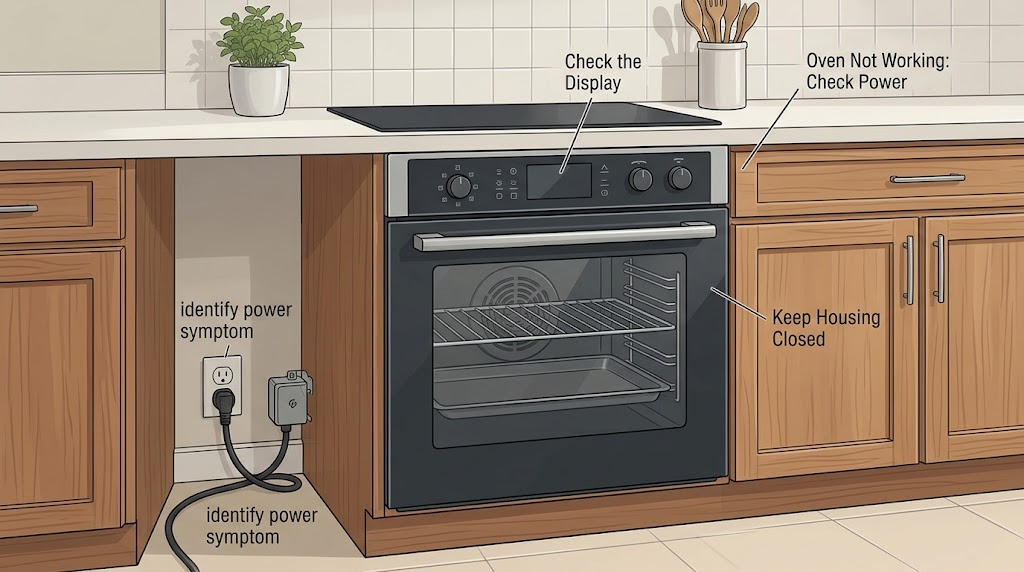
Work through in order
Diagnostic checks
Use only checks that match the exact appliance or system and its official guide.
-
Check 1
Observe the oven display, clock, interior light, cooktop or surface functions, and any indicator lamps without opening the appliance. At the electrical panel, look for a breaker that is visibly off or tripped; reset it once only if the panel and surroundings are dry and safe, and do not remove the panel cover.
Expected result: The whole appliance is dark, the display works but the oven does not start, the cooktop works while the oven does not, or a breaker trips again.
Next step: If power cannot be restored safely, leave the oven off and call an electrician or appliance professional. If the display is active, continue to the model-specific control and start check.
Stop if: Stop for smoke, sparks, a hot or discolored outlet, burning odor, exposed wiring, or any need to work inside the panel or appliance.
Why this matters
Why: A dark appliance favors an incoming-power or control-supply problem. A working display with a dead oven points toward a control state, door interlock, heating circuit, or gas ignition path. A repeat breaker trip indicates an unresolved electrical fault and is not a reset instruction.
-
Check 2
Use the exact Admiral owner manual to verify that the oven is in a cooking mode, the temperature is selected, the timer or delayed-start function is not holding the start, and any control lock or demo state is cleared. Make one documented change at a time and press Start only as the manual describes.
Expected result: The oven was in a timer, lock, demo, or non-cooking state, the display accepts the command and starts, or the display accepts commands but the oven remains inactive.
Next step: Allow the oven to run only while it behaves normally and stop if an error, odor, abnormal sound, or repeated failure appears. If the manual does not identify the control state or the oven remains inactive, arrange service.
Stop if: Stop if the control panel is cracked, buttons stick, a reset sequence is unknown, or the appliance enters an unexpected mode.
Why this matters
Why: A control state can prevent heating even when the display is powered. If a documented change starts the oven, the symptom was a control-state issue. If commands are accepted but there is no heat or operation, the fault is farther along the heating or ignition path.
-
Check 3
Confirm that the oven door closes fully and that cookware or a rack is not preventing closure. From the outside, check that a freestanding range sits level and does not rock; do not pull it forward or defeat an anti-tip device to reach the back.
Expected result: The door is ajar or obstructed, the range rocks or appears unsecured, the door closes and the range is stable, or the oven starts but stops when the door or controls are disturbed.
Next step: Remove only an accessible obstruction and close the door normally. If the range is unstable or the anti-tip protection is missing or uncertain, stop using it and obtain qualified installation or appliance service.
Stop if: Stop for a broken hinge, damaged glass, unstable range, missing anti-tip protection, or any need to move the appliance to reach the rear.
Why this matters
Why: A door or safety-interlock condition can prevent or interrupt heating on some models. An unstable range is a tip-over hazard and must be corrected before service or use. A properly closed door and stable unit make the heat-source branch more likely.
-
Check 4
After the oven is set to a documented cooking mode and the door is closed, observe from a safe distance whether an electric heating element begins its normal heating cycle or whether a gas model shows the expected ignition behavior described in its manual. Do not touch an element, remove a burner panel, use a meter, or keep trying if gas odor is present.
Expected result: An electric element is visibly damaged or does not heat, a gas igniter clicks or glows without a stable flame, the oven heats normally, or there is gas odor, smoke, sparking, or an abnormal sound.
Next step: Turn the oven off. For a visibly failed element, ignition failure, or persistent no-heat condition, record the model and arrange qualified appliance service. If gas odor is present, leave the area and follow local gas-emergency guidance; do not operate switches or relight the oven.
Stop if: Stop immediately for gas odor, smoke, flame rollout, sparking, a damaged element, exposed wire, or a need for live voltage or gas-pressure testing.
Why this matters
Why: A damaged or inactive element can explain no heat on an electric model; ignition without a stable flame can indicate a gas ignition or supply issue. Normal visible heating shifts attention to temperature sensing, calibration, airflow, or a specific cooking-mode issue. Odor, smoke, and sparking are safety conditions, not diagnostic invitations.
-
Check 5
Record whether the oven stopped after a power outage, installation, cleaning cycle, control change, or gas interruption, and whether the cooktop or other oven functions still work. Photograph the model label and display without publishing or altering it; do not remove covers to find a fuse or control board.
Expected result: The failure follows installation, outage, cleaning, or a recent setting change; only one cooking function fails; or all oven functions fail with stable power.
Next step: Give the model, symptom timeline, power observations, control state, door condition, gas or electric format, and heat-source observation to a qualified technician. Keep the oven off until a suspected electrical or gas fault is assessed.
Stop if: Stop before accessing fuses, terminal blocks, wiring, igniters, gas valves, or control boards; these require qualified diagnosis.
Why this matters
Why: Timing helps a technician distinguish a control-state or connection issue from a failed heating, ignition, sensor, or control component. One failed function does not prove the same part as a completely dead oven, and a recent installation may require connection verification by a professional.
Use your observations
Decision map
Find the observation that best matches what you see, then follow the next safe action.
-
PATH 01Next step
What you see
The oven and controls are dark, power is absent, or the breaker trips again.
Do this next
Leave the appliance off and have the dedicated circuit, connection, and appliance power path checked by a qualified electrician or appliance professional.
-
PATH 02Next step
What you see
The display works but the oven is locked, delayed, in a non-cooking mode, or otherwise not accepting the documented start command.
Do this next
Use the exact Admiral manual to restore the mode, timer, or control state once.
-
PATH 03Next step
What you see
The door cannot close fully, the range rocks, or anti-tip protection is uncertain.
Do this next
Stop operating the oven; correct only an accessible door obstruction and use qualified service for hinges, leveling, or stability hardware.
-
PATH 04Next step
What you see
An electric oven has a visibly damaged or inactive heating element after safe power and control checks.
Do this next
Turn the oven off and do not touch or meter the element; provide the model and visual observation to a qualified technician.
-
PATH 05Next step
What you see
A gas oven will not ignite, repeatedly clicks, has an unstable flame, or produces gas odor.
Do this next
Turn the control off; for gas odor, leave the area without operating electrical switches and follow local gas-emergency guidance. Do not relight or disassemble the burner system.
-
PATH 06Next step
What you see
Power, controls, door, and stability are acceptable, but all or most oven functions remain inactive.
Do this next
Stop DIY diagnosis and preserve the model, symptom timeline, and observations for appliance service.
Helpful context
Understand the symptom
“Not working” can mean no display, a display with no start, no heat, or a gas oven with no ignition. Check those states in order because an outlet or breaker problem calls for a different response from a control, element, igniter, or gas-supply problem. Admiral lists both electric ovens and gas cookers, so do not assume the appliance type or control layout from the brand name.
Use only observations that do not expose live wiring or gas. A display, clock, or cooktop that works shows that some functions have power, not that the oven heating circuit is healthy. Do not remove the rear cover, probe terminals, bypass a safety switch, or repeatedly attempt ignition when gas odor is present.
If the unit is a freestanding range, do not pull or tip it to reach wiring unless a qualified professional has made it safe and confirmed the anti-tip protection. CPSC identifies range tip-over as a serious burn hazard; stability is part of the repair boundary, not an optional cosmetic check.
Safety boundary
Stop conditions
- There is gas odor, flame rollout, smoke, sparking, or an abnormal burning smell.
- A breaker trips again, the cord or outlet is hot or damaged, or wiring is exposed.
- The heating element, burner, door glass, hinge, or control is visibly damaged.
- The freestanding range rocks, the anti-tip protection is missing or uncertain, or the appliance must be moved to reach wiring.
- The next step requires live voltage measurement, gas-pressure testing, removing covers, accessing a fuse or control board, or opening the gas system.
- The oven remains inactive after safe model-specific control and power checks.
Only after diagnosis
Potential parts
- Model-specific oven heating element
Consider only when a qualified diagnosis confirms an electric element is open, damaged, or not heating after power and control checks.
Confirm the complete model and element configuration; do not infer fit or test live voltage as a homeowner. - Model-specific gas oven igniter
Consider only when qualified gas-appliance diagnosis identifies ignition failure and rules out unsafe gas supply or control conditions.
Igniter type and installation are model-specific and require gas and electrical safety checks. - Oven control or timer assembly
Consider only after power, mode, timer, door, heating, and ignition checks show a failed control or timer.
Verify the exact model and control revision; a no-start symptom alone does not establish compatibility or failure.
When checks do not resolve it
Need a professional?
Call a qualified electrician for a dead circuit, repeated breaker trip, damaged cord or outlet, or suspected supply wiring problem., Arrange appliance service when the display works but the oven will not start or heat after the documented control and door checks., Use qualified gas-appliance service for ignition failure, unstable flame, gas odor, or any gas valve, igniter, burner, or pressure diagnosis., Have a qualified installer or appliance professional correct an unstable freestanding range or uncertain anti-tip protection before use.
Safety scope: Do not remove covers, probe live wiring, test gas pressure, bypass interlocks, relight after gas odor, move an unstable range, or select a replacement part from the symptom alone.
Common questions
FAQ
Why is my Admiral oven not working but the cooktop still works?
The appliance can have partial power while the oven control, door condition, heating element, igniter, sensor, or safety circuit has a fault. Verify the model-specific mode and door closure, then stop and arrange service if the oven still will not start or heat.
Could a timer or control setting stop an Admiral oven from starting?
Yes. Admiral offers different oven formats and controls, so a timer, mode, lock, or start sequence can vary by model. Use the owner manual and make one documented change; do not guess at a reset sequence or open the control panel.
What should I do if my Admiral gas oven smells like gas?
Turn the control off, leave the area, and follow local gas-emergency guidance without operating electrical switches or trying to relight the oven. Arrange qualified gas-appliance service after the area is safe.
When should I stop troubleshooting an Admiral oven?
Stop for gas odor, smoke, sparks, a repeat breaker trip, damaged heating parts or wiring, an unstable range, failed door closure, or any need for live testing, panel removal, gas-pressure work, or control-board access. Have a qualified professional diagnose it.
Read the exact guide
Official sources
- Admiral - Reliable and Safe Cooking AppliancesAdmiral Appliances · Admiral gas-cooker and oven product identity, ignition, oven heating, controls, and model-specific format context
- Admiral Microwaves, Electric Ovens, Kettles, Toasters and SandwichmakerAdmiral Appliances · Admiral electric-oven product identity, temperature-control, timer, heating-element, and format context
- Free Standing Kitchen RangesU.S. Consumer Product Safety Commission · CPSC range stability and tip-over hazard information for freestanding kitchen ranges
Community feedback
Share a repair observation
Share a plain-text repair observation. Accepted observations are published automatically; this page may take a moment to update.