
On this page
Start here
Quick answer
If an AEG oven is not working, first separate a completely dead oven from an oven that powers on but will not heat. Check only safe, visible conditions: whether the supply or protective device has tripped, whether a digital clock is flashing after a power cut, whether a lock or Demo indication is active, whether a heating function and temperature were selected, and whether the door is fully closed. If the display stays dark, a protective device trips again, the oven shuts down repeatedly, an error remains, or electrical access is needed, stop and arrange qualified AEG appliance service or an electrician; do not remove covers or work on live wiring.
Before you begin
Safety first
- This article supports ordinary-access visual checks and model-approved control settings only. Do not open the oven, access wiring, test energized circuits, bypass protection, or replace internal heating or control parts.
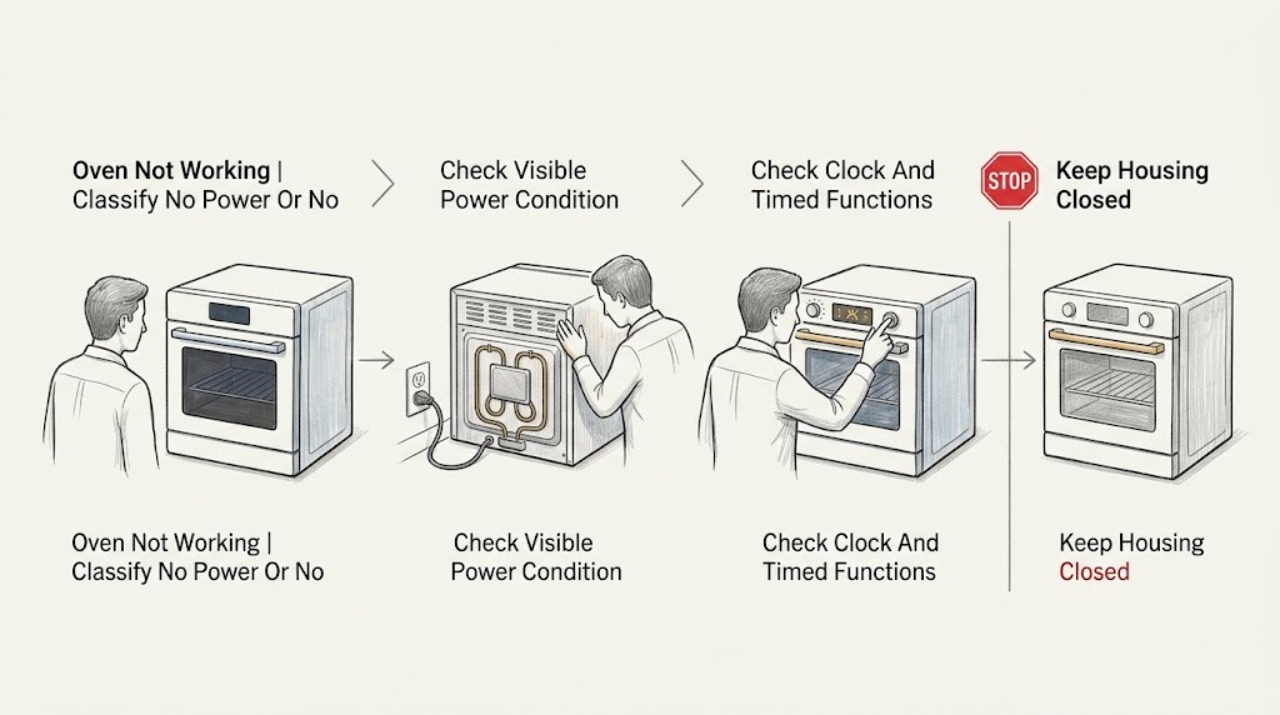
Work through in order
Diagnostic checks
Use only checks that match the exact appliance or system and its official guide.
-
Check 1
Observe the oven without opening it and distinguish a blank display or no response from a display that works but produces no heat. If the display works, note whether one heating function or every function is affected.
Expected result: Record whether the display is dark, the controls respond, the interior light works, one function fails, several functions fail, or the oven starts and then stops.
Next step: Use the result to choose the safe supply, clock, setting, door, and safety checks below, and keep the oven unused if there is smoke, burning odor, visible damage, or repeated shutdown.
Stop if: Do not remove the control panel, rear cover, or oven cavity panels to identify the failed component.
Why this matters
Why: A dark display or total loss of response points toward supply or control power. A working display with one failed function points toward a function-specific setting or component; several failed functions make clock, lock, Demo, power, or control conditions more likely.
-
Check 2
If the display is dark, check only from a safe position whether the plug or supply connection is visibly secure and whether a household fuse or protective device has visibly tripped, without removing any cover or touching exposed conductors.
Expected result: Record whether other appliances on the same supply work, the oven remains completely dark, a protective device is off, or the protective device trips again when the oven is used.
Next step: If the supply device is visibly tripped and you are competent to follow the home's safety procedure, use only that ordinary user reset; if it trips again, leave the oven off and arrange a qualified electrician or appliance technician.
Stop if: Do not open the oven, remove a fuse carrier, touch wiring, use extension equipment, or reset a device repeatedly after it trips.
Why this matters
Why: A supply interruption can make the oven appear dead without proving an oven component has failed. A repeated trip or an uncertain connection indicates an electrical or installation fault that should not be diagnosed by live testing.
-
Check 3
With the display on, inspect the clock and timer area for a flashing time or an active Duration, End, or delayed-start setting. Use the exact AEG model manual to set the clock or cancel a timed function through ordinary controls.
Expected result: Record whether the clock is flashing after a power cut, whether the oven accepts a function only after the time is set, and whether a timed program prevents an immediate start.
Next step: Set the clock and choose an ordinary heating program according to the manual, then observe whether the oven starts. If it remains cold or the clock resets again, stop and arrange service.
Stop if: Do not bypass a timer, alter hidden settings without the manual, or open the control electronics.
Why this matters
Why: AEG says a digital clock may need to be set after a power cut and that Duration or End settings can affect operation. If the clock and timers are correct but the oven still will not heat, the cause is not established as a simple time setting.
-
Check 4
Inspect the display for Child Lock, SAFE, a padlock symbol, Demo, or d, and confirm that a function and temperature can be selected using the normal controls. Follow the exact model manual to clear a user-accessible lock or Demo setting.
Expected result: Record whether a lock or Demo indication is present, whether controls respond after the manual procedure, and whether the display appears normal but the cavity remains cold.
Next step: Use the model-specific unlock or Demo instructions once, then select a heating function and temperature. If the oven still does not respond or heat, keep it off and escalate.
Stop if: Do not bypass a lock with improvised codes, disconnect control wiring, or repeatedly reset the appliance to defeat a safety state.
Why this matters
Why: AEG identifies Child Lock and model-dependent Demo mode as conditions that can prevent ordinary heating or operation. If those indications are absent or return after the manual procedure, a control or power fault remains possible.
-
Check 5
Select the intended heating function and a temperature through the ordinary controls, then confirm that the oven door closes fully without an obstruction. If only one heating type failed, compare another manual-approved function without leaving the oven unattended.
Expected result: Record whether the chosen function and temperature remain displayed, the door closes and latches normally, the oven begins heating, or only one function remains cold.
Next step: Keep the door fully closed during a normal test and stop if the oven does not heat after the manual-approved setup. Provide the failed function and temperature setting to the technician.
Stop if: Do not force the door, defeat a door switch, operate with a damaged seal or glass, or reach into a hot cavity to test a heater.
Why this matters
Why: AEG lists missing function or temperature selection and an incompletely closed door among no-heat checks. If another function heats but one does not, the issue is function-specific; if no function heats with correct settings, service is more likely.
-
Check 6
If the oven shut itself off, observe from outside whether the control area is unusually hot, whether the cooling fan runs as expected after shutdown, and whether the oven can be used again only after it has cooled according to the manual.
Expected result: Record whether the oven recovers once cool, shuts down again, shows an error, has a hot or damaged control area, or has smoke, burning odor, or visible electrical damage.
Next step: Stop using the oven and arrange qualified AEG service or electrical assessment for any repeated shutdown, error, abnormal fan behavior, smoke, odor, or visible damage.
Stop if: Do not restart a hot or damaged oven repeatedly, bypass an automatic shutdown, remove covers, or perform energized electrical tests.
Why this matters
Why: AEG describes automatic safety shutdown and cooling behavior on some models. Recovery after cooling does not prove the underlying condition is fixed; repeated shutdown, a hot control area, error, smoke, or odor indicates a safety or cooling-system fault.
Use your observations
Decision map
Find the observation that best matches what you see, then follow the next safe action.
-
PATH 01Safety boundary
What you see
The display is dark, the oven does not respond, or a household protective device is visibly off.
Do this next
Make only a safe visual check of the supply condition; arrange qualified electrical or appliance service if the supply is uncertain or the device trips again.
Why this path and its safety boundary
Why it matters: The immediate branch is supply or installation power, not a temperature-setting correction.
Safety stop: Do not touch exposed conductors, open the oven, remove fuse carriers, or repeatedly reset a tripping device.
-
PATH 02Safety boundary
What you see
The digital clock flashes or a Duration, End, or delayed-start function is active after a power interruption.
Do this next
Set the clock or cancel the timed function through the exact model manual, then select a heating function and temperature.
Why this path and its safety boundary
Why it matters: The oven may be waiting for a required clock or timed-program state before normal operation.
Safety stop: Stop and arrange service if the clock will not save, resets repeatedly, or the oven remains cold with correct settings.
-
PATH 03Safety boundary
What you see
The display shows Child Lock, SAFE, a padlock, Demo, or d and ordinary functions cannot start or heat.
Do this next
Follow the exact AEG model procedure to clear that state once, then test a normal function and temperature.
Why this path and its safety boundary
Why it matters: A user-accessible safety or demonstration state may be preventing heating.
Safety stop: Do not use improvised codes, disconnect controls, or continue if the indication returns.
-
PATH 04Safety boundary
What you see
The display and controls work, the door closes, and at least one heating function works while another remains cold.
Do this next
Record the failed function, temperature, and display behavior and request model-specific AEG service if it remains cold.
Why this path and its safety boundary
Why it matters: The problem is function-specific rather than a confirmed total power failure.
Safety stop: Do not remove a heater, fan, thermostat, or wiring to compare functions.
-
PATH 05Safety boundary
What you see
The clock, lock state, function, temperature, and door are correct, but the oven still does not heat.
Do this next
Stop using the oven and arrange qualified AEG appliance service with the model and completed checks.
Why this path and its safety boundary
Why it matters: The visible user settings do not explain the no-heat symptom; a heater, sensor, control, supply, or safety fault remains possible.
Safety stop: Do not open the cavity or control panels, bypass a door switch, or test live components.
-
PATH 06Safety boundary
What you see
The oven shuts down again after cooling, the control area is unusually hot, an error remains, or smoke, burning odor, or visible damage is present.
Do this next
Stop using the oven and arrange qualified AEG service or electrical assessment; provide the observed code and shutdown pattern.
Why this path and its safety boundary
Why it matters: This is a safety or cooling-system service condition, not a normal reset or setting issue.
Safety stop: Do not restart repeatedly, bypass protection, operate with damaged glass or wiring, or open the appliance.
Helpful context
Understand the symptom
First identify what “not working” means
A black display and no response point toward supply or control power. A lit display with a cold cavity points more toward a clock, lock, Demo mode, selected function, temperature, door, or heating fault. If only one heating function fails while others work, record that distinction; if every function fails, the service boundary arrives sooner.
Check settings after a power interruption
AEG support guidance notes that a flashing digital clock after a power cut may prevent normal use, and that some models show Demo or a lock indication. Restore only ordinary settings through the model's controls and manual. Do not treat a reset as a repair if the oven remains cold or the indication returns.
Keep electrical and thermal faults professional
An oven contains mains wiring, heating elements, controls, and a cooling system. Do not remove panels, test energized circuits, bypass a safety function, or replace a heater from a symptom alone. AEG's guidance directs persistent no-heat, repeated shutdown, or internal electrical problems to authorized service or a qualified electrician.
Safety boundary
Stop conditions
- Do not remove oven covers, control panels, heating-element guards, or wiring access panels.
- Do not perform energized electrical testing, bypass the lock, defeat a door switch, or override an automatic safety shutdown.
- Stop for repeated fuse or protective-device trips, smoke, burning odor, visible scorching, damaged glass, exposed wiring, or a hot control area.
- Stop using the oven if it shuts down repeatedly, displays a persistent error, or remains cold after the clock, lock, function, temperature, and door checks.
- Do not replace a heater, thermostat, fan, control board, or other internal part from the no-heat symptom alone.
When checks do not resolve it
Need a professional?
Arrange qualified AEG appliance service or a qualified electrician when the display remains dark, a protective device trips again, the clock or settings will not save, the lock or Demo indication returns, one or all heating functions remain cold, the oven shuts down repeatedly, an error persists, the door or glass is damaged, or any diagnosis would require access to wiring or internal components.
Safety scope: This article supports ordinary-access visual checks and model-approved control settings only. Do not open the oven, access wiring, test energized circuits, bypass protection, or replace internal heating or control parts.
Common questions
FAQ
Why is my AEG oven on but not heating?
Check the selected heating function and temperature, clock, Duration or End setting, Child Lock or Demo indication, and whether the door closes fully. If all settings are correct but the cavity stays cold, arrange qualified AEG service rather than opening the oven.
Why is my AEG oven display blank?
A supply interruption or protective-device trip can make the oven appear dead, but a blank display can also indicate an appliance or installation fault. Make only a safe visual check and do not touch wiring; a repeated trip or persistent darkness needs qualified electrical or appliance service.
Can a flashing clock stop an AEG oven from working?
Yes, some AEG models require the clock to be set again after a power cut. Set it through the exact model manual and check that no Duration, End, or delayed-start function is active. If the clock will not save or the oven remains cold, arrange service.
What does Demo mode or SAFE mean on an AEG oven?
Demo mode can allow controls to appear normal without heating, while SAFE or a padlock usually indicates a Child Lock or other lock state. Follow the exact model instructions once; if the indication returns or heating does not resume, stop and request service.
When should I stop using an AEG oven and call a technician?
Stop for repeated shutdown, protective-device trips, persistent errors, smoke, burning odor, visible damage, a hot control area, or a door or glass problem. Also call when the oven stays cold after safe checks or when diagnosis would require opening the appliance or touching electrical parts.
Read the exact guide
Official sources
- Oven does not heat up | AEGAEG · AEG support article applying to built-in, double, compact ovens, and cookers; exact model instructions control the particular appliance.
- Der Backofen hat keine Funktion oder heizt nicht mehr | AEGAEG · AEG official oven support guidance; the page is German, so the installed model's manual remains controlling for exact user steps.
- EN User Manual | OvenAEG · AEG English user manual for the specified oven model; a different AEG model may have different controls and procedures.
Community feedback
Share a repair observation
Share a plain-text repair observation. Accepted observations are published automatically; this page may take a moment to update.