
On this page
Start here
Quick answer
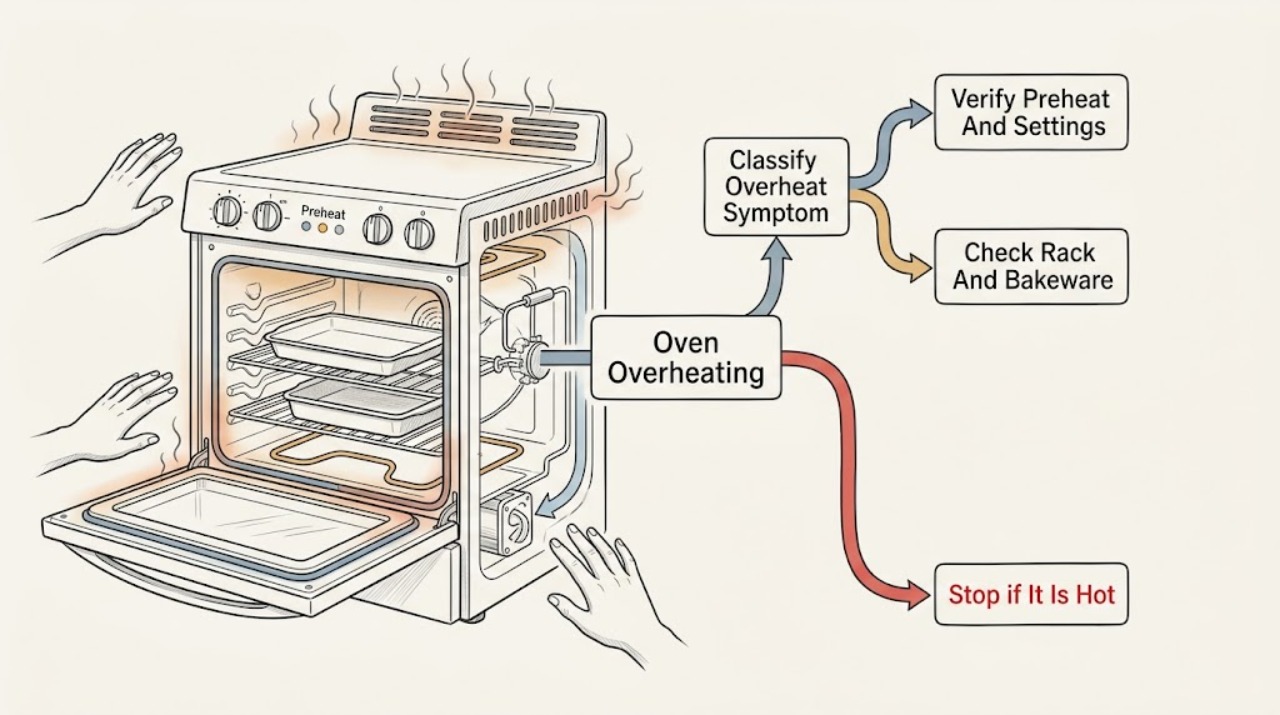
If an Electrolux oven seems to overheat, first decide whether only the front or door feels hot during ordinary use, the food is overbrowning, the cavity is actually exceeding the selected temperature, or an overheating alert appears. Electrolux notes that heat naturally spreads to the front and door, while its temperature guidance recommends proper preheating, correct rack placement and bakeware, and the exact model manual for calibration. Check that ventilation openings are not covered and that no foil, tray, or other item blocks the airflow specified by the manual. If the oven continues heating after being switched off, shows a thermal or high-temperature alert, trips power, emits smoke or a burning smell, damages food or surroundings, or is a gas oven with a gas odor, stop using it, let it cool without touching hot surfaces, isolate power or gas only when safe, and arrange qualified service.
Before you begin
Safety first
- This article supports safe observation, settings review, and visible ventilation checks only. Do not open the oven, test live circuits, move a built-in unit, defeat thermal protection, alter a sensor, or handle a gas or electrical connection.
Work through in order
Diagnostic checks
Use only checks that match the exact appliance or system and its official guide.
-
Check 1
Stop cooking and record what is actually overheating: the front or door, the food, the cavity temperature, nearby cabinetry, or the appliance after shutdown. Note the function, selected temperature, rack, bakeware, preheat behavior, alert text, smoke, odor, and whether heating stops when the controls are turned off.
Expected result: A warm front during ordinary use differs from overbrowning, an oven that keeps heating, a high-temperature message, smoke, or heat reaching adjacent materials.
Next step: If the oven continues heating, shows a thermal alert, smokes, smells burnt, trips power, or damages surroundings, stop and isolate it only when safe. Otherwise continue with the manual-approved setting and airflow checks.
Stop if: Stop for gas odor, flames outside the cavity, smoke, burning insulation smell, melting material, electrical shock, or a door or control that will not respond.
Why this matters
Why: The symptom class determines whether the next safe check is usage and ventilation, a model-specific alert response, or immediate professional service.
-
Check 2
Once the oven is cool and no hazard is present, verify the selected function and temperature against the exact Electrolux manual. Use the manual's preheat guidance and do not add food, foil, or cookware during a preheat unless the model's instructions explicitly allow it.
Expected result: Record whether the oven was still preheating, whether a fast-preheat or special mode was selected, and whether the reported result occurs across functions or only one mode.
Next step: Use the exact manual to select a normal permitted function and temperature once. If the oven still overshoots, continues heating, or displays an error, stop and arrange service rather than recalibrating by guesswork.
Stop if: Do not test a cavity that is smoking, heat-damaged, contaminated by melted material, or producing a gas or electrical warning.
Why this matters
Why: A mode or preheat misunderstanding can cause uneven or apparently excessive cooking, while overheating across functions or after the controls are off is not explained by a recipe setting alone.
-
Check 3
With the oven cool, inspect the rack position, pan size, foil, baking paper, and cookware against the model's Use and Care or Bakeware guidance. Keep vents and the cavity's intended air path clear; do not cover the oven floor or vents with unapproved material.
Expected result: Food may brown faster near one element, a pan may block circulation, or foil may redirect heat. A uniform over-temperature result across rack positions and bakeware points beyond cookware.
Next step: Correct only the rack or cookware arrangement the manual permits and compare one supervised bake at a safe setting. Stop if the cavity remains excessively hot or heat reaches materials outside the appliance.
Stop if: Do not use foil or cookware to shield a suspected runaway element, and do not continue with melted, scorched, or damaged components.
Why this matters
Why: Rack placement and bakeware can change cooking results, but they do not justify altering a sensor, thermostat, element, or control when the oven itself is over-temperature.
-
Check 4
After the oven is cool, inspect only visible room and appliance ventilation openings. Remove a carpet, mat, storage item, or other obstruction that the manual or installation instructions do not permit near an opening; do not pull out a built-in oven or alter cabinetry.
Expected result: A covered base or blocked airflow path can reduce ventilation. Clear visible openings with no improvement, or an oven that overheats even with correct airflow, indicates a different cause.
Next step: Restore only the ventilation arrangement specified by the exact manual or installation guide. If the oven still overheats, keep it out of service and arrange qualified repair.
Stop if: Stop for hot cabinetry, scorched trim, a blocked built-in installation, a cooling fan that is damaged or abnormal, or any need to alter the housing.
Why this matters
Why: Electrolux warns that insufficient airflow may lead to overheating and component failure, but airflow correction does not prove that a sensor, fan, thermostat, or control is healthy.
-
Check 5
If the display shows a thermal or high-temperature alert, record the exact message and switch the oven off using the normal control if it responds. Allow the appliance to cool without touching hot surfaces; do not repeatedly reset or restart it to see whether the alert returns.
Expected result: An alert that clears after cooling but returns on the next use is different from an alert that remains, a control that does not respond, or heat that continues after shutdown.
Next step: Use the exact manual for the recorded alert. If it returns, remains, or is paired with smoke, odor, or damage, keep the oven off and arrange qualified service.
Stop if: Do not open the cabinet, defeat a thermal safety device, or operate the oven again while the alert or abnormal heat persists.
Why this matters
Why: Electrolux identifies a thermal-runaway alert as higher-than-normal temperature detection and treats persistence as a reason to contact support, not as a calibration invitation.
-
Check 6
If the oven is otherwise safe and the issue is a repeatable cooking-temperature difference rather than runaway heat, look up the exact model's temperature-calibration instructions. Do not change calibration, sensor position, or control parameters without that manual procedure.
Expected result: Electrolux says calibration instructions vary by model. A manual-approved adjustment may address a consistent cooking-temperature offset, while an oven that keeps heating or reaches an alert is not a normal calibration case.
Next step: If the manual does not provide an owner calibration procedure, or the issue includes an alert, smoke, odor, damage, or continued heating, stop and request service.
Stop if: Do not access the sensor, wiring, relay, thermostat, or control board, and do not run self-cleaning to test temperature regulation.
Why this matters
Why: Calibration is a model-specific settings operation and cannot safely correct a failed sensor, relay, thermostat, element, cooling system, or control.
-
Check 7
Record the exact Electrolux model, function and temperature, rack and cookware, preheat and shutdown behavior, display alert, ventilation condition, front or cabinet heat, smoke, odor, and any circuit or gas symptom. Use the Electrolux support and manual pages to identify the appropriate repair route.
Expected result: A precise record can distinguish normal hot surfaces, cooking-result variation, blocked airflow, a model-specific thermal alert, and an oven that fails to regulate or shut off.
Next step: Keep the oven out of service for persistent or unsafe overheating and arrange qualified repair. Contact the installer or electrician for a new-installation or supply concern.
Stop if: Stop all user troubleshooting if the appliance cannot be safely isolated or heat damage is worsening.
Why this matters
Why: The record helps a technician determine whether the cause is usage, installation, calibration, sensor, thermostat, element, fan, relay, wiring, or another fault, but it does not establish a replacement part.
Use your observations
Decision map
Find the observation that best matches what you see, then follow the next safe action.
-
PATH 01Safety boundary
What you see
Only the front panel or door feels hot during ordinary use, with no smoke, damage, fault message, or abnormal cooking result.
Do this next
Keep children away, follow the model manual, and monitor safe use; arrange service if heat is extreme, the surface is damaged, or the behavior changes.
Why this path and its safety boundary
Why it matters: Electrolux says heat naturally spreads to surfaces including the front and door, and materials can feel different to the touch.
Safety stop: Do not touch hot surfaces to measure them or continue if there is smoke, damage, or unsafe heat at adjacent materials.
-
PATH 02Safety boundary
What you see
Food overbrowns or cooks unevenly, but the oven stops heating normally and there is no thermal alert, smoke, odor, or heat damage.
Do this next
Follow the exact manual for preheat, rack, bakeware, and calibration guidance; arrange service if the result remains abnormal across permitted settings.
Why this path and its safety boundary
Why it matters: Preheat, rack, bakeware, function, or a model-specific calibration setting may affect the result without proving runaway heat.
Safety stop: Do not compensate with foil, sensor movement, unapproved calibration, or repeated high-temperature tests.
-
PATH 03Safety boundary
What you see
Visible ventilation openings are covered or airflow around the installed appliance is restricted.
Do this next
Restore only the ventilation arrangement specified by the exact installation guide, then keep the oven off and seek service if overheating remains.
Why this path and its safety boundary
Why it matters: Electrolux warns that insufficient airflow may lead to overheating and component failure.
Safety stop: Do not pull out a built-in oven or alter cabinetry to create a generic opening.
-
PATH 04Safety boundary
What you see
A high-temperature or thermal alert appears, the oven continues heating after shutdown, or heat damages food, trim, or nearby materials.
Do this next
Switch off normally if it responds, allow it to cool without touching hot surfaces, isolate power or gas only when safe, and arrange qualified service.
Why this path and its safety boundary
Why it matters: The temperature-control safety boundary has been exceeded or is unresolved; a sensor, thermostat, element, relay, fan, wiring, or control fault remains possible.
Safety stop: Do not reset repeatedly, defeat a safety device, open the cabinet, or restart the oven while the condition persists.
-
PATH 05Safety boundary
What you see
A gas odor, smoke, sparks, shock, exposed wiring, repeated power trip, or active fire is present.
Do this next
Leave the area as appropriate, use the local emergency or gas-safety route, and arrange qualified electrical or appliance service. Do not operate switches or handle the appliance in the hazard area.
Why this path and its safety boundary
Why it matters: This is an immediate safety hazard, not a cooking-temperature adjustment.
Safety stop: Stop all troubleshooting and do not re-enter or restart until the responsible safety professional says it is safe.
Helpful context
Understand the symptom
A hot door is not the same as a runaway oven
The front panel and door can feel hot during normal cooking, and opening the door can warm the panel further. That is different from food burning at the correct setting, a cavity that continues heating after the controls are off, an alert for excessive temperature, smoke, or heat damage. Record the setting, function, rack, bakeware, preheat behavior, and when the symptom appears before changing calibration or replacing a part.
Protect the room and the appliance before checking settings
Do not touch a hot element, probe the cavity with an improvised thermometer, remove covers, or work on live wiring. Keep children away and leave the door closed if opening it would release unsafe heat or smoke. For a gas oven, a gas odor is an emergency stop condition: do not operate electrical switches or make a flame. If an electrical oven trips power, smokes, or continues heating, isolate it only when safe and arrange qualified service.
Safety boundary
Stop conditions
- Stop for gas odor, smoke, active fire, sparks, shock, exposed wiring, a repeated circuit trip, or heat damage to the oven or surrounding materials.
- Stop for a thermal or high-temperature alert, heating that continues after shutdown, a control that will not respond, or a door or cabinet that is damaged.
- Do not open covers, access live wiring, move a built-in oven, defeat a thermal device, reposition a sensor, or use foil or self-cleaning to test overheating.
- If the oven remains excessively hot after safe manual-approved setting and ventilation checks, keep it out of service and arrange qualified repair.
When checks do not resolve it
Need a professional?
Arrange qualified repair when a thermal or high-temperature alert appears, heating continues after shutdown, the cavity remains excessively hot, food or surrounding materials are damaged, the issue persists after manual-approved preheat, rack, bakeware, ventilation, or calibration checks, or the oven trips power. Contact a qualified electrician or installer for a supply or installation concern and use the local gas-safety route for a gas odor.
Safety scope: This article supports safe observation, settings review, and visible ventilation checks only. Do not open the oven, test live circuits, move a built-in unit, defeat thermal protection, alter a sensor, or handle a gas or electrical connection.
Common questions
FAQ
Is it normal for an Electrolux oven door to feel hot?
Electrolux says heat naturally spreads to the front and door during use, but extreme heat, damage, smoke, or unsafe surrounding temperatures are not a reason to continue testing. Keep children away and arrange service if the behavior is abnormal.
Why is my Electrolux oven burning food at the correct setting?
Check the exact manual's function, preheat, rack, and bakeware guidance, and use model-specific calibration only if the manual provides it. If the oven overshoots across settings, continues heating, shows an alert, or causes damage, stop using it and call qualified repair.
Can blocked ventilation make an Electrolux oven overheat?
Electrolux warns that insufficient airflow can lead to overheating and component failure. Check only visible openings and remove an obstruction the installation instructions do not permit; do not alter cabinetry or pull out a built-in oven.
What should I do if my Electrolux oven shows a high-temperature alert?
Turn it off normally if it responds and let it cool without touching hot surfaces. Record the exact message, follow the model manual, and arrange service if the alert returns or persists. Do not defeat thermal protection or repeatedly restart the oven.
When should I call for Electrolux oven overheating repair?
Call qualified repair for continued heating after shutdown, a thermal alert, smoke, burning or gas odor, repeated power trips, heat damage, or an oven that remains excessively hot after safe manual-approved setup and airflow checks. Do not open the oven or test live circuits.
Read the exact guide
Official sources
- Your Electrolux SupportElectrolux · Official Electrolux support portal used to direct model-specific manual lookup and qualified repair when safe checks do not resolve overheating.
- Poor ventilationElectrolux · Official Electrolux support article used for visible airflow and ventilation checks around installed appliances; installation instructions for the exact model control.
- Oven - Is too HotElectrolux · Official Electrolux support article covering range and wall ovens; exact model instructions govern calibration and operating details.
- Oven front panel / door gets hotElectrolux · Official Electrolux article for ovens and cookers used to distinguish expected hot surfaces from extreme cases requiring service.
- Oven Error Codes and Alarms GuideElectrolux · Official Electrolux owner guidance used only for thermal-alert interpretation and the instruction to switch off, cool, and seek support; error meanings vary by model.
- Oven Trips Fuses or Circuit Breaker – Causes & How to FixElectrolux · Official Electrolux support article used for the electrical stop boundary; power-supply investigation belongs to trained technicians.
Community feedback
Share a repair observation
Share a plain-text repair observation. Accepted observations are published automatically; this page may take a moment to update.