
On this page
Start here
Quick answer
First separate normal heat and fan behavior from a true over-temperature fault. Confirm the exact JennAir model, the selected cycle, the target temperature, and whether the display is using Fahrenheit or Celsius. Do not line the oven floor or a whole rack with foil, crowd pans against the walls, or use a household thermometer as the sole temperature test; JennAir says heating elements cycle and recommends a model-specific bake-performance test instead. If the test shows a consistent temperature offset, use only the calibration method and small adjustment described in the owner's manual. A cooling fan may continue after a cycle to protect the controls, but an oven that keeps heating after Cancel, shows an over-temperature fault, produces smoke or a gas odor, trips the breaker, has a damaged door or wiring, or makes the exterior abnormally hot must be stopped and serviced rather than repeatedly reset.
Before you begin
Safety first
- This article covers ordinary-access controls, visible setup, and model-approved performance testing only. Do not open panels, probe live wiring, touch heating elements or fans, bypass a sensor, alter a gas component, run Self-Clean, or continue operating with uncontrolled heat, smoke, gas odor, flames, arcing, repeated trips, damaged glass, or abnormal exterior heat.
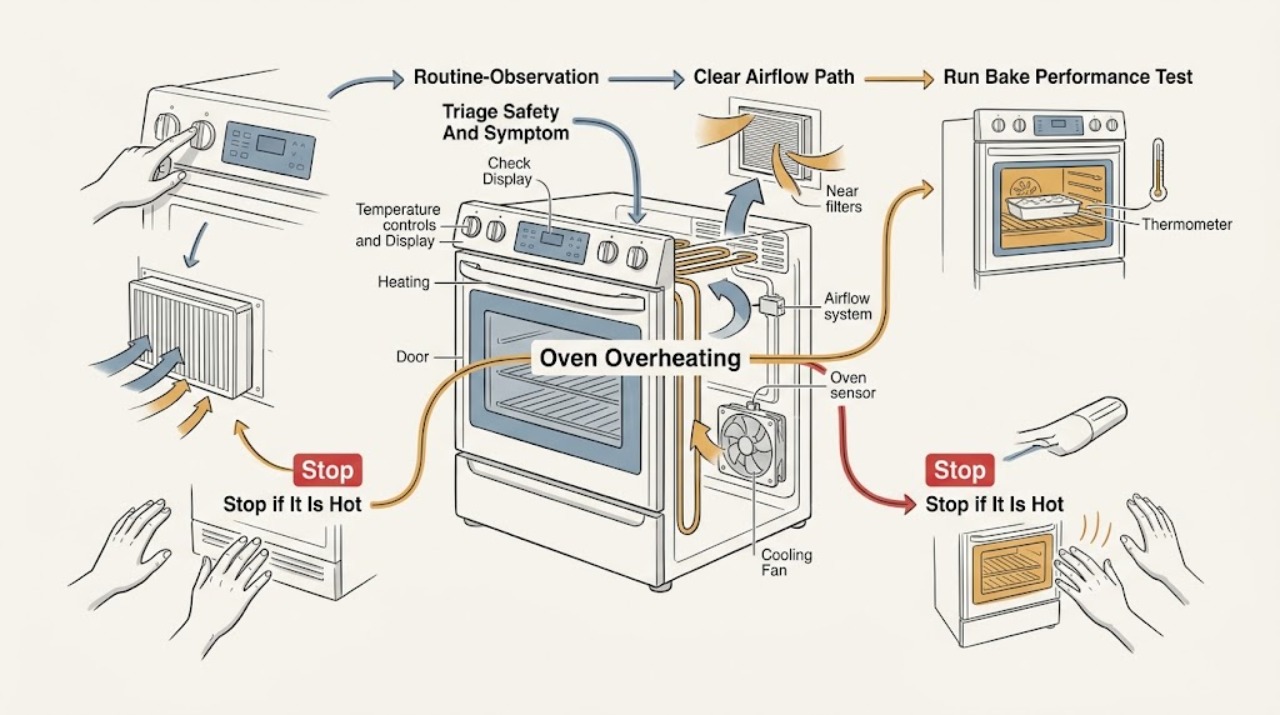
Work through in order
Diagnostic checks
Use only checks that match the exact appliance or system and its official guide.
-
Check 1
Stop the cooking cycle with the normal control if it responds, stand clear of the hot cavity and door, and classify the symptom before touching any rack or control; record the exact model, cycle, set temperature, displayed unit, and any message.
Expected result: Record whether the oven is simply hot during a selected cycle, the cooling fan is running after a cycle, the oven continues heating after Cancel, the display shows an over-temperature or cooling-fan fault, or there is smoke, gas odor, burning smell, arcing, repeated breaker tripping, or an abnormally hot exterior.
Next step: For a normal-use symptom continue to the setup check; for a hazard, leave the oven off, keep clear, and arrange qualified appliance or gas service using the model's safe shutoff instructions.
Stop if: Do not open panels, reach into a hot oven, relight or test a gas burner, repeatedly press Cancel or reset, or keep operating with smoke, gas odor, flames, arcing, exposed wiring, or repeated electrical trips.
Why this matters
Why: Normal cavity heat and a post-cycle cooling fan can be expected. Continued heating, a returning fault, smoke, gas odor, arcing, repeated trips, or abnormal external heat indicates a safety or control problem rather than a calibration preference.
-
Check 2
With the oven cool enough to approach safely, verify the selected cycle and target temperature in the exact owner manual, confirm the displayed Fahrenheit/Celsius unit, and inspect the rack and pan arrangement without lining the floor or an entire rack with foil.
Expected result: Record whether the symptom occurs only in Broil, Clean, Warm, Proof, or another special cycle; whether the unit was changed; whether pans touch the walls; or whether foil, an oversized pan, or crowded racks block the documented airflow.
Next step: Correct only the visible cycle, unit, rack, pan, or foil issue, then repeat the same normal bake setup; do not alter hidden vents, remove panels, or use a hot rack as a diagnostic tool.
Stop if: Stop if the door, gasket, glass, vent area, control, wiring, or surrounding cabinet is damaged, smoking, unusually hot, or unsafe to inspect.
Why this matters
Why: A cycle or unit mismatch can make an oven appear too hot, and blocked airflow or poor pan placement can cause hot spots and uneven results without proving a failed sensor or element. A correct setup with the same symptom moves the diagnosis toward measurement, calibration, or a fault.
-
Check 3
When there is no hazard and the model manual permits it, perform JennAir's model-appropriate bake-performance test with the specified food, rack, bakeware, temperature, and timing; do not substitute a household thermometer or preheat above the test setting.
Expected result: Record whether the test food is evenly done within its stated time range, browns early or unevenly, or cannot be completed because the oven overshoots, continues heating, shows a fault, or becomes unsafe.
Next step: If the result supports an offset, proceed to the manual's calibration method; if it is unsafe or remains abnormal after a correct test, stop the oven and provide the test details to a qualified technician.
Stop if: Stop the test immediately for smoke, gas odor, flames, arcing, burning smell, a door or control that becomes abnormally hot, an over-temperature message, repeated electrical trip, or any sign that heating cannot be controlled.
Why this matters
Why: A repeatable result within the documented range supports normal temperature control. A repeatable offset may support calibration, while uncontrolled heating, a recurring error, smoke, or an unsafe temperature points to service rather than a user setting.
-
Check 4
If the controlled test shows a consistent temperature offset and the oven is otherwise safe, open the exact owner's manual and use only its documented Settings, Options, Temp/Time, or Bake calibration interface; make no larger adjustment than the manual allows.
Expected result: Record whether the model exposes a calibration setting, whether the adjustment saves normally, and whether the same bake-performance test improves, remains too hot, or reveals a new error after the change.
Next step: Repeat the identical performance test once after a supported adjustment; if the result remains too hot or the procedure is not documented for the model, stop changing settings and schedule service.
Stop if: Do not guess calibration values, use calibration to compensate for runaway heating, bypass a sensor, or work on electrical, gas, or control components.
Why this matters
Why: Improvement after a small documented offset supports a calibration issue. No improvement, a limit reached, a new fault, or heating that remains uncontrolled suggests a sensor, control, relay, element, gas valve, or other internal fault that calibration cannot repair.
-
Check 5
Observe the cooling fan only from a safe distance during and after a normal cycle, and compare its behavior with the model manual; record whether it moves air, runs after the cycle, displays a fan-speed message, or makes a rubbing or metal-on-metal sound.
Expected result: Record whether the fan runs normally until the appliance cools, does not run when the model indicates it should, runs unusually long with an over-temperature symptom, or returns a cooling-fan error after a permitted single power reset.
Next step: Keep the oven off and arrange service for a missing, abnormal, or faulted cooling response; if the official model guidance permits one power cycle for that exact message, follow it once and monitor without opening the appliance.
Stop if: Do not insert tools into the vent, touch the fan, remove covers, operate through smoke or gas odor, or continue after the same error, breaker trip, or overheating returns.
Why this matters
Why: Fan operation after a cycle is often normal and protects controls. An airflow restriction, failed fan, wiring fault, abnormal noise, or recurring fan-speed error can prevent safe cooling and requires service; it is not a reason to reach behind the oven.
-
Check 6
After the safe cycle, unit, airflow, performance-test, calibration, and cooling observations, stop user troubleshooting and prepare a service record if the oven still overheats or cannot be turned off normally.
Expected result: Record the exact model and serial information, cycle and set point, displayed unit, test setup and result, calibration value if any, error text, fan behavior, door or gasket condition, and the time and circumstances of any smoke, odor, trip, or abnormal heat.
Next step: Arrange qualified JennAir appliance service; for any suspected gas leak or fire risk, leave the area and contact the appropriate emergency or gas-safety service from a safe location.
Stop if: Do not use the oven again for cooking or self-cleaning with uncontrolled heat, a returning fault, smoke, gas odor, flames, arcing, exposed wiring, damaged glass, repeated breaker trips, or an exterior/cabinet that becomes abnormally hot.
Why this matters
Why: A persistent over-temperature symptom after correct setup is not established as a calibration-only issue. Internal sensor, control, relay, heating element, gas valve, door, airflow, or cooling-fan diagnosis requires qualified service.
Use your observations
Decision map
Find the observation that best matches what you see, then follow the next safe action.
-
PATH 01Safety boundary
What you see
The oven is hot only during an intended cycle or the cooling fan continues after the cycle, with no smoke, odor, fault, uncontrolled heating, or abnormal exterior heat.
Do this next
Follow the model manual for normal cycle completion and keep the cooling path unobstructed; continue only if the oven returns to normal behavior.
Why this path and its safety boundary
Why it matters: Heat and post-cycle fan operation can be normal; the fan protects the cavity and electronic controls while the appliance cools.
Safety stop: Stop if the fan makes abnormal contact noise, a fault appears, controls remain excessively hot, or heating continues after the cycle is canceled.
-
PATH 02Safety boundary
What you see
The symptom occurs in a special cycle, the displayed unit is unexpected, pans or racks block circulation, or foil covers a rack or oven floor.
Do this next
Restore the documented cycle, unit, rack, pan clearance, and airflow arrangement, then repeat the same safe test.
Why this path and its safety boundary
Why it matters: The selected function, unit, pan position, and airflow can change cooking results and create hot spots without proving an internal over-temperature failure.
Safety stop: Do not cover the floor or rack with foil, modify vents, or continue if the door, gasket, vent, glass, or cabinet is damaged or dangerously hot.
-
PATH 03Safety boundary
What you see
A model-appropriate bake-performance test is safe to complete and repeatedly shows early browning or a consistent temperature offset, while heating still cycles normally.
Do this next
Use only the owner's manual's calibration interface and small allowed adjustment, then repeat the identical test once.
Why this path and its safety boundary
Why it matters: The result may justify a model-specific calibration adjustment, but a test result alone does not identify a failed sensor or control.
Safety stop: Do not keep increasing offsets, use a thermometer as the sole proof, or calibrate an oven that runs uncontrolled, shows an over-temperature fault, or continues heating after Cancel.
-
PATH 04Safety boundary
What you see
The cooling fan does not behave as the manual indicates, has abnormal rubbing noise, shows a fan-speed message, or runs unusually long with overheating.
Do this next
Keep the oven off and arrange qualified service; perform a power cycle only once and only if the exact official error guidance permits it.
Why this path and its safety boundary
Why it matters: An airflow restriction, fan, wiring, sensor, or control problem may prevent safe cooling; normal post-cycle fan operation does not cover a recurring fault.
Safety stop: Do not reach into vents, remove panels, touch the fan, or continue after a returning error, smoke, odor, abnormal heat, or breaker trip.
-
PATH 05Safety boundary
What you see
Heating continues after Cancel, an over-temperature fault returns, smoke or gas odor appears, flames or arcing are visible, the breaker trips, or the door/control/cabinet is abnormally hot or damaged.
Do this next
Stop using the oven, leave the area for gas or fire symptoms, and contact qualified appliance or emergency/gas-safety service from a safe location.
Why this path and its safety boundary
Why it matters: This is a safety or internal-fault condition, not a calibration preference; continued operation can create fire, electric-shock, gas, or burn risk.
Safety stop: Do not relight, test, repeatedly reset, open panels, inspect live wiring, run Self-Clean, or resume cooking to see whether the symptom clears.
Helpful context
Understand the symptom
Decide whether the symptom is normal heat or dangerous overheating
An oven cavity, door glass, and nearby surfaces become hot during cooking, and a cooling fan can continue after the cycle while it cools the cavity and electronic controls. That does not explain visible smoke, a gas odor, arcing, a burning smell, an uncontrolled temperature rise, an error that returns, or heating that continues after the control is canceled. Stop using the oven for any of those symptoms, keep people away from the hot area, and use the model's safe power or gas shutoff procedure only when it can be reached without exposure to heat or flames.
Check the selected cycle and airflow before changing calibration
Use the owner's manual to confirm that Bake, Broil, Warm, Proof, Clean, or another special cycle is the one intended; these cycles do not have the same heating behavior. Check that the displayed unit is the intended Fahrenheit or Celsius setting, that a delayed or timed function is not still active, and that pans are not touching the oven walls. JennAir warns against covering an entire rack or the oven bottom with foil because it can block airflow. Correct only a visible setup issue and do not move a hot rack with bare hands.
Use a bake-performance test to distinguish offset from a control fault
JennAir's temperature-evaluation guidance uses a controlled bake test and the result over the package's stated time range rather than a household thermometer reading. Follow the exact model instructions, use the prescribed rack and bakeware arrangement, and do not preheat beyond the test temperature. An evenly baked result supports normal calibration; a repeatable early browning or uneven result can justify a small calibration adjustment, but a persistent overshoot, fault message, or heating that does not cycle normally needs service.
Calibrate only when the model and test support it
JennAir provides several calibration interfaces, including Settings, Options, a Temp/Time control, or a Bake control, and the correct interface is model-specific. Use the owner's manual and save only a small adjustment supported by the documented procedure; never use calibration to hide an oven that runs away, overheats the controls, or continues heating after Cancel. Re-run the same performance test after an allowed adjustment. If the result is still too hot or the adjustment is already at its limit, stop changing settings and arrange service.
Treat cooling-fan and power symptoms as separate branches
A fan during preheat, Bake, Broil, Clean, or after the cycle can be normal and can vary with the selected temperature, cycle length, and surrounding conditions. A fan-speed message, rubbing noise, no airflow when the model requires cooling, a control that remains hot, or a fan that runs unusually long with an over-temperature symptom is different: record the exact message and stop for service. If the model's official error guidance permits a single power cycle, follow that procedure once; never continue using the oven if the breaker trips again or the fault returns.
When checks do not resolve it
Need a professional?
Safety scope: This article covers ordinary-access controls, visible setup, and model-approved performance testing only. Do not open panels, probe live wiring, touch heating elements or fans, bypass a sensor, alter a gas component, run Self-Clean, or continue operating with uncontrolled heat, smoke, gas odor, flames, arcing, repeated trips, damaged glass, or abnormal exterior heat.
Common questions
FAQ
Is a JennAir oven fan running after cooking a sign of overheating?
Not by itself. JennAir says an automatic cooling fan can run during or after a cycle to cool the cavity and electronic controls. It becomes a service concern when the fan has a recurring error, abnormal rubbing noise, no airflow when required, unusually long operation with overheating, or the oven also shows smoke, odor, uncontrolled heat, or abnormal exterior temperature.
Can I use an oven thermometer to prove that my JennAir oven is overheating?
JennAir cautions that elements cycle and household thermometers may react too slowly to represent the oven's controlled temperature. Use the model-appropriate bake-performance test and its timing or food result first, then follow the owner's manual for any calibration procedure.
Should I calibrate a JennAir oven that is cooking too hot?
Only after a safe, repeatable performance test shows a consistent offset and the owner's manual supports calibration for that model. Use the documented control path and a small allowed adjustment, then repeat the same test. Calibration is not a fix for runaway heat, an over-temperature error, heating after Cancel, smoke, or a gas or electrical hazard.
Can foil or pan placement make a JennAir oven seem too hot?
Yes, it can create airflow problems and hot spots. JennAir says not to cover an entire rack or the oven bottom with foil and recommends leaving clearance around pans and using the rack arrangement appropriate to the food. Correct only a visible setup issue while the oven is cool; do not block vents or modify the oven.
When should I stop using an overheating JennAir oven?
Stop immediately for smoke, gas odor, flames, arcing, burning smell, heating that continues after Cancel, a returning over-temperature fault, repeated breaker trips, exposed wiring, damaged glass or door, or an exterior/control area that becomes abnormally hot. Leave the area for gas or fire symptoms and arrange qualified service from a safe location.
Read the exact guide
Official sources
- Oven Not Shutting Off - Product Help | JennAirJennAir · JennAir range support guidance; follow the exact model's controls and service instructions.
- How to Evaluate if Temperature Calibration is Needed - Product Help | JennAirJennAir · JennAir temperature-evaluation guidance; the exact test and calibration controls remain model-specific.
- Fan is Running During Non Convection Cycles - Product Help | JennAirJennAir · JennAir range and oven fan-operation guidance; fan behavior varies by model, cycle, temperature, and surroundings.
- Cooling Fan Speed - Range - Product Help | JennAirJennAir · JennAir range error-code guidance for a cooling-fan speed message; exact error behavior is model-specific.
- Oven Too Hot - Needs Calibration - Range - Product Help | JennAirJennAir · JennAir range and oven support guidance; calibration controls vary by model and should be confirmed in the matching owner's manual.
- JennAir Product Manuals and LiteratureJennAir · JennAir owner-resource page used to locate the matching manual; exact instructions depend on model.
- Oven Too Hot - Calibrated - Wall Oven - Product Help | JennAirJennAir · JennAir wall-oven support article; exact cycle behavior and calibration procedure remain model-specific.
- Oven Temperature Incorrect (Too Hot or Too Cold) - Product Help | JennAirJennAir · JennAir oven and range temperature guidance; use the matching owner's manual for the particular appliance.
- Understanding Fan or Humming Noise in Oven - Product Help | JennAirJennAir · JennAir oven and range fan guidance; normal fan timing and sound depend on model and cycle.
Community feedback
Share a repair observation
Share a plain-text repair observation. Accepted observations are published automatically; this page may take a moment to update.