
On this page
Start here
Quick answer
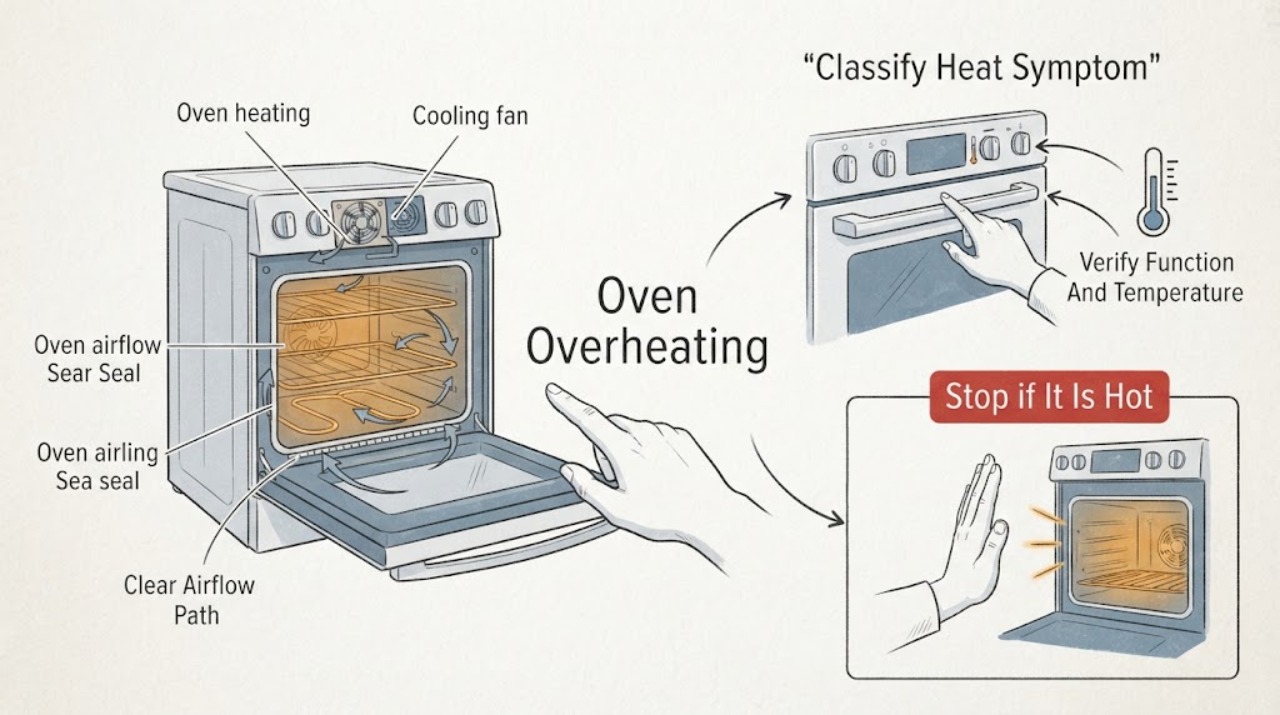
If a Hotpoint oven seems to overheat, first separate normal residual heat or a cooling fan from true uncontrolled heating. Confirm the selected function and temperature, compare the result with the recipe or model manual, and note whether food burns, the temperature overshoots, or the display fails to respond. Keep the oven's vents clear, place food on the correct shelf, and check the door seal and visible cavity for grease or residue that can block airflow or cause smoke. A cooling fan can continue after switch-off to protect the controls, but heating that continues after the oven is off, a door that will not close, smoke, sparks, gas odor, an unusually hot exterior, or a breaker trip requires immediate shutdown and qualified service. Do not open the cabinet, probe live wiring, adjust gas parts, or keep testing an oven that cannot be safely controlled.
Before you begin
Safety first
- This article supports cool, ordinary-access observations of settings, shelf placement, visible cavity residue, door seal, and fan behavior only. Do not open the cabinet, access live wiring, adjust gas parts, bypass a thermostat, or continue testing uncontrolled heat.
Work through in order
Diagnostic checks
Use only checks that match the exact appliance or system and its official guide.
-
Check 1
Stop cooking and, without touching hot surfaces, classify the symptom: normal heat during cooking, cooling fan after switch-off, food burning at the selected setting, heating that continues after switch-off, smoke or sparks, gas odor, or an unusually hot exterior.
Expected result: Record the function, selected temperature, display response, element or burner behavior, fan behavior, how long heat continues after switch-off, and whether there is smoke, burning smell, gas odor, spark, visible damage, or a breaker trip.
Next step: Follow the immediate stop branch for any safety symptom or heat that cannot be controlled. If the oven is cool enough and only cooking results are poor, continue to the function and placement check.
Stop if: Stop immediately for gas odor, smoke, sparks, a burning smell, a hot or damaged cord, heating after switch-off, a painful exterior temperature, visible damage, or a repeated breaker trip.
Why this matters
Why: A cooling fan after use can be normal on modern Hotpoint ovens. Uncontrolled heating, a nonresponsive control, repeated smoke, gas odor, sparks, or abnormal external heat indicates a safety or control fault and overrides routine cooking checks.
-
Check 2
When the oven is cool and no safety symptom is present, compare the selected cooking function and temperature with the model manual and food care instructions; confirm that a grill, fan, conventional, cleaning, or special high-heat function was not selected accidentally.
Expected result: Record the exact function icon or label, temperature setting, timer state, whether the display accepts changes, and whether the food symptom occurs on one function or every function.
Next step: Correct only an obvious setting error, then use a suitable empty-oven observation only as allowed by the model manual. If heat remains uncontrolled or the symptom occurs across functions, stop and request service.
Stop if: Do not run a high-heat or cleaning function as a test, leave the oven unattended, or continue if the control cannot stop heat or an element remains energized.
Why this matters
Why: A function mismatch can apply heat from a different element or airflow path and produce a result that feels like overheating. A display that will not accept a change, or heat that remains after the function is cancelled, points toward a control or heating fault.
-
Check 3
With the oven off and cool, inspect that food is centered on the correct shelf, not on the oven base, that a tall-sided pan is not blocking circulation, and that the visible ventilation openings are not covered by cookware or residue.
Expected result: Record a correct shelf position, food on the base, a tall or crowded pan, a blocked visible vent, or a cooking result that remains too hot or uneven after placement is corrected.
Next step: Reposition the food and pan according to the manual and observe one attended cooking cycle at a suitable setting. If the oven still overheats or cannot be controlled, stop using it and arrange service.
Stop if: Do not cover vents, place cookware on the base when the manual forbids it, or continue cooking when food burns, smokes, or the exterior becomes abnormally hot.
Why this matters
Why: Hotpoint says shelf placement and pan shape affect heat circulation and cooking results. A corrected placement that resolves uneven browning points to airflow or setup; persistent severe heat or burning points back to the function, control, element, or sensor path.
-
Check 4
After the oven is fully cool, inspect the visible cavity, fan area, door glass, and door seal for heavy grease, food residue, a torn or displaced seal, or a door that does not close evenly; use only the model-approved cleaning method.
Expected result: Record clean surfaces, grease or residue near airflow openings, a seal that sits continuously, a seal gap or tear, a door that cannot close, or smoke that returns when residue is heated.
Next step: Clean only accessible residue with an approved product and restore a seal only as the manual permits. Request service for a damaged seal, blocked internal fan, door misalignment, recurring smoke, or persistent overheating.
Stop if: Do not use abrasive or unapproved chemicals, remove panels, force the seal, reach into a fan, or heat grease to test whether it smokes.
Why this matters
Why: Hotpoint identifies grease and grime as possible fan obstructions and smoke sources, while a damaged seal can let heat escape and make the oven work harder. A torn seal, blocked fan, or smoke that returns is a service or cleaning boundary, not a reason to increase the setting.
-
Check 5
After a normal, attended cooking cycle with no abnormal heat or odor, switch the oven off and observe the cooling fan from a safe distance without blocking vents or touching the controls.
Expected result: Record a fan that continues for a limited cool-down period and then stops, a fan that never starts, a fan that runs while the oven is cool, a fan with grinding or scraping noise, or heating that continues after the controls are off.
Next step: Allow a normal cool-down fan to finish without interference. If it does not behave as the manual describes, keep the oven off and arrange service; do not disable the fan or continue a high-heat test.
Stop if: Do not block the fan, reach through a vent, remove a guard, disable a cooling circuit, or remain near an oven that is smoking or heating after switch-off.
Why this matters
Why: Hotpoint says a cooling fan may run for up to about 30 minutes after switch-off to protect the controls, and it may cycle on and off. A fan that never stops, fails to cool, makes an abnormal noise, or accompanies uncontrolled heating needs model-specific service.
-
Check 6
For a gas or electric Hotpoint oven, inspect only accessible controls and visible connections from a dry, safe position; do not remove covers, access terminals, adjust burners, or probe wiring.
Expected result: Record a normal control response, a gas odor or abnormal flame, a hot or damaged cord or plug, sparks, smoke, a breaker trip, or a heating element or burner that remains active after switch-off.
Next step: Stop the oven and follow the urgent safety branch. If there is no hazard but heat remains uncontrolled or the oven cannot be switched off normally, isolate it from a safe position and arrange qualified gas or appliance service.
Stop if: Do not relight burners, adjust gas components, operate switches in a gas-filled area, touch damaged electrical parts, bypass a thermostat, or restart to reproduce the fault.
Why this matters
Why: Gas odor, abnormal flame, sparks, smoke, uncontrolled heating, cord damage, or repeated trips indicate a gas, fire, shock, or control risk. These symptoms cannot be safely separated from an internal fault by ordinary cooking tests.
-
Check 7
If the oven still overheats after safe setting, placement, seal, cavity, and fan observations, document the model, function, temperature, food result, display behavior, cooling-fan behavior, and every safety symptom before arranging service.
Expected result: Record a repeatable overshoot, heat after switch-off, persistent smoke, an error message, a fan fault, a seal fault, an element or burner that stays active, or no clear external cause.
Next step: Keep the oven off and request Hotpoint or qualified appliance service. Provide the exact model, function, temperature, timing, food result, display, fan, seal, and safety observations.
Stop if: Do not keep running the oven to collect more evidence, open the cabinet, bypass a temperature control, or attempt gas or electrical repair.
Why this matters
Why: A repeatable pattern helps a technician distinguish control, sensor, heating element, gas, fan, seal, or installation faults. A lack of an external cause does not justify opening the oven or changing a part without model-specific diagnosis.
Use your observations
Decision map
Find the observation that best matches what you see, then follow the next safe action.
-
PATH 01Safety boundary
What you see
There is gas odor, smoke, sparks, a burning smell, uncontrolled heating after switch-off, a hot or damaged cord, an unusually hot exterior, visible damage, or a repeated breaker trip.
Do this next
Stop the oven. If safe from a dry position, isolate power or gas without entering a hazardous area or touching damaged parts; leave for gas odor, smoke, or fire and request emergency or utility help from outside the affected area. Arrange qualified service before any restart.
Why this path and its safety boundary
Why it matters: This is a fire, gas, shock, or control risk, not a temperature-setting issue.
Safety stop: Do not relight, restart, operate switches in a gas-filled area, spray water, open panels, touch hot or wet electrical parts, or bypass a safety control.
-
PATH 02Safety boundary
What you see
The cooking function turns off normally, no smoke or abnormal heat is present, and the fan continues during cool-down before stopping.
Do this next
Keep vents unobstructed and allow the fan to complete its cool-down. Request service only if it never stops, fails to cool, makes an abnormal noise, or is paired with uncontrolled heating.
Why this path and its safety boundary
Why it matters: Hotpoint describes post-use cooling fan operation as normal on many modern ovens because it protects the controls from excess heat.
Safety stop: Do not block, disable, or dismantle the cooling fan, and stop if smoke, gas odor, burning smell, or unsafe heat appears.
-
PATH 03Safety boundary
What you see
The oven responds to controls, the symptom occurs on one function or shelf setup, and there is no smoke, gas odor, sparks, or uncontrolled heat.
Do this next
Select the model-approved function and temperature, center food on the correct shelf, keep it off the oven base, and observe one attended cycle.
Why this path and its safety boundary
Why it matters: A function, shelf position, pan shape, or food placement can change heat circulation and cooking results without a failed control.
Safety stop: Stop if food burns rapidly, smoke appears, heat remains after switch-off, or the same overshoot occurs across functions.
-
PATH 04Safety boundary
What you see
Heavy grease or residue is visible near airflow areas, smoke returns when residue heats, or the door seal is torn, displaced, or unable to close evenly.
Do this next
Allow the oven to cool, use only the approved cleaning method, and request service for an internal fan obstruction, damaged seal, recurring smoke, or door alignment problem.
Why this path and its safety boundary
Why it matters: Hotpoint links residue with blocked fans and smoke, and a damaged seal can make the oven work harder and longer by allowing heat to escape.
Safety stop: Do not heat grease deliberately, use abrasive chemicals, force the seal, remove panels, or continue cooking with smoke or a damaged door.
-
PATH 05Safety boundary
What you see
The oven overshoots across suitable functions, the display will not change or cancel heat, an element or burner stays active after switch-off, or the cooling system does not behave normally.
Do this next
Keep the oven off, isolate it from a safe position when practical, and arrange Hotpoint or qualified appliance service with the model and documented pattern.
Why this path and its safety boundary
Why it matters: A thermostat, sensor, control, heating element, gas control, or cooling fault remains possible and cannot be confirmed safely from external checks.
Safety stop: Do not bypass a thermostat, probe live wiring, adjust gas parts, run another cycle, or replace a component without diagnosis.
Helpful context
Understand the symptom
A hot oven is not always an overheating fault
Hotpoint says many modern ovens use a cooling fan to keep the controls from becoming too hot, and that fan may continue after the oven is switched off. That is different from an element staying energized, food burning well before the selected setting, a display that cannot control the function, or an exterior that becomes abnormally hot. Record which part is hot, when heat continues, and whether the oven responds to its controls.
Function, shelf position, and airflow change cooking results
Hotpoint's oven guidance notes that fan-assisted and conventional functions distribute heat differently. Food should be centered on a shelf rather than placed directly on the oven base, and tall-sided pans can alter airflow. A wrong function or crowded placement can look like a temperature fault even when the control is working.
Grease and a damaged seal can create heat and smoke symptoms
Hotpoint warns that grease, grime, and food residue can block fans and cause smoke or unpleasant smells. Its maintenance guidance also says a worn oven door seal lets heat escape and makes the oven work harder and longer. Inspect only ordinary-access surfaces, use the model's approved cleaning method, and do not continue heating when smoke or a burning smell is present.
Gas and electrical symptoms need a separate stop path
A gas odor, abnormal flame, sparks, smoke, an energized element after switch-off, a hot or damaged cord, or a repeated breaker trip is not a cooking-adjustment problem. Stop the oven, keep away from ignition sources, isolate power or gas only from a safe position when this can be done without touching a hazard, leave the area for an emergency condition, and arrange qualified service.
Safety boundary
Stop conditions
- Stop immediately for gas odor, smoke, sparks, burning smell, uncontrolled heating after switch-off, a hot or damaged cord, an unusually hot exterior, visible damage, or a repeated breaker trip.
- Leave a gas-filled, smoking, or burning area and request emergency or utility help from a safe location; do not operate switches or relight the oven there.
- Do not open the cabinet, probe live wiring, adjust gas components, bypass a thermostat or safety control, or restart an oven that cannot be switched off normally.
- Do not use abrasive or unapproved cleaners, heat grease to test smoke, block vents, reach into a fan, or force a damaged door seal.
- Keep the oven off and request qualified service when safe function, placement, seal, cavity, and fan checks do not resolve overheating.
Only after diagnosis
Potential parts
- oven door seal
Consider this category only when inspection confirms a torn, displaced, or persistently leaking seal and service diagnosis supports replacement.
Confirm the exact Hotpoint model and seal profile before ordering; do not force or heat a damaged seal. - oven temperature sensor
Consider this category only when model-specific diagnosis links repeatable temperature overshoot or a code to the sensor circuit.
Confirm the exact model and technician diagnosis before ordering; do not access sensor wiring while the oven is connected to power. - oven heating element or gas control
Consider this category only after a qualified technician identifies an element or gas-control fault causing uncontrolled or incorrect heat.
Confirm the exact model, gas or electric type, and service diagnosis; do not substitute or adjust a heating or gas component by guesswork.
When checks do not resolve it
Need a professional?
Arrange Hotpoint or qualified appliance service when the oven continues heating after switch-off, overshoots across suitable functions, the display or temperature control is unresponsive, a heating element or burner remains active, the cooling fan fails or runs abnormally, the door seal or door is damaged, smoke returns, gas odor or sparks occur, the exterior becomes abnormally hot, or a breaker trips again.
Safety scope: This article supports cool, ordinary-access observations of settings, shelf placement, visible cavity residue, door seal, and fan behavior only. Do not open the cabinet, access live wiring, adjust gas parts, bypass a thermostat, or continue testing uncontrolled heat.
Common questions
FAQ
Is it normal for a Hotpoint oven fan to run after switch-off?
Often, yes. Hotpoint says many modern ovens use a cooling fan to protect the controls, and it can run for a cool-down period after the oven is off. It is not normal if the oven keeps heating, the fan never stops, smoke appears, or the exterior becomes unsafe.
Why does my Hotpoint oven burn food at the correct setting?
Check the selected function, shelf position, food placement, and pan shape. Hotpoint notes that fan-assisted and conventional functions distribute heat differently, food should be on a shelf rather than the oven base, and tall-sided pans can affect airflow. Persistent overshoot across functions needs service.
Can grease make a Hotpoint oven overheat or smoke?
Grease and food residue can obstruct fans and create smoke when heated. Let the oven cool, use only the model-approved cleaning method, and stop if smoke or a burning smell returns. Do not heat grease deliberately as a test or remove internal panels.
Can a damaged Hotpoint oven door seal cause overheating?
A damaged seal allows heat to escape and can make the oven work harder and longer, while a door that will not close can create a separate safety issue. Inspect only the visible seal when cool; request service for a tear, persistent gap, door misalignment, smoke, or uncontrolled heat.
What should I do if my Hotpoint oven keeps heating after I turn it off?
Stop using it. Do not keep testing, bypass a thermostat, open the cabinet, or adjust gas parts. If safe from a dry position, isolate the appliance; leave for smoke, fire, or gas odor and request emergency or utility help from outside the affected area. Arrange qualified service before a restart.
When should I call for Hotpoint oven overheating service?
Request service when heat is uncontrolled, the display or function will not cancel it, an element or burner stays active, the fan fails or behaves abnormally, smoke returns, the door seal is damaged, gas odor or sparks occur, the exterior is unusually hot, or a breaker trips again.
Read the exact guide
Official sources
- Hotpoint Appliances Safety Notices - Hotpoint - HotpointHotpoint UK · Hotpoint UK safety-notice portal; affected models and required actions must be checked by model number.
- Hotpoint Service Oven Repair - HotpointHotpoint UK · Hotpoint UK oven repair and troubleshooting guidance; functions and controls vary by model.
- Hotpoint Oven TroubleshootingHotpoint UK · Hotpoint UK oven troubleshooting hub; exact advice and functions vary by model.
- 15 Kitchen Appliance Mistakes You Need to Avoid - HotpointHotpoint UK · Hotpoint UK appliance maintenance article; model-specific manual instructions control cleaning and repair.
- Gas & Electric Cooker Troubleshooting & RepairHotpoint UK · Hotpoint UK gas and electric cooker guidance; exact cooker and oven controls vary by model.
- Why You Need to Bring Pyrolytic Ovens into Your HomeHotpoint UK · Hotpoint UK article about pyrolytic ovens; only models with this function support that cleaning cycle.
Community feedback
Share a repair observation
Share a plain-text repair observation. Accepted observations are published automatically; this page may take a moment to update.