
On this page
Start here
Quick answer
Stop the Fisher & Paykel dryer, unplug it, and do not pull, bend, cut or file the metal piece or run another load. With power removed, look through the open door for a loose item, load hardware or a visibly displaced filter or rack that can be removed without tools. A fixed or sharp projection, scraping that continues with the drum empty, damage to the drum or seal, burning smell, sparking or a damaged cord is a service condition. Fisher & Paykel user guidance says not to continue a drying cycle after stopping the noise and routes unresolved problems to a trained and supported service technician.
Before you begin
Safety first
- Do not run with the projection present, pull or cut metal, remove the cabinet or drum, reach near heaters or wiring, bypass the door or other safety controls, or order a part by appearance.
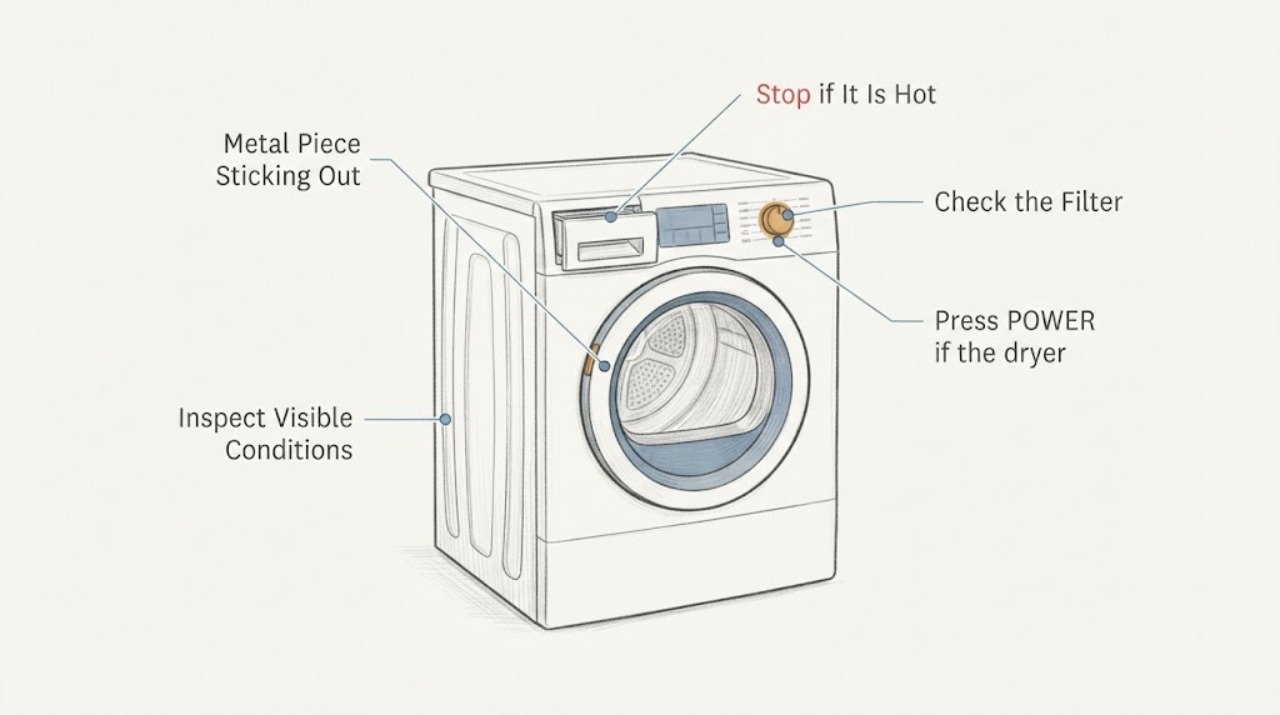
Work through in order
Diagnostic checks
Use only checks that match the exact appliance or system and its official guide.
-
Check 1
Press POWER if the dryer responds, then disconnect it from its normal power source and wait for the drum and nearby surfaces to cool. Do not restart it to reproduce the noise and do not continue a cycle with a metal projection visible.
Expected result: The noise stops when the dryer is stopped, or the dryer continues to hum/scrape, smells hot, sparks or shows cord or housing damage.
Next step: Keep the dryer unplugged and arrange trained service for persistent noise, damage, burning smell or sparking.
Why this matters
Why: Fisher & Paykel warns not to continue drying after stopping the noise. Persistent noise or any heat, electrical or sharp-edge sign raises the risk beyond a safe observation check.
-
Check 2
With the dryer unplugged and cool, remove the load and inspect only through the open door and at the normal lint-filter opening. Look for a loose zipper, hook, coin, rack fitting, garment hardware or other object that could be mistaken for a fixed metal part; lift out only an object that is plainly loose and needs no tool.
Expected result: The projection is a loose load item, no loose item is present but a fixed sharp or displaced piece remains, or the drum/seal shows scrape marks or damage.
Next step: If no loose object explains the symptom, stop handling the projection and use qualified Fisher & Paykel service. Do not pull, bend, cut or file it.
Why this matters
Why: A loose object can explain a noise without proving an appliance-part failure. A fixed projection or scrape mark keeps a damaged drum, baffle, seal or other internal assembly in scope, but the symptom cannot identify which part.
-
Check 3
Only if the dryer has the matching user-accessible filter arrangement described by its own manual, inspect the lint and condenser filters for damage or trapped material. For a DH8060C-style heat-pump dryer, switch off and unplug before filter access; vacuum the visible evaporator grid gently and keep hands away from its sharp fins. Do not use this step to reach the protruding metal part.
Expected result: A filter is damaged or something is visibly trapped in the filter or grid, or the filter area is clear while the drum projection/noise remains.
Next step: Replace or refit only a user-removable filter as the exact manual shows; do not operate with a damaged/missing filter. For the remaining projection or noise, leave the dryer unplugged and call service.
Why this matters
Why: Fisher & Paykel identifies damaged or obstructed filters as user-checkable airflow issues and warns that the evaporator surface has sharp edges. A clear filter area does not explain or clear a metal projection in the drum.
-
Check 4
Read the full model and serial information from the dryer label and provide it to Fisher & Paykel support or an authorised service partner, together with whether the projection is fixed, where it sits, whether the drum turns freely by normal user movement without force, and when the noise occurs. Do not order a drum, baffle, seal or bearing by appearance.
Expected result: The model is confirmed but no exact user procedure covers the projection, or the label cannot be read while the unsafe condition remains.
Next step: Book Fisher & Paykel trained service and keep the dryer out of operation until the projection and noise are assessed.
Why this matters
Why: Fisher & Paykel support can route manuals and service, but an unidentified or model-specific fixed metal part is outside a safe universal repair instruction.
Use your observations
Decision map
Find the observation that best matches what you see, then follow the next safe action.
-
PATH 01Next step
What you see
A loose object or load hardware is visible and can be lifted out without tools, and the drum and seal show no scrape or damage.
Do this next
Keep the dryer unplugged while removing it, then use the exact model guide before any single supervised test; stop immediately if the projection or noise remains.
Why this path and its safety boundary
Why it matters: The noise may have come from the loose object rather than a confirmed dryer-part failure.
-
PATH 02Next step
What you see
The metal piece is fixed, sharp, displaced, catches fabric, leaves scrape marks, or remains after the load and visible filter areas are clear.
Do this next
Do not pull, cut, bend, file or run the dryer. Keep it unplugged and arrange Fisher & Paykel trained service.
Why this path and its safety boundary
Why it matters: The symptom is outside safe user cleaning and may involve a damaged drum-area assembly; the exact part cannot be identified from the description.
-
PATH 03Next step
What you see
There is burning smell, sparking, smoke, a damaged cord, exposed wiring or a hot electrical odor.
Do this next
Leave the dryer disconnected, keep clear of damaged parts and use qualified appliance service; seek emergency help if there is an active fire or smoke emergency.
Why this path and its safety boundary
Why it matters: This is an electrical or fire-risk stop condition rather than a noise diagnosis.
Helpful context
Understand the symptom
Treat the projection and noise as a stop condition
A metal piece that appears to protrude into the drum can catch clothing, scrape the drum or create a sharp-edge hazard, but the description alone does not identify whether it is a loose load item, a user-removable accessory or a damaged fixed part. Stop the cycle and unplug the dryer before looking. Do not try to straighten, cut, file, pull or push a fixed piece back into place.
Limit checks to visible, user-accessible areas
After the dryer is disconnected and cool, remove the load and inspect the visible drum, door opening, lint-filter area and any rack or accessory for a loose object or obstruction. Remove only an item that is clearly loose and can be lifted out without tools. Do not remove panels or reach behind the drum, seals or heater area to investigate the metal projection.
The model manual controls the next step
No Fisher & Paykel model was supplied. The opened DH8060C guide is manufacturer evidence for a specific heat-pump dryer family, so its cleaning and user-accessible boundaries are examples of the checks that may apply, not permission to use a model-specific disassembly sequence on an unidentified dryer. Confirm the rating-label model before ordering any drum, baffle, seal or other part.
When checks do not resolve it
Need a professional?
Stop and arrange Fisher & Paykel trained service if the metal piece is fixed, sharp, displaced, catches fabric, causes scraping, remains after the visible load/filter check, or is accompanied by heat, smell, sparks, smoke, cord damage or exposed wiring. Do not keep testing the dryer.
Safety scope: Do not run with the projection present, pull or cut metal, remove the cabinet or drum, reach near heaters or wiring, bypass the door or other safety controls, or order a part by appearance.
Have this ready
- Provide the full model and serial information, a photo of the projection with the dryer unplugged, its location relative to the door or drum, whether it catches clothing, and when the noise starts.
Common questions
FAQ
Can I bend or cut the metal piece so the dryer can run?
No. Keep the dryer unplugged and do not pull, bend, cut or file a fixed or sharp projection. The description does not establish what assembly it belongs to, so use the exact model information and qualified service.
Can I run one empty cycle to see whether the noise is gone?
No when a metal projection remains visible or the dryer has scraping, heat, smell or electrical damage. Fisher & Paykel guidance says not to continue the drying cycle after stopping the noise; remove the load and arrange service if the condition is not plainly a loose object.
Read the exact guide
Official sources
- Heat Pump Clothes Dryer DH8060C Installation and User GuideFisher & Paykel · Opened official Fisher & Paykel DH8060C guide. It is a model-specific dryer guide used for manufacturer safety and user-accessible boundaries; no DH8060C-specific part fit, disassembly or fault diagnosis is transferred to this unidentified Fisher & Paykel dryer.
- Help & SupportFisher & Paykel · Opened official Fisher & Paykel Help & Support page. It provides the manufacturer route for manuals, troubleshooting and booking a Fisher & Paykel technician or authorised service partner; it does not identify an internal part for an unspecified dryer.
Community feedback
Share a repair observation
Share a plain-text repair observation. Accepted observations are published automatically; this page may take a moment to update.