
On this page
Start here
Quick answer
Confirm that the Fisher & Paykel dryer is on a heated cycle rather than COOL AIR or another air-only setting, and check whether the progress display has already reached COOL or END. On condensing and heat-pump models, empty and correctly refit the water tank; a full tank can prevent normal heating or drying. Clean and correctly refit the lint and condenser filters, keep the airflow openings and any exhaust path clear, and remove some items if the drum is overloaded. If the dryer still runs with cold air after these model-appropriate checks, or it shows a fault, repeatedly stops, smells hot, smokes, trips power, or has damaged wiring, stop using it and arrange a Fisher & Paykel trained and supported service technician. Never open the cabinet or test the heater, thermostat, thermal cut-out, sensor, or wiring yourself.
Before you begin
Safety first
- This article covers display, cycle, load, water-tank, filter, and ordinary-access airflow checks only. Leave heater, thermal cut-out, sensor, fan, control, wiring, gas where fitted, and cabinet work to Fisher & Paykel trained and supported service.
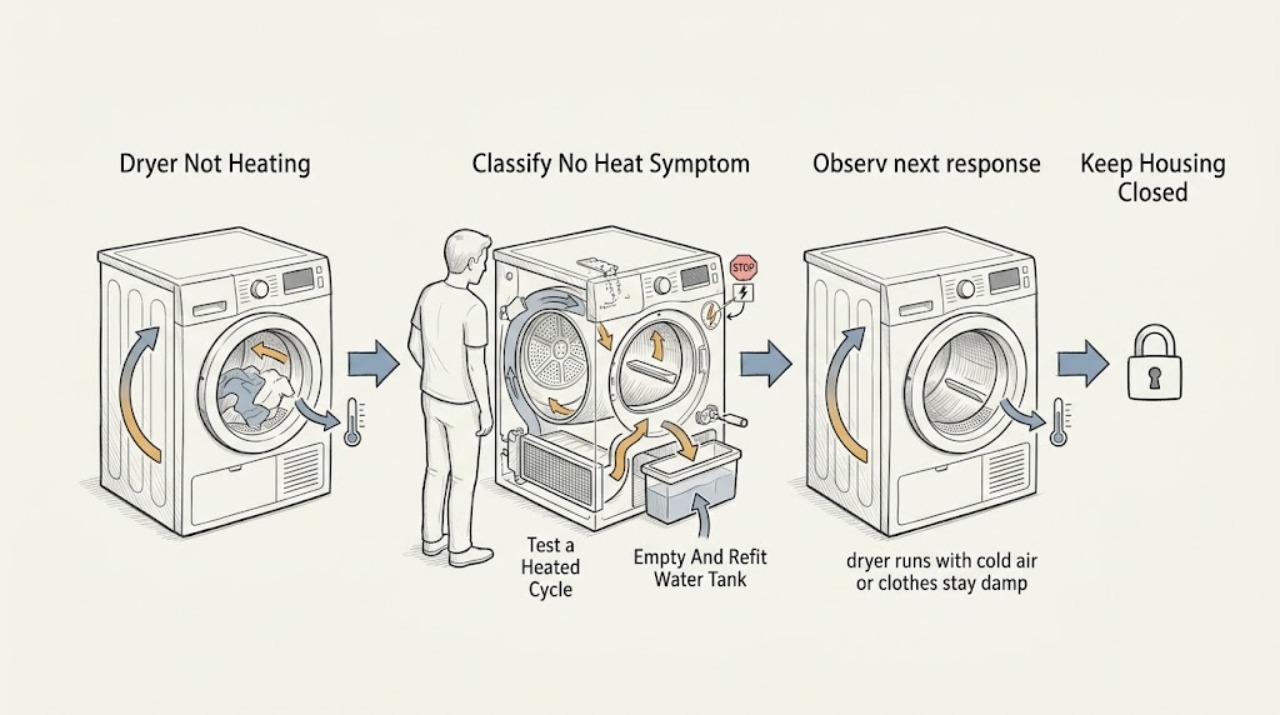
Work through in order
Diagnostic checks
Use only checks that match the exact appliance or system and its official guide.
-
Check 1
Run no further test than needed to observe the display and drum from a safe position. Record whether the drum turns, whether air feels cold throughout the cycle or only at the end, and whether the display shows COOL, END, a cycle name, a warning, or a fault code.
Expected result: Note whether the dryer is on COOL AIR or another air-only cycle, whether it has reached its cool-down phase, whether the drum never starts, and whether any warning or fault code appears.
Next step: Use the cycle branch, tank branch, filter and airflow branch, or service branch below. Record any displayed code for the technician rather than guessing its meaning.
Stop if: Stop immediately for smoke, burning smell, sparking, shock, a hot or damaged cord, repeated electrical trips, or a fault accompanied by abnormal heat or noise.
Why this matters
Why: A completed cool-down phase is different from a heated cycle that never warms. Fisher & Paykel lists COOL AIR, progression to COOL, and fault or user warnings as separate troubleshooting branches.
-
Check 2
With the dryer stopped, compare the selected cycle with the exact model guide and choose a cycle intended to heat the load. Do not treat COOL AIR, air-only, or a completed COOL/END display as a heater failure.
Expected result: Record the selected cycle, whether the cycle has a COOL AIR option, and whether the dryer produces warmth when the correct heated cycle is selected.
Next step: If the correct heated cycle remains cold from start to finish, continue to the model-specific tank and filter checks. If the cycle heats normally, use the model guide for cycle selection rather than changing parts.
Stop if: Do not open the cabinet, bypass a control, or repeatedly restart a cycle if a warning, fault code, smoke, or abnormal heat appears.
Why this matters
Why: Fisher & Paykel lists an incorrect COOL AIR selection and progression to COOL as reasons a dryer may appear not to heat. Warm air on the correct cycle moves the diagnosis away from a failed heating circuit.
-
Check 3
If the dryer is a condensing or heat-pump model with a removable water tank, switch it off and empty the tank as the exact model guide describes. Refit the tank fully and check that any automatic drain hose is secure where fitted.
Expected result: Record whether the tank was full, missing, incorrectly seated, or empty and correctly fitted, and whether the no-heat or no-dry symptom changes after the approved tank check.
Next step: Run the model-approved cycle only if the tank is secure and there are no other warnings. If the tank refit does not restore heat, continue to filters and airflow, then service.
Stop if: Do not force the tank, spill water into the cabinet, handle a damaged drain connection, or continue if water is near electrical parts.
Why this matters
Why: Fisher & Paykel identifies a full water tank or a tank not correctly in place as a cause of a dryer not heating or not starting on applicable models. This check does not apply to every dryer design.
-
Check 4
With power safely off, remove and clean the door lint filter and, where the model has one, the condenser or foam filter according to the manual. Check that each filter is dry, correctly seated, and that the base openings, exhaust duct, or external vent path are not blocked or crushed.
Expected result: Record whether a filter was blocked, wet, missing, or incorrectly fitted, whether a condenser or exhaust path is restricted, and whether airflow improves after the approved cleaning.
Next step: Refit the filters and restore only the airflow arrangement specified for the exact model. Reduce the load and use the appropriate cycle before one cautious confirmation.
Stop if: Do not run with a missing filter, use water on an electrical part, insert tools into the heater or fan path, or dismantle the condenser or duct beyond the manual procedure.
Why this matters
Why: Fisher & Paykel requires filters to be clean and correctly replaced and identifies condenser or drain restrictions as causes of poor drying on applicable models. Restricted airflow can make a dryer run cold or stop protecting itself from overheating; clearing it does not prove the heater is intact.
-
Check 5
Check that the drum is not overloaded and that the selected cycle matches the fabric and load. Open out tangled items, separate items that are wrapped together, and remove some items if the model guide indicates the load is too large.
Expected result: Record the load size, whether items were tightly packed or wrapped together, how wet they were when loaded, and whether a smaller, correctly selected load produces warm air and acceptable drying.
Next step: Follow the exact model's capacity and cycle guidance. If a correctly loaded, heated cycle still produces cold air, stop home testing and arrange service.
Stop if: Do not exceed the model's capacity, dry items that are not suitable for the selected cycle, or keep testing if clothes become unusually hot, scorched, or damaged.
Why this matters
Why: Fisher & Paykel guides list overloading, an inappropriate cycle, wrapped items, and environmental conditions as contributors to poor drying. A smaller load that dries normally does not establish that the heating circuit is healthy under all conditions, but it makes a load or airflow issue more likely.
-
Check 6
After the cycle, tank, filter, airflow, and load checks, make one cautious observation on a correct heated cycle only if the dryer is stable, dry, and free of warning symptoms. If it remains cold or displays a fault, stop using it and arrange Fisher & Paykel service.
Expected result: Record whether warm air ever appears, whether the dryer stops or beeps, the exact fault code or light pattern, the cycle and load, and whether the tank and filters were correctly fitted.
Next step: Provide the model and serial information, fault code, selected cycle, load, tank and filter status, and the timing of the no-heat symptom to the authorised service channel.
Stop if: Do not remove panels, test resistance, reset or bypass a thermal cut-out, bridge wiring, or continue operation after smoke, burning smell, sparking, shock, or repeated power trips.
Why this matters
Why: Persistent cold air after owner-access checks can involve an internal heater, thermal protection, sensor, control, fan, or another model-specific fault. The manuals direct unresolved faults to a trained and supported service technician rather than an owner repair.
Use your observations
Decision map
Find the observation that best matches what you see, then follow the next safe action.
-
PATH 01Safety boundary
What you see
The selected cycle is COOL AIR or air-only, or the display shows COOL or END after the cycle has progressed.
Do this next
Select a model-supported heated cycle and observe one appropriate load; use the exact guide for cycle meanings.
Why this path and its safety boundary
Why it matters: The dryer may be operating a non-heated cycle or normal cool-down rather than failing to generate heat.
Safety stop: Stop for a fault code, smoke, abnormal heat, damaged cord, sparking, shock, or repeated electrical trips.
-
PATH 02Safety boundary
What you see
A condensing or heat-pump dryer has a full water tank or the tank is not correctly in place.
Do this next
Empty and refit the tank using the exact model procedure, then check the automatic drain arrangement if fitted.
Why this path and its safety boundary
Why it matters: Fisher & Paykel lists the water tank state as a possible reason for a dryer not heating or not starting on applicable models.
Safety stop: Do not force or spill the tank, and stop if water reaches electrical parts or the tank connection is damaged.
-
PATH 03Safety boundary
What you see
A lint or condenser filter is blocked or incorrectly seated, airflow is restricted, or the load is overloaded or unsuitable for the cycle.
Do this next
Clean and refit the applicable filters, restore the manual-specified airflow path, reduce the load, and choose the correct cycle.
Why this path and its safety boundary
Why it matters: Poor airflow and load conditions can reduce drying performance and may prevent the dryer from operating as expected; they do not identify a failed heater by themselves.
Safety stop: Do not run without a filter, insert tools into the heater or fan path, or continue if the dryer overheats or produces a burning smell.
-
PATH 04Safety boundary
What you see
A correct heated cycle remains cold after the tank, filters, airflow, and load checks, or a fault code returns.
Do this next
Stop using the dryer and arrange service with the model, serial information, fault code, cycle, load, and completed checks.
Why this path and its safety boundary
Why it matters: An internal heater, thermal protection, sensor, control, fan, or another model-specific fault is possible and cannot be safely distinguished at home.
Safety stop: Do not open the cabinet, test live or high-current circuits, bypass a safety device, or repeatedly restart the dryer.
-
PATH 05Safety boundary
What you see
No heat is accompanied by smoke, burning smell, sparking, shock, a hot or damaged cord, repeated trips, unusual noise, or clothes becoming abnormally hot or scorched.
Do this next
Stop immediately and isolate power only from a dry, safely reachable position; keep the dryer out of service and arrange qualified diagnosis.
Why this path and its safety boundary
Why it matters: This is a safety or overheating branch, not a routine cycle or filter adjustment.
Safety stop: Do not touch damaged wiring, restart the dryer, bypass thermal protection, or open the cabinet.
Helpful context
Understand the symptom
Separate a no-heat fault from a normal cool-down phase
A dryer can tumble while producing no heat because the selected cycle is COOL AIR, because the cycle has reached COOL or END, or because a full water tank or filter condition has stopped normal operation on a model that uses those parts. Check the display and the model's cycle description before suspecting a heater. A cool load at the end of a completed cycle is not the same symptom as cold air from the start of a heated cycle.
Start with the parts the owner can safely reach
Empty and refit the water tank on a condensing or heat-pump model, clean the lint and condenser filters as the manual directs, and check that airflow openings or a vent path are not blocked. Reduce an overloaded load and choose a cycle appropriate for the fabric. These checks can restore normal airflow or remove a full-tank condition; they cannot prove that an internal heater or sensor is good.
Keep the heating circuit closed to DIY work
Fisher & Paykel manuals state that owners should not attempt to repair the dryer themselves and direct unresolved problems to a trained and supported service technician. Disconnect power only from a dry, safely reachable position before approved cleaning or inspection. Do not remove the cabinet, bypass a thermal safety device, or probe live wiring.
Safety boundary
Stop conditions
- Stop immediately for smoke, burning smell, sparking, shock, a hot or damaged cord, repeated electrical trips, or scorched clothing.
- Do not open the cabinet, remove heater or control covers, test wiring, bypass a thermal safety device, or attempt an internal repair.
- Disconnect power before approved cleaning or inspection only from a dry, safely reachable position; keep water away from electrical parts.
- Do not run the dryer with a missing or incorrectly fitted lint or condenser filter, blocked airflow, or a damaged water tank or drain connection.
- Arrange qualified Fisher & Paykel service when a correct heated cycle remains cold after model-appropriate owner checks or a fault code returns.
Only after diagnosis
Potential parts
- dryer lint or condenser filter
Consider this category only when the exact model's filter is damaged, missing, or no longer seals after cleaning and refitting.
Confirm the exact Fisher & Paykel model and filter design; do not run the dryer without the required filter. - dryer water tank or drain hose component
Consider this only for a condensing or heat-pump model when the tank or drain connection is cracked, cannot seat, or leaks after correct installation.
Confirm the exact model and tank or hose connection before ordering; keep water away from electrical parts. - dryer heater or thermal protection component
Consider this internal part category only after qualified diagnosis confirms persistent cold air on a correct heated cycle with the airflow path clear.
Confirm the exact model, electrical specification, and safety cause before replacement; do not test or bypass the heating circuit yourself.
When checks do not resolve it
Need a professional?
Arrange a Fisher & Paykel trained and supported service technician when the correct heated cycle remains cold after checking the display, water tank where applicable, lint and condenser filters, airflow, and load; when a fault code returns; or when there is smoke, burning smell, sparking, shock, repeated electrical trips, abnormal overheating, or any need to open the cabinet.
Safety scope: This article covers display, cycle, load, water-tank, filter, and ordinary-access airflow checks only. Leave heater, thermal cut-out, sensor, fan, control, wiring, gas where fitted, and cabinet work to Fisher & Paykel trained and supported service.
Common questions
FAQ
Why is my Fisher & Paykel dryer running but not heating?
Check whether COOL AIR or another air-only cycle is selected and whether the display has reached COOL or END. Then check the water tank and filters on applicable models, airflow, and load size. Persistent cold air on a correct heated cycle needs service.
Can a full water tank stop a Fisher & Paykel dryer from heating?
On condensing and heat-pump models, Fisher & Paykel lists a full or incorrectly fitted water tank as a possible cause. Empty and refit it using the exact model guide; this check does not apply to every dryer design.
Does COOL on the display mean the Fisher & Paykel dryer is broken?
Not necessarily. COOL can be the cool-down phase after heating, while COOL AIR is a non-heated cycle on applicable models. Check the selected cycle and when the air becomes cold before diagnosing the heater.
Can a blocked filter cause a Fisher & Paykel dryer not to heat?
A blocked or incorrectly fitted lint or condenser filter can reduce airflow and drying performance. Clean and refit the applicable filter as the manual directs, and arrange service if a correct heated cycle remains cold.
When should I stop troubleshooting a Fisher & Paykel dryer with no heat?
Stop for smoke, burning smell, sparking, shock, repeated electrical trips, abnormal overheating, or a returning fault code. Also stop after the cycle, tank, filter, airflow, and load checks fail; do not open the cabinet or test the heater yourself.
Read the exact guide
Official sources
- User Guide: Heat Pump Condensing Dryer DH8060P3Fisher & Paykel · Official Fisher & Paykel guide for the DH8060P3 heat-pump condensing family; use the exact model guide for the appliance.
- Help & Support | Book A Service | Repair | TechnicianFisher & Paykel · Fisher & Paykel UK support portal; service channels and availability vary by country.
- User Guide: Condensing Dryer DE8060P2Fisher & Paykel · Official Fisher & Paykel guide for the DE8060P2 condensing dryer family; exact controls and procedures vary by model.
Community feedback
Share a repair observation
Share a plain-text repair observation. Accepted observations are published automatically; this page may take a moment to update.