
On this page
Start here
Quick answer
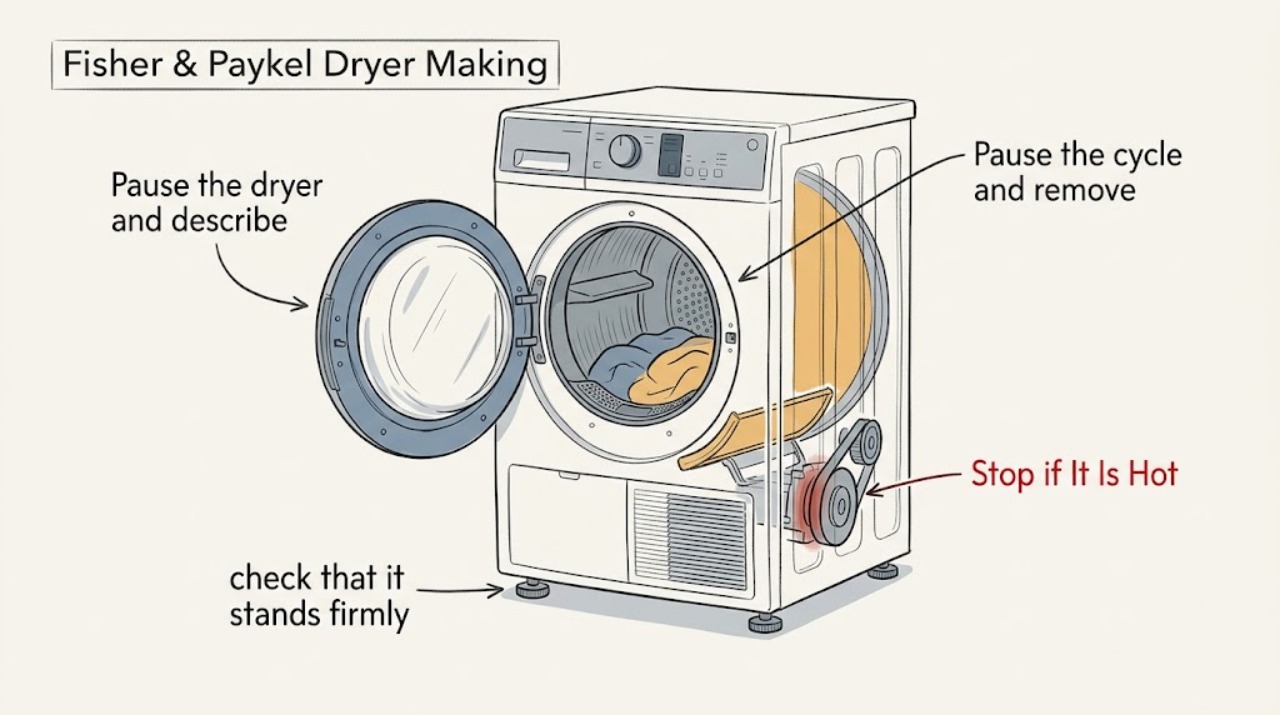
Pause the Fisher & Paykel dryer and identify whether the noise is vibration, rattling, scraping, or a repeated alarm. The manufacturer's dryer guide lists an overloaded load, an unlevel dryer, the end of a cycle, or a dryer fault as possible explanations for vibrating or making noises. Remove excess or tangled items, confirm the dryer is stable and level, and clean and refit the lint filters using the exact model guide. Do not continue a cycle after a fault alert or if the sound is grinding, scraping, rapidly worsening, or accompanied by smoke, a burning smell, abnormal heat, or repeated electrical trips. After safe external checks, a persistent noise needs a Fisher & Paykel trained or otherwise qualified appliance technician rather than cabinet disassembly.
Work through in order
Diagnostic checks
Use only checks that match the exact appliance or system and its official guide.
-
Check 1
Pause the dryer and describe the sound: low vibration, rattling, scraping, thumping, squealing, or a repeated series of beeps. Note whether it starts with the drum, occurs only with laundry, appears at the end of a cycle, or coincides with a fault indication.
Expected result: The noise is limited to a large or tangled load, the cycle has ended, the dryer shows an alert or fault, or the noise continues with the drum empty and no alert.
Next step: Follow the branch that matches the observation. If the sound is harsh, continuous, or associated with a safety warning, stop using the dryer and arrange service instead of repeating the cycle.
Why this matters
Why: Fisher & Paykel's guide treats an overloaded load, an unlevel dryer, the end of a cycle, and a dryer fault as different explanations for vibration or noise. A persistent empty-drum noise is less likely to be a simple loading condition.
-
Check 2
Pause the cycle and remove some items if the drum is full. Untangle sheets, duvet covers, and other large pieces; spread items individually rather than restarting an overloaded or tightly wound load.
Expected result: The noise and vibration reduce with a smaller, separated load, or the dryer remains noisy with a small balanced load.
Next step: Use smaller, separated loads only if the dryer is otherwise stable and quiet. If the sound remains, pause and continue with the level and fault checks; do not compensate by overloading the dryer.
Why this matters
Why: An overloaded or tangled load can place an uneven moving weight in the drum. If a small balanced load makes no difference, the load is not a sufficient explanation and installation or an internal fault needs attention.
-
Check 3
With the dryer paused and power disconnected, check that it stands firmly without rocking and is level according to the exact installation guide. Confirm the dryer has not shifted against a wall, stacked appliance, vent, or other object.
Expected result: The cabinet rocks, a leveling adjustment is needed, or clearance is being lost; or the cabinet is stable and clear on all sides.
Next step: Correct the installation only as described in the model-specific guide and restore safe clearance. If it is already level and stable, do not open the cabinet; continue to the filter and alert checks.
Why this matters
Why: The Fisher & Paykel guide directs the owner to the installation guide when the dryer is not level. A rocking cabinet can turn normal drum movement into a pronounced vibration, while a stable cabinet makes a load or internal drive cause more likely.
-
Check 4
With power disconnected and the dryer cool, remove the lint filter or filters as described by the model guide. Clean lint, check that each filter is undamaged and seated correctly, and look only for a loose object at the accessible filter opening. Do not probe into the blower or drive area.
Expected result: A filter is blocked, damaged, incorrectly seated, or has a visible foreign object; or the filters are clean, intact, correctly fitted, and the noise remains.
Next step: Refit the filters before any operation and use the model guide for any further cleaning. If the noise persists or an object is out of reach, stop and have a technician inspect the appliance.
Why this matters
Why: Fisher & Paykel manuals instruct owners to clean lint filters and check that nothing is stuck in the filter or air-flow path. A clear filter does not prove that a drum bearing, pulley, fan, or other internal part is sound.
-
Check 5
Read the display for an alert or fault code and record it before clearing anything. Follow only the reset and retry sequence in the exact Fisher & Paykel user guide; do not continue drying while the guide says the alert needs attention.
Expected result: A fault or alert returns after the documented reset and retry, or no alert is shown and the noise remains.
Next step: Stop using the dryer and arrange service when the alert returns, the dryer stops, or the sound remains abnormal. Give the technician the code and the conditions under which the noise occurs.
Why this matters
Why: The heat-pump guide says to note a fault code, retry the prescribed basic steps, and contact a trained and supported service technician if the fault returns. A persistent mechanical sound without a code still requires a mechanical inspection when the external checks fail.
-
Check 6
Only after the load, leveling, clearance, filters, and alerts are resolved, run a short supervised cycle with a small balanced load. Stop immediately if the noise becomes a scrape, grind, loud repeated knock, or is accompanied by smoke, burning odor, abnormal heat, sparks, or a breaker trip.
Expected result: The dryer is quiet, the noise is brief and clearly tied to the corrected load or installation, or the abnormal sound continues with the small load.
Next step: Use the dryer only when it operates normally without warning signs. Otherwise disconnect power when safe, keep it out of service, and book a Fisher & Paykel trained or qualified appliance technician.
Why this matters
Why: A change that follows load or installation correction supports an external condition. Continued noise with a small balanced load is not a reason to keep testing; it can require inspection of the drum support, belt, motor, blower, or other model-specific parts.
Use your observations
Decision map
Find the observation that best matches what you see, then follow the next safe action.
-
PATH 01Next step
What you see
The noise occurs only with an overloaded or tangled load and improves after removing items and separating the load.
Do this next
Use a smaller, separated load and monitor a brief supervised cycle. If vibration returns with normal loading, stop and recheck leveling.
-
PATH 02Next step
What you see
The dryer rocks, is not level, or has shifted against another appliance or the surrounding installation.
Do this next
Correct the installation using the exact model guide. Do not operate until it is stable; arrange service if it cannot be leveled without disassembly.
-
PATH 03Next step
What you see
A lint filter is blocked, damaged, loose, or has a visible item at the accessible opening.
Do this next
Clean or refit it as the model guide directs, remove only an accessible loose item, and stop if the object is beyond reach or the filter is damaged.
-
PATH 04Next step
What you see
A fault or alert returns after the user-guide reset and retry sequence.
Do this next
Stop the cycle, record the displayed code, and arrange service with a Fisher & Paykel trained and supported technician.
-
PATH 05Next step
What you see
A scrape, grind, loud knock, or continuous squeal remains with a small balanced load and a stable, clear dryer.
Do this next
Stop using the dryer and arrange qualified service. Do not remove panels or replace a part without the exact model documentation and a confirmed diagnosis.
-
PATH 06Next step
What you see
Smoke, burning odor, sparks, abnormal heat, exposed wiring, or repeated electrical trips occur.
Do this next
Stop immediately, disconnect power only if safe, keep clear of damaged wiring, and seek qualified appliance or electrical service. Do not run another test.
Helpful context
Understand the symptom
Match the noise to the condition
A brief end-of-cycle sound or vibration from a load that is too large can have a different cause from a scrape that follows every drum revolution. Note whether the noise changes when the dryer is paused, whether it occurs only with one load, and whether an alert or fault code appears. Fisher & Paykel models differ, so use the exact model code to select the correct user and installation guide.
Keep the checks outside the cabinet
Pause the cycle and disconnect power before reaching into the drum or removing a filter. Keep hands, tools, and clothing away from a moving drum. Do not remove panels, bypass a door switch, or keep testing a dryer that has smoke, a burning odor, exposed wiring, abnormal heat, or a fast worsening grind.
When checks do not resolve it
Need a professional?
Book service for persistent noise, a returning fault, or any inspection that requires cabinet removal; use qualified electrical help when the cord, receptacle, or wiring is damaged or overheated.
Common questions
FAQ
Why is my Fisher & Paykel dryer vibrating or making noise?
Start by checking for an overloaded or tangled load, an unlevel or rocking dryer, an ended cycle, a blocked or incorrectly fitted filter, or a displayed fault. Persistent noise with a small balanced load needs service.
Can an overloaded load cause a Fisher & Paykel dryer to shake?
Yes. The manufacturer's guide lists an overloaded dryer as a cause to check. Pause the cycle, remove some items, and separate tangled laundry before retrying a supervised cycle.
Should I keep running the dryer after a fault alert or loud noise?
No. Record the alert or fault code and follow only the exact model guide's reset steps. If the fault returns, or if the sound is scraping, grinding, or rapidly worsening, stop and arrange service.
What information should I give the technician?
Give the model code, the sound type, whether it occurs empty or only with a load, whether leveling or filter cleaning changed it, any alert code, and any smoke, odor, heat, or electrical warning.
Read the exact guide
Official sources
- INSTALLATION GUIDE / USER GUIDE — VENTED CLOTHES DRYERFisher & Paykel · Use only for the matching Fisher & Paykel vented dryer family; other models may have different filters and controls.
- TROUBLESHOOTINGFisher & Paykel · Use the noise and troubleshooting entries only when the exact Fisher & Paykel dryer model has matching controls and installation instructions.
- Help & Support | Book A Service | Repair | Technician | Fisher and Paykel USAFisher & Paykel · Use for Fisher & Paykel service escalation after model-specific external troubleshooting; service availability varies by location.
Community feedback
Share a repair observation
Share a plain-text repair observation. Accepted observations are published automatically; this page may take a moment to update.