
On this page
Start here
Quick answer
An Amana dryer can make normal thumping after sitting unused, whirling as air moves, pulsating as the drum rotates, or clicking as parts operate. For a new rattling, clanking, or vibrating sound, stop the dryer, remove the load, and check pockets, the drum edges, load balance, and whether all feet sit firmly on the floor. If the sound is scraping, grinding, or persistent after these external checks, or there is a burning smell, smoke, overheating, a damaged drum, or an electrical symptom, stop using the dryer and arrange qualified appliance service; do not open the cabinet or reach into moving or electrical parts.
Before you begin
Safety first
- This article supports ordinary-access observation and manual-approved load, leveling, lint, and visible exhaust checks only. Do not open the dryer, access internal moving, heating, gas, or electrical parts, or perform energized tests.
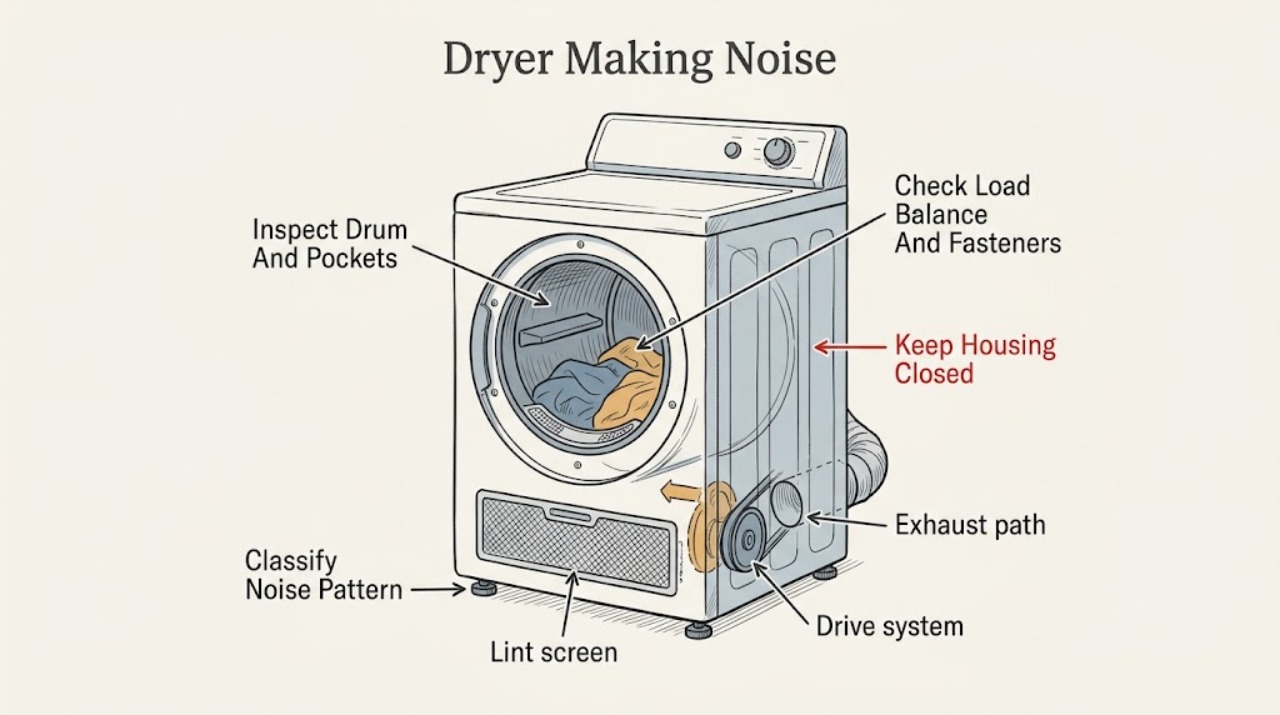
Work through in order
Diagnostic checks
Use only checks that match the exact appliance or system and its official guide.
-
Check 1
Stop the dryer and record when the noise occurs: at startup, only with clothing, during drum rotation, as air moves, at the end of a cycle, or after shutdown. Observe from outside the appliance and do not open the cabinet.
Expected result: Describe the sound as thumping, whirling, pulsating, clicking, rattling, clanking, vibrating, squealing, scraping, grinding, or unidentified; note whether it changes with load, drum direction, or time since the dryer was last used.
Next step: If there is no burning smell, smoke, overheating, water, gas concern, or electrical symptom, unload the dryer and continue with the drum and load checks. Otherwise leave it off and arrange service.
Stop if: Do not run the dryer repeatedly just to reproduce an unexplained or worsening noise.
Why this matters
Why: A thump after non-use, air whirling, drum pulsation, or operating-part clicking can match Amana's documented normal sounds. A new harsh mechanical sound or a sound tied to rotation but not to the load needs the external checks and service boundary below.
-
Check 2
With the dryer stopped and empty, inspect the visible front and rear edges of the drum and check clothing pockets for coins, pins, screws, or other loose objects. Remove only an object that is plainly reachable without tools or force.
Expected result: Record whether an object is loose in the drum, caught at an edge, rubbing the seal area, absent, or reachable only by opening a panel or reaching into a moving mechanism.
Next step: Remove a plainly reachable loose object, close pockets before the next load, and observe whether the noise is gone during a supervised normal cycle. If the object is trapped or the noise persists, stop and arrange service.
Stop if: Do not reach behind seals, pry the drum, use a tool to fish out an object, or remove a panel.
Why this matters
Why: Amana identifies small objects at the drum edges as a cause of rattling or vibrating noise. A clear drum does not rule out an internal mechanical issue, but probing with a tool can damage the seal or drum and changes the task to service.
-
Check 3
Inspect the removed load for buckles, zippers, buttons, or hard items and determine whether clothing was balled together or packed unevenly. Separate the items and secure fasteners according to their garment care instructions.
Expected result: Note whether the noise was tied to one garment, a balled-up bundle, a heavy uneven load, or an otherwise free-tumbling load.
Next step: Use a freely tumbling load and monitor only if the dryer is otherwise safe. If the noise returns with a small, balanced load or an empty drum, stop using it and request diagnosis.
Stop if: Do not overload the drum, dry an item that can damage the appliance, or keep operating when clothing snags, tears, or contacts a damaged surface.
Why this matters
Why: Amana says metal fasteners can strike the drum and a balled-up load can bounce and vibrate. If the noise disappears with a separated, appropriate load, the load was a plausible contributor; a sound with an empty drum points elsewhere.
-
Check 4
With the dryer off, inspect whether it rocks, the floor is stable, and all four visible leveling feet appear to contact the floor. If an adjustment is clearly safe and the installation instructions are available, follow those instructions; do not move or tilt a heavy dryer alone.
Expected result: Record whether the cabinet rocks, a foot is loose or lifted, the floor is uneven, or the dryer is stable but still rattles.
Next step: Correct only an installation-approved leveling issue without straining the appliance, then observe a normal supervised cycle. If the cabinet remains unstable or the noise continues, arrange appliance service or installation help.
Stop if: Do not lift or slide the dryer alone, remove structural parts, adjust gas or electrical connections, or work under an unsupported appliance.
Why this matters
Why: Amana identifies an improperly leveled dryer or feet not firmly contacting the floor as a cause of vibration. A stable dryer with persistent noise makes floor contact less likely and does not justify opening the drive system.
-
Check 5
If the noise is accompanied by long drying, overheating, or a change in airflow, clean the lint screen and inspect only the visible exhaust path, exterior hood, and hose for lint, kinks, crushing, or a loose external connection while the dryer is off.
Expected result: Record whether the lint screen or visible vent is blocked, whether the exhaust hood opens and moves air during a normal safe cycle, and whether heat or noise is abnormal.
Next step: Clean only the accessible lint screen or visible obstruction allowed by the manual. Arrange professional vent or appliance service if the path remains restricted, the dryer overheats, or noise persists.
Stop if: Do not insert tools deep into the vent, dismantle the exhaust system, run the dryer with a damaged vent, or continue operation when heat or odor is excessive.
Why this matters
Why: Amana links restricted airflow with poor drying and loss of heat, and lists lint or vent restrictions as conditions to check. Airflow inspection does not diagnose a drum or motor fault; overheating or abnormal noise remains a reason to stop.
-
Check 6
After the dryer is empty and the visible checks are complete, inspect the cabinet, door, drum surface, cord or gas-line area, and surrounding floor for smoke residue, burning odor, scorching, damage, or a leak. Do not restart it if any hazard is present.
Expected result: Classify the result as normal sound pattern, noise resolved by object or load correction, noise resolved by leveling, persistent noise with a clear drum, or noise with burning odor, smoke, overheating, damage, repeated trips, or gas concern.
Next step: Stop using the dryer and arrange qualified appliance service for persistent or hazardous noise. Give the technician the sound pattern, load, drum, leveling, airflow, and hazard observations.
Stop if: Do not open the cabinet, reach for a belt, roller, pulley, blower, heater, motor, wiring, or gas component, and do not perform energized tests.
Why this matters
Why: A resolved external cause supports cautious return to normal use. Persistent noise or any hazard can indicate a drive, drum support, blower, heater, vent, gas, or electrical fault that cannot be selected safely from sound alone.
Use your observations
Decision map
Find the observation that best matches what you see, then follow the next safe action.
-
PATH 01Safety boundary
What you see
The sound is a brief thump after the dryer sat unused, a smooth air-whirling sound, drum pulsation, or normal operating click, with no heat, odor, or damage concern.
Do this next
Continue only with normal supervised use and monitor for a new, louder, or harsher sound.
Why this path and its safety boundary
Why it matters: The pattern matches Amana's listed normal operating sounds more closely than a confirmed fault.
Safety stop: Stop if the sound changes, persists abnormally, or is accompanied by smoke, burning odor, overheating, or damage.
-
PATH 02Safety boundary
What you see
A coin, pin, fastener, or other loose object is visible in the drum or at a reachable drum edge.
Do this next
Remove only the plainly reachable object, check pockets and fasteners, then monitor a normal supervised cycle.
Why this path and its safety boundary
Why it matters: The object is a plausible source of rattling, clanking, or scraping.
Safety stop: Stop if the object is trapped, the seal or drum is damaged, or the sound remains after removal.
-
PATH 03Safety boundary
What you see
The noise occurs with a balled-up, uneven, or fastener-heavy load and decreases when garments are separated or secured.
Do this next
Use a freely tumbling load and secure suitable fasteners before drying.
Why this path and its safety boundary
Why it matters: The load arrangement or garment hardware was a plausible contributor to bouncing or drum contact.
Safety stop: Stop if noise returns with a balanced load or the drum snags clothing.
-
PATH 04Safety boundary
What you see
The cabinet rocks or one or more feet do not firmly contact a stable floor.
Do this next
Follow the installation instructions for a safe leveling correction, or arrange installation help if the dryer must be moved or supported.
Why this path and its safety boundary
Why it matters: Installation level and floor contact can explain vibration without proving a drive-system failure.
Safety stop: Stop if the dryer is unstable, damaged, or requires lifting alone or access underneath without support.
-
PATH 05Safety boundary
What you see
Noise occurs with long drying, weak exhaust, excessive heat, a blocked lint screen, or visible vent restriction.
Do this next
Clean the accessible lint screen and address only visible obstructions allowed by the manual; arrange professional vent or appliance service if restriction or overheating remains.
Why this path and its safety boundary
Why it matters: Airflow restriction may be contributing to performance or heat, but it does not identify the mechanical source of a noise.
Safety stop: Do not operate with a damaged or deeply blocked vent, excessive heat, burning odor, or smoke.
-
PATH 06Safety boundary
What you see
Noise remains with an empty drum, clear reachable edges, balanced load, stable leveling, and no visible airflow explanation, or it is accompanied by grinding, scraping, burning odor, smoke, damage, repeated trips, or gas concern.
Do this next
Stop using the dryer and arrange qualified appliance service; tell the technician when the sound occurs and what external checks changed or did not change it.
Why this path and its safety boundary
Why it matters: An internal mechanical, electrical, heating, airflow, or gas fault is possible and cannot be diagnosed safely from the outside.
Safety stop: Do not remove panels, reach into the drive or heater area, lubricate or replace internal parts, or perform energized testing.
Helpful context
Understand the symptom
Classify the sound before guessing at a part
The sound's timing and response to an unloaded, balanced drum are more useful than a part-name guess. Amana describes a thump after a period of non-use, a whirling sound from moving air, a pulsating sound as the drum rotates, and clicking from operating parts as possible normal operation. A sudden rattle, scrape, grind, or vibration that does not change after safe external checks needs a different path.
Check the load, drum edges, and floor contact
Stop the dryer before checking pockets, the front and rear drum edges, clothing fasteners, or the load arrangement. A coin or pin, a buckle or zipper, clothes balled together, or a dryer that is not level can create a noise without proving an internal failure. Keep hands and tools out of the drum when it is moving and follow the installation instructions for any leveling adjustment.
A burning smell or persistent mechanical noise is a stop point
Do not keep running a dryer to see whether a scrape or grind improves. Burning odor, smoke, overheating, a damaged cabinet or drum, a repeated circuit trip, or a noise that remains with a clear drum and stable load can indicate a mechanical, airflow, gas, or electrical fault. Qualified service should inspect the appliance before it is used again.
Safety boundary
Stop conditions
- Stop the dryer before checking pockets, drum edges, load arrangement, leveling, lint, or visible vent conditions.
- Do not open the cabinet, remove guards, reach into the drive, blower, heater, motor, wiring, or gas components, or perform energized testing.
- Stop for burning odor, smoke, scorching, overheating, a damaged drum or cabinet, repeated electrical trips, gas concern, or clothing snagging.
- Do not lift, tilt, slide, or work beneath a heavy dryer alone or without proper support.
- Arrange qualified appliance or vent service when noise persists after safe external checks, comes from an empty drum, or the cause is not visible.
When checks do not resolve it
Need a professional?
Arrange qualified appliance service when a rattling, clanking, scraping, grinding, squealing, or vibrating sound persists with an empty or balanced drum, the dryer is unstable, the drum or cabinet is damaged, airflow or overheating is abnormal, a circuit trips, a burning smell or smoke appears, a gas concern exists, or diagnosis would require opening the cabinet or touching internal components.
Safety scope: This article supports ordinary-access observation and manual-approved load, leveling, lint, and visible exhaust checks only. Do not open the dryer, access internal moving, heating, gas, or electrical parts, or perform energized tests.
Common questions
FAQ
Why is my Amana dryer thumping?
A thump after the dryer has sat unused can be normal and should diminish with use, according to Amana. If the thump is new, loud, continues with an empty drum, or comes with scraping, grinding, odor, smoke, or damage, stop using the dryer and arrange service.
What causes rattling or clanking in an Amana dryer?
Check for coins, pins, screws, or other loose objects at the drum edges, metal clothing fasteners, a balled-up load, and an unlevel dryer. Stop the dryer before checking. If the sound remains with a clear drum, balanced load, and stable leveling, request appliance diagnosis.
Is a whirling or clicking sound from an Amana dryer normal?
Amana describes whirling as air moving through the dryer and clicking as operating parts on some models; both can be normal. A harsh, new, or worsening sound, especially with heat, odor, smoke, or a fault, is not a reason to keep testing the appliance.
Can a dryer that is not level make noise?
Yes. Amana says vibration can result when the dryer is not properly leveled or its feet do not firmly contact the floor. Check stability with the dryer off and follow the installation instructions; do not lift or move a heavy dryer alone.
When should I stop using a noisy Amana dryer?
Stop for grinding, scraping, persistent squealing, burning odor, smoke, overheating, a damaged drum or cabinet, repeated circuit trips, a gas concern, or noise that remains after safe load, drum-edge, leveling, and visible airflow checks. Arrange qualified service before using it again.
Read the exact guide
Official sources
- Use & Care GuideAmana · Amana use-and-care troubleshooting guidance for the specified dryer family; the installed model manual controls exact access and settings.
- TROUBLESHOOTINGAmana · Amana dryer owner's manual troubleshooting guidance; the exact model manual controls model-specific procedures.
Community feedback
Share a repair observation
Share a plain-text repair observation. Accepted observations are published automatically; this page may take a moment to update.