
On this page
Start here
Quick answer
Start by separating the symptom: no lights or response points to the household supply, power switch, cord, or control; lights on but no start points to a paused cycle, open door, keylock or delay setting, a full or incorrectly fitted water tank on applicable condensing models, an incorrectly seated lint filter, overload, or a displayed warning; a running drum with no heat points to an air-only cycle, the COOL phase, a full tank, or an airflow or internal heating fault. Check the exact Fisher & Paykel guide for the model, close the door firmly, clear and refit the applicable filters, empty and refit the water tank where fitted, and remove some items if overloaded. If a fault returns after the model-approved restart and one empty or appropriate-load check, or if there is smoke, burning smell, sparking, shock, a damaged cord, or abnormal heat, stop using the dryer and arrange a Fisher & Paykel trained and supported service technician. Do not open the cabinet or test live wiring, heater, motor, sensor, or thermal protection.
Before you begin
Safety first
- This article covers display, supply, controls, door, cycle, tank, filter, drain, airflow, and load checks only. Leave heater, thermal protection, motor, fan, sensor, control, wiring, and cabinet work to Fisher & Paykel trained and supported service.
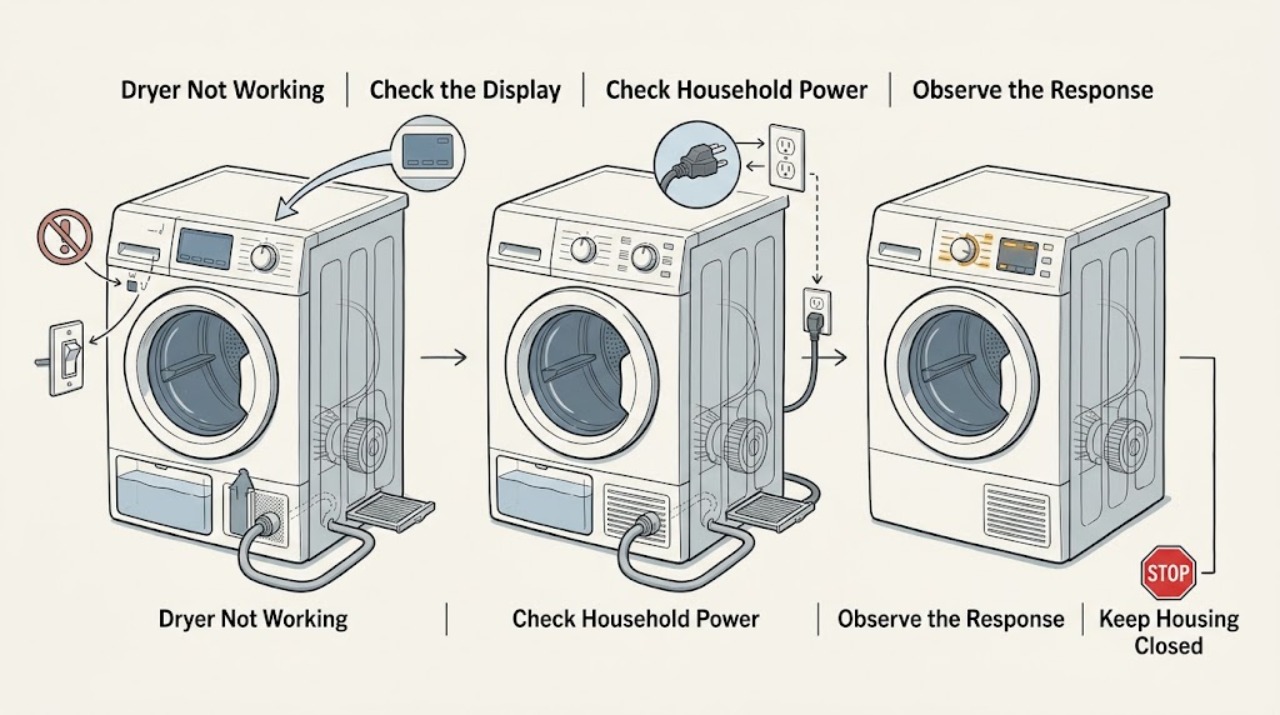
Work through in order
Diagnostic checks
Use only checks that match the exact appliance or system and its official guide.
-
Check 1
Press POWER once from a dry, safe position and observe without repeatedly cycling the control. Record whether the display and indicators respond, whether the drum turns, whether the door locks or closes, and whether a warning, beeping pattern, or fault code appears.
Expected result: Classify the symptom as no electrical response, lights on but no start, starts then stops, drum turns with cold air, or a fault code or warning. Note COOL, END, Air Dry, Delay Start, or a flashing start or pause indicator where shown.
Next step: Follow the matching branch below and record the exact model and display information for any service call.
Stop if: Stop immediately for smoke, burning smell, sparking, shock, a hot or damaged cord, repeated electrical trips, abnormal noise, or abnormal heat.
Why this matters
Why: No response points to power or control checks. A responsive but idle dryer points to door, pause, keylock, delay, tank, filter, overload, or fault checks. A turning drum with cold air is a cycle, tank, airflow, or heating branch.
-
Check 2
If the dryer has no lights or response, inspect the plug, cord, wall switch, and outlet from a dry, accessible position. If safe and permitted by the household setup, compare the outlet with a known-working low-risk appliance; do not use a damaged cord or wet outlet.
Expected result: Record whether the cord is connected, the wall switch is on, the outlet supplies another appliance, a breaker or fuse has tripped, or the dryer remains dead despite a known supply.
Next step: Restore only an obviously switched-off supply or correctly seated plug if dry and undamaged. Arrange an electrician or appliance service for a tripped circuit that recurs, a damaged cord, a wet outlet, or a dryer that remains unresponsive.
Stop if: Do not open the plug, outlet, cabinet, or control area; do not touch a wet or hot cord, and do not keep resetting a breaker that trips.
Why this matters
Why: Fisher & Paykel lists an unplugged cord, a switched-off power point, and a household power fault as causes of no response. A working outlet with a dead dryer shifts the issue toward the appliance and requires service rather than repeated resets.
-
Check 3
If the dryer has power but will not start, close the door firmly and check whether the start or pause indicator is flashing, the machine is paused, keylock is enabled, or Delay Start is selected. Confirm the lint filter and water tank are seated on models that use them.
Expected result: Record whether the door closes and latches, the start control responds, keylock or delay is active, the filter projects into the door path, or the tank is full or not properly in place.
Next step: Close the door, cancel or wait for a delay only using the exact model controls, refit the filter or tank, and remove some items if overloaded. If the dryer still will not start, record any code and arrange service.
Stop if: Do not force the door, defeat a door switch, run without a required filter, spill water into the cabinet, or bypass keylock or safety controls.
Why this matters
Why: Fisher & Paykel lists a paused cycle, door not closed, warning or fault, full or incorrectly fitted tank, lint filter placement, overload, and Delay Start among reasons a drying cycle will not start.
-
Check 4
If the drum turns but the air feels cold, compare the selected cycle with the exact model guide. Check whether Air Dry or another non-heated cycle is selected, or whether the dryer has already progressed to COOL or END.
Expected result: Record the cycle name, progress indicator, whether warmth appeared earlier, whether the drum turns normally, and whether clothes are merely cool at the end or remain cold and damp from the beginning.
Next step: Select an appropriate heated cycle only when the model supports it and run one suitable load after the tank and filter checks. Persistent cold air on the correct cycle belongs with service.
Stop if: Do not keep testing if the load becomes abnormally hot, scorched, or smells burned; do not open the heating enclosure.
Why this matters
Why: Fisher & Paykel lists Air Dry and progression to COOL as explanations for a dryer that does not heat. Cold air from a correct heated cycle throughout the run is a different fault path.
-
Check 5
With power safely off, empty and refit the water tank on a condensing or heat-pump model, clean and correctly seat the lint and condenser filters, inspect any connected drain hose for blockage or damage, and reduce an overloaded or tangled load according to the model guide.
Expected result: Record whether the tank was full or mis-seated, filters were blocked or missing, the drain hose was kinked or damaged, the load exceeded the cycle limit, or wet items were tangled or unusually saturated.
Next step: Restore the model-approved tank, filter, drain, and load arrangement, then perform one appropriate cycle only if no safety symptom or fault code remains. Escalate if the dryer still stops or stays cold.
Stop if: Do not run without filters, force the tank, use tools in the fan or heater path, open a wet cabinet, or work on a drain connection that is damaged or inaccessible.
Why this matters
Why: Fisher & Paykel lists a full tank, blocked or incorrectly fitted filters, blocked or damaged drainage, an inappropriate or overloaded cycle, and tangled or very wet loads as reasons for no start, poor results, or stopping.
-
Check 6
If a fault code appears or the dryer stops mid-cycle, turn it off at the power point only when dry and safely reachable, wait the interval specified by the exact model guide, remove the load, check installation and visible owner-access items, and retry one approved cycle.
Expected result: Record whether the fault clears, whether the dryer restarts, whether the code returns, and whether the dryer still does not work with an empty or appropriate load.
Next step: Arrange a Fisher & Paykel trained and supported service technician and provide the exact code, serial number, cycle, load, and completed checks.
Stop if: Do not remove covers, test or bypass internal components, bridge wiring, repeatedly power-cycle the dryer, or continue after smoke, burning smell, sparking, shock, or abnormal heat.
Why this matters
Why: Fisher & Paykel fault guidance uses a controlled off-and-wait, installation, load-removal, and test-cycle sequence; a returning fault is evidence for service, not permission to repeat resets indefinitely.
Use your observations
Decision map
Find the observation that best matches what you see, then follow the next safe action.
-
PATH 01Safety boundary
What you see
The dryer has no display or indicator response when POWER is pressed.
Do this next
Check only the dry, visible supply and outlet; arrange electrical or appliance service if the supply is good or the circuit repeatedly trips.
Why this path and its safety boundary
Why it matters: An unplugged cord, switched-off wall supply, household power fault, cord damage, or appliance control fault is possible.
Safety stop: Do not touch a wet or damaged cord, open the outlet or plug, or reset a repeatedly tripping breaker.
-
PATH 02Safety boundary
What you see
The display responds but the cycle will not start.
Do this next
Close the door, check the control state, refit the applicable tank and lint filter, reduce the load, and use the exact model guide for the start control.
Why this path and its safety boundary
Why it matters: A paused cycle, door, keylock, delay, tank, filter, overload, or warning may be blocking start.
Safety stop: Do not force or bypass the door switch, run without a filter, or continue if a fault code returns.
-
PATH 03Safety boundary
What you see
The drum turns but air remains cold, or clothes remain damp on a correct heated cycle.
Do this next
Confirm the cycle and progress phase, check the applicable tank and filters, reduce the load, and arrange service if a correct heated cycle remains cold.
Why this path and its safety boundary
Why it matters: Air Dry or COOL may be selected or active; a full tank, blocked filter, airflow issue, or internal heating fault is also possible.
Safety stop: Stop for scorching, burning smell, smoke, abnormal heat, or any need to open the heater or control enclosure.
-
PATH 04Safety boundary
What you see
The dryer stops mid-cycle, beeps, shows a warning or fault code, or repeatedly fails after restart.
Do this next
Follow one model-approved off-and-wait, installation, load-removal, and test-cycle sequence; arrange trained service if the code or failure returns.
Why this path and its safety boundary
Why it matters: A power interruption, paused or open-door state, tank or filter condition, or model-specific fault may be present.
Safety stop: Do not repeatedly reset, bridge a safety device, or open the cabinet to chase the code.
-
PATH 05Safety boundary
What you see
The dryer has smoke, burning smell, sparking, shock, a hot or damaged cord, repeated electrical trips, or clothes that become abnormally hot or scorched.
Do this next
Stop immediately and isolate power only from a dry, safely reachable position; keep the appliance out of service and arrange qualified diagnosis.
Why this path and its safety boundary
Why it matters: This is a safety or overheating event, not a routine cycle, tank, or filter problem.
Safety stop: Do not restart, touch damaged wiring, bypass thermal protection, or open the cabinet.
Helpful context
Understand the symptom
Classify the failure before changing settings
A dryer with no display, a dryer that lights but will not start, a drum that turns without heat, and a dryer that stops mid-cycle have different first checks. Note the display, buttons, door, drum, progress phase, and any fault code. COOL or END may be a normal phase after heating; Air Dry is deliberately non-heated on applicable models.
Use only model-appropriate owner checks
Check the wall switch and cord from a dry, safe position, close the door, clear and correctly seat the lint filter, and empty the water tank on a condensing or heat-pump model. A full tank, blocked filter, overload, drain restriction, or delay setting can prevent normal operation, but the presence of one symptom does not prove the internal cause.
A returning fault belongs with service
Fisher & Paykel manuals direct unresolved faults to a trained and supported service technician. Do not remove panels or try to reach the heater, motor, belt, fan, sensor, thermal cut-out, or control. Disconnect power before an approved cleaning step only when the plug or switch is dry and safely reachable.
Safety boundary
Stop conditions
- Stop immediately for smoke, burning smell, sparking, shock, a hot or damaged cord, repeated electrical trips, abnormal heat, or scorched clothing.
- Do not open the cabinet, test live wiring, access the heater, motor, fan, sensor, belt, control, or thermal protection, or bypass a safety device.
- Disconnect power before approved cleaning only from a dry, safely reachable position and keep water away from electrical parts.
- Do not run with a missing or incorrectly fitted lint or condenser filter, a damaged water tank or drain connection, or a blocked airflow path.
- Arrange trained and supported Fisher & Paykel service when a correct cycle still will not start, a correct heated cycle remains cold, or a warning or fault returns after one model-approved reset.
Only after diagnosis
Potential parts
- dryer lint or condenser filter
Consider this category only when the exact model's required filter is damaged, missing, or cannot seat correctly after cleaning.
Confirm the exact Fisher & Paykel model and filter design; never run the dryer without the required filter. - dryer water tank or drain hose component
Consider this only on a condensing or heat-pump model when the tank or drain connection is cracked, cannot seat, or leaks after correct fitting.
Confirm the exact model and connection design before ordering and keep water away from electrical components. - dryer heater or thermal protection component
Consider this internal category only after qualified diagnosis confirms persistent cold air on a correct heated cycle with the tank, filters, airflow, and load checked.
Confirm the exact model and safety cause before replacement; do not test or bypass the heating circuit yourself.
When checks do not resolve it
Need a professional?
Arrange a Fisher & Paykel trained and supported service technician when the dryer remains dead with a confirmed supply, will not start after the door, controls, tank, filter, load, and delay checks, stops repeatedly, shows a returning fault, or runs cold on a correct heated cycle. Seek prompt qualified help for smoke, burning smell, sparking, shock, abnormal heat, damaged wiring, or repeated power trips.
Safety scope: This article covers display, supply, controls, door, cycle, tank, filter, drain, airflow, and load checks only. Leave heater, thermal protection, motor, fan, sensor, control, wiring, and cabinet work to Fisher & Paykel trained and supported service.
Common questions
FAQ
Why is my Fisher & Paykel dryer completely dead?
Check the dry, visible power path: cord, wall switch, outlet, and household supply. If the outlet works but the dryer remains unresponsive, stop resetting it and arrange qualified service, especially if the cord or outlet is damaged or hot.
Why does my Fisher & Paykel dryer have power but not start?
Check that the door closes, the cycle is not paused or delayed, keylock is not blocking controls, and the applicable water tank and lint filter are correctly fitted. Remove some items if overloaded and follow the exact model guide.
Why is my Fisher & Paykel dryer running but not heating?
Confirm that Air Dry is not selected and that COOL or END is not simply the normal end phase. Check the tank and filters on applicable models; persistent cold air on a correct heated cycle needs service.
What should I do if my Fisher & Paykel dryer stops mid-cycle?
Record the display or fault code, check whether the door is closed and the cycle is paused, and follow one model-approved off-and-wait and restart sequence. Remove the load and retry once; a returning fault needs a trained technician.
When should I stop troubleshooting a Fisher & Paykel dryer?
Stop for smoke, burning smell, sparking, shock, a hot or damaged cord, repeated electrical trips, abnormal heat, or a returning fault. Do not open the cabinet or test the heater, motor, sensor, or wiring yourself.
Read the exact guide
Official sources
- DE8060P Condenser Clothes Dryer User GuideFisher & Paykel · Official Fisher & Paykel condenser dryer guide; exact controls, tank, and cycle names vary by model.
- DH8060P3 Heat Pump Condensing Dryer User GuideFisher & Paykel · Official Fisher & Paykel heat-pump condensing dryer guide; use the exact model guide for the appliance.
- Help & Support | Book A Service | Repair | TechnicianFisher & Paykel · Fisher & Paykel Europe support portal; service channels vary by country.
Community feedback
Share a repair observation
Share a plain-text repair observation. Accepted observations are published automatically; this page may take a moment to update.