
On this page
Start here
Quick answer
When a Fisher & Paykel oven is not working, first check whether the display and oven light are also off. If they are, check the visible wall switch, household fuse or circuit breaker, and any local power outage. If the screen is on but the oven does not heat, check for Demo Mode or Sabbath Mode and make sure the door is fully closed; Fisher & Paykel notes that heating elements are disabled while the door is open. Gas models also require an available gas supply, but gas connections and faults belong to qualified service. A cracked oven-door glass pane, smoke, gas odor, repeated breaker trips, or an oven that remains inoperative after these checks is a stop-use condition.
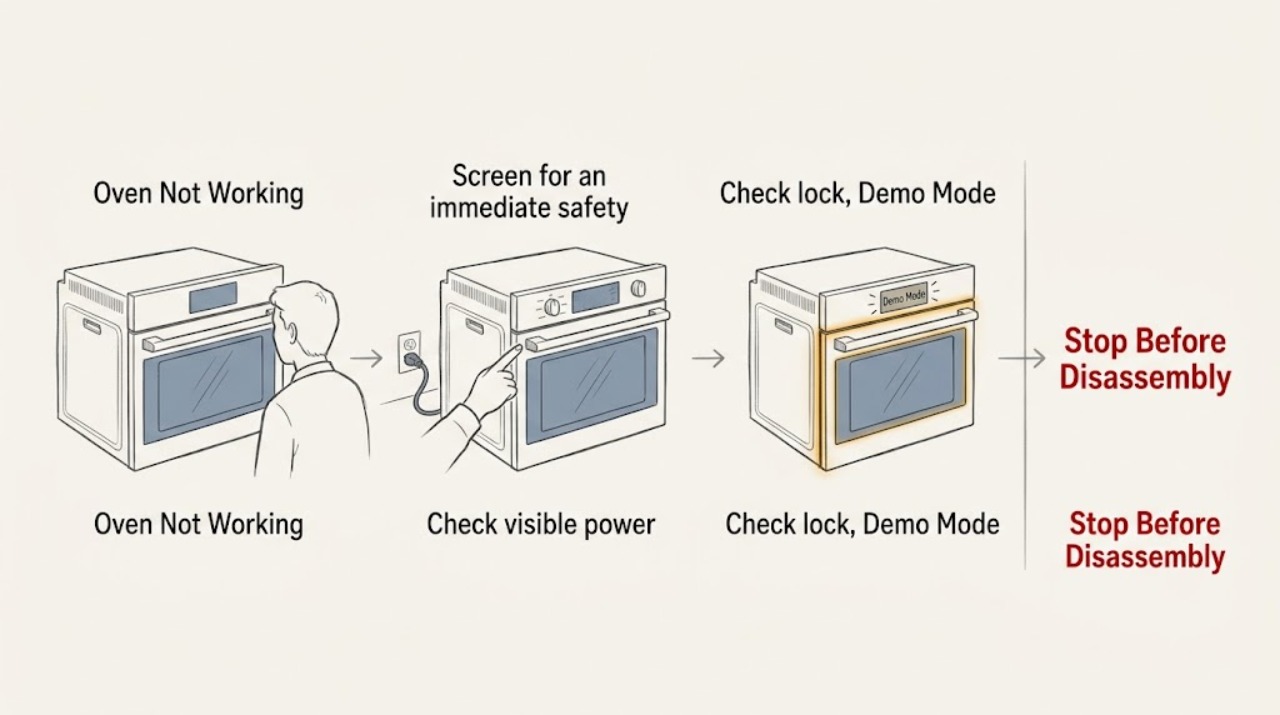
Work through in order
Diagnostic checks
Use only checks that match the exact appliance or system and its official guide.
-
Screen for an immediate safety stop
Turn the oven off using its normal control if it responds and look for smoke, a gas odor, sparking, damaged wiring, or a cracked, chipped, or shattered door pane. Do not touch broken glass or continue a cooking cycle while any warning is present.
Expected result: There is no smoke, gas odor, electrical damage, or door-glass damage, or one of those hazards is present.
Next step: For gas odor, smoke, sparking, or fire risk, leave the area when safe and seek the appropriate emergency or gas service. For damaged door glass or wiring, leave the oven out of use and arrange trained service. Otherwise continue with power checks.
Why this matters
Why: Basic power and control checks are appropriate only when the oven is physically safe. Fisher & Paykel explicitly says not to use an oven with damaged door glass.
-
Check visible power to the oven
Observe whether the oven light, display, dial halos, or wall switch respond. Check that the visible wall switch is on, then look for a tripped household breaker or blown fuse and a known power outage. Do not remove covers or test internal wiring.
Expected result: The display and light return after a visible power issue, or they remain off while the household supply appears normal.
Next step: If the breaker trips again, leave the oven off and call a qualified electrician or appliance technician. If power is present but the oven remains dark, arrange service rather than opening the appliance.
Why this matters
Why: Fisher & Paykel lists no power, a tripped breaker or fuse, and a local power outage as causes when the oven does not work.
-
Check lock, Demo Mode, and Sabbath Mode
If the display is on but controls do not respond or the oven does not heat, look for a lock indicator or a Demo Mode or Sabbath Mode setting. Follow the exact unlock or mode instructions in the model's owner guide; do not guess at a reset sequence.
Expected result: The panel unlocks or the special mode clears and the oven can start, or the screen remains on while the oven still will not operate.
Next step: If the mode clears, select a normal cooking function and continue to the door check. If the screen remains on but the oven stays inactive, contact Fisher & Paykel trained service.
Why this matters
Why: Fisher & Paykel identifies a locked control panel, Demo Mode, and Sabbath Mode as possible explanations for an unresponsive or non-heating oven.
-
Confirm the door is fully closed
Close the oven door gently and check that it meets the frame evenly, the latch or seal is not obstructed, and no rack or cookware prevents closure. Start one normal function only after the door is fully closed and stay clear of hot surfaces.
Expected result: The oven begins heating after the door closes correctly, or the door will not close or the oven remains cold with a closed door.
Next step: If the door does not align or latch, stop using the oven and arrange service. If it closes normally but no heat starts, continue to the gas or electrical service branch rather than repeatedly starting cycles.
Why this matters
Why: Fisher & Paykel states that heating elements are disabled while the door is open and that an improperly closed door can prevent heating.
-
Separate gas-supply issues from control failure
For a gas oven, with no gas odor and the controls Off between attempts, note whether the surface or oven ignition responds and whether other gas appliances have normal supply. Do not remove gas panels, adjust burners, or attempt to repair the gas connection.
Expected result: The oven has no gas supply, was recently installed or reconnected, or the gas supply appears normal but the oven still does not heat or ignite.
Next step: If supply or connection is uncertain, stop using the oven and call a qualified gas technician. If gas supply is normal but ignition or heating fails, arrange Fisher & Paykel trained service.
Why this matters
Why: Fisher & Paykel lists no gas supply as a cause for a gas oven that does not work; installation and gas faults need qualified evaluation.
-
Interpret fan and alert behavior before escalating
Observe whether the cooling fan runs during preheating or continues after the oven is turned off, and record any display alert or repeated failure without cancelling safety cooling prematurely.
Expected result: Warm air and fan operation stop after cooling and the oven works normally, or the oven remains inoperative, displays an alert, or repeatedly fails after cooling.
Next step: If the oven remains inoperative or shows a recurring alert, record the message and arrange service. Follow the model guide's cooling instructions before switching power off at the wall.
Why this matters
Why: Fisher & Paykel describes cooling-fan operation and warm vent air as normal protective behavior, while unresolved faults need its trained service path.
Use your observations
Decision map
Find the observation that best matches what you see, then follow the next safe action.
-
PATH 01Next step
What you see
The display and light were off because of a visible power interruption, and the oven resumes normal operation when power is restored.
Do this next
Use the oven only if the breaker remains stable and no damage or unusual heat is present.
-
PATH 02Next step
What you see
The screen is on but controls are locked or the oven is in Demo Mode or Sabbath Mode.
Do this next
Use the model-specific guide to clear the mode. If the oven still will not operate, arrange trained service.
-
PATH 03Next step
What you see
The door is open, obstructed, misaligned, or damaged, or the oven stays cold after the door is correctly closed.
Do this next
Stop use and arrange qualified service for the door or heating system.
-
PATH 04Next step
What you see
A gas supply problem, gas odor, smoke, sparking, repeated breaker trip, or damaged door glass is present.
Do this next
Stop immediately and seek qualified gas, electrical, appliance, or emergency help as appropriate.
Helpful context
Understand the symptom
Not working can mean no display, unresponsive controls, no heat, or a gas oven that cannot ignite. Separate those observations before changing settings. Fisher & Paykel also notes that cooling fans and warm air from the vents can continue after an oven is turned off; that behavior alone does not mean the oven failed.
Do not use an oven with cracked, chipped, or shattered door glass. For a gas smell, smoke, sparking, or damaged wiring, stop using the appliance, leave the area when appropriate, and seek qualified emergency, gas, or appliance assistance from a safe location.
When checks do not resolve it
Need a professional?
Call Fisher & Paykel trained service when the oven remains inoperative with confirmed power, Demo Mode or Sabbath Mode cannot be cleared, the door will not close or align, a gas oven has an uncertain supply or ignition fault, an alert recurs, or the breaker trips again. Do not use the oven with cracked door glass. For gas odor, smoke, sparking, or fire risk, leave the area and seek appropriate emergency or gas assistance.
Common questions
FAQ
Why does my Fisher & Paykel oven have power but not heat?
Check whether a lock, Demo Mode, or Sabbath Mode is active and make sure the door is fully closed. Fisher & Paykel says heating elements are disabled while the door is open; persistent no-heat behavior needs trained service.
Is a Fisher & Paykel oven fan running after shutdown normal?
Yes. Fisher & Paykel describes cooling fans and warm air from the vents after shutdown as normal protective behavior that stops after the oven cools.
Can I use a Fisher & Paykel oven with cracked door glass?
No. Do not use an oven with cracked, chipped, or shattered door glass. Keep it out of service and arrange trained appliance support.
Read the exact guide
Official sources
- Fisher & Paykel RIV3-486 Induction Range User GuideFisher & Paykel · Fisher & Paykel electric oven no-power, controls, door, cooling fan, and troubleshooting guidance
- Fisher & Paykel RGV3-366-L Gas Cooker User GuideFisher & Paykel · Fisher & Paykel gas oven no-power, gas supply, door, control, and cooling behavior
- Help & Support | Book A Service | Repair | Technician | Fisher and Paykel USAFisher & Paykel · Fisher & Paykel product help and trained or authorized service support
Community feedback
Share a repair observation
Share a plain-text repair observation. Accepted observations are published automatically; this page may take a moment to update.