
On this page
Start here
Quick answer
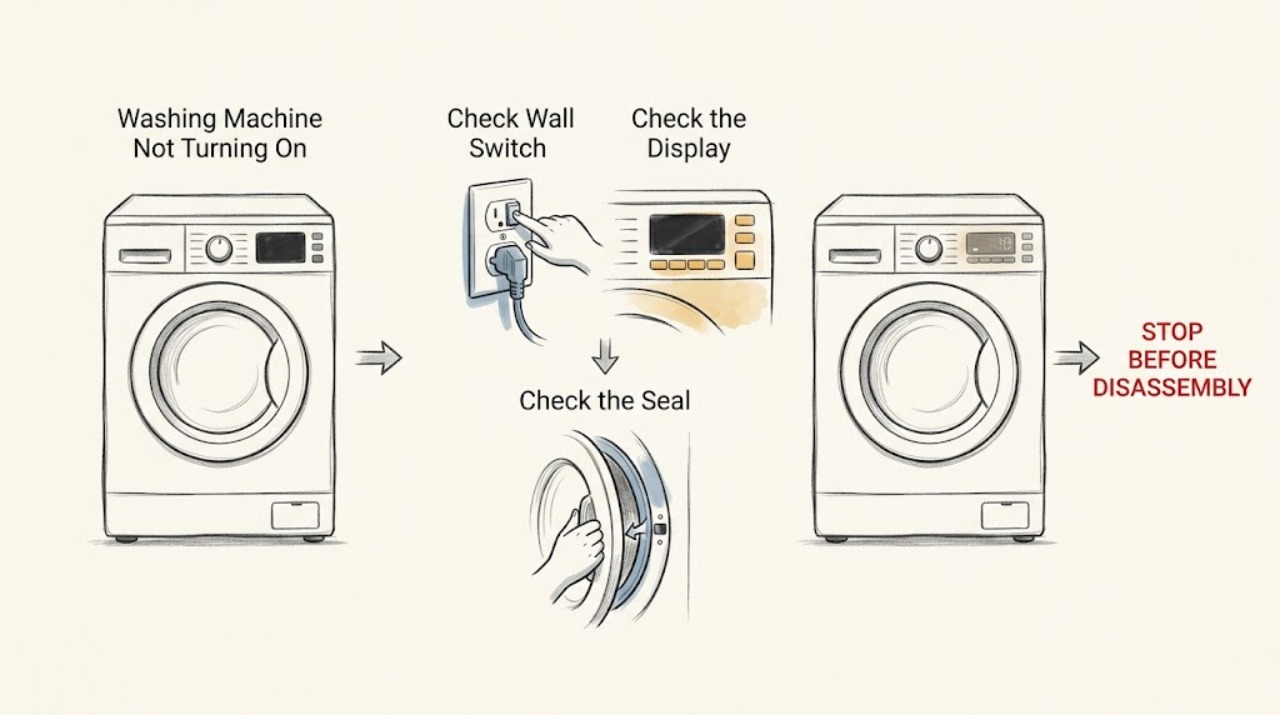
If a Fisher & Paykel washing machine will not turn on, confirm the wall power switch is on and test the outlet with another small appliance from a safe, dry location. Press POWER once, then check whether a keylock is active and whether the panel shows a fault or delayed-start status. Make sure the door is fully closed and the water taps are open before trying a cycle. If the outlet works but the washer stays dark or the same fault returns after the model guide’s one-minute reset, stop and arrange qualified service; do not open the cabinet or bypass the door lock.
Work through in order
Diagnostic checks
Use only checks that match the exact appliance or system and its official guide.
-
Check 1
From a dry, safe position, confirm the washer’s wall switch is on and that the power cord is seated as designed. Test the same outlet with another small appliance, without using an extension cord or touching a wet connection.
Expected result: The test appliance works, or the outlet is dead and the washer panel remains dark.
Next step: If the outlet is dead, stop at the outlet and arrange qualified electrical help. If it works, press POWER once and observe the panel.
Why this matters
Why: A dead outlet indicates a household supply, switch, breaker, or outlet issue rather than proof of a failed washer. A working outlet with a dark washer points to the washer’s cord, internal supply, or controls.
-
Check 2
Press POWER once and inspect the display for a keylock symbol, fault text, a delayed-start indication, or a prompt to select a cycle. If keylock is shown, use only the hold sequence in the matching Fisher & Paykel guide.
Expected result: The panel wakes and accepts a cycle, the lock clears, or the panel remains unresponsive or shows a fault.
Next step: If the panel works, select a cycle and continue to the door and water checks. If it remains dark or faulted, record the indication before resetting.
Why this matters
Why: A cleared lock or prompt explains a no-start symptom. A persistent fault or unresponsive panel after the controls are unlocked requires the documented reset or service path.
-
Check 3
With no immediate leak or electrical hazard, close the washer door firmly, make sure nothing is caught in the seal, turn on the required hot and cold taps, and check that the selected cycle is not delayed. Press START or the model’s Start/Pause control once.
Expected result: The door locks and the washer begins filling, or it does not lock, does not fill, or displays a door, water, or delay warning.
Next step: Correct only an obvious door, tap, or delay setting. If the washer still does not start, do not bypass the door lock or remove panels; proceed to the reset/service branch.
Why this matters
Why: A washer can appear not to turn on when it is waiting for a closed door, water supply, confirmation, or the end of a delay. A door that will not lock or a persistent water warning can indicate a safety or supply fault.
-
Check 4
If a fault code is present and the owner guide permits a reset, turn the washer off at the wall, wait one minute, restore power, remove the load only when the door is safely unlocked, and follow the guide’s limited test cycle. Do not repeat resets beyond the documented procedure.
Expected result: The panel returns to normal and the washer starts, or the same code returns or the washer remains dark/unresponsive.
Next step: Record the exact code and serial/model information and arrange Fisher & Paykel-supported service if the fault returns or the washer still will not turn on.
Why this matters
Why: A one-time recovery can clear a transient state. A recurring code or continuing no-power symptom means the cause remains and needs a trained technician.
Use your observations
Decision map
Find the observation that best matches what you see, then follow the next safe action.
-
PATH 01Safety boundary
What you see
Another appliance also fails at the washer outlet, or the wall switch/breaker will not supply power.
Do this next
Leave the washer disconnected and arrange qualified electrical service for the household supply.
Why this path and its safety boundary
Safety stop: Do not change protection ratings, open the outlet, or test wiring while energized.
-
PATH 02Safety boundary
What you see
The outlet works but the Fisher & Paykel washer remains dark after POWER is pressed.
Do this next
Stop user checks and arrange appliance service for the power cord, internal supply, or control system.
Why this path and its safety boundary
Safety stop: Do not remove the cabinet, probe live parts, or substitute a cord without model-specific authorization.
-
PATH 03Safety boundary
What you see
The panel is on but the door will not lock, water does not enter, or a water/door warning remains.
Do this next
Check the door seal, taps, hose condition, and obvious delay setting from outside. If the warning persists, leave the washer out of service and arrange qualified help.
Why this path and its safety boundary
Safety stop: Do not bypass the door interlock, remove a high-water door, or disconnect hoses while pressurized.
-
PATH 04Safety boundary
What you see
A displayed fault returns after the documented one-minute reset, or the washer still will not respond.
Do this next
Arrange a Fisher & Paykel-trained service visit and provide the exact code, model/serial information, and the reset result.
Why this path and its safety boundary
Safety stop: Do not repeat resets indefinitely, enter a technician test mode, or open electrical covers.
Helpful context
Understand the symptom
First separate no power from no start
A completely dark panel is a supply or control problem. A lit panel that will not begin a wash may instead be waiting for START, blocked by keylock, waiting for water, or refusing to lock the door. Check the symptom before moving the machine or touching connections.
Keep the water and door safe
If the washer has water in it, is leaking, or is already filling, close both water taps before troubleshooting further. A front-loader door can remain locked when the water level or drum temperature is unsafe; never force it open.
Use the model-specific guide
Fisher & Paykel control layouts and keylock procedures vary. Record the model and any displayed code, then use the matching owner guide for the exact control sequence rather than copying a sequence from another washer.
Safety boundary
Stop conditions
- Stop immediately for smoke, burning odor, arcing, a hot cord, water near the plug or outlet, an overflowing drum, or a breaker that trips again.
- Do not force a locked door, bypass the door interlock, remove a pump filter with a high water level, or open the washer cabinet.
- If the outlet works but the panel stays dark, or a fault returns after the documented reset, leave the washer out of service and arrange qualified repair.
Only after diagnosis
Potential parts
- power cord or internal power-supply component
Only consider this category after the household outlet is confirmed working and a qualified technician identifies a washer-side supply fault.
Confirm the complete model and electrical requirements; do not substitute a cord or internal supply part by appearance. - door-lock assembly
Only consider this category when the panel works, the door closes correctly, and qualified testing confirms that the interlock prevents a safe start.
Door locks are model-specific safety components and require exact fit and testing information. - control panel or control module
Only consider this category after stable household power and the keylock, door, and water checks pass but the washer remains unresponsive.
Electronic modules require exact model compatibility and configuration by a qualified technician.
When checks do not resolve it
Need a professional?
Arrange qualified electrical service for a dead outlet or repeated breaker trip. Arrange Fisher & Paykel appliance service when the outlet works but the washer stays dark, the panel remains unresponsive, the door or water warning persists, or a fault returns after the model guide’s documented reset.
Common questions
FAQ
Why is my Fisher & Paykel washer completely dark?
Confirm the wall switch and test the outlet with another small appliance from a dry, safe location. If the outlet works but the washer stays dark, arrange appliance service instead of opening the cabinet.
Can keylock stop the washer from turning on?
Yes. A keylock can make the controls appear inactive. Use the exact unlock sequence for your model, then press POWER and select a cycle.
Why is the panel on but the washer will not start?
Check that the door is fully closed, the taps are open, a delay is not set, and the cycle has been confirmed with START or Start/Pause. A persistent door, water, or fault warning needs service.
How many times should I reset the washer?
Use the model guide’s one-minute reset once when a fault is displayed. If the code returns or the washer remains unresponsive, stop resetting and provide the code to a trained technician.
Read the exact guide
Official sources
- Front Loader Washing Machine User GuideFisher & Paykel · Fisher & Paykel control-panel, keylock, and POWER operation
- Before You Call for ServiceFisher & Paykel · Fisher & Paykel washer fault-code and service escalation guidance
- Front Loader Washing Machine User GuideFisher & Paykel · Fisher & Paykel fault-code reset, door safety, and no-start troubleshooting
- Front Loading Clothes Washer User GuideFisher & Paykel · Fisher & Paykel washer power, keylock, start, and water troubleshooting
Community feedback
Share a repair observation
Share a plain-text repair observation. Accepted observations are published automatically; this page may take a moment to update.