
On this page
Start here
Quick answer
If a food processor has power but the blade is not spinning, unplug it before checking whether the bowl and lid are correctly aligned and locked, whether a disc is in its processing position rather than storage position, and whether the blade or motor shaft shows damage. Never reach into the bowl while powered. If the assembly is correctly locked but the drive still does not move, stop and arrange model-specific service.
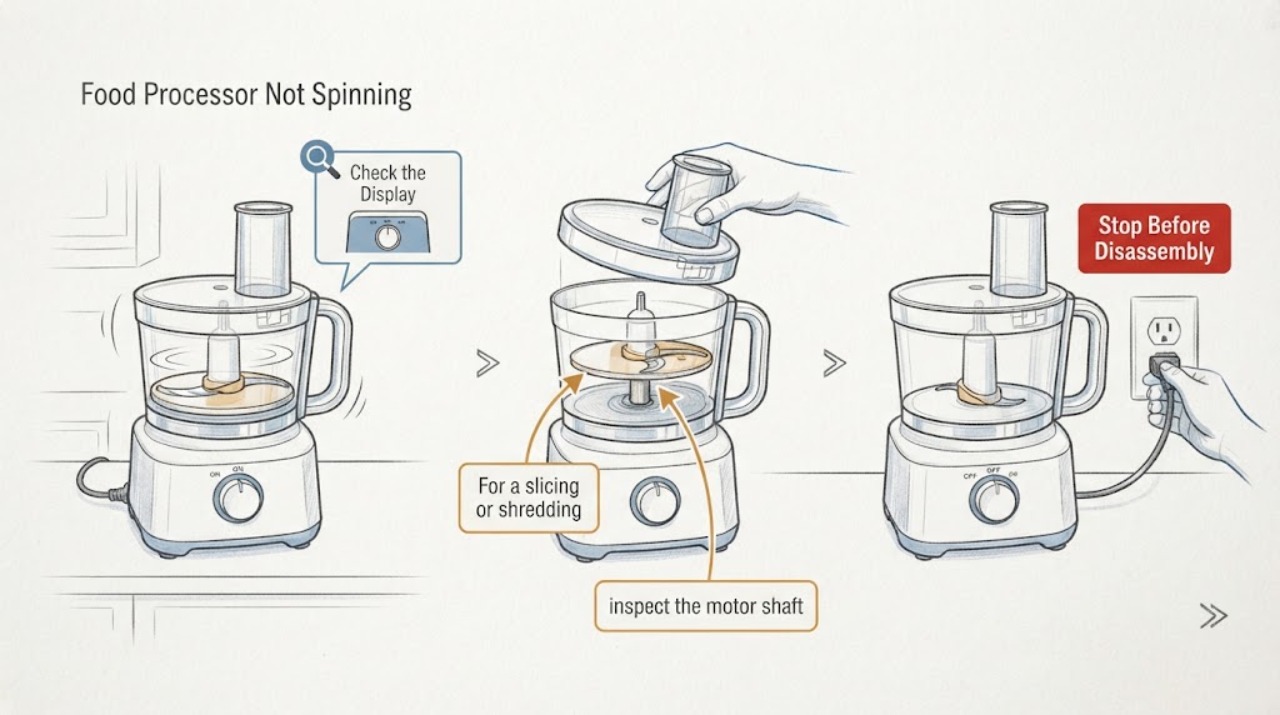
Work through in order
Diagnostic checks
Use only checks that match the exact appliance or system and its official guide.
-
Check 1
Turn the control off, unplug the processor, and remove only the food and attachments needed to inspect the bowl, lid, blade, and disc without touching a moving edge.
Expected result: The bowl or lid is not aligned/locked, an attachment is jammed, or the assembly is clear.
Next step: Reassemble only as the exact model manual shows, keeping fingers away from blades, and perform one brief test.
Stop if: Do not reach into the bowl or remove a jam while the processor is plugged in.
Why this matters
Why: KitchenAid identifies bowl/lid alignment and locking as start conditions; a jam can also prevent rotation.
-
Check 2
For a slicing or shredding disc, confirm it is positioned in the process position near the top of the bowl rather than the lower storage position.
Expected result: The disc is in storage position or correctly positioned for processing.
Next step: Move it only with power disconnected and the model-safe handling method, then lock the bowl and lid.
Stop if: Do not grip a sharp disc by its cutting edge.
Why this matters
Why: KitchenAid says a disc in storage position can prevent proper processing movement.
-
Check 3
If the multipurpose blade can be removed safely, inspect the motor shaft and the blade hub for visible malformation, cracking, or wear.
Expected result: The shaft or blade hub is damaged, or no damage is visible.
Next step: Keep the unit unplugged and obtain the exact model’s part or service guidance; do not assume a generic blade fits.
Stop if: Do not bend, file, lubricate, or force the shaft or blade.
Why this matters
Why: KitchenAid notes that shaft or blade deformation increases recurrence of a blade that will not spin.
-
Check 4
With the correct empty assembly locked and the work area clear, perform one short control test and note whether the motor hums, the shaft moves, or the processor remains silent.
Expected result: The shaft spins after correct locking, or the processor has power but remains still/silent.
Next step: Stop the test and arrange KitchenAid or qualified service for a persistent drive or control fault.
Stop if: Stop for burning odor, smoke, sparks, cracked plastic, or abnormal heat.
Why this matters
Why: Recovery after interlock correction points to assembly position; persistent failure with power and correct assembly needs service.
Use your observations
Decision map
Find the observation that best matches what you see, then follow the next safe action.
-
PATH 01Next step
What you see
The bowl or lid was not aligned/locked, or the disc was in storage position.
Do this next
Correct the position with power disconnected and test once.
Why this path and its safety boundary
Why it matters: The safety/assembly interlock or attachment position explains the no-spin symptom.
-
PATH 02Next step
What you see
The assembly is correctly locked but the blade/shaft shows visible damage.
Do this next
Keep the processor unplugged and obtain exact model-specific part or service guidance.
Why this path and its safety boundary
Why it matters: A damaged drive interface can prevent rotation and recur if reused.
-
PATH 03Next step
What you see
The bowl, lid, disc, blade, and shaft are correctly positioned with no visible damage but the motor still does not rotate.
Do this next
Do not open the base; arrange qualified service.
Why this path and its safety boundary
Why it matters: An internal drive, interlock, or control fault needs service diagnosis.
Helpful context
Understand the symptom
What the symptom tells you
If a food processor has power but the blade is not spinning, unplug it before checking whether the bowl and lid are correctly aligned and locked, whether a disc is in its processing position rather than storage position, and whether the blade or motor shaft shows damage. Never reach into the bowl while powered. If the assembly is correctly locked but the drive still does not move, stop and arrange model-specific service.
Use the exact model information
Controls, code meanings, safe access, and replacement parts vary by model. Record the model and the exact symptom before requesting service.
When checks do not resolve it
Need a professional?
Give the manufacturer or a qualified appliance technician the exact model, serial information, symptom timing, and all observations. Do not open sealed, refrigerant, gas, high-voltage, or energized assemblies.
Common questions
FAQ
Why does a powered food processor blade not spin?
KitchenAid points to bowl/lid alignment and locking, a disc in storage position, or damage at the blade and motor shaft. Unplug before checking any of these.
Can I force the blade or shaft to free it?
No. Sharp components and the drive interface can be damaged. Keep the processor unplugged and use exact model service guidance.
Read the exact guide
Official sources
- Blade Not Spinning - Has Power - Food ProcessorKitchenAid · Food processor blade/disc position, bowl/lid interlock, motor shaft, and service checks
Community feedback
Share a repair observation
Share a plain-text repair observation. Accepted observations are published automatically; this page may take a moment to update.