
On this page
Start here
Quick answer
For a Thermomix TM5 that crashes or stops responding when you press the user interface, first protect the food and your hands: stop heating or mixing if it is safe, keep clear of hot steam and moving parts, and do not open the bowl lid by force. Vorwerk’s TM5 display guidance says to check that the protective film has been removed and then switch the appliance off and on. Its TM5 restart guidance gives a soft restart by holding the selector dial for about 10 seconds, waiting several seconds, and pressing it again; a factory reset is different and deletes settings and signs the user out. Clean the screen and use clean, dry hands, but do not pour liquid into the base or open the appliance. If crashes recur, the dial jumps, the display remains unresponsive, the cord/plug is damaged, or the appliance was exposed to liquid or heat, stop using it and contact Vorwerk service rather than replacing a screen or board from the symptom alone.
Work through in order
Diagnostic checks
Use only checks that match the exact appliance or system and its official guide.
-
Check 1
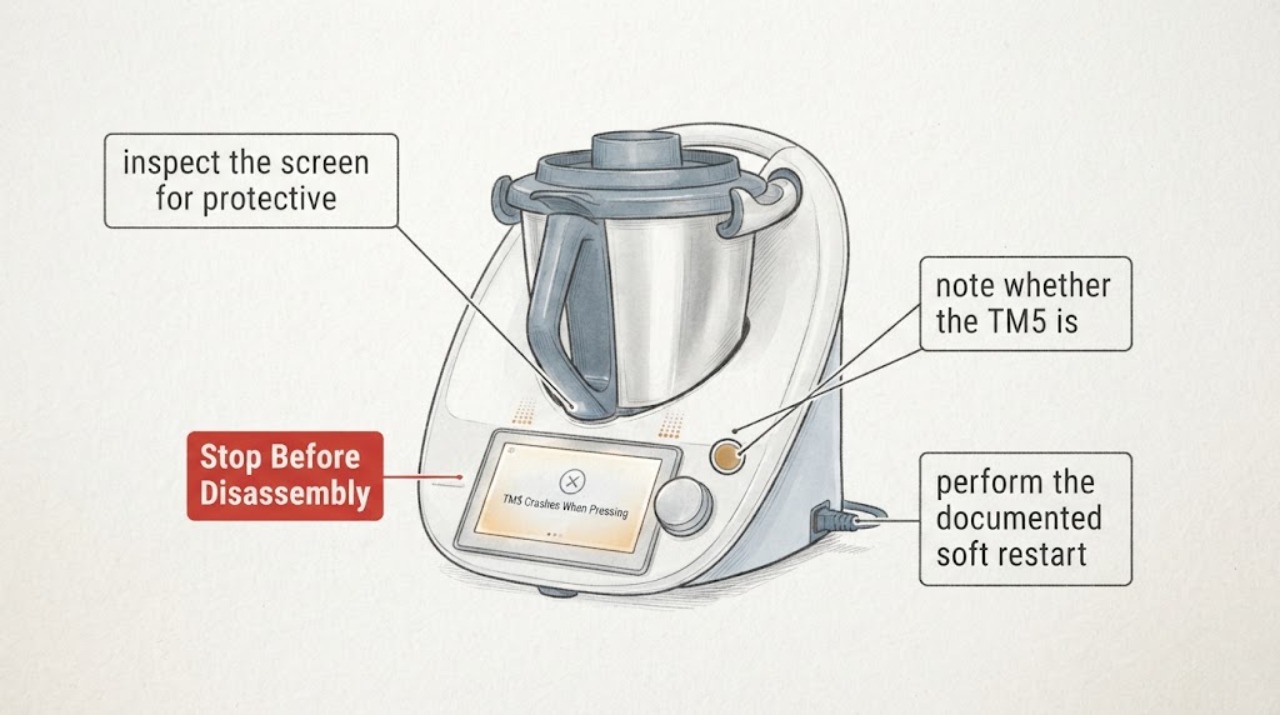
Before pressing more buttons, note whether the TM5 is heating, steaming, mixing, or showing a hot-bowl state. Keep hands away from the lid, locking arms and mixing knife; do not force the lid open.
Expected result: The bowl is hot or producing steam, the knife is moving, the lid is locked, or the appliance is idle and cool.
Next step: Leave a hot or locked appliance alone until the manual’s safe release conditions are met. If the appliance malfunctions, leaks or behaves unpredictably, stop use and request service.
Why this matters
Why: A UI crash during heat or motion carries burn, pressure and laceration risks. Vorwerk’s safety guidance requires a safe stopped state before accessories are removed or the lid is handled.
-
Check 2
After the appliance is safely idle, inspect the screen for protective film, food/oil residue or moisture and clean it only with the exact support guidance and a soft dry cloth. Use clean, dry fingers and keep liquid away from the base.
Expected result: Protective film or residue is present, the screen responds after cleaning, or it remains frozen/flickers/selects functions without touch.
Next step: Remove only the documented film or residue. If the UI remains unresponsive or acts without touch, stop operating the TM5 and record the symptom for service.
Why this matters
Why: Vorwerk identifies protective film and display state as first checks; official Thermomix support also describes moisture, oil, food residue and touch sensitivity as possible contributors to ghost-touch behavior. A persistent failure is not diagnosed by this check.
-
Check 3
When the TM5 is safely stopped and cool enough to handle, perform the documented soft restart: hold the selector dial for about 10 seconds, wait several seconds, then press it again until the TM5 starts. Do not select factory reset unless the exact manual or service team directs it.
Expected result: The TM5 restarts normally, remains frozen, reboots again when a UI control is pressed, or shows a service message.
Next step: Make one restart attempt and capture the exact result. If the crash returns, stop repeated testing and contact Vorwerk service with the device details and recording.
Why this matters
Why: A restart can clear a transient software state, but recurrence under the same UI action is evidence for further diagnosis, not proof of a failed screen or board. Factory reset would delete settings and log the user out.
-
Check 4
Record whether the failure follows a screen tap, silver-dial turn, recipe/Cook-Key action, bowl installation, heating, or motor operation. Note any error/service code, power trip, unusual sound, odor or liquid near the base. Do not open the housing or remove internal wiring.
Expected result: The symptom is touch-only, dial-only, linked to a recipe/accessory, linked to heat/mixing, or occurs at startup regardless of input.
Next step: Give Vorwerk the exact trigger, screen behavior, TM5 identification and restart result. Keep the appliance out of service for liquid, power, heat or damage symptoms.
Why this matters
Why: Different triggers help service separate input sensitivity, selector mechanics, accessory communication, thermal/motor events and power/electronic faults. The trigger alone cannot identify a component or justify a part order.
Use your observations
Decision map
Find the observation that best matches what you see, then follow the next safe action.
-
PATH 01Next step
What you see
The TM5 is hot, steaming, mixing, or its locking mechanism has not released when the UI crashes.
Do this next
Do not force the lid or reach into the bowl. Wait for the manual’s safe release state and arrange service if the appliance remains unpredictable.
Why this path and its safety boundary
Why it matters: The immediate risk is burn, pressure or moving-knife injury, so display troubleshooting is secondary.
-
PATH 02Next step
What you see
Protective film, moisture, oil or food residue is visible on the display, or the screen responds after a careful dry clean.
Do this next
Remove only the documented film/residue, keep the surface and hands dry, and monitor one safe use. Recurrence needs service.
Why this path and its safety boundary
Why it matters: The input surface may have been affecting touch recognition; this does not prove an electronic component fault.
-
PATH 03Next step
What you see
The TM5 restarts after the documented selector hold and remains stable when the UI is used.
Do this next
Save the symptom notes and use the appliance cautiously. If it crashes again, stop repeated resets and contact Vorwerk.
Why this path and its safety boundary
Why it matters: The event may have been a transient software state; successful restart does not verify the display hardware or rule out recurrence.
-
PATH 04Next step
What you see
The TM5 remains frozen, reboots repeatedly, changes functions without touch, trips power, shows a service message, or has liquid/damage/cord symptoms.
Do this next
Stop using the TM5 and arrange Vorwerk-authorized service. Do not open the appliance, modify accessories or continue a cooking cycle to reproduce the crash.
Why this path and its safety boundary
Why it matters: This is an unresolved electronic, input, accessory or safety service boundary. The display symptom alone does not identify a board or screen.
Helpful context
Understand the symptom
Protect the bowl before troubleshooting the interface
A UI crash during cooking is first a food and motion-safety event, not a reason to keep tapping. If the TM5 is heating, steaming or rotating, stop using the controls from a safe position and keep hands away from the bowl lid, locking arms and knife. Vorwerk warns about hot contents, moving parts and forced lid opening, and says a malfunctioning or damaged appliance should not be operated. Wait for the exact safety state in the manual before removing the bowl or accessories.
Rule out film, residue and wet touch input
Vorwerk’s TM5 display article first asks the owner to check that the protective film has been removed, then recommends switching the appliance off and on if the display remains unresponsive. A clean, dry screen and clean, dry fingers are reasonable external checks; keep moisture out of the base and do not spray cleaner onto the device. A display that reacts without a touch, flickers, or selects a different function is not proof that the motor or recipe is at fault.
Use the soft restart, not a casual factory reset
Vorwerk’s TM5 restart instructions say to press the selector dial for about 10 seconds, wait several seconds, and press it again until the TM5 starts. A factory restart requires the settings menu and deletes settings and logs out of the account. Use the soft restart once when the appliance is in a safe state; do not keep interrupting a hot or active process and do not choose factory reset merely because the screen is slow.
Separate touchscreen symptoms from selector symptoms
Record whether the crash happens on one screen area, when the silver dial is turned, after a recipe or Cook-Key action, or during heating/mixing. Official Thermomix support describes TM5 screen sensitivity and “ghost touch” symptoms such as functions changing without contact, while a separate support section discusses numbers jumping when the silver dial turns. These observations narrow the service report, but they do not establish a replaceable display, dial, board or bowl part.
Recurring crashes need service
If the TM5 reboots, freezes after the soft restart, repeatedly changes functions, trips power, shows a service message, or has a damaged cord, wet base, leaking bowl or damaged accessory, stop using it and contact Vorwerk service. Do not open the electronics, remove a panel, defeat a safety mechanism or keep running a machine that has malfunctioned. Provide the TM5 identification, exact screen behavior, whether the bowl was hot, and what restart was attempted.
When checks do not resolve it
Need a professional?
Contact Vorwerk-authorized service if the TM5 crashes again after one soft restart, remains unresponsive, exhibits ghost-touch behavior, reboots during heating/mixing, trips power, shows a repeated service message, or has liquid, cord, bowl or accessory damage. Do not select a display, dial, control board or bowl part from the symptom alone.
Common questions
FAQ
Should I factory-reset the TM5 when the UI crashes?
No. First use the documented soft restart. Vorwerk says a factory restart requires the settings menu and deletes settings and logs the user out, so it is not a first response to an unresponsive interface.
Can a dirty or wet screen cause TM5 UI problems?
Vorwerk support identifies protective film as a first check, and official Thermomix support describes moisture, oil, food residue and touch sensitivity as contributors to ghost-touch behavior. Clean only as instructed and keep liquid out of the base.
Does a crash when pressing the screen prove the display board is bad?
No. A transient software state, touch-surface issue, selector input, accessory event, heat/motor state or electronic fault can look similar. Record the trigger and restart result, then let authorized service identify the cause.
Read the exact guide
Official sources
- Important Safeguards for Thermomix TM5Vorwerk, LLC · Official Vorwerk TM5 safety guidance used for stopping a malfunctioning/damaged appliance, hot bowl/locking/knife boundaries and keeping liquid out of the base.
- Troubleshooting Your Thermomix ModelVorwerk Australia / Thermomix · Official Thermomix distributor support page with a TM5-specific troubleshooting section. Used only for symptom characterization (screen sensitivity, selector numbers jumping, residue/dryness) and service boundary; no board or part fit is inferred.
- The display on my Thermomix TM5 isn’t respondingVorwerk UK & Ireland · Exact official Vorwerk support article for TM5 display non-response. It gives only external first checks and does not diagnose or authorize display-board repair.
- Restart / Reset the Thermomix TM5Vorwerk UK & Ireland · Exact official Vorwerk TM5 restart article used for the soft selector hold and factory-reset warning; it does not establish a hardware diagnosis.
- Thermomix TM5 User ManualVorwerk · Exact official Vorwerk TM5 manual used for hot/moving/accessory boundaries and service context; it does not identify the cause of an unspecified UI crash.
Community feedback
Share a repair observation
Share a plain-text repair observation. Accepted observations are published automatically; this page may take a moment to update.